
- Local time
- 8:11 PM
- Messages
- 8,138
The topic of this thread is the same as the title of this Google support website...
https://support.google.com/installer/answer/126299
...because that is what I want to talk about - sort of.
I looked inside of the EXE files that you get via various URLs found around the Interent.
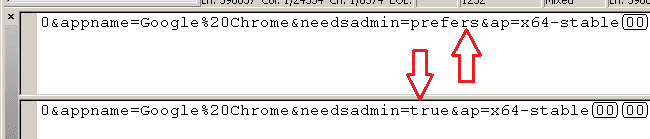
It is not too hard to figure out that what you get - depends on what you ask for via the URL. In the URLs below, some options/switches are not needed. The has server defaults. I included the options for my own clarity and those server defaults might change.
These are for 64bit standalone (offline) installers:
Single user. Installs into the user's AppData folder. Does not require admin rights.
All users. Installs into the Program Files (x86) folder. Requires admin rights.
This is one that I have yet to see anyone document...
...but you can get this by omitting the "system=" part of the URL.
The EXE from that 3rd link will let you pick the type of install*. Answering No to the UAC prompt will get you another prompt from the installer. Answering Yes to that installer prompt will get you the same results as the EXE from link #1. Answering No to the UAC prompt will get you the same results as the EXE from link #2.
*Assumes User Account Contro (UAC) is on.
That is the main question/point of this post: Does anyone know of a URL option (or a switch that can be used when launching the installer) that will install Chrome 64bit into the Program Files folder?
I might be able to get Chrome to go into the desired folder using an MSI file, but several forum posts indicate issues with .NET 4.
Not really a part of my question, but I'll ramble on a bit.
For 32bit installers, use...
...or omit the option. (But someday, the default might change to 64bit.)
I happen to be using the offline installer on multiple computers. The user does not have admin rights and Chrome is not the default browser. If you select Chrome as the default browser during the download process, then you might get two UAC prompts during the installation. The first determines where/how Chrome is to be installed (link #1 or link #2). The second UAC prompt is used to set Chrome as the default browser. You don't actually need admin rights to do that, but Chrome does some odd stuff at the same time.
https://support.google.com/installer/answer/126299
...because that is what I want to talk about - sort of.
I looked inside of the EXE files that you get via various URLs found around the Interent.
It is not too hard to figure out that what you get - depends on what you ask for via the URL. In the URLs below, some options/switches are not needed. The has server defaults. I included the options for my own clarity and those server defaults might change.
These are for 64bit standalone (offline) installers:
Single user. Installs into the user's AppData folder. Does not require admin rights.
Code:
https://www.google.com/chrome/browser/desktop/index.html?system=false&standalone=1&platform=win64
Code:
https://www.google.com/chrome/browser/desktop/index.html?system=true&standalone=1&platform=win64
Code:
https://www.google.com/chrome/browser/desktop/index.html?system=prefers&standalone=1&platform=win64The EXE from that 3rd link will let you pick the type of install*. Answering No to the UAC prompt will get you another prompt from the installer. Answering Yes to that installer prompt will get you the same results as the EXE from link #1. Answering No to the UAC prompt will get you the same results as the EXE from link #2.
*Assumes User Account Contro (UAC) is on.
That is the main question/point of this post: Does anyone know of a URL option (or a switch that can be used when launching the installer) that will install Chrome 64bit into the Program Files folder?
I might be able to get Chrome to go into the desired folder using an MSI file, but several forum posts indicate issues with .NET 4.
Not really a part of my question, but I'll ramble on a bit.
For 32bit installers, use...
Code:
platform=winI happen to be using the offline installer on multiple computers. The user does not have admin rights and Chrome is not the default browser. If you select Chrome as the default browser during the download process, then you might get two UAC prompts during the installation. The first determines where/how Chrome is to be installed (link #1 or link #2). The second UAC prompt is used to set Chrome as the default browser. You don't actually need admin rights to do that, but Chrome does some odd stuff at the same time.
Last edited:
My Computer
At a glance
W7 Pro SP1 64biti78GBIntel HD Graphics
- Computer type
- Laptop
- Computer Manufacturer/Model Number
- Employer provided Dell Latitude
- OS
- W7 Pro SP1 64bit
- CPU
- i7
- Memory
- 8GB
- Graphics Card(s)
- Intel HD Graphics
- Hard Drives
- crappy SSD
- Antivirus
- Employer mandated Symantec Endpoint Protection
- Browser
- Pale Moon 64bit, IE11 64bit & Chrome 64bit


 ) me because of a completly different matter with Google Chrome.
 !!!!!
!!!!!
