Solved Alureon.E (virus)trojan

My Computer

Computer type
Laptop
Computer Manufacturer/Model Number
SONY VAIO
OS
Windows 7 Home Premium x64
CPU
Intel i5
Memory
4GB
Hard Drives
TOSHIBA 500GB
Antivirus
MSE
Browser
Mozilla Firefox
Let's take an additional step...


Please download Malwarebytes : Malwarebytes Anti-Rootkit

Save to the Desktop (easy to find)

Right-click the file and select: Extract here...


Run the program and follow ithe Usage instructions on the website from Step 3 to Step 6.
For now, please stop at Step 6.


When the program is done, two reports are created in the mbar folder:
1. system-log.txt
2. mbar-log-2013-02-18 (20-13-32).txt (corresponds to mbar-log-year-month-day (hour-minute-second).txt)


Please provide the mbar-log containing information on what was detected and removed.
 

My Computer

Computer type
PC/Desktop
Computer Manufacturer/Model Number
An ol' eMachines
OS
Windows 7 Home Premium
Internet Speed
Fine for me...I'm retired!
Also, let's see what the following short scan shows...

Please download
Tlcharger RogueKiller (Site Officiel)
•When you get to the website, go to where it says:
(Download link) Lien de téléchargement:
rendu2.png


•Click the x64 button to download.
•Save to the Desktop

•Close all windows and browsers
•Right-click and select: Run as Administrator

•Press: SCAN

•A report opens on the Desktop: RKreport.txt

Please provide the RKreport.txt (Mode: Scan) in your reply.
 

My Computer

Computer type
PC/Desktop
Computer Manufacturer/Model Number
An ol' eMachines
OS
Windows 7 Home Premium
Internet Speed
Fine for me...I'm retired!

My Computer

Computer type
Laptop
Computer Manufacturer/Model Number
SONY VAIO
OS
Windows 7 Home Premium x64
CPU
Intel i5
Memory
4GB
Hard Drives
TOSHIBA 500GB
Antivirus
MSE
Browser
Mozilla Firefox
We have a 7 hour time difference!

Please quit all programs...
•Right-click the RogueKiller file and select : Run as Administrator
•Wait until the Prescan finishes
•Click: Delete

Please post the new RKreport (Mode: Delete) in your reply.

~~~~
Now, run MSE once again. Any change?

~~~~
Next, please download: aswMBR
http://public.avast.com/~gmerek/aswMBR.exe
Save it to the Desktop.

>>Make sure your AntiVirus is temporarily disabled!!<<
For information on how to disable protective programs, refer to this Info:
How To Temporarily Disable Your Anti-virus, Firewall And Anti-malware Programs - BleepingComputer.com

Right-click aswMBR and select: Run as Administrator

When promped with: This Application can use the Avast! Free AntiVirus for scanning...etc.
Select: Yes

The last line of the run in progress will provide the status of the Avast! scan.
It will say: Downloading Avast! virus definitiond database, etc.
When the Avast! scan is done, the last line changes to: Avast Engine definitions #####

At this point, click the Scan button on the lower left of the aswMBR screen.
The last line will now say "Scanning" while it is in progress.

Upon completion of the scan, click >Save log< and save it to the Desktop.
Note: Please do NOT attempt to fix anything!!
Exit the program.

Please post the new aswMBR log in your reply.

Also, notice that another file is created on the Desktop.
It is named MBR.dat.

Please submit MBR.dat for analysis to VirusTotal:
http://www.virustotal.com/

http://www.sevenforums.com/tutorials/277740-online-scanners-scan-suspicious-files-your-pc.html

If you get a message saying: 'File has already been analyzed', click: Reanalyze file

Once scanned, and you see the full results page on your screen, go up to the address bar at the top of the browser, and copy the http:\\etc. address there.

Then, provide the http:\\ address to the results page in your reply.
 

My Computer

Computer type
PC/Desktop
Computer Manufacturer/Model Number
An ol' eMachines
OS
Windows 7 Home Premium
Internet Speed
Fine for me...I'm retired!
I've just completed the RogueKiller scan. Here's the RKreport after i press 'Delete' button: View attachment RKreport[2]_D_03262013_02d2353.txt

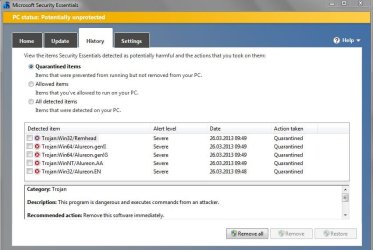
I ran MSE, after quick scan it said that 'No threats were detected during this scan', however, i'm still able to see those quarantined Trojans at 'History' pane. Here's a screenshot:
pule.JPG

Shoud i proceed the next steps ?

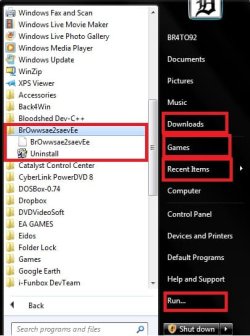
EDIT: I've just restarted Windows, MSE didn't pop up again, but i noticed that my Start Menu has changed a little bit, despide i didn't change nothing before the restart (i have some new options on the right side - Downloads, Games, Recent Items, Run, also have a new application which i never installed - called Br0wwsae2saevEe). Look here:
mueeee.jpg
 
Last edited:

My Computer

Computer type
Laptop
Computer Manufacturer/Model Number
SONY VAIO
OS
Windows 7 Home Premium x64
CPU
Intel i5
Memory
4GB
Hard Drives
TOSHIBA 500GB
Antivirus
MSE
Browser
Mozilla Firefox
I would proceed with the steps Cottonball advised you . To be sure .

The history on the MSE is nothing to worry about it just tells you want it found before .
 
Last edited:

My Computer

Computer Manufacturer/Model Number
Custom Built
OS
Windows 7 Ultimate 32-Bit & Windows 7 Ultimate 64-Bit
CPU
Intel Core i7 CPU 950 @ 3.07GHz
Motherboard
ASUS P6T DELUXE V2
Memory
OCZ 6GB (3 x 2GB) 240-Pin DDR3 SDRAM DDR3 1600 OCZ3X1600R2
Graphics Card(s)
ATI Radeon HD 5700 Series
Sound Card
OnBoard
Hard Drives
WD6400AACS-00M3B0 (640GB SATA )
PSU
CORSAIR 850w
Case
NZXT LEXA
Cooling
Intel Stock Heatsink Fan
Keyboard
Microsoft Wireless Laser Keyboard 7000
Mouse
Microsoft Wireless Laser Mouse 7000

My Computer

Computer type
Laptop
Computer Manufacturer/Model Number
SONY VAIO
OS
Windows 7 Home Premium x64
CPU
Intel i5
Memory
4GB
Hard Drives
TOSHIBA 500GB
Antivirus
MSE
Browser
Mozilla Firefox
brato92,

On the Br0wwsae2saevEe...
Is there an entry for it in Control Panel > Programs and Features?
If so, press on and Uninstall/Remove
Post back on whether it is there or not, and, if there, whether you removed the program.


Next, please do an: AdwCleaner Download
Save to the Desktop

Right-click on adwcleaner.exe and select: Run As Administrator

Click the Search button

When done, a text file opens.

Please post the content of the AdwCleaner[Sn].txt in your reply.
Note: You can also find the reports at C:\AdwCleaner[Sn].txt (S = search, n = order number), or, C:\AdwCleaner[Rn].txt (R = remove, n = order number)


Also do a Junkware Removal Tool Download
Save to the Desktop.

Make sure you temporarily disable your AntiVirus, Firewall, and any other security applications.
These programs may interfere with the running of JRT.
For information on how to disable protective programs, refer to this info:
How To Temporarily Disable Your Anti-virus, Firewall And Anti-malware Programs - BleepingComputer.com

Right-click JRT.exe and select: Run as Administrator
The tool opens and starts scanning the system. Please be patient as this can take a while...

When done, a report (JRT.txt) is saved on the Desktop.

Please post the contents of JRT.txt in your reply.


Next, let's go back to FRST64.

Have used this tool since its release in 2010.
In my experience, it has detected malware when other tools have not.

Please follow the instrucions on Post #3, and tap the F8 key until the Advanced Boot Options menu appears.
Use the arrow keys to select the Repair your computer menu item.

See if you can get to the System Recovery Options menu and select the Command Prompt, vs. getting a black screen.

If so, proceed with FRST64.

 

My Computer

Computer type
PC/Desktop
Computer Manufacturer/Model Number
An ol' eMachines
OS
Windows 7 Home Premium
Internet Speed
Fine for me...I'm retired!
You could remove "Downloads, Games, Recent Items, Run" by

:ar: Right click on the :orb: button and click on Properties.

:ar: Click on the Customize button.

:ar: Uncheck Run and choose Don't display this item on the other items
 

My Computer

Computer Manufacturer/Model Number
Custom Built
OS
Windows 7 Ultimate 32-Bit & Windows 7 Ultimate 64-Bit
CPU
Intel Core i7 CPU 950 @ 3.07GHz
Motherboard
ASUS P6T DELUXE V2
Memory
OCZ 6GB (3 x 2GB) 240-Pin DDR3 SDRAM DDR3 1600 OCZ3X1600R2
Graphics Card(s)
ATI Radeon HD 5700 Series
Sound Card
OnBoard
Hard Drives
WD6400AACS-00M3B0 (640GB SATA )
PSU
CORSAIR 850w
Case
NZXT LEXA
Cooling
Intel Stock Heatsink Fan
Keyboard
Microsoft Wireless Laser Keyboard 7000
Mouse
Microsoft Wireless Laser Mouse 7000
That's a good one, VistaKing.

@brato92,

RogueKiller apparently did some changes:
[HJ SMENU] HKCU\[...]\Advanced : Start_ShowRecentDocs (0) -> REPLACED (1)
[HJ SMENU] HKCU\[...]\Advanced : Start_ShowDownloads (0) -> REPLACED (1)
[HJ SMENU] HKCU\[...]\Advanced : Start_ShowRun (0) -> REPLACED (1)

Nothing to be concerned about. If not wanted, then follow VK's guidance.

If we can get rid of the Br0wwsae2saevEe, whatever that is...
Just a thought...Is there any program installed on the machine in a language other than English?
 

My Computer

Computer type
PC/Desktop
Computer Manufacturer/Model Number
An ol' eMachines
OS
Windows 7 Home Premium
Internet Speed
Fine for me...I'm retired!
Try to use Revo Uninstaller to remove Br0wwsae2saevEe just incase it locates left over registry files .
 

My Computer

Computer Manufacturer/Model Number
Custom Built
OS
Windows 7 Ultimate 32-Bit & Windows 7 Ultimate 64-Bit
CPU
Intel Core i7 CPU 950 @ 3.07GHz
Motherboard
ASUS P6T DELUXE V2
Memory
OCZ 6GB (3 x 2GB) 240-Pin DDR3 SDRAM DDR3 1600 OCZ3X1600R2
Graphics Card(s)
ATI Radeon HD 5700 Series
Sound Card
OnBoard
Hard Drives
WD6400AACS-00M3B0 (640GB SATA )
PSU
CORSAIR 850w
Case
NZXT LEXA
Cooling
Intel Stock Heatsink Fan
Keyboard
Microsoft Wireless Laser Keyboard 7000
Mouse
Microsoft Wireless Laser Mouse 7000
I've managed to uninstall Br0wwsae2saevEe from Control Panel, seems that it was a web plugin or something like that - uninstalled in a sec.
 

My Computer

Computer type
Laptop
Computer Manufacturer/Model Number
SONY VAIO
OS
Windows 7 Home Premium x64
CPU
Intel i5
Memory
4GB
Hard Drives
TOSHIBA 500GB
Antivirus
MSE
Browser
Mozilla Firefox
Did you get your start menu fixed
 

My Computer

Computer Manufacturer/Model Number
Custom Built
OS
Windows 7 Ultimate 32-Bit & Windows 7 Ultimate 64-Bit
CPU
Intel Core i7 CPU 950 @ 3.07GHz
Motherboard
ASUS P6T DELUXE V2
Memory
OCZ 6GB (3 x 2GB) 240-Pin DDR3 SDRAM DDR3 1600 OCZ3X1600R2
Graphics Card(s)
ATI Radeon HD 5700 Series
Sound Card
OnBoard
Hard Drives
WD6400AACS-00M3B0 (640GB SATA )
PSU
CORSAIR 850w
Case
NZXT LEXA
Cooling
Intel Stock Heatsink Fan
Keyboard
Microsoft Wireless Laser Keyboard 7000
Mouse
Microsoft Wireless Laser Mouse 7000
Yes, i've already fix my Start Menu last night (i knew how to remove those menus). Thanks anyway VistaKing.
 

My Computer

Computer type
Laptop
Computer Manufacturer/Model Number
SONY VAIO
OS
Windows 7 Home Premium x64
CPU
Intel i5
Memory
4GB
Hard Drives
TOSHIBA 500GB
Antivirus
MSE
Browser
Mozilla Firefox
You're welcome
 

My Computer

Computer Manufacturer/Model Number
Custom Built
OS
Windows 7 Ultimate 32-Bit & Windows 7 Ultimate 64-Bit
CPU
Intel Core i7 CPU 950 @ 3.07GHz
Motherboard
ASUS P6T DELUXE V2
Memory
OCZ 6GB (3 x 2GB) 240-Pin DDR3 SDRAM DDR3 1600 OCZ3X1600R2
Graphics Card(s)
ATI Radeon HD 5700 Series
Sound Card
OnBoard
Hard Drives
WD6400AACS-00M3B0 (640GB SATA )
PSU
CORSAIR 850w
Case
NZXT LEXA
Cooling
Intel Stock Heatsink Fan
Keyboard
Microsoft Wireless Laser Keyboard 7000
Mouse
Microsoft Wireless Laser Mouse 7000

My Computer

Computer type
Laptop
Computer Manufacturer/Model Number
SONY VAIO
OS
Windows 7 Home Premium x64
CPU
Intel i5
Memory
4GB
Hard Drives
TOSHIBA 500GB
Antivirus
MSE
Browser
Mozilla Firefox
Run AdwCleaner again and choose Delete this time . Upload the log once you're done
 

My Computer

Computer Manufacturer/Model Number
Custom Built
OS
Windows 7 Ultimate 32-Bit & Windows 7 Ultimate 64-Bit
CPU
Intel Core i7 CPU 950 @ 3.07GHz
Motherboard
ASUS P6T DELUXE V2
Memory
OCZ 6GB (3 x 2GB) 240-Pin DDR3 SDRAM DDR3 1600 OCZ3X1600R2
Graphics Card(s)
ATI Radeon HD 5700 Series
Sound Card
OnBoard
Hard Drives
WD6400AACS-00M3B0 (640GB SATA )
PSU
CORSAIR 850w
Case
NZXT LEXA
Cooling
Intel Stock Heatsink Fan
Keyboard
Microsoft Wireless Laser Keyboard 7000
Mouse
Microsoft Wireless Laser Mouse 7000
@VistaKing: I ran AdwCleaner once again. Here's the report after i pressed 'Delete' and restart the system: View attachment AdwCleaner[S1].txt

@cottonball: i've proceeded your steps from post #3 once again, well, this time 'Repair Your Computer' option worked. Here's the log files:

Farbar Recovery Scan Tool: View attachment FRST.txt

List Parts: View attachment Result.txt

Hope that my laptop is clean now. I'm waiting for your replies.
 

My Computer

Computer type
Laptop
Computer Manufacturer/Model Number
SONY VAIO
OS
Windows 7 Home Premium x64
CPU
Intel i5
Memory
4GB
Hard Drives
TOSHIBA 500GB
Antivirus
MSE
Browser
Mozilla Firefox
I noticed that my laptop runs very smooth now, i can install Windows Updates once again, also i am able to plug out memory sticks from Safety Remove Hardware (before i followed your steps it kept telling me that the stick is used by another program and can't be removed), also when i start up or shut down Windows it respods very very quick.
 

My Computer

Computer type
Laptop
Computer Manufacturer/Model Number
SONY VAIO
OS
Windows 7 Home Premium x64
CPU
Intel i5
Memory
4GB
Hard Drives
TOSHIBA 500GB
Antivirus
MSE
Browser
Mozilla Firefox
Back
Top