A a7bitrary New member Local time 6:37 AM Messages 2 Jan 13, 2010 #1 This is driving me mad. I want to use the combined feature with the icons labeled but cant figure it out. In windows xp I liked the group tasks feature that would group the applications together. My Computer OSwindows 7
This is driving me mad. I want to use the combined feature with the icons labeled but cant figure it out. In windows xp I liked the group tasks feature that would group the applications together.
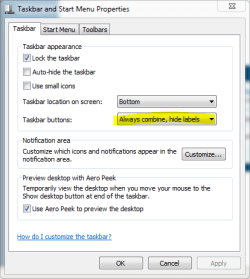
D derekimo New member SF Team Local time 3:37 AM Messages 16,779 Location Shasta County Jan 13, 2010 #2 If are you talking about the taskbar, rt. click, then properties. Attachments taskbar.PNG 11.8 KB · Views: 20 My Computer Computer typePC/DesktopComputer Manufacturer/Model NumberSelf BuiltOSWin 10 Pro x64CPUIntel I5-2500K @3.3GHzMotherboardAsrock P67 Extreme4Memory16GB G.Skill Ripjaws X (4x4GB)Graphics Card(s)EVGA GeForce 750 Ti SC 2GBSound CardASUS Xonar DG 5.1 Channels 24-bit 96KHz PCI Interface SoundMonitor(s) Displaysauria eq2367Screen Resolution1920 x 1080Hard Drives250GB Samsung 850 EVO SSD 1TB WD Blue 1TB HitachiPSUSeaSonic X 650W 80 Plus GoldCaseCorsair Obsidian 750DCoolingCorsair H60, Three 140mm case fansKeyboardLogitech Wireless Keyboard K520MouseLogitech Wireless Mouse M310Internet SpeedWave Broadband ~ 100 dn 5 upAntivirusWindows Defender, Malwarebytes PremiumBrowserEdge, IE11, ChromeOther InfoLaptop specs: HP g7-1365dx / CPU: AMD A6-3420M APU with Radeon(tm) HD Graphics / RAM: Crucial 8Gb (2x4Gb) / SSD: Crucial M4-CT128M4SSD2 ATA Device/ FW 000F / GFX: AMD Radeon HD 6520G / OS: Windows 10 Pro x64
A a7bitrary New member Thread Starter Local time 6:37 AM Messages 2 Jan 14, 2010 #3 I know this. What I want is that option but to have it show the label. For instance the Firefox icon will say "Firefox" next to it. My Computer OSwindows 7
I know this. What I want is that option but to have it show the label. For instance the Firefox icon will say "Firefox" next to it.
D derekimo New member SF Team Local time 3:37 AM Messages 16,779 Location Shasta County Jan 14, 2010 #4 If you select "never combine" you'll get this below. If that's not what you want, someone else may come along with a better answer. Attachments never combine.PNG 36.6 KB · Views: 145 My Computer Computer typePC/DesktopComputer Manufacturer/Model NumberSelf BuiltOSWin 10 Pro x64CPUIntel I5-2500K @3.3GHzMotherboardAsrock P67 Extreme4Memory16GB G.Skill Ripjaws X (4x4GB)Graphics Card(s)EVGA GeForce 750 Ti SC 2GBSound CardASUS Xonar DG 5.1 Channels 24-bit 96KHz PCI Interface SoundMonitor(s) Displaysauria eq2367Screen Resolution1920 x 1080Hard Drives250GB Samsung 850 EVO SSD 1TB WD Blue 1TB HitachiPSUSeaSonic X 650W 80 Plus GoldCaseCorsair Obsidian 750DCoolingCorsair H60, Three 140mm case fansKeyboardLogitech Wireless Keyboard K520MouseLogitech Wireless Mouse M310Internet SpeedWave Broadband ~ 100 dn 5 upAntivirusWindows Defender, Malwarebytes PremiumBrowserEdge, IE11, ChromeOther InfoLaptop specs: HP g7-1365dx / CPU: AMD A6-3420M APU with Radeon(tm) HD Graphics / RAM: Crucial 8Gb (2x4Gb) / SSD: Crucial M4-CT128M4SSD2 ATA Device/ FW 000F / GFX: AMD Radeon HD 6520G / OS: Windows 10 Pro x64
If you select "never combine" you'll get this below. If that's not what you want, someone else may come along with a better answer.
surfasb Angry Dragon Power User Local time 5:37 AM Messages 274 Jan 14, 2010 #5 AFAIK, there is no always combine but show labels option. I just Alt-Tab to switch programs though, so I don't bother with the taskbar half the time. My Computer OSWindows 7
AFAIK, there is no always combine but show labels option. I just Alt-Tab to switch programs though, so I don't bother with the taskbar half the time.