am i using my turbo?

skrillek

New member
Member
VIP
Local time
6:12 PM
Messages
237
Location
southampton
my procesor is 3.4ghs but it goes up to 3.8, how do i know if it is working?
 

My Computer My Computer

Computer type
PC/Desktop
Computer Manufacturer/Model Number
Custom Build
OS
64 bit windows 7 home professional SP1
CPU
intel i5 3570k 3.4ghz quad core
Motherboard
ASUS P8-Z77-V LX
Memory
DDR3 16GB 1600MHZ
Graphics Card(s)
ASUS AMD R9 270X OC
Sound Card
SB Audigy
Monitor(s) Displays
Novatech
Screen Resolution
1920 - 1080 60HZ
Hard Drives
3 X 500G
seagate momentus xt 750
PSU
850w
Case
novatech
Cooling
1 blue led outtake + 1 blue led Intake 1 cpu 1 gpu 1 psu
Keyboard
aula
Mouse
Mad Cats ( R.A.T 3 )
Internet Speed
300 mbps
Antivirus
Avast
Browser
Firefox
Hi there and merry christmas :party:

Anyway is this for the computer listed?

I ask this because with some quick googling it reports that your processor is set at 3.6ghz. AMD A6-5400K- Amazon UK

Anyway a good way to check what frequency (GHz) the processor is running at is CPU-Z.

Cupid - CPU-Z
 

My Computer My Computer

Computer type
PC/Desktop
Computer Manufacturer/Model Number
GIGABYTE Rig (Custom)
OS
Windows 7 Professional (x64/SP1) /Linux Mint 16
CPU
Intel i5-3570k 3.40 GHz @ 4.6 GHz
Motherboard
GIGABYTE Z77X-D3H
Memory
8GB (2133MHz) DDR3
Graphics Card(s)
Asus GTX560 Ti (Nvidia)
Monitor(s) Displays
HP 23", Acer 19" and a Dell 17"
Screen Resolution
1080p, 1440x900 and 1280x1024
Hard Drives
Sandisk Extreme 120GB (SSD), WD 2TB green and 4 other HDDs
PSU
Antec 620w High Current Gamer
Case
Corsair Obsidian 600D
Cooling
CPU - Antec KÜHLER H₂O 920
Keyboard
Steelseries 6Gv2
Mouse
Roccat LUA
Internet Speed
4 - 6mb/s
Antivirus
ESET NOD32
Browser
Chrome/Firefox
Other Info
Intel Gigabit CT (PCIE NIC) and Thinkpad T61p,
No I need to update it and I will do it well :) I have a new 3.4ghz but it says it goes up to 3.8 turbo, how do I know it is using all of it? And merry christmas :D
 

My Computer My Computer

Computer type
PC/Desktop
Computer Manufacturer/Model Number
Custom Build
OS
64 bit windows 7 home professional SP1
CPU
intel i5 3570k 3.4ghz quad core
Motherboard
ASUS P8-Z77-V LX
Memory
DDR3 16GB 1600MHZ
Graphics Card(s)
ASUS AMD R9 270X OC
Sound Card
SB Audigy
Monitor(s) Displays
Novatech
Screen Resolution
1920 - 1080 60HZ
Hard Drives
3 X 500G
seagate momentus xt 750
PSU
850w
Case
novatech
Cooling
1 blue led outtake + 1 blue led Intake 1 cpu 1 gpu 1 psu
Keyboard
aula
Mouse
Mad Cats ( R.A.T 3 )
Internet Speed
300 mbps
Antivirus
Avast
Browser
Firefox
Ahh I thought it might be an Intel as that's the default for mine.

Intel do have monitoring software https://downloadcenter.intel.com/Detail_Desc.aspx?DwnldID=19105 but if you're like me and reluctant to install extra software, check the bios and it should be lingering in the settings. It should be enabled by default as my motherboard enables it by default when and if I reset it. I will be honest you probably wont notice it but that's not to say you turn it off as it will help.
 

My Computer My Computer

Computer type
PC/Desktop
Computer Manufacturer/Model Number
GIGABYTE Rig (Custom)
OS
Windows 7 Professional (x64/SP1) /Linux Mint 16
CPU
Intel i5-3570k 3.40 GHz @ 4.6 GHz
Motherboard
GIGABYTE Z77X-D3H
Memory
8GB (2133MHz) DDR3
Graphics Card(s)
Asus GTX560 Ti (Nvidia)
Monitor(s) Displays
HP 23", Acer 19" and a Dell 17"
Screen Resolution
1080p, 1440x900 and 1280x1024
Hard Drives
Sandisk Extreme 120GB (SSD), WD 2TB green and 4 other HDDs
PSU
Antec 620w High Current Gamer
Case
Corsair Obsidian 600D
Cooling
CPU - Antec KÜHLER H₂O 920
Keyboard
Steelseries 6Gv2
Mouse
Roccat LUA
Internet Speed
4 - 6mb/s
Antivirus
ESET NOD32
Browser
Chrome/Firefox
Other Info
Intel Gigabit CT (PCIE NIC) and Thinkpad T61p,
I looked in bios and it says 3.4 :(I have specky but it still says 3.4 will it only use thr extra when I'm using it?
 

My Computer My Computer

Computer type
PC/Desktop
Computer Manufacturer/Model Number
Custom Build
OS
64 bit windows 7 home professional SP1
CPU
intel i5 3570k 3.4ghz quad core
Motherboard
ASUS P8-Z77-V LX
Memory
DDR3 16GB 1600MHZ
Graphics Card(s)
ASUS AMD R9 270X OC
Sound Card
SB Audigy
Monitor(s) Displays
Novatech
Screen Resolution
1920 - 1080 60HZ
Hard Drives
3 X 500G
seagate momentus xt 750
PSU
850w
Case
novatech
Cooling
1 blue led outtake + 1 blue led Intake 1 cpu 1 gpu 1 psu
Keyboard
aula
Mouse
Mad Cats ( R.A.T 3 )
Internet Speed
300 mbps
Antivirus
Avast
Browser
Firefox
The bios should say 3.4 as the 'boost' dynamically increases the cpu multiplier when needed. It's a separate setting and will only increase the cpu speed when required. Read the details on this site to understand. How Intel Turbo Boost Works [Technology Explained]

"What is Intel® Turbo Boost? This technology looks at how the processor is running, where it is using all the cores and it TDP (Thermal Design Power) if it hasn’t reached these limits it will increase the clock speed up to reach a faster speed to stay within the TDP. You can install this software and it will show you when your processor clocks up speed in Intel Turbo Boost http://downloadcenter.intel.com/Detail_Desc.aspx?agr=Y&.... Most of the time your system won’t be using Intel Turbo Boost but when you need increased performance it is nice to have it right there waiting for you to use. For more information on the Intel Turbo Boost Technology you can check this out http://www.intel.com/support/processors/sb/CS-029908.ht...(turbo+boost)."

If still uncertain use the software mentioned in the quote and it should clarify the situation.
 

My Computer My Computer

Computer type
PC/Desktop
Computer Manufacturer/Model Number
GIGABYTE Rig (Custom)
OS
Windows 7 Professional (x64/SP1) /Linux Mint 16
CPU
Intel i5-3570k 3.40 GHz @ 4.6 GHz
Motherboard
GIGABYTE Z77X-D3H
Memory
8GB (2133MHz) DDR3
Graphics Card(s)
Asus GTX560 Ti (Nvidia)
Monitor(s) Displays
HP 23", Acer 19" and a Dell 17"
Screen Resolution
1080p, 1440x900 and 1280x1024
Hard Drives
Sandisk Extreme 120GB (SSD), WD 2TB green and 4 other HDDs
PSU
Antec 620w High Current Gamer
Case
Corsair Obsidian 600D
Cooling
CPU - Antec KÜHLER H₂O 920
Keyboard
Steelseries 6Gv2
Mouse
Roccat LUA
Internet Speed
4 - 6mb/s
Antivirus
ESET NOD32
Browser
Chrome/Firefox
Other Info
Intel Gigabit CT (PCIE NIC) and Thinkpad T61p,
your link for software isnt working :/
 

My Computer My Computer

Computer type
PC/Desktop
Computer Manufacturer/Model Number
Custom Build
OS
64 bit windows 7 home professional SP1
CPU
intel i5 3570k 3.4ghz quad core
Motherboard
ASUS P8-Z77-V LX
Memory
DDR3 16GB 1600MHZ
Graphics Card(s)
ASUS AMD R9 270X OC
Sound Card
SB Audigy
Monitor(s) Displays
Novatech
Screen Resolution
1920 - 1080 60HZ
Hard Drives
3 X 500G
seagate momentus xt 750
PSU
850w
Case
novatech
Cooling
1 blue led outtake + 1 blue led Intake 1 cpu 1 gpu 1 psu
Keyboard
aula
Mouse
Mad Cats ( R.A.T 3 )
Internet Speed
300 mbps
Antivirus
Avast
Browser
Firefox

My Computer My Computer

Computer type
PC/Desktop
Computer Manufacturer/Model Number
Skylake Special #666
OS
Windows 10 Pro x64
CPU
Intel Core i7 6700K
Motherboard
Asus Sabertooth Z170 Mark 1
Memory
GSkill TridentZ RGB 16GB 3600 16-16-16-36
Graphics Card(s)
EVGA GTX 980 Ti SC x2
Sound Card
Realtek High Definition
Monitor(s) Displays
AOC G2460PG
Screen Resolution
1920 x 1080 144Hz
Hard Drives
Samsung 860 Pro 256GB, Seagate Barracuda 4TB x2
PSU
EVGA 1000 P2, EVGA White Custom Braided Cables
Case
Corsair Vengeance C70 Gunmetal Black
Cooling
Corsair H100i v2, Corsair ML120 x2, Thermal Grizzly Kryonaut
Keyboard
Logitech G910 Orion Spectrum
Mouse
Logitech G700s
Internet Speed
Verizon Fios Quantum Gateway 75/75
Antivirus
Windows Defender, Malwarebytes Free 3.8.3
Browser
Chrome
Other Info
Corsair SP120 x4, LG Blu-ray Drive, Durabrand HT-395 100 Watt Dolby Digital Amp, Corsair H2100 Wireless 7.1 Headset
i already had that so i guess it is working thanks! but will it work if i stop it from booting at start up?
 

My Computer My Computer

Computer type
PC/Desktop
Computer Manufacturer/Model Number
Custom Build
OS
64 bit windows 7 home professional SP1
CPU
intel i5 3570k 3.4ghz quad core
Motherboard
ASUS P8-Z77-V LX
Memory
DDR3 16GB 1600MHZ
Graphics Card(s)
ASUS AMD R9 270X OC
Sound Card
SB Audigy
Monitor(s) Displays
Novatech
Screen Resolution
1920 - 1080 60HZ
Hard Drives
3 X 500G
seagate momentus xt 750
PSU
850w
Case
novatech
Cooling
1 blue led outtake + 1 blue led Intake 1 cpu 1 gpu 1 psu
Keyboard
aula
Mouse
Mad Cats ( R.A.T 3 )
Internet Speed
300 mbps
Antivirus
Avast
Browser
Firefox
The CPU is independent from the OS and it's software so you can uninstall/disable it if you wish.
 

My Computer My Computer

Computer type
PC/Desktop
Computer Manufacturer/Model Number
GIGABYTE Rig (Custom)
OS
Windows 7 Professional (x64/SP1) /Linux Mint 16
CPU
Intel i5-3570k 3.40 GHz @ 4.6 GHz
Motherboard
GIGABYTE Z77X-D3H
Memory
8GB (2133MHz) DDR3
Graphics Card(s)
Asus GTX560 Ti (Nvidia)
Monitor(s) Displays
HP 23", Acer 19" and a Dell 17"
Screen Resolution
1080p, 1440x900 and 1280x1024
Hard Drives
Sandisk Extreme 120GB (SSD), WD 2TB green and 4 other HDDs
PSU
Antec 620w High Current Gamer
Case
Corsair Obsidian 600D
Cooling
CPU - Antec KÜHLER H₂O 920
Keyboard
Steelseries 6Gv2
Mouse
Roccat LUA
Internet Speed
4 - 6mb/s
Antivirus
ESET NOD32
Browser
Chrome/Firefox
Other Info
Intel Gigabit CT (PCIE NIC) and Thinkpad T61p,
but does the program just show me what my cpu is doing or does it control it and make it turbo as swell?
 

My Computer My Computer

Computer type
PC/Desktop
Computer Manufacturer/Model Number
Custom Build
OS
64 bit windows 7 home professional SP1
CPU
intel i5 3570k 3.4ghz quad core
Motherboard
ASUS P8-Z77-V LX
Memory
DDR3 16GB 1600MHZ
Graphics Card(s)
ASUS AMD R9 270X OC
Sound Card
SB Audigy
Monitor(s) Displays
Novatech
Screen Resolution
1920 - 1080 60HZ
Hard Drives
3 X 500G
seagate momentus xt 750
PSU
850w
Case
novatech
Cooling
1 blue led outtake + 1 blue led Intake 1 cpu 1 gpu 1 psu
Keyboard
aula
Mouse
Mad Cats ( R.A.T 3 )
Internet Speed
300 mbps
Antivirus
Avast
Browser
Firefox
i already had that so i guess it is working thanks! but will it work if i stop it from booting at start up?

Hi,

Your processor will go into "turbo" mode when needed. It will not run 100 percent of the time, and that's a good thing because it'll prematurely die from heat - the harder a processor runs, the more heat it generates.

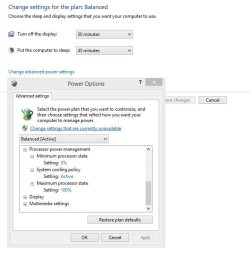
As to your question, not sure I get where you're coming from but as I said before, it won't run at 100 load unless needed, or you change your Processor power management settings in the Power Management Plan...

Processor PM Plans.JPG

http://www.sevenforums.com/tutorials/778-power-plan-settings-change.html

If it's set like shown in the image above, I'd leave it alone, unless you like running inefficient as 100 percent all the time, which goes back to my first point about heat.

Good luck.
 

My Computer My Computer

Computer type
PC/Desktop
Computer Manufacturer/Model Number
Custom built by me.
OS
Windows 10 Pro
CPU
Intel Core i7-4770K (3.5Ghz)
Motherboard
Gigabyte G1 Sniper 5 (F10 Bios)
Memory
32 gig Corsair Dominator Platinum (4x8Gig)
Graphics Card(s)
Sapphire Tri-X R9 Fury
Sound Card
Soundblaster ZXR
Monitor(s) Displays
NEC PA242W 24" LCD Monitor
Screen Resolution
1920 x 1200
Hard Drives
Primary - Samsung 850 Pro (512gig), Samsung 840 Pro (256gig), 2TB WD Caviar Black.
PSU
EVGA Supernova 1000 G2
Case
Cooler Master HAF X
Cooling
Corsair H100i with Corsair Air Series SP120 Quiet Fans
Keyboard
Logitech Wireless Wave
Mouse
Logitech Performance MX
Internet Speed
High Speed Cable
Antivirus
Norton Security
Browser
IE11
Other Info
Memory Timings - 1866MHz @ 9-9-9-27-1T @ 1.5 volts
The CPU is independent from the OS and it's software so you can uninstall/disable it if you wish.

Be aware you can also affect how the processor runs (as well as system state regarding Power Management) through BIOS settings as well, which can override or affect the OS settings.

This is usually dealt with in CIE/EIST settings. Here's a good article here: Maximum PC Essentials: Ultimate BIOS Tweaking Guide - Page 3 | Maximum PC

What you might not know is the purpose of some of the more obscure CPU-related BIOS settings. Both C1E and EIST relate to power-saving techniques employed by Intel CPUs.
 

My Computer My Computer

Computer type
PC/Desktop
Computer Manufacturer/Model Number
Custom built by me.
OS
Windows 10 Pro
CPU
Intel Core i7-4770K (3.5Ghz)
Motherboard
Gigabyte G1 Sniper 5 (F10 Bios)
Memory
32 gig Corsair Dominator Platinum (4x8Gig)
Graphics Card(s)
Sapphire Tri-X R9 Fury
Sound Card
Soundblaster ZXR
Monitor(s) Displays
NEC PA242W 24" LCD Monitor
Screen Resolution
1920 x 1200
Hard Drives
Primary - Samsung 850 Pro (512gig), Samsung 840 Pro (256gig), 2TB WD Caviar Black.
PSU
EVGA Supernova 1000 G2
Case
Cooler Master HAF X
Cooling
Corsair H100i with Corsair Air Series SP120 Quiet Fans
Keyboard
Logitech Wireless Wave
Mouse
Logitech Performance MX
Internet Speed
High Speed Cable
Antivirus
Norton Security
Browser
IE11
Other Info
Memory Timings - 1866MHz @ 9-9-9-27-1T @ 1.5 volts
Will Turbo boost work ? Yes. The only way I know of to disable turbo boost is through the bios, the turbo boost monitor (gadget) only monitors it, after awhile you won`t even need it.
 

My Computer My Computer

Computer type
PC/Desktop
Computer Manufacturer/Model Number
Skylake Special #666
OS
Windows 10 Pro x64
CPU
Intel Core i7 6700K
Motherboard
Asus Sabertooth Z170 Mark 1
Memory
GSkill TridentZ RGB 16GB 3600 16-16-16-36
Graphics Card(s)
EVGA GTX 980 Ti SC x2
Sound Card
Realtek High Definition
Monitor(s) Displays
AOC G2460PG
Screen Resolution
1920 x 1080 144Hz
Hard Drives
Samsung 860 Pro 256GB, Seagate Barracuda 4TB x2
PSU
EVGA 1000 P2, EVGA White Custom Braided Cables
Case
Corsair Vengeance C70 Gunmetal Black
Cooling
Corsair H100i v2, Corsair ML120 x2, Thermal Grizzly Kryonaut
Keyboard
Logitech G910 Orion Spectrum
Mouse
Logitech G700s
Internet Speed
Verizon Fios Quantum Gateway 75/75
Antivirus
Windows Defender, Malwarebytes Free 3.8.3
Browser
Chrome
Other Info
Corsair SP120 x4, LG Blu-ray Drive, Durabrand HT-395 100 Watt Dolby Digital Amp, Corsair H2100 Wireless 7.1 Headset
okay im happy thank you all very much! reps all around
 

My Computer My Computer

Computer type
PC/Desktop
Computer Manufacturer/Model Number
Custom Build
OS
64 bit windows 7 home professional SP1
CPU
intel i5 3570k 3.4ghz quad core
Motherboard
ASUS P8-Z77-V LX
Memory
DDR3 16GB 1600MHZ
Graphics Card(s)
ASUS AMD R9 270X OC
Sound Card
SB Audigy
Monitor(s) Displays
Novatech
Screen Resolution
1920 - 1080 60HZ
Hard Drives
3 X 500G
seagate momentus xt 750
PSU
850w
Case
novatech
Cooling
1 blue led outtake + 1 blue led Intake 1 cpu 1 gpu 1 psu
Keyboard
aula
Mouse
Mad Cats ( R.A.T 3 )
Internet Speed
300 mbps
Antivirus
Avast
Browser
Firefox
but does the program just show me what my cpu is doing or does it control it and make it turbo as swell?


It does not affect the turbo, it only displays the speed.
 

My Computer My Computer

Computer type
PC/Desktop
Computer Manufacturer/Model Number
Skylake Special #666
OS
Windows 10 Pro x64
CPU
Intel Core i7 6700K
Motherboard
Asus Sabertooth Z170 Mark 1
Memory
GSkill TridentZ RGB 16GB 3600 16-16-16-36
Graphics Card(s)
EVGA GTX 980 Ti SC x2
Sound Card
Realtek High Definition
Monitor(s) Displays
AOC G2460PG
Screen Resolution
1920 x 1080 144Hz
Hard Drives
Samsung 860 Pro 256GB, Seagate Barracuda 4TB x2
PSU
EVGA 1000 P2, EVGA White Custom Braided Cables
Case
Corsair Vengeance C70 Gunmetal Black
Cooling
Corsair H100i v2, Corsair ML120 x2, Thermal Grizzly Kryonaut
Keyboard
Logitech G910 Orion Spectrum
Mouse
Logitech G700s
Internet Speed
Verizon Fios Quantum Gateway 75/75
Antivirus
Windows Defender, Malwarebytes Free 3.8.3
Browser
Chrome
Other Info
Corsair SP120 x4, LG Blu-ray Drive, Durabrand HT-395 100 Watt Dolby Digital Amp, Corsair H2100 Wireless 7.1 Headset
You can watch the CPU frequency with CPUz but it's not a gadget.
 

My Computer My Computer

Computer type
PC/Desktop
Computer Manufacturer/Model Number
Home Built Desktop By DataTech
OS
Windows 7 Ultimate X64 SP1
CPU
Intel i5-2550K, Differing ~4.4-4.8GHz No built in GPU
Motherboard
ASUS P8Z68-V PRO/GEN3
Memory
16GB G.Skill Sniper 1866MHz @ 2133MHz 2x8GB
Graphics Card(s)
ASUS GTX650TIB-DC2OC-2GD5, (650TI Boost)
Sound Card
Onboard Realtek 5-1
Monitor(s) Displays
Samsung P2570HD
Screen Resolution
1920x1080
Hard Drives
Samsung 840 Pro 256GB SSD for OS, 500GB Seagate Constellation (Enterprise drive) for Data
PSU
Corsair HX650W
Case
Inwin Dragon Rider
Cooling
Hyper 212 EVO w/two Noctua fans, push-pull, @1300 RPM
Keyboard
E-Z Eyes, bright yellow keys with large characters
Mouse
steelseries SENSEI Laser Pro Gaming
Internet Speed
48-51Mbs Mbs down, 11 Mbs up Xfinity Cable
Antivirus
Norton Internet Security 2013
Browser
IE 10, Opera, Pale Moon if needed
Other Info
4 case fans, LG BluRay-RE, ASUS DVD-RW, Mr. Fusion power supply, 1.21 gigawatts.
Will Turbo boost work ? Yes. The only way I know of to disable turbo boost is through the bios,...

Correct - Enabling/disabling is done through BIOS; although the "function" of it is controlled by the processor. This is why it's sometimes better to disable it during certain overclocks.


Example - If you overclock the CPU to say 4.8gig, and turbo boost is still enabled - the processor will run at 4.8 + the turbo speed.... pushing the processor past your intended settings. Thus if you leave turbo boost enabled, you need to compensate for it during your overclock calculations.

But I realize that's not the question asked :)

Edit - I stand corrected, if you want the CPU running at that speed all the time, than disable it. Outside of that, there's really no benefit is disabling turbo boost.

Thanks Gary :o
 
Last edited:

My Computer My Computer

Computer type
PC/Desktop
Computer Manufacturer/Model Number
Custom built by me.
OS
Windows 10 Pro
CPU
Intel Core i7-4770K (3.5Ghz)
Motherboard
Gigabyte G1 Sniper 5 (F10 Bios)
Memory
32 gig Corsair Dominator Platinum (4x8Gig)
Graphics Card(s)
Sapphire Tri-X R9 Fury
Sound Card
Soundblaster ZXR
Monitor(s) Displays
NEC PA242W 24" LCD Monitor
Screen Resolution
1920 x 1200
Hard Drives
Primary - Samsung 850 Pro (512gig), Samsung 840 Pro (256gig), 2TB WD Caviar Black.
PSU
EVGA Supernova 1000 G2
Case
Cooler Master HAF X
Cooling
Corsair H100i with Corsair Air Series SP120 Quiet Fans
Keyboard
Logitech Wireless Wave
Mouse
Logitech Performance MX
Internet Speed
High Speed Cable
Antivirus
Norton Security
Browser
IE11
Other Info
Memory Timings - 1866MHz @ 9-9-9-27-1T @ 1.5 volts
Drew, turbo will not push the CPU past what the CPU multiplier is set at. In your example, 4.8Ghx would be the max it would boost to. The set multiplier is the turbo ratio. :D
 

My Computer My Computer

Computer type
PC/Desktop
Computer Manufacturer/Model Number
Home Built Desktop By DataTech
OS
Windows 7 Ultimate X64 SP1
CPU
Intel i5-2550K, Differing ~4.4-4.8GHz No built in GPU
Motherboard
ASUS P8Z68-V PRO/GEN3
Memory
16GB G.Skill Sniper 1866MHz @ 2133MHz 2x8GB
Graphics Card(s)
ASUS GTX650TIB-DC2OC-2GD5, (650TI Boost)
Sound Card
Onboard Realtek 5-1
Monitor(s) Displays
Samsung P2570HD
Screen Resolution
1920x1080
Hard Drives
Samsung 840 Pro 256GB SSD for OS, 500GB Seagate Constellation (Enterprise drive) for Data
PSU
Corsair HX650W
Case
Inwin Dragon Rider
Cooling
Hyper 212 EVO w/two Noctua fans, push-pull, @1300 RPM
Keyboard
E-Z Eyes, bright yellow keys with large characters
Mouse
steelseries SENSEI Laser Pro Gaming
Internet Speed
48-51Mbs Mbs down, 11 Mbs up Xfinity Cable
Antivirus
Norton Internet Security 2013
Browser
IE 10, Opera, Pale Moon if needed
Other Info
4 case fans, LG BluRay-RE, ASUS DVD-RW, Mr. Fusion power supply, 1.21 gigawatts.
Drew, turbo will not push the CPU past what the CPU multiplier is set at. In your example, 4.8Ghx would be the max it would boost to. The set multiplier is the turbo ratio. :D

You sure about that? I know the older systems (X58) worked like that, at least on my board :confused:

Yeah, you're right it shouldn't push pass the multiplier, but...

Let me look into something :)

Edit - I stand corrected, if you want the CPU running at that speed all the time, than disable it. Outside of that, there's really no benefit is disabling turbo boost.
 

My Computer My Computer

Computer type
PC/Desktop
Computer Manufacturer/Model Number
Custom built by me.
OS
Windows 10 Pro
CPU
Intel Core i7-4770K (3.5Ghz)
Motherboard
Gigabyte G1 Sniper 5 (F10 Bios)
Memory
32 gig Corsair Dominator Platinum (4x8Gig)
Graphics Card(s)
Sapphire Tri-X R9 Fury
Sound Card
Soundblaster ZXR
Monitor(s) Displays
NEC PA242W 24" LCD Monitor
Screen Resolution
1920 x 1200
Hard Drives
Primary - Samsung 850 Pro (512gig), Samsung 840 Pro (256gig), 2TB WD Caviar Black.
PSU
EVGA Supernova 1000 G2
Case
Cooler Master HAF X
Cooling
Corsair H100i with Corsair Air Series SP120 Quiet Fans
Keyboard
Logitech Wireless Wave
Mouse
Logitech Performance MX
Internet Speed
High Speed Cable
Antivirus
Norton Security
Browser
IE11
Other Info
Memory Timings - 1866MHz @ 9-9-9-27-1T @ 1.5 volts
Back
Top