AMD HD7950 No Audio Output from HDMI

jetsfan4ever80

New member
Local time
12:55 PM
Messages
4
Hi, I've been having an issue getting sound via an HDMI connection. I've been attempting to run an HDMI cable from my AMD HD7950 to my TV. I'm able to get video without any issues, however I can't seem to get any audio. The strange thing is, when I look at my playback devices, the TV is listed. However, unlike the other playback devices on the list, there are no volume bars on the right side of the device. For instance, when audio is coming from one of the other listed devices, the volume bars flicker, but when it comes to my TV, there are no volume bars at all. Additionally, I'm unable to set my TV as the default device. I've tried uninstalling, reinstalling and updating the AMD drivers but I've had no luck. I'd deeply appreciate any help! Thank you.

30lfpd5.png
 

My Computer My Computer

At a glance

Windows 7 Home Premium 64biti5-3570kAMD Radeon 7950
Computer type
PC/Desktop
Computer Manufacturer/Model Number
Custom Build
OS
Windows 7 Home Premium 64bit
CPU
i5-3570k
Graphics Card(s)
AMD Radeon 7950
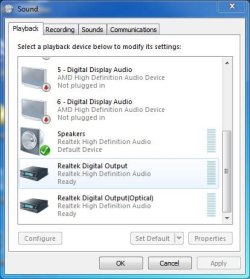
Normally, you will have multiple AMD High Def listings on the Playback Panel (see screenshot from my AMD HD7770 below).

If that is not showing, and you have reinstalled the drivers, etc, it sounds like a possible hardware problem with the video card. One test you can do, if your motherboard has an HDMI port, remove the AMD video card and use the Intel HD graphics in the i5 and see if that works OK (you may have to reinstall the Intel HD Graphics drivers). If it does work OK that would suggest the video card is the problem.
 

Attachments

  • Sound Panel Capture.JPG
    Sound Panel Capture.JPG
    39.2 KB · Views: 22

My Computer My Computer

At a glance

Windows 10 64 bitIntel i7 6700K16GB Corsair DominatorIntel CPU Graphics
Computer type
PC/Desktop
Computer Manufacturer/Model Number
My Own Build
OS
Windows 10 64 bit
CPU
Intel i7 6700K
Motherboard
ASUS ROG Maximus VIII Hero
Memory
16GB Corsair Dominator
Graphics Card(s)
Intel CPU Graphics
Sound Card
RealTek
Monitor(s) Displays
27" Dell S2719dgf
Screen Resolution
2560X1440
Hard Drives
1 TB Samsung 850 EVO SSD for Win 10 Pro
500GB Samsung 850 EVO SSD for Win 10 Insider
2 TB drive for backup
PSU
EVGA Supernova 750G2
Case
BeQuiet Silent Base 600
Cooling
Deepcool Captain 120EX
Keyboard
Microsoft Wireless 2000
Mouse
Microsoft wireless
Internet Speed
100 MB/sec (Cable)
Antivirus
Microsoft Defender and Malwarebytes
Browser
Edge/Firefox
Other Info
Cakewalk (Sonar) by BandLab and Studio One 4.1 Pro recording studio software. MOTU 896Mk3 Hybrid recording interface, Frontier Tranzport wireless control unit, Behringer X-Touch Control Surface.
Five USB connected optical drives for CD Audio production using Nero BurningROM
Hi there

Here's another test -- a bit more technical but it will soon find out if you've got any problem with your HDMI.

1) Download LINUX MINT 17 KDE and create a bootable USB. This will have all the multi-media stuff on it.

2) Boot up the USB - with the HDMI cable plugged into the TV.

3) Open Firefox browser and either logon to the BBC website or any other FREE Video streaming website.

4) Play the video -- on the right hand side you'll see a little speaker symbol -- right mouse click it and it will give you configure Audio.

5) Choose the HDMI - disable the Analog and you should hear sound coming from the TV.

If that works we can now look at Windows and fix that-- I suggest trying the Linux Live Distro first (you don't have to install - it runs from the USB stick) because this will immediately tell you if the Audio is working properly -- Linux Mint has worked on 100% of the computers I've run this test on and I've fixed audio often this way.

BTW if you use HDMI output you need to disable the computers speaker output - otherwise the Audio will get lost somewhere. You don't need to disconnect them though.

Cheers
jimbo
 

My Computer My Computer

At a glance

Linux CENTOS 7 / various Windows OS'es and se...Intel i7 Intel i58GB, 16GBOn Motherboard
Computer type
PC/Desktop
Computer Manufacturer/Model Number
Custom built, several laptops HP/ASUS
OS
Linux CENTOS 7 / various Windows OS'es and servers
CPU
Intel i7 Intel i5
Memory
8GB, 16GB
Graphics Card(s)
On Motherboard
Sound Card
Realtek HD audio
Monitor(s) Displays
Apple Cinema display, Samsung LCD
Screen Resolution
1920 X 1080
Hard Drives
4 X 1TB SATA
Mouse
Toshiba wireless laser
Internet Speed
> 20MB up
Hi, I've been having an issue getting sound via an HDMI connection. I've been attempting to run an HDMI cable from my AMD HD7950 to my TV. I'm able to get video without any issues, however I can't seem to get any audio. The strange thing is, when I look at my playback devices, the TV is listed. However, unlike the other playback devices on the list, there are no volume bars on the right side of the device. For instance, when audio is coming from one of the other listed devices, the volume bars flicker, but when it comes to my TV, there are no volume bars at all. Additionally, I'm unable to set my TV as the default device. I've tried uninstalling, reinstalling and updating the AMD drivers but I've had no luck. I'd deeply appreciate any help! Thank you.

30lfpd5.png
Are you trying to use the speakers in the TV, connected through the HDMI cable?

If so, why do you have "Speakers" checked as your default playback device? That's from the VIA sound card/chip to external speakers (say from analog cable from the sound card to speakers), not for HDMI-delivered audio delivered from the video graphics card to a device connected via HDMI cable.

You need to check that TV and "AMD high definition audio" as your default playback device, in order to get sound delivered via your HDMI cable to your TV and playing through the TV's speakers. And yet you say you've been "unable" to do this.

What happens if you check the TV and push the "Set Default" button??

For example, here's what my "playback devices" looks like from my laptop when I plugged my Panny 65VT50 to it (using miniDP->HDMI cable) from the nVidia K1000M graphics card. The TV was selected as the default playback device, and sure enough I got sound from the TV's speakers along with video from the TV (as an external monitor from the laptop).

qu3v.jpg
 

My Computer My Computer

At a glance

Windows 7 Pro x64 (1), Win7 Pro X64 (2)i5-3350p 3.1Ghz/6MB-cache (1); E8400 3.0Ghz/6...8GB PC3-12800 DDR3 (1); 4GB PC3-10600 DDR3 (2)ATI HD7750 (1), (see TV cards); ATI R7 250 (2)
Computer type
PC/Desktop
Computer Manufacturer/Model Number
Home-built, two systems (1) and (2)
OS
Windows 7 Pro x64 (1), Win7 Pro X64 (2)
CPU
i5-3350p 3.1Ghz/6MB-cache (1); E8400 3.0Ghz/6MB-cache (2)
Motherboard
ASUS P8Z77-V Pro (1); ASUS P5Q3 (2)
Memory
8GB PC3-12800 DDR3 (1); 4GB PC3-10600 DDR3 (2)
Graphics Card(s)
ATI HD7750 (1), (see TV cards); ATI R7 250 (2)
Sound Card
Realtek ALC892 HD Audio (1); Realtek ALC1200 HD Audio (2)
Monitor(s) Displays
Eizo HD2441W LCD, Eizo S2433W (1); Eizo 24" S2433W (2)
Screen Resolution
1920x1200, 1920x1200 (1); 1920x1200 (2)
Hard Drives
(1) 1TB SATA-II (7200RPM), 2x2TB SATA-III (7200RPM), 250GB SATA-III (10000RPM) for OS; 2x2TB external USB 3.0

(2) 320GB SATA-II (7200RPM), 750GB SATA-II (7200RPM), 150GB SATA-II (10000RPM) for OS; 2TB external USB 3.0
PSU
Nesteq ECS-6001 600W (1); Nesteq ECS-5001 500W (2)
Case
Acousti-Case 360 (1) and (2)
Cooling
Noctua NH-U12P SE2 for CPU, 2x120mm case fans (1) and (2)
Keyboard
IBM PS/2 (1) and (2)
Mouse
Logitech MX Revolution wireless (1); Microsoft wired (2)
Internet Speed
100mbps down / 10mbps up
Antivirus
Microsoft Security Essentials; Malwarebyte Anti-Malware Pro
Browser
Firefox
Other Info
Ceton InfiniTV 4-tuner cablecard-enabled TV card as well as Hauppauge HVR-2250 OTA/ATSC 2-tuner TV card in (1), running under Win7 WMC
Thanks for the response!

Jimbo, I'm going to try this out as my first attempt at reconciling the issue. I'm downloading Linux as I type this. Thanks!

Firebird, I do have multiple AMD High Def listings - although 5 out of the 6 listings are "not plugged in" and the one that is available is my TV that isn't getting any sound. I was thinking about trying to remove the card and testing it that way. If the Linux test fails I will attempt to remove it and see what happens. I hope it's not a hardware issue. I used to get sound from my HDMI when connected to a different TV, but then I moved homes and now I'm having this issue. I tried to see if the TV itself was the problem, but I'm still having the issue after connecting to several different TVs and monitors.

dsperber, when I say that I was unable to make my TV as my default device I meant that when I click "Set as default device" nothing happens. The analog speakers continue to be my default and I can't get the TV to switch to the default device. It does give me the option to set it as my default device - it's not grayed out - but nothing happens when I click it.
 

My Computer My Computer

At a glance

Windows 7 Home Premium 64biti5-3570kAMD Radeon 7950
Computer type
PC/Desktop
Computer Manufacturer/Model Number
Custom Build
OS
Windows 7 Home Premium 64bit
CPU
i5-3570k
Graphics Card(s)
AMD Radeon 7950
Hi there

Here's another test -- a bit more technical but it will soon find out if you've got any problem with your HDMI.

1) Download LINUX MINT 17 KDE and create a bootable USB. This will have all the multi-media stuff on it.

2) Boot up the USB - with the HDMI cable plugged into the TV.

3) Open Firefox browser and either logon to the BBC website or any other FREE Video streaming website.

4) Play the video -- on the right hand side you'll see a little speaker symbol -- right mouse click it and it will give you configure Audio.

5) Choose the HDMI - disable the Analog and you should hear sound coming from the TV.

If that works we can now look at Windows and fix that-- I suggest trying the Linux Live Distro first (you don't have to install - it runs from the USB stick) because this will immediately tell you if the Audio is working properly -- Linux Mint has worked on 100% of the computers I've run this test on and I've fixed audio often this way.

BTW if you use HDMI output you need to disable the computers speaker output - otherwise the Audio will get lost somewhere. You don't need to disconnect them though.

Cheers
jimbo

Thank you for this suggestion! I was able to get sound via HDMI through Linux. I'm happy to know it's not a hardware issue! Unfortunately, I have no idea how to fix the Windows issue. Any suggestions would be greatly appreciated. Thanks again!
 

My Computer My Computer

At a glance

Windows 7 Home Premium 64biti5-3570kAMD Radeon 7950
Computer type
PC/Desktop
Computer Manufacturer/Model Number
Custom Build
OS
Windows 7 Home Premium 64bit
CPU
i5-3570k
Graphics Card(s)
AMD Radeon 7950
Hey, I had the same issue and for some video cards you have to attach a little 2pin wire from your MOBO to the video card itself to export audio through HDMI. Then the audio should work properly. Sry if this doesn't apply, but I figured I'd let ya know! Instructions on how to connect it are in the online manual.
 

My Computer My Computer

At a glance

Windows 7 Pro 64 bit
Computer type
PC/Desktop
OS
Windows 7 Pro 64 bit
Hey, I had the same issue and for some video cards you have to attach a little 2pin wire from your MOBO to the video card itself to export audio through HDMI. Then the audio should work properly. Sry if this doesn't apply, but I figured I'd let ya know! Instructions on how to connect it are in the online manual.

Thanks, but it appears everything is plugged in. I believe it's a software issue since I can get sound on Linux, but not Windows. It's been frustrating.
 

My Computer My Computer

At a glance

Windows 7 Home Premium 64biti5-3570kAMD Radeon 7950
Computer type
PC/Desktop
Computer Manufacturer/Model Number
Custom Build
OS
Windows 7 Home Premium 64bit
CPU
i5-3570k
Graphics Card(s)
AMD Radeon 7950
On older cards with HDMI, they used S/PDIF from the PC's motherboard, what burrmanchu was referring to. That is not applicable to newer video cards as they have their own sound module built into the video card.
 

My Computer My Computer

At a glance

Windows 10 64 bitIntel i7 6700K16GB Corsair DominatorIntel CPU Graphics
Computer type
PC/Desktop
Computer Manufacturer/Model Number
My Own Build
OS
Windows 10 64 bit
CPU
Intel i7 6700K
Motherboard
ASUS ROG Maximus VIII Hero
Memory
16GB Corsair Dominator
Graphics Card(s)
Intel CPU Graphics
Sound Card
RealTek
Monitor(s) Displays
27" Dell S2719dgf
Screen Resolution
2560X1440
Hard Drives
1 TB Samsung 850 EVO SSD for Win 10 Pro
500GB Samsung 850 EVO SSD for Win 10 Insider
2 TB drive for backup
PSU
EVGA Supernova 750G2
Case
BeQuiet Silent Base 600
Cooling
Deepcool Captain 120EX
Keyboard
Microsoft Wireless 2000
Mouse
Microsoft wireless
Internet Speed
100 MB/sec (Cable)
Antivirus
Microsoft Defender and Malwarebytes
Browser
Edge/Firefox
Other Info
Cakewalk (Sonar) by BandLab and Studio One 4.1 Pro recording studio software. MOTU 896Mk3 Hybrid recording interface, Frontier Tranzport wireless control unit, Behringer X-Touch Control Surface.
Five USB connected optical drives for CD Audio production using Nero BurningROM
Back
Top