AMD Phenom CPU Upgrade

kevtherev

New member
Local time
9:10 AM
Messages
21
Windows7 Home Edition.
I have on my PC a AMD Phenom(tm) II X6 1055T Processor 2800 Mhz on a MS-7646 motherboard from Medion. I would like if possible to upgrade the processor to 3400 Mhz to improve my system. I have approached Medion to see if this is possible but have only received vague answers. Anyone know anything about this upgrading ie. is it possible ? If so is it just a matter of changing the CPU or is this a little more complicated.
 

My Computer

Computer Manufacturer/Model Number
Medion
OS
Microsoft Windows 7 Home Premium 64-Bit 7601 Multiprocessor Free Service Pack 1
CPU
AMD Phenom(tm) II X6 1055T Processor
Motherboard
MEDIONPC MS-7646
Memory
8,00 GB
Graphics Card(s)
AMD Radeon HD 6570
Sound Card
(1) Realtek High Definition Audio (2) AMD High Definition
Monitor(s) Displays
Acer AL1716 / NEC Multisync LCD1770NX
Screen Resolution
Both 1280 X 1024
Hard Drives
ST310005 28AS SATA Disk Device Fixed hard disk media 931,51 GB
Keyboard
Medion
Mouse
Medion
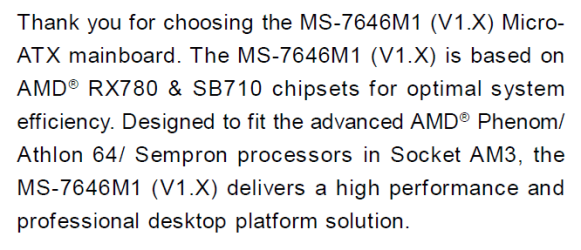
From your motherboard's manual:

Capture.PNG

So you will be able to use a CPU which has the AM3 Socket type. I'd look at an Athlon 64, one of those should be your best bet.

   Warning
Be sure to verify your BIOS supports that specific chipset. A BIOS flash may be required prior to installing.
 

My Computer

Computer type
PC/Desktop
Computer Manufacturer/Model Number
Custom Build
OS
W7 Pro x64 SP1 | W10 Pro IP x64 | W8.1 Pro x64 VM | Linux Mint VM
CPU
i7-4790k @ 4GHz (4.4GHz Boost)
Motherboard
ASUS Sabertooth Z87 (BIOS Rev 2004)
Memory
16GB DDR3 Kingston HyperX Fury @ 1600MHz CL 9-9-9-27
Graphics Card(s)
EVGA GTX 980 Classified
Sound Card
Realtek Onboard
Monitor(s) Displays
Samsung S27D390
Screen Resolution
1920 x 1080
Hard Drives
240GB Intel 520 Series SSD |
Samsung 850 EVO 120GB SSD |
2TB WD Caviar Black |
2TB WD Caviar Green
PSU
Corsair HX850-80 Gold Modular
Case
Cooler Master Silencio 650
Cooling
Corsair H80i w/2 x Corsair SP120 | 2 x 120mm Noctua NF-S12B
Keyboard
Microsoft Sidewinder X4
Mouse
Gigabyte M6900 optical
Internet Speed
152mb
Antivirus
F-Secure
Browser
Firefox 38.0
Other Info
Backup Rig: Win 7 Pro 64-bit | AMD A10-5800k | ASUS F2A85-V Pro | 8GB Samsung DDR3 @1600MHz | 120GB Toshiba SDD | 2TB Seagate HDD | Cooler Master Silencio 550
From Phenom II X6 to Athlon 64 would be a huge downgrade.

Chk: AMD Phenom II X6 1055T - HDT55TFBK6DGR / HDT55TFBGRBOX. Your CPU has Turbo, so it automatically increases frequency to 3300 MHz whenever required.

An upgrade to your CPU would be Phenom II X6 1100T with 3300 MHz base frequency and 3700 MHz turbo frequency.

You may also upgrade to a better motherboard like 990FX series motherboard and overclock your current 1055T CPU upto 4000 MHz to gain extra performance.
Note: Overclocking CPU would require an aftermarket cooler for enhanced cooling.

Upgrading to a 990FX series motherboard will also open future upgrade path for 8 core AMD processors like FX 8320 or 8350 etc.
 

My Computer

Computer type
PC/Desktop
Computer Manufacturer/Model Number
Custom
OS
Windows 7 Ultimate x64
CPU
AMD Phenom II 960T 3GHz
Motherboard
MSI 970A G46
Memory
Corsair Venegeance 2x4GB DDR3 1600 MHz
Graphics Card(s)
Zotac GTX 760 2GB GDDR5 256bit
Hard Drives
Seagate 1TB
WD Green 1TB
Internet Speed
Reliance Broadband 2Mbps U/L
Antivirus
Avast
Browser
Chrome, Firefox
From Phenom II X6 to Athlon 64 would be a huge downgrade.

Chk: AMD Phenom II X6 1055T - HDT55TFBK6DGR / HDT55TFBGRBOX. Your CPU has Turbo, so it automatically increases frequency to 3300 MHz whenever required.

An upgrade to your CPU would be Phenom II X6 1100T with 3300 MHz base frequency and 3700 MHz turbo frequency.

Indeed it would, my bad. I got my Semprons and Phenoms completely arse about face.

If you're on about upgrading motherboards as well though you may as well just get a Sabertooth z97 and an i7. Job done. I think the OP is looking to keep his current motherboard though.
 

My Computer

Computer type
PC/Desktop
Computer Manufacturer/Model Number
Custom Build
OS
W7 Pro x64 SP1 | W10 Pro IP x64 | W8.1 Pro x64 VM | Linux Mint VM
CPU
i7-4790k @ 4GHz (4.4GHz Boost)
Motherboard
ASUS Sabertooth Z87 (BIOS Rev 2004)
Memory
16GB DDR3 Kingston HyperX Fury @ 1600MHz CL 9-9-9-27
Graphics Card(s)
EVGA GTX 980 Classified
Sound Card
Realtek Onboard
Monitor(s) Displays
Samsung S27D390
Screen Resolution
1920 x 1080
Hard Drives
240GB Intel 520 Series SSD |
Samsung 850 EVO 120GB SSD |
2TB WD Caviar Black |
2TB WD Caviar Green
PSU
Corsair HX850-80 Gold Modular
Case
Cooler Master Silencio 650
Cooling
Corsair H80i w/2 x Corsair SP120 | 2 x 120mm Noctua NF-S12B
Keyboard
Microsoft Sidewinder X4
Mouse
Gigabyte M6900 optical
Internet Speed
152mb
Antivirus
F-Secure
Browser
Firefox 38.0
Other Info
Backup Rig: Win 7 Pro 64-bit | AMD A10-5800k | ASUS F2A85-V Pro | 8GB Samsung DDR3 @1600MHz | 120GB Toshiba SDD | 2TB Seagate HDD | Cooler Master Silencio 550
One problem with upgrading/changing to a new motherboard is the RAM/Random Access Memory, modules from the current setup may not work in the new one.
 

My Computer

Computer type
PC/Desktop
Computer Manufacturer/Model Number
Customs, Dell, Gateway, HP, Toshiba, Acer, ASUS
OS
Windows 7 Ultimate 64-bit, Windows 8.1 64-bit, Mac OS X 10.10, Linux Mint 17, Windows 10 Pro TP
Keyboard
Microsoft
Mouse
Microsoft
Many thanks you guys, the info was really helpfull. Now I just have to save some money from my meagre pension to be able to afford one, they seem to fairly expensive.
:(
 

My Computer

Computer Manufacturer/Model Number
Medion
OS
Microsoft Windows 7 Home Premium 64-Bit 7601 Multiprocessor Free Service Pack 1
CPU
AMD Phenom(tm) II X6 1055T Processor
Motherboard
MEDIONPC MS-7646
Memory
8,00 GB
Graphics Card(s)
AMD Radeon HD 6570
Sound Card
(1) Realtek High Definition Audio (2) AMD High Definition
Monitor(s) Displays
Acer AL1716 / NEC Multisync LCD1770NX
Screen Resolution
Both 1280 X 1024
Hard Drives
ST310005 28AS SATA Disk Device Fixed hard disk media 931,51 GB
Keyboard
Medion
Mouse
Medion
My brother has an AMD Phenom 2 X6 1100T he has it running at 3.7ghz standard, runs like a dream and has no issues with any games at the current time. Great processor and benches higher than most of the fx 6 cores!
 

My Computer

Computer type
Laptop
Computer Manufacturer/Model Number
Packard Bell
OS
Windows 7 Home Premium 64Bit
CPU
AMD A6-3420M 1.5GHZ OC - 2.0GHZ
Memory
4GB DDR3 1600MHZ
Graphics Card(s)
AMD RADEON 6520G+AMD RADEON HD7470M 1GB DDR3
Screen Resolution
1366x768
Hard Drives
500GB SATA
Internet Speed
18Mb Unlimited
Antivirus
AVAST!
Browser
MOZILLA FIREFOX
Windows7 Home Edition.
I have on my PC a AMD Phenom(tm) II X6 1055T Processor 2800 Mhz on a MS-7646 motherboard from Medion. I would like if possible to upgrade the processor to 3400 Mhz to improve my system. I have approached Medion to see if this is possible but have only received vague answers. Anyone know anything about this upgrading ie. is it possible ? If so is it just a matter of changing the CPU or is this a little more complicated.

Probably the best upgrade you could make to your system would be an SSD drive (say 120 Gb or 240 Gb) with the OS and your main programs on this. Use your existing drive as storage. There are tutorials on this site to help you.
As to your CPU. That is a 6 core with 3.3Ghz turbo mode where 3 of the cores will go higher clock rate on single threaded applications and is a brute of a chip. I have one myself and would not part with it. An SSD will make you think you have a new PC which in many ways you will.
 

My Computer

Computer type
PC/Desktop
Computer Manufacturer/Model Number
Bluethunder II
OS
Windows 7 x64 Ultimate and numerous virtual machines
CPU
AMD FX-8350 Vishera 32nm Technology @ 4.2 GHz default
Motherboard
ASUSTeK COMPUTER INC. SABERTOOTH 990FX R2.0 (Socket 942)
Memory
G Skill 32.0GB Dual-Channel DDR3 @ 1204MHz (11-13-13-31)
Graphics Card(s)
EVGA GeForce GTX 960 4GB Super SC ACX 2.0+ with Back Plate
Sound Card
Creative X-Fi Titanium HD Audiophile PCIe
Monitor(s) Displays
LG L227WTG x 3
Screen Resolution
1680 x 1050 16:10
Hard Drives
238GB Samsung850 PRO SATA Disk Device (SSD)
1863GB Seagate ST2000DM 001-1CH164 (SATA)
1397GB Seagate ST1500DL 003-9VT16L(SATA)
466GB Western Digital WDC WD50 03AZEX-00K1GA0 (SATA) x 2
932GB Seagate ST310005 28AS SATA Disk Device (SATA)
PSU
Enermax Revolution87+ 1000 Watts Gold Certified Power Supply
Case
Rocketfish Full Tower
Cooling
Cooler Master Hyper 212 EVO Push Pull 120mm Fans
Keyboard
Logitech K740
Mouse
Logitech G100S Laser LED + Logitech Gamepad F310
Internet Speed
500 mbs down and 30mbs up
Antivirus
Malwarebytes Pro & Avast and MSE on certain Virtual Machines
Browser
Firefox (Main) Chrome, Internet Explorer (Back Up)
Other Info
Logitech X 230 2.1 Stereo System and 5.1 Yamaha RX V2090
B&W DM6 Monitor Speakers + Center and Surround Speakers
Using Mouse Without Borders (Google it)
If you need it, Overclock the CPU to 3.3ghz and disable Turbo, you should have no issues what so ever.
 

My Computer

Computer type
Laptop
Computer Manufacturer/Model Number
Packard Bell
OS
Windows 7 Home Premium 64Bit
CPU
AMD A6-3420M 1.5GHZ OC - 2.0GHZ
Memory
4GB DDR3 1600MHZ
Graphics Card(s)
AMD RADEON 6520G+AMD RADEON HD7470M 1GB DDR3
Screen Resolution
1366x768
Hard Drives
500GB SATA
Internet Speed
18Mb Unlimited
Antivirus
AVAST!
Browser
MOZILLA FIREFOX
If I may, whatever you do don't buy a x6 1100T as it won't work on that motherboard. That motherboard only supports up to 95W processors, and the 100T is a 125W.
 

My Computer

Computer type
PC/Desktop
Computer Manufacturer/Model Number
Me
OS
Win 7 Ultimate x64
CPU
FX-8350 @ 4.6 GHz so far
Motherboard
Asus M5A97 EVO
Memory
ADATA XPG V1 Series Black 8GB DDR3 1600
Graphics Card(s)
Sapphire R9 270x Dual-X
Sound Card
Xonar DGX w/ Corsair Vengence 1300
Monitor(s) Displays
Acer S232HL Abid
Screen Resolution
1920x1080
Hard Drives
120 GB OCZ Vertex 3
500 GB Seagate 7200.12
PSU
Antec Earthwatts 650W Green
Case
Antec Three Hundred
Cooling
Cooler Master 212 EVO
Keyboard
Logitech G510
Mouse
Logitech G500s
Internet Speed
35000/3000
If I may, whatever you do don't buy a x6 1100T as it won't work on that motherboard. That motherboard only supports up to 95W processors, and the 100T is a 125W.

And frankly you will not notice any increase in performance with a few 100 mhz difference. Get an SSD. Probably not a good idea to try and overclock the CPU as the motherboard may actually not be able to cope with the increased power draw and you end up slowing the CPU back down or worse blown mosfets on the motherboard. Leave the CPU alone, there is nothing wrong with it.
 

My Computer

Computer type
PC/Desktop
Computer Manufacturer/Model Number
Bluethunder II
OS
Windows 7 x64 Ultimate and numerous virtual machines
CPU
AMD FX-8350 Vishera 32nm Technology @ 4.2 GHz default
Motherboard
ASUSTeK COMPUTER INC. SABERTOOTH 990FX R2.0 (Socket 942)
Memory
G Skill 32.0GB Dual-Channel DDR3 @ 1204MHz (11-13-13-31)
Graphics Card(s)
EVGA GeForce GTX 960 4GB Super SC ACX 2.0+ with Back Plate
Sound Card
Creative X-Fi Titanium HD Audiophile PCIe
Monitor(s) Displays
LG L227WTG x 3
Screen Resolution
1680 x 1050 16:10
Hard Drives
238GB Samsung850 PRO SATA Disk Device (SSD)
1863GB Seagate ST2000DM 001-1CH164 (SATA)
1397GB Seagate ST1500DL 003-9VT16L(SATA)
466GB Western Digital WDC WD50 03AZEX-00K1GA0 (SATA) x 2
932GB Seagate ST310005 28AS SATA Disk Device (SATA)
PSU
Enermax Revolution87+ 1000 Watts Gold Certified Power Supply
Case
Rocketfish Full Tower
Cooling
Cooler Master Hyper 212 EVO Push Pull 120mm Fans
Keyboard
Logitech K740
Mouse
Logitech G100S Laser LED + Logitech Gamepad F310
Internet Speed
500 mbs down and 30mbs up
Antivirus
Malwarebytes Pro & Avast and MSE on certain Virtual Machines
Browser
Firefox (Main) Chrome, Internet Explorer (Back Up)
Other Info
Logitech X 230 2.1 Stereo System and 5.1 Yamaha RX V2090
B&W DM6 Monitor Speakers + Center and Surround Speakers
Using Mouse Without Borders (Google it)
o/k guys, point taken, will look at a SSD. Many thanks for all your help.
 

My Computer

Computer Manufacturer/Model Number
Medion
OS
Microsoft Windows 7 Home Premium 64-Bit 7601 Multiprocessor Free Service Pack 1
CPU
AMD Phenom(tm) II X6 1055T Processor
Motherboard
MEDIONPC MS-7646
Memory
8,00 GB
Graphics Card(s)
AMD Radeon HD 6570
Sound Card
(1) Realtek High Definition Audio (2) AMD High Definition
Monitor(s) Displays
Acer AL1716 / NEC Multisync LCD1770NX
Screen Resolution
Both 1280 X 1024
Hard Drives
ST310005 28AS SATA Disk Device Fixed hard disk media 931,51 GB
Keyboard
Medion
Mouse
Medion

My Computer

Computer type
Laptop
Computer Manufacturer/Model Number
Packard Bell
OS
Windows 7 Home Premium 64Bit
CPU
AMD A6-3420M 1.5GHZ OC - 2.0GHZ
Memory
4GB DDR3 1600MHZ
Graphics Card(s)
AMD RADEON 6520G+AMD RADEON HD7470M 1GB DDR3
Screen Resolution
1366x768
Hard Drives
500GB SATA
Internet Speed
18Mb Unlimited
Antivirus
AVAST!
Browser
MOZILLA FIREFOX
According to a benchmark i just read, theres a 125w version of the 1055t aswell as a 95 watt version?
AMD Phenom II X6 1055T (125W) vs 1100T
AMD Phenom? II Processors If you go to the "Model number comparison" find the 1055t it also says 125w

Hey Devlin
Here is the 95W part used mainly by OEM's
AMD Phenom II X6 1055T (95W) benchmarks

Once you start overclocking the CPU the power used will go up and the motherboard is not built for overclocking (like most non enthusiast parts).
 

My Computer

Computer type
PC/Desktop
Computer Manufacturer/Model Number
Bluethunder II
OS
Windows 7 x64 Ultimate and numerous virtual machines
CPU
AMD FX-8350 Vishera 32nm Technology @ 4.2 GHz default
Motherboard
ASUSTeK COMPUTER INC. SABERTOOTH 990FX R2.0 (Socket 942)
Memory
G Skill 32.0GB Dual-Channel DDR3 @ 1204MHz (11-13-13-31)
Graphics Card(s)
EVGA GeForce GTX 960 4GB Super SC ACX 2.0+ with Back Plate
Sound Card
Creative X-Fi Titanium HD Audiophile PCIe
Monitor(s) Displays
LG L227WTG x 3
Screen Resolution
1680 x 1050 16:10
Hard Drives
238GB Samsung850 PRO SATA Disk Device (SSD)
1863GB Seagate ST2000DM 001-1CH164 (SATA)
1397GB Seagate ST1500DL 003-9VT16L(SATA)
466GB Western Digital WDC WD50 03AZEX-00K1GA0 (SATA) x 2
932GB Seagate ST310005 28AS SATA Disk Device (SATA)
PSU
Enermax Revolution87+ 1000 Watts Gold Certified Power Supply
Case
Rocketfish Full Tower
Cooling
Cooler Master Hyper 212 EVO Push Pull 120mm Fans
Keyboard
Logitech K740
Mouse
Logitech G100S Laser LED + Logitech Gamepad F310
Internet Speed
500 mbs down and 30mbs up
Antivirus
Malwarebytes Pro & Avast and MSE on certain Virtual Machines
Browser
Firefox (Main) Chrome, Internet Explorer (Back Up)
Other Info
Logitech X 230 2.1 Stereo System and 5.1 Yamaha RX V2090
B&W DM6 Monitor Speakers + Center and Surround Speakers
Using Mouse Without Borders (Google it)
kevtherev Lets us know if you need help choosing an ssd and installing it. There is plenty of help here.
 

My Computer

Computer type
PC/Desktop
Computer Manufacturer/Model Number
Bluethunder II
OS
Windows 7 x64 Ultimate and numerous virtual machines
CPU
AMD FX-8350 Vishera 32nm Technology @ 4.2 GHz default
Motherboard
ASUSTeK COMPUTER INC. SABERTOOTH 990FX R2.0 (Socket 942)
Memory
G Skill 32.0GB Dual-Channel DDR3 @ 1204MHz (11-13-13-31)
Graphics Card(s)
EVGA GeForce GTX 960 4GB Super SC ACX 2.0+ with Back Plate
Sound Card
Creative X-Fi Titanium HD Audiophile PCIe
Monitor(s) Displays
LG L227WTG x 3
Screen Resolution
1680 x 1050 16:10
Hard Drives
238GB Samsung850 PRO SATA Disk Device (SSD)
1863GB Seagate ST2000DM 001-1CH164 (SATA)
1397GB Seagate ST1500DL 003-9VT16L(SATA)
466GB Western Digital WDC WD50 03AZEX-00K1GA0 (SATA) x 2
932GB Seagate ST310005 28AS SATA Disk Device (SATA)
PSU
Enermax Revolution87+ 1000 Watts Gold Certified Power Supply
Case
Rocketfish Full Tower
Cooling
Cooler Master Hyper 212 EVO Push Pull 120mm Fans
Keyboard
Logitech K740
Mouse
Logitech G100S Laser LED + Logitech Gamepad F310
Internet Speed
500 mbs down and 30mbs up
Antivirus
Malwarebytes Pro & Avast and MSE on certain Virtual Machines
Browser
Firefox (Main) Chrome, Internet Explorer (Back Up)
Other Info
Logitech X 230 2.1 Stereo System and 5.1 Yamaha RX V2090
B&W DM6 Monitor Speakers + Center and Surround Speakers
Using Mouse Without Borders (Google it)
Back
Top