
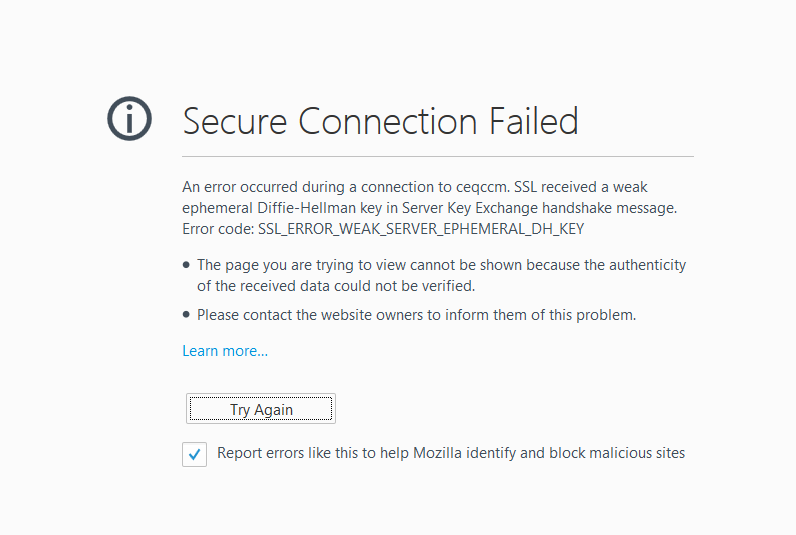
An error occurred during a connection to ceqccm. Weak ephemeral DH key

reeoploit

New member
Local time
2:08 AM
Messages
12
Hi,

When I navigate to a CISCO Admin page for CISCO Phones on Mozilla Firefox I receive this error:
eRb3RhB.png


I do know how to get around it and these are the steps I use:

(1) In a new tab, type or paste about:config in the address bar and press Enter. Click the button promising to be careful.

(2) In the search box above the list, type or paste dhe and pause while the list is filtered

(3) Double-click the security.ssl3.dhe_rsa_aes_128_sha preference to switch it from true to false (disable Firefox from using this cipher)

(4) Double-click the security.ssl3.dhe_rsa_aes_256_sha preference to switch it from true to false (disable Firefox from using this cipher)

Is there any downside or vulnerabilities that will occur after doing this?

Thanks
 

My Computer My Computer

At a glance

64 BitIntel Core i7-3770 CPU @ 3.40GHz16GB DDR3NVIDIA GeForce GTX 650
Computer type
PC/Desktop
Computer Manufacturer/Model Number
Custom Build
OS
64 Bit
CPU
Intel Core i7-3770 CPU @ 3.40GHz
Motherboard
Gigabyte
Memory
16GB DDR3
Graphics Card(s)
NVIDIA GeForce GTX 650
Hard Drives
1TB HDD
128GB SSD
Antivirus
Symantec
Browser
Google Chrome
try the link in IE
 

My Computer My Computer

At a glance

Win7 H.Prem. 32bit+SP1
Computer Manufacturer/Model Number
Look in my Signature.
OS
Win7 H.Prem. 32bit+SP1
Quite the opposite, it's good advice to do so.
Both protocols that you're disabling are from the SSL3 family, which have been proven insecure and obsolete. By disabling such protocol, you're in fact increasing your security, by not trusting a potentially insecure connection (this is why the browser complains originally).

As for the downsides, by disabling a protocol you're effectively prevented of using sites that rely on those exclusively. Obviously you lose those pages, but also you cannot fall into the trap of believing a site is secure when it's actually not.
 

My Computer My Computer

At a glance

Windows 7 Ultimate x64Intel Core i7-740QM8 GB DDR3NVIDIA GeForce 330GT
Computer type
Laptop
Computer Manufacturer/Model Number
Toshiba Sattelite A665-S6092
OS
Windows 7 Ultimate x64
CPU
Intel Core i7-740QM
Memory
8 GB DDR3
Graphics Card(s)
NVIDIA GeForce 330GT
Screen Resolution
1366x768
Hard Drives
Samsung 840 SSD 500GB
1TB USB3 external HD
Cooling
Coolermaster Notepal U3 notebook cooling pad
Internet Speed
3mbps ASDL
Antivirus
ClamWin 0.98.7
Browser
Opera 12.17 x86 (main), Firefox 38 (sec), IE11 (last resort)
Quite the opposite, it's good advice to do so.
Both protocols that you're disabling are from the SSL3 family, which have been proven insecure and obsolete. By disabling such protocol, you're in fact increasing your security, by not trusting a potentially insecure connection (this is why the browser complains originally).

As for the downsides, by disabling a protocol you're effectively prevented of using sites that rely on those exclusively. Obviously you lose those pages, but also you cannot fall into the trap of believing a site is secure when it's actually not.

Hi,

Thanks for your reply.. wow I did not realize that increases security. Should I ALWAYS have it disabled? How do you have it?

Thanks
 

My Computer My Computer

At a glance

64 BitIntel Core i7-3770 CPU @ 3.40GHz16GB DDR3NVIDIA GeForce GTX 650
Computer type
PC/Desktop
Computer Manufacturer/Model Number
Custom Build
OS
64 Bit
CPU
Intel Core i7-3770 CPU @ 3.40GHz
Motherboard
Gigabyte
Memory
16GB DDR3
Graphics Card(s)
NVIDIA GeForce GTX 650
Hard Drives
1TB HDD
128GB SSD
Antivirus
Symantec
Browser
Google Chrome
Hi,

Thanks for your reply.. wow I did not realize that increases security. Should I ALWAYS have it disabled? How do you have it?

Thanks

I would simply leave it disabled permanently, until there is a strong reason to bring it back. Basically, having a broken security protocol enabled creates a false sense of security, and by disabling it you avoid that pitfall. So yes, disable it always.
I have since long forgot about SSL3, and not missed it a bit really. I've also recently begin disabling all but the newest TLS 1.2 (disabled TLS 1 and 1.1 in addition to SSL3) and so far, my web experience remains the same.
 

My Computer My Computer

At a glance

Windows 7 Ultimate x64Intel Core i7-740QM8 GB DDR3NVIDIA GeForce 330GT
Computer type
Laptop
Computer Manufacturer/Model Number
Toshiba Sattelite A665-S6092
OS
Windows 7 Ultimate x64
CPU
Intel Core i7-740QM
Memory
8 GB DDR3
Graphics Card(s)
NVIDIA GeForce 330GT
Screen Resolution
1366x768
Hard Drives
Samsung 840 SSD 500GB
1TB USB3 external HD
Cooling
Coolermaster Notepal U3 notebook cooling pad
Internet Speed
3mbps ASDL
Antivirus
ClamWin 0.98.7
Browser
Opera 12.17 x86 (main), Firefox 38 (sec), IE11 (last resort)
Back
Top