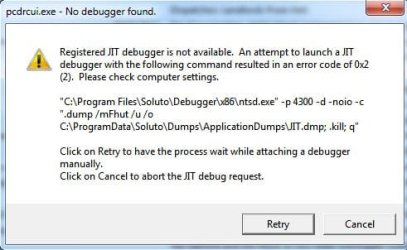
M Mutley Banned Local time 4:56 AM Messages 8 Jul 30, 2011 #1 Hi, Any idea how I get rid of this. I once had Soluto installed Attachments Capture.JPG 33 KB · Views: 12 My Computer OSW7 HE 32bit
M marsmimar New member Guru Gold Member VIP Local time 10:56 PM Messages 6,973 Location South Central Texas Jul 30, 2011 #2 The Just In Time debugger is a part of Microsoft Visual Studio. You should be able to disable it by following these instructions. What Is JIT Debugger? | eHow.com More info from MSDN: Just-In-Time Debugging If you don't use Visual Studio (if you're not a developer) there's nothing to prevent you from uninstalling it. My Computer Computer typeLaptopComputer Manufacturer/Model NumberSony Vaio VPCEB47GM LaptopOSWin 7 Pro 64-bitCPUIntel i5 2.4 GhzMemory8GB DDR3Graphics Card(s)Intel HD 3000Sound CardIDT High DefinitionMonitor(s) Displays15.6 WGXA Anti-Glare LEDScreen Resolution1280x800Hard Drives640Gb 7200rpmAntivirusMSEBrowserOpera (primary) with IE9 backup
The Just In Time debugger is a part of Microsoft Visual Studio. You should be able to disable it by following these instructions. What Is JIT Debugger? | eHow.com More info from MSDN: Just-In-Time Debugging If you don't use Visual Studio (if you're not a developer) there's nothing to prevent you from uninstalling it.
M Mutley Banned Thread Starter Local time 4:56 AM Messages 8 Jul 30, 2011 #3 Many thanks, I'll give it a go. My Computer OSW7 HE 32bit