Annoying outline

EmeralSoul

New member
Local time
5:33 PM
Messages
4
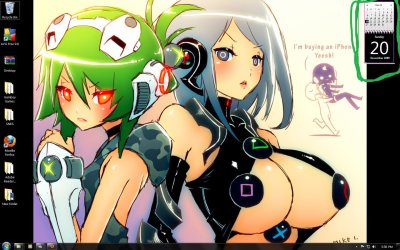
Ok I just got windows 7, love everything except this very small but annoying detail e.e

As you can see in the screen shot the nasty purple color is outlining my calendar >.> I can't figure out how to make it go away. Also if you look on the bottom part of the calender, you'll also see like a white/tanish line. I would like to remove that too.

The sooner this is fixed the sooner I can be happy again xD So please help me out if you can and thanks.

Or better yet, is there a way to change the color of the original calender without editing the image files or installing new gadgets?
 

Attachments
  • annoying.jpg
    annoying.jpg
    197.7 KB · Views: 212

My Computer

OS
Windows 7

My Computer

OS
windows 7 ulimate
CPU
QuadCore Intel Core 2 Quad Q6600, 3433 MHz
Motherboard
nVIDIA nForce 790i Ultra SLI
Memory
4gb Crucial Ballistix BL12864BA1608.8SF DDR3-1066 DDR3 SDRAM
Graphics Card(s)
2 x NVIDIA GeForce 8800 GTX (768 MB)
Sound Card
Realtek
Monitor(s) Displays
Samsung SyncMaster 2232BW
Screen Resolution
1680 x 1050
Hard Drives
OCZ AGILITY SSD (59 GB
140gb WD Raptor
PSU
Coolermaster RealPower 1000W
Case
Coolermaster RC-1000 Cosmos
Cooling
Thermalright Ultra-120 Extreme
Thanks I'll try that and edit this post if it works or fails.

I did a clean install of windows 7 just a day ago and apparently I don't even have IE8 installed on my comp ........... but I can use it e.e so I'm not sure what this means or how I'm going to uninstall it if it's not under the programs xD

I also went the Microsoft site, and it seems IE8 isn't even listed to be DL for windows 7.

Give me a sec xD I just learned how to do it on 7 xD brb

(Sorry for so many edits)

It didn't work v.v Actually I think uninstalling/disabling IE8 made my comp slower e.e so I wouldn't recommend doing that v.v
 
Last edited:

My Computer

OS
Windows 7

My Computer

OS
windows 7 ulimate
CPU
QuadCore Intel Core 2 Quad Q6600, 3433 MHz
Motherboard
nVIDIA nForce 790i Ultra SLI
Memory
4gb Crucial Ballistix BL12864BA1608.8SF DDR3-1066 DDR3 SDRAM
Graphics Card(s)
2 x NVIDIA GeForce 8800 GTX (768 MB)
Sound Card
Realtek
Monitor(s) Displays
Samsung SyncMaster 2232BW
Screen Resolution
1680 x 1050
Hard Drives
OCZ AGILITY SSD (59 GB
140gb WD Raptor
PSU
Coolermaster RealPower 1000W
Case
Coolermaster RC-1000 Cosmos
Cooling
Thermalright Ultra-120 Extreme
I forgot to mention dont worry about this calendar being in spanish, it will be in english when you install it.
 

My Computer

OS
windows 7 ulimate
CPU
QuadCore Intel Core 2 Quad Q6600, 3433 MHz
Motherboard
nVIDIA nForce 790i Ultra SLI
Memory
4gb Crucial Ballistix BL12864BA1608.8SF DDR3-1066 DDR3 SDRAM
Graphics Card(s)
2 x NVIDIA GeForce 8800 GTX (768 MB)
Sound Card
Realtek
Monitor(s) Displays
Samsung SyncMaster 2232BW
Screen Resolution
1680 x 1050
Hard Drives
OCZ AGILITY SSD (59 GB
140gb WD Raptor
PSU
Coolermaster RealPower 1000W
Case
Coolermaster RC-1000 Cosmos
Cooling
Thermalright Ultra-120 Extreme
I can read both so no prob xD and thanks. I'll post if it works.

It didn't work, I still get the outline. I still think there might be a setting in the comp that has the purple color as a default color but I can't find it. If anyone does, let me know.

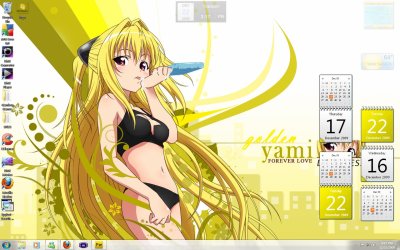
As y'all can see on the shot, I got the line to go away, the color I wanted it but I still can't get of the orange e.e and I can't find a file to edit or even a place to look to edit for it.
 

Attachments

  • yellow.jpg
    yellow.jpg
    222.3 KB · Views: 223
Last edited:

My Computer

OS
Windows 7
Update your DirectX
and most important >> Video/Graphical Card Drivers ! Reboot your system and check if the outline is still there !
Remember that I had the same purple/pink outline in Vista 64-bit (side-bar), only when I deinstalled my Videocard Drivers rebooted the system and had the purple/pink outline, once the new up to date drivers installed and it was gone.
Hope it helps.

Best Regards,
 

My Computer

Computer Manufacturer/Model Number
6.1.7600 (Win7 RTM)
OS
Windows 7 Ultimate x64
CPU
Q6600 2.4 GHz Overclocked to 3.6 GHz
Motherboard
Asus Formula SE X38
Memory
4 GB (DDR2-800 DDR2 SDRAM)
Graphics Card(s)
EVGA NVIDIA GeForce 8800 Ultra (768 MB)
Sound Card
SoundMAX Integrated Digital HD Audio
Monitor(s) Displays
Samsung SyncMaster 206BW (20")
Hard Drives
Seagate 2x 1 TB
Hitachi 2x 1 TB
Case
NZXT BLackline Lexa Blue Lad
Cooling
Antec Tricolor Blue

My Computer

Computer type
PC/Desktop
Computer Manufacturer/Model Number
Me
OS
Win 7 Ultimate x64
CPU
FX-8350 @ 4.6 GHz so far
Motherboard
Asus M5A97 EVO
Memory
ADATA XPG V1 Series Black 8GB DDR3 1600
Graphics Card(s)
Sapphire R9 270x Dual-X
Sound Card
Xonar DGX w/ Corsair Vengence 1300
Monitor(s) Displays
Acer S232HL Abid
Screen Resolution
1920x1080
Hard Drives
120 GB OCZ Vertex 3
500 GB Seagate 7200.12
PSU
Antec Earthwatts 650W Green
Case
Antec Three Hundred
Cooling
Cooler Master 212 EVO
Keyboard
Logitech G510
Mouse
Logitech G500s
Internet Speed
35000/3000
We discussed this problem awhile back and it seems to be a problem that IE8 causes with some gadgets.

I started to get the "pink" outline on some gadgets when I first installed IE8 on my Vista x86 and it continued when I used certain gadgets with W7 x64 and IE8.

I never really found a fix except to uninstall IE8.

Since I kept IE8 I just got rid of the gadgets that had the "pink" or corrupted outline and replaced them with comparable gadgets and have had no problems since.
 

My Computer

OS
Windows 8 Professional x64
CPU
Intel Core i7-3770K @4.5 GHz
Motherboard
Asus Sabertooth Z77
Memory
16GB G.Skill Ripjaws DDR3-1600
Graphics Card(s)
Gigabyte GeForce GTX 670 OC
Sound Card
Realtek
Monitor(s) Displays
HP 2711x 27" LED
Screen Resolution
1920 X 1080p
Hard Drives
Crucial m4 256GB SSD (system)
Seagate Barracuda XT 2TB 7200 RPM (storage)
PSU
Strider Gold Evolution ST1000-G
Case
Raven RV01
Cooling
Noctua NH-D14
Keyboard
Logitech K800
Mouse
Logitech Performance Mouse MX
Internet Speed
FIOS - 75/35 Mbps
Other Info
Pioneer black internal CD/DVD/BD read/write
Logitech Z506 5.1 speakers
--------------------------------------------------
Alienware X51/i7-3770/EVGA GTX 660ti FTW/16GB 1600/Blu-ray/2TB SATA III HD
Every thing is updated and rebooted, I have win 7 32 and I already uninstalled IE8 every thing stayed the same until I edited the yellow calender (Shown in the screen shot in my previous post).

The lines are gone but now I want to get rid of the orange squares xD
 

My Computer

OS
Windows 7

My Computer

OS
windows 7 ulimate
CPU
QuadCore Intel Core 2 Quad Q6600, 3433 MHz
Motherboard
nVIDIA nForce 790i Ultra SLI
Memory
4gb Crucial Ballistix BL12864BA1608.8SF DDR3-1066 DDR3 SDRAM
Graphics Card(s)
2 x NVIDIA GeForce 8800 GTX (768 MB)
Sound Card
Realtek
Monitor(s) Displays
Samsung SyncMaster 2232BW
Screen Resolution
1680 x 1050
Hard Drives
OCZ AGILITY SSD (59 GB
140gb WD Raptor
PSU
Coolermaster RealPower 1000W
Case
Coolermaster RC-1000 Cosmos
Cooling
Thermalright Ultra-120 Extreme
Back
Top