Annoying outline

EmeralSoul

New member
Local time
3:56 AM
Messages
4
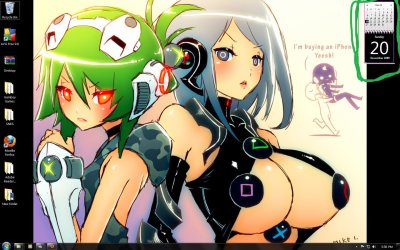
Ok I just got windows 7, love everything except this very small but annoying detail e.e

As you can see in the screen shot the nasty purple color is outlining my calendar >.> I can't figure out how to make it go away. Also if you look on the bottom part of the calender, you'll also see like a white/tanish line. I would like to remove that too.

The sooner this is fixed the sooner I can be happy again xD So please help me out if you can and thanks.

Or better yet, is there a way to change the color of the original calender without editing the image files or installing new gadgets?
 

Attachments
  • annoying.jpg
    annoying.jpg
    197.7 KB · Views: 212

My Computer My Computer

OS
Windows 7

My Computer My Computer

OS
windows 7 ulimate
CPU
QuadCore Intel Core 2 Quad Q6600, 3433 MHz
Motherboard
nVIDIA nForce 790i Ultra SLI
Memory
4gb Crucial Ballistix BL12864BA1608.8SF DDR3-1066 DDR3 SDRAM
Graphics Card(s)
2 x NVIDIA GeForce 8800 GTX (768 MB)
Sound Card
Realtek
Monitor(s) Displays
Samsung SyncMaster 2232BW
Screen Resolution
1680 x 1050
Hard Drives
OCZ AGILITY SSD (59 GB
140gb WD Raptor
PSU
Coolermaster RealPower 1000W
Case
Coolermaster RC-1000 Cosmos
Cooling
Thermalright Ultra-120 Extreme
Thanks I'll try that and edit this post if it works or fails.

I did a clean install of windows 7 just a day ago and apparently I don't even have IE8 installed on my comp ........... but I can use it e.e so I'm not sure what this means or how I'm going to uninstall it if it's not under the programs xD

I also went the Microsoft site, and it seems IE8 isn't even listed to be DL for windows 7.

Give me a sec xD I just learned how to do it on 7 xD brb

(Sorry for so many edits)

It didn't work v.v Actually I think uninstalling/disabling IE8 made my comp slower e.e so I wouldn't recommend doing that v.v
 
Last edited:

My Computer My Computer

OS
Windows 7

My Computer My Computer

OS
windows 7 ulimate
CPU
QuadCore Intel Core 2 Quad Q6600, 3433 MHz
Motherboard
nVIDIA nForce 790i Ultra SLI
Memory
4gb Crucial Ballistix BL12864BA1608.8SF DDR3-1066 DDR3 SDRAM
Graphics Card(s)
2 x NVIDIA GeForce 8800 GTX (768 MB)
Sound Card
Realtek
Monitor(s) Displays
Samsung SyncMaster 2232BW
Screen Resolution
1680 x 1050
Hard Drives
OCZ AGILITY SSD (59 GB
140gb WD Raptor
PSU
Coolermaster RealPower 1000W
Case
Coolermaster RC-1000 Cosmos
Cooling
Thermalright Ultra-120 Extreme
I forgot to mention dont worry about this calendar being in spanish, it will be in english when you install it.
 

My Computer My Computer

OS
windows 7 ulimate
CPU
QuadCore Intel Core 2 Quad Q6600, 3433 MHz
Motherboard
nVIDIA nForce 790i Ultra SLI
Memory
4gb Crucial Ballistix BL12864BA1608.8SF DDR3-1066 DDR3 SDRAM
Graphics Card(s)
2 x NVIDIA GeForce 8800 GTX (768 MB)
Sound Card
Realtek
Monitor(s) Displays
Samsung SyncMaster 2232BW
Screen Resolution
1680 x 1050
Hard Drives
OCZ AGILITY SSD (59 GB
140gb WD Raptor
PSU
Coolermaster RealPower 1000W
Case
Coolermaster RC-1000 Cosmos
Cooling
Thermalright Ultra-120 Extreme
I can read both so no prob xD and thanks. I'll post if it works.

It didn't work, I still get the outline. I still think there might be a setting in the comp that has the purple color as a default color but I can't find it. If anyone does, let me know.

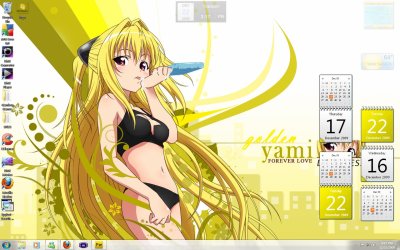
As y'all can see on the shot, I got the line to go away, the color I wanted it but I still can't get of the orange e.e and I can't find a file to edit or even a place to look to edit for it.
 

Attachments

  • yellow.jpg
    yellow.jpg
    222.3 KB · Views: 223
Last edited:

My Computer My Computer

OS
Windows 7
Update your DirectX
and most important >> Video/Graphical Card Drivers ! Reboot your system and check if the outline is still there !
Remember that I had the same purple/pink outline in Vista 64-bit (side-bar), only when I deinstalled my Videocard Drivers rebooted the system and had the purple/pink outline, once the new up to date drivers installed and it was gone.
Hope it helps.

Best Regards,
 

My Computer My Computer

Computer Manufacturer/Model Number
6.1.7600 (Win7 RTM)
OS
Windows 7 Ultimate x64
CPU
Q6600 2.4 GHz Overclocked to 3.6 GHz
Motherboard
Asus Formula SE X38
Memory
4 GB (DDR2-800 DDR2 SDRAM)
Graphics Card(s)
EVGA NVIDIA GeForce 8800 Ultra (768 MB)
Sound Card
SoundMAX Integrated Digital HD Audio
Monitor(s) Displays
Samsung SyncMaster 206BW (20")
Hard Drives
Seagate 2x 1 TB
Hitachi 2x 1 TB
Case
NZXT BLackline Lexa Blue Lad
Cooling
Antec Tricolor Blue

My Computer My Computer

Computer type
PC/Desktop
Computer Manufacturer/Model Number
Me
OS
Win 7 Ultimate x64
CPU
FX-8350 @ 4.6 GHz so far
Motherboard
Asus M5A97 EVO
Memory
ADATA XPG V1 Series Black 8GB DDR3 1600
Graphics Card(s)
Sapphire R9 270x Dual-X
Sound Card
Xonar DGX w/ Corsair Vengence 1300
Monitor(s) Displays
Acer S232HL Abid
Screen Resolution
1920x1080
Hard Drives
120 GB OCZ Vertex 3
500 GB Seagate 7200.12
PSU
Antec Earthwatts 650W Green
Case
Antec Three Hundred
Cooling
Cooler Master 212 EVO
Keyboard
Logitech G510
Mouse
Logitech G500s
Internet Speed
35000/3000
We discussed this problem awhile back and it seems to be a problem that IE8 causes with some gadgets.

I started to get the "pink" outline on some gadgets when I first installed IE8 on my Vista x86 and it continued when I used certain gadgets with W7 x64 and IE8.

I never really found a fix except to uninstall IE8.

Since I kept IE8 I just got rid of the gadgets that had the "pink" or corrupted outline and replaced them with comparable gadgets and have had no problems since.
 

My Computer My Computer

OS
Windows 8 Professional x64
CPU
Intel Core i7-3770K @4.5 GHz
Motherboard
Asus Sabertooth Z77
Memory
16GB G.Skill Ripjaws DDR3-1600
Graphics Card(s)
Gigabyte GeForce GTX 670 OC
Sound Card
Realtek
Monitor(s) Displays
HP 2711x 27" LED
Screen Resolution
1920 X 1080p
Hard Drives
Crucial m4 256GB SSD (system)
Seagate Barracuda XT 2TB 7200 RPM (storage)
PSU
Strider Gold Evolution ST1000-G
Case
Raven RV01
Cooling
Noctua NH-D14
Keyboard
Logitech K800
Mouse
Logitech Performance Mouse MX
Internet Speed
FIOS - 75/35 Mbps
Other Info
Pioneer black internal CD/DVD/BD read/write
Logitech Z506 5.1 speakers
--------------------------------------------------
Alienware X51/i7-3770/EVGA GTX 660ti FTW/16GB 1600/Blu-ray/2TB SATA III HD
Every thing is updated and rebooted, I have win 7 32 and I already uninstalled IE8 every thing stayed the same until I edited the yellow calender (Shown in the screen shot in my previous post).

The lines are gone but now I want to get rid of the orange squares xD
 

My Computer My Computer

OS
Windows 7

My Computer My Computer

OS
windows 7 ulimate
CPU
QuadCore Intel Core 2 Quad Q6600, 3433 MHz
Motherboard
nVIDIA nForce 790i Ultra SLI
Memory
4gb Crucial Ballistix BL12864BA1608.8SF DDR3-1066 DDR3 SDRAM
Graphics Card(s)
2 x NVIDIA GeForce 8800 GTX (768 MB)
Sound Card
Realtek
Monitor(s) Displays
Samsung SyncMaster 2232BW
Screen Resolution
1680 x 1050
Hard Drives
OCZ AGILITY SSD (59 GB
140gb WD Raptor
PSU
Coolermaster RealPower 1000W
Case
Coolermaster RC-1000 Cosmos
Cooling
Thermalright Ultra-120 Extreme
Back
Top