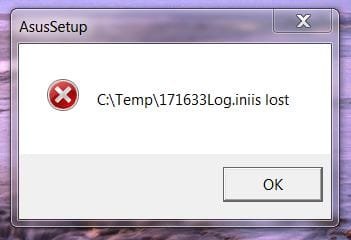
Annoying window on start up

eagle223

New member
Local time
2:57 PM
Messages
26
I have win 7 running on an ASUS motherboard. After I installed Win 7, I installed a couple of ASUS applets.
A few days later while cleaning up, the Temp files were deleted. Now, every time I start up, as soon as I get to the desktop screen, I get a little popup window warning that a file in the Temp is lost (directory structure is included). I searched the registry (using keywords from the popup window, startup and msconfig. I find no reference to the file. Everything works fine, just annoying.
I uninstalled the applets, no change, reinstalled them, no change.
I hate to have to reinstall Win7 now that it works as I like it.
Is there another area where I can check to find what causes the popup warning?
 

My Computer

OS
Win 7
CPU
Athlon Phenom II X4
Motherboard
Asus M4A78T-E
Memory
4G
PSU
CORSAIR
With a problem like this system restore is your best bet. The problem only happened a few days ago. You can use system restore and it will bring you back to where you were before the problem occured. Just go into search type system restore and you can go back to a point in time of your choice. There is also a link that will allow you to find out before hand which programs will be affected. If you are not happy with the results you can bring it back to the point prior to the restore. Good luck
 

My Computer

Computer type
PC/Desktop
Computer Manufacturer/Model Number
Dell XPS 420
OS
Windows 10, Home Clean Install
CPU
Intel Core2 processsor Q8200(2.33Ghz 1333FSB) Quad Core Tech
Motherboard
Dell
Memory
6 gb
Graphics Card(s)
ATI Radeon 256MB HD3650
Sound Card
Intergrated 7.1 Channel Audio
Monitor(s) Displays
Dell SP2009W 20"
Hard Drives
640 GB Serial ATA Hard drive
Cooling
Fan
Keyboard
Dell USB Keyboard
Mouse
Dell Premium Optical USB
Internet Speed
DSL 2.85
Use system restore

Too late for that, I waited too long before I decided to do something, that restore point is long gone.
The file information is not in the registry. Is there another place Win7 could hold that information?
Thanks.
 

My Computer

OS
Win 7
CPU
Athlon Phenom II X4
Motherboard
Asus M4A78T-E
Memory
4G
PSU
CORSAIR
Go to the start menu type cmd

In the cmd prompt, from an administrators account, type sfc /scannow. That might bring you back.
 
Last edited:

My Computer

Computer type
PC/Desktop
Computer Manufacturer/Model Number
Dell XPS 420
OS
Windows 10, Home Clean Install
CPU
Intel Core2 processsor Q8200(2.33Ghz 1333FSB) Quad Core Tech
Motherboard
Dell
Memory
6 gb
Graphics Card(s)
ATI Radeon 256MB HD3650
Sound Card
Intergrated 7.1 Channel Audio
Monitor(s) Displays
Dell SP2009W 20"
Hard Drives
640 GB Serial ATA Hard drive
Cooling
Fan
Keyboard
Dell USB Keyboard
Mouse
Dell Premium Optical USB
Internet Speed
DSL 2.85
Go to the start menu type cmd

In the cmd prompt type sfc /scannow. That might bring you back.

Hadn't used sfc for at least a decade. I have to try it when I get home, where the problem is. I tried it on the laptop and found out that it will not run from the start button, it takes an elevated cmd prompt with Admin privileges. I'll let you know how it turns out, thanks a lot.
 

My Computer

OS
Win 7
CPU
Athlon Phenom II X4
Motherboard
Asus M4A78T-E
Memory
4G
PSU
CORSAIR
Thank you for the report, if sfc does not work, I can give you another tip. I am sure others here have a lot more. This is a small problem, we will get it to work so you can have a Happy New Year and just enjoy Windows 7.
 

My Computer

Computer type
PC/Desktop
Computer Manufacturer/Model Number
Dell XPS 420
OS
Windows 10, Home Clean Install
CPU
Intel Core2 processsor Q8200(2.33Ghz 1333FSB) Quad Core Tech
Motherboard
Dell
Memory
6 gb
Graphics Card(s)
ATI Radeon 256MB HD3650
Sound Card
Intergrated 7.1 Channel Audio
Monitor(s) Displays
Dell SP2009W 20"
Hard Drives
640 GB Serial ATA Hard drive
Cooling
Fan
Keyboard
Dell USB Keyboard
Mouse
Dell Premium Optical USB
Internet Speed
DSL 2.85
Go to the start menu type cmd

In the cmd prompt type sfc /scannow. That might bring you back.

Hadn't used sfc for at least a decade. I have to try it when I get home, where the problem is. I tried it on the laptop and found out that it will not run from the start button, it takes an elevated cmd prompt with Admin privileges. I'll let you know how it turns out, thanks a lot.

When using the search bar in the start menu, type in CMD then hit CTRL+Shift+Enter to enter run as admin quickly.
 

My Computer

OS
Home Premium x64
CPU
Intel e7400 2.8GHz Dual Core, OC @ 3.36GHz
Motherboard
Gigabyte GA-EP43-DS3L/S3L
Memory
4GB DDR2 1066
Graphics Card(s)
Nvidia GeForce 9800 GT
Sound Card
Realtek Surround Onboard.
Monitor(s) Displays
ASUS VW224, 22 Inch and Samsung SyncMaster 713v
Screen Resolution
Main Screen @1680x1050, Secondary @ 1280x1024
Hard Drives
Western Digital WD3200AAKS 320GB 7200 RPM SATA 3.0Gb/s
PSU
Thermaltake Purepower W0100RU 500W
Case
Rosewill R5601-BK Screw-less
Cooling
Two 120mm fans and Stock CPU fans
Keyboard
Old Dell Keyboard my neighbor gave me.
Mouse
Logitech MX518
Internet Speed
6Kbps
Other Info
Logitech X-540 70 watts 5.1 Speakers
Thank you for the report, if sfc does not work, I can give you another tip. I am sure others here have a lot more. This is a small problem, we will get it to work so you can have a Happy New Year and just enjoy Windows 7.

I installed Windows 7 soon after it came out. I deleted the Temp files after I had installed all my applications and I was too busy to do something then. I was sure I can fix it by deleting a registry entry. The truth is I can live with it, it just bugs me. I even changed the location of TMP and TEMP hoping it will affect the warning, it didn't.
Happy New Year to you, thanks.
 

My Computer

OS
Win 7
CPU
Athlon Phenom II X4
Motherboard
Asus M4A78T-E
Memory
4G
PSU
CORSAIR
I have win 7 running on an ASUS motherboard. After I installed Win 7, I installed a couple of ASUS applets.
A few days later while cleaning up, the Temp files were deleted. Now, every time I start up, as soon as I get to the desktop screen, I get a little popup window warning that a file in the Temp is lost (directory structure is included). I searched the registry (using keywords from the popup window, startup and msconfig. I find no reference to the file. Everything works fine, just annoying.
I uninstalled the applets, no change, reinstalled them, no change.
I hate to have to reinstall Win7 now that it works as I like it.
Is there another area where I can check to find what causes the popup warning?


Bite the bullet. Remove any documents you don't have backedup and reinstall Win7.

My 2 cents.
 

My Computer

Computer type
PC/Desktop
Computer Manufacturer/Model Number
Self Built
OS
Windows 10 Pro
CPU
Intel i5
Motherboard
I have a fatherboard
Memory
I'm old and lost a few chips
Graphics Card(s)
Yup
Sound Card
Yup
Monitor(s) Displays
Samsung 32" UHD
Screen Resolution
3840 x 2160
Hard Drives
Samsung 860 EVO drives
PSU
450 Watt and some fans that blow
Case
Small tower
Cooling
Yes I am cool. lol
Keyboard
Who needs a keyboard?
Mouse
Logitech Laser G7 wireless
Internet Speed
Zippy fast UP and DOWN
Antivirus
I got a shot
Browser
The new Improved EDGE 2020
Try sfc /scannow as Rich suggests. Use the Run box or type CMD in search box as given.

If that fails, run a http://www.sevenforums.com/tutorials/3413-repair-install.html?ltr=R

These are always the final two steps before Clean Reinstall.

Repair install is actually an Upgrade install which keeps everything in place and reinstalls the OS. But corruption can return via imported settings. Worth a try, though.
 
Try sfc /scannow as Rich suggests. Use the Run box or type CMD in search box as given.

If that fails, run a http://www.sevenforums.com/tutorials/3413-repair-install.html?ltr=R

These are always the final two steps before Clean Reinstall.

Repair install is actually an Upgrade install which keeps everything in place and reinstalls the OS. But corruption can return via imported settings. Worth a try, though.

Gregrocker, IggyAZ, I need to figure it out somehow, so next time, when a utility deletes my Temp files, I know what to do.
A setting in Windows 7 holds the information, it has to be there because if it was the application, it would have been fixed when I uninstalled, deleted the directories and reinstalled the program. I thought everything is in the registry, I guess not.
 

My Computer

OS
Win 7
CPU
Athlon Phenom II X4
Motherboard
Asus M4A78T-E
Memory
4G
PSU
CORSAIR
Please do a print screen of the pop up so we can see what it looks like. That might give us a better idea of what you are dealing with.
 

My Computer

Computer Manufacturer/Model Number
Gigabyte
OS
Windows 7 Ultimate
CPU
Intel Core(TM)2 Quad- Q9550, 2.83GHz
Motherboard
G31M-ES2L
Memory
4GB
Graphics Card(s)
ATI Radeon HD4600
Sound Card
On Board:
Monitor(s) Displays
Acer AL2223W, Acer AL1916
Screen Resolution
1680 x 1050, 1280 x 1024
Hard Drives
160GB
350GB
250GB
250GB
PSU
600W
Case
Cooler Master
Keyboard
Microsoft Laser 6000
Mouse
Logitech Optical Trackman
Internet Speed
1.5MB
Other Info
I am also running a quasar gamatron flux capacitor with twin pulse tronic phasers......jk, I have no such stuff.
You can make a snip of the error box using Snipping Tool in Start Menu, attach file using paper clip in reply box.

Just don't close the box until you snip it.
 
I will post a picture tomorrow, thanks.
 

My Computer

OS
Win 7
CPU
Athlon Phenom II X4
Motherboard
Asus M4A78T-E
Memory
4G
PSU
CORSAIR
Have you tries Autoruns to see where the popup is going?
 

My Computer

Computer Manufacturer/Model Number
Sony Vaio Z46GDU
OS
Windows 7 Ultimate x86-64
CPU
[email protected] 1066MHz FSB
Motherboard
Sony branded
Memory
6GB DDR3 1066MHz
Graphics Card(s)
9300M GS 256MB Dedicated (Speed) + Intel4500MHD (Stamina)
Sound Card
Realtek HD Audio
Monitor(s) Displays
13.1' WXGA
Screen Resolution
1600x900
Hard Drives
320GB 7200RPM w/ 16MB cache
Internet Speed
1MB/s
I searched the registry for run, runonce and autorun items and every word on the popup, I checked msconfig and start menu start items and run sfc.
The path shown is the current Temp path. When the problem started popping up, it was showing the path to the Temp where it was at the time (c:\user.....). When I changed the temp location, the warning was updated.
 

Attachments

  • Capture.JPG
    Capture.JPG
    16.8 KB · Views: 2

My Computer

OS
Win 7
CPU
Athlon Phenom II X4
Motherboard
Asus M4A78T-E
Memory
4G
PSU
CORSAIR
From that shot, I assume you have an asus mother board or some sort of asus device. Go thru your msconfig, and uncheck any asus components one at time to see how it affects things.
 

My Computer

Computer Manufacturer/Model Number
Gigabyte
OS
Windows 7 Ultimate
CPU
Intel Core(TM)2 Quad- Q9550, 2.83GHz
Motherboard
G31M-ES2L
Memory
4GB
Graphics Card(s)
ATI Radeon HD4600
Sound Card
On Board:
Monitor(s) Displays
Acer AL2223W, Acer AL1916
Screen Resolution
1680 x 1050, 1280 x 1024
Hard Drives
160GB
350GB
250GB
250GB
PSU
600W
Case
Cooler Master
Keyboard
Microsoft Laser 6000
Mouse
Logitech Optical Trackman
Internet Speed
1.5MB
Other Info
I am also running a quasar gamatron flux capacitor with twin pulse tronic phasers......jk, I have no such stuff.
Uninstall those Asus utilities and see if the popup doesn't appear anymore.
Then reinstall them, one after the other, everytime restart and check which utility make that popup appear.
 

My Computer

Computer Manufacturer/Model Number
Custom Build
OS
Windows 7 Ultimate x64 SP1 clean install
CPU
AMD Athlon 64 X2 6400+
Motherboard
Asus M2N-E SLI
Memory
4 GB
Graphics Card(s)
2 x NVidia Geforce 8600 GTS
Sound Card
Trust 5.1 Surround USB
Monitor(s) Displays
Benq FP931 19"
Screen Resolution
1280x1024@32bit@75MHz
Hard Drives
1 x Western Digital 500GB SATA (OS installation), 2 x Seagate 320GB SATA, 1 x Seagate 250GB IDE (in external USB box), 1 x TrekStor 750GB USB
PSU
650W
Keyboard
Logitech Cordless Desktop EX 100
Mouse
Logitech Cordless Optical
Internet Speed
8192 kbps / 640 kbps

My Computer

Computer type
PC/Desktop
Computer Manufacturer/Model Number
Home Built
OS
Windows 8.1 Pro w/Media Center 64bit, Windows 7 HP 64bit
CPU
Phenom II X6 1100T
Motherboard
ASUS M5A99X EVO
Memory
Crucial Balistic 8gb DDR3-1866 CL9
Graphics Card(s)
MSI R6850 Cyclone IGD5 PE
Sound Card
On Board
Monitor(s) Displays
ASUS VE258Q 25" LED with DVI-HDMI-DisplayPort
Screen Resolution
1920 x 1080
Hard Drives
Two WD Cavier Black 2TB Sata III, WD My Book Essential 2TB USB 3.0
PSU
Seasonic X650 80 Plus GOLD Modular
Case
Corsair 400R
Cooling
Antec Kuhler H2O 620, Two 120mm and four 140mm
Keyboard
Logitech K120
Mouse
Logitech Marble Mouse USB, Logitech Precision Game Pad
Internet Speed
15MB
Antivirus
Norton IS 2013, Malwarebytes Pro Beta 2
Browser
IE-11, FF-27
Other Info
APC UPS ES 750, Netgear WNR3500L Gigabit & Wireless N Router with SamKnows Test Program, Motorola SB6120 Gigabit Cable Modem. Brother HL-2170W Laser Printer, Epson V300 Scanner
Back
Top