
I made a huge mistake. I called Xbox support and expected them to be able to assist me. I spent 6 hours on the phone with them. I disconnected my router several times, unplugged it, did some changes here and there, I am not really sure what they are doing.
I think I can solve the problem on my own. I have a "modem router" AT&T Uverse all in 1. My xbox is running sluggish and giving me errors. I found instructions on the net, I can follow them. I am receiving a NAT error. I need to move my xbox to the outside of my router or to another port. Their incompetence was astounding.
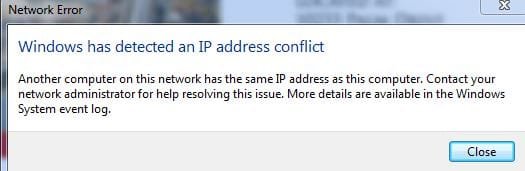
ANYHOW after 6 hours of failure I am now getting this error (Attached). I have 1 Computer, a lapton,xbox old ipad and Samsung galaxy tablet that share the router. Prior to calling Xbox - I NEVER received this error. What s it? How do I fix this conflict?
I think I can solve the problem on my own. I have a "modem router" AT&T Uverse all in 1. My xbox is running sluggish and giving me errors. I found instructions on the net, I can follow them. I am receiving a NAT error. I need to move my xbox to the outside of my router or to another port. Their incompetence was astounding.
ANYHOW after 6 hours of failure I am now getting this error (Attached). I have 1 Computer, a lapton,xbox old ipad and Samsung galaxy tablet that share the router. Prior to calling Xbox - I NEVER received this error. What s it? How do I fix this conflict?
Attachments
My Computer
At a glance
Windows7
- Computer type
- PC/Desktop
- Computer Manufacturer/Model Number
- ASUS
- OS
- Windows7

