Another diskpart clean tale of woe

Many thanks jumanji. I do wish Microsoft and Apple could agree on a common filesystem!
 

My Computer My Computer

At a glance

Windows 10 Pro x64i5
Computer type
PC/Desktop
Computer Manufacturer/Model Number
Intel NUC
OS
Windows 10 Pro x64
CPU
i5
Hard Drives
128gb SSD
WD Passport 500gb
WD Passport 1tb
WD Passport Ultra 2tb
I don't believe that there is a an hfs+exfat file system. It's either one or the other. I don't know anything about file recovery so I don't have anything to offer. I've stated before that file recovery isn't guaranteed. You might have to leave this as a lesson learned and from now on have double backups for important data. If you do so you might want to keep one of the drives disconnected except to backup. Only you can determine how much of your time you can afford to spend on this.

As for the file system differences pretty much all OS's have their own be it windows, unix, linux, solaris, mac, mainframe, etc. Mac and windows are so fundamentally different that they really can't have a full common filesystem. It would be easier for mac to share a filesystem with Linux because the permissions are much more complicated on Windows and on top of that windows has efs encryption built in. The fat filesystems are the closest you can get to a compromise between the two because integrating all of the "features" that each company wants onto a single filesystem is probably impossible and certainly impractical. The fat file systems only works with both because they are stripped down to the bare essentials and contain none of the features of either. Really it was Microsoft that developed and patented exfat and do you really think that they would have even considered Macs when designing it? All they where concerned about was sd flash cards and usb flash drives. That was their intended purpose. Mac is only able to support exfat because Apple bought a license to use it and really they didn't even have to do that.
 
Last edited:

My Computers My Computers

  • At a glance

    Windows 7 pro/Windows 10 ProIntel i7 860 Quad core 2.8 ghz8 gbATI Radeon HD 5770 1 gb ram
    Computer type
    PC/Desktop
    Computer Manufacturer/Model Number
    HP Pavillion Elite HPE-250f
    OS
    Windows 7 pro/Windows 10 Pro
    CPU
    Intel i7 860 Quad core 2.8 ghz
    Memory
    8 gb
    Graphics Card(s)
    ATI Radeon HD 5770 1 gb ram
    Monitor(s) Displays
    Alienware 25 AW2521HF & Viewsonic
    Screen Resolution
    1920 x1080 & 1680x1050
    Hard Drives
    WD blue 1 tb & 500 gb.
    Browser
    FF of course.
    Other Info
    https://www.bestbuy.com/site/hp-pavilion-elite-desktop-intel-core-i7-processor-8gb-memory-1tb-hard-drive/9921493.p?skuId=9921493
  • At a glance

    Windows 2012 R2 Data center/Linux Minti3 9100 3.6GHz, 8M cache, 4C/4T8GB 2666MT/s DDR4 ECC UDIMM
    Computer type
    PC/Desktop
    System Manufacturer/Model Number
    Dell Poweredge T140
    OS
    Windows 2012 R2 Data center/Linux Mint
    CPU
    i3 9100 3.6GHz, 8M cache, 4C/4T
    Memory
    8GB 2666MT/s DDR4 ECC UDIMM
    Monitor(s) Displays
    Viewsonic
    Screen Resolution
    1680x1050
    Hard Drives
    1 TB & 750 GB
    Other Info
    https://www.dell.com/en-us/work/shop/productdetailstxn/poweredge-t140?~ck=bt
I don't believe that there is a an hfs+exfat file system. It's either one or the other.
Correct, but it's possible to have two partitions, one exFAT and one HFS, on one physical drive. That was the situation I had, the exFAT partition allowed me to exchange data with my Windows machines and I needed an HFS partition to use the Time Machine backup software integrated into OSX.

As for file systems, I understand that different developers have differing requirements and objectives, but given that OS X can read an NTFS volume without issue it really shouldn't be a big deal to implement basic write capability. There are drivers available to allow OSX to write to an NTFS partition but they seem to get mixed reviews, because they're not properly integrated into the system. I never tried reading HFS with a Windows machine, but it shouldn't be all that complicated. It's just quite frustrating as someone who uses both systems!
 

My Computer My Computer

At a glance

Windows 10 Pro x64i5
Computer type
PC/Desktop
Computer Manufacturer/Model Number
Intel NUC
OS
Windows 10 Pro x64
CPU
i5
Hard Drives
128gb SSD
WD Passport 500gb
WD Passport 1tb
WD Passport Ultra 2tb
As far as I know and perceive exFat does not have MFT but only File Allocation Table. ( I am just learning about exFat because of your problem, and that is still not complete :D)

Your sector 0 does show it as an MBR drive but without the partition table. ( an external drive really does not need the MBR code)

I want to see sector 2048 ( seeing is believing :D). So select sector 2048 with bootice and post a screen shot. The exFat volume bootsector at 2048 will look like this screenshot.

View attachment 389544
I have also been following Jumanji and it is all above me but I did find this that might be of interest to you

https://en.wikipedia.org/wiki/ExFAT
 

My Computer My Computer

At a glance

Desk1 7 Home Prem / Desk2 10 Pro / Main lap A...Desk1 i5 3750K / Laptop i7 GTX 860M / Desk2 i...Desk1 8GB (1866) / Desk2 16GB (1333) / Laptop...Desk 1& 2NVidia GTX 650 & Laptops on board Intel
Computer type
PC/Desktop
Computer Manufacturer/Model Number
Own build (new) Desk1 / Asus ROG Win 7 / Desk2 1st build
OS
Desk1 7 Home Prem / Desk2 10 Pro / Main lap Asus ROG 10 Pro 2 laptop Toshiba 7 Pro Asus P2520 7 & 10
CPU
Desk1 i5 3750K / Laptop i7 GTX 860M / Desk2 i5 2500
Motherboard
Desk1 Asus P877-V / Desk2 Gigabyte H67 UD3H / Laptop ?
Memory
Desk1 8GB (1866) / Desk2 16GB (1333) / Laptop 8Gb DDR3
Graphics Card(s)
Desk 1& 2NVidia GTX 650 & Laptops on board Intel
Sound Card
Desk 1 & 2 -XONAR DG Realtek High Def audio Laptop
Monitor(s) Displays
Desk 1 Benq HD 2450 / Desk2 Philips 24" / Laptop 17.5"
Screen Resolution
1920x1080 D1 & D2 & Laptop 1
Hard Drives
Desk1 Samsung 120GB 830 SSD
Asus ROG 256GB 850 Pro SSD
Desk2 Samsung 840 256 SSD
Toshiba 120GB EVO
PSU
Desk 1 Corsair HX 1050/ Laptop ? / Desk 2 Corsair HX 650
Case
Desk 1 Cooler HAF XM ? Toshiba laptop / Desk2 Coolermaster
Cooling
Fans on all Desk1 -2 Desk2 - all Coolermasters 5 Laptop ?
Keyboard
Desk 1 MS Sidewinder X6 Desk 2 MS Sidewinder X 4
Mouse
Desk 1&2 - Gigabyte MS 900 gamer - laptop - Logitec wireless
Internet Speed
ADSL2+
Other Info
One other Desktop (tester) and spare Toshba laptop both with SSD's
Running Kaspersky 2016 ISS on all machines config'd identically
Logitec audio stereo systems on each machine (x3)
Canon MG5250MFC
Router/modem TP-Link running WPA2SK
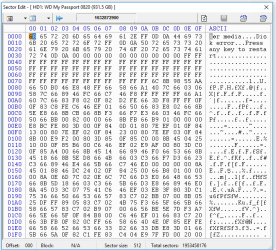
I don't suppose this looks like anything sensible? It seems to contain some elements of the bootsector you posted, split across two blocks

Screenshot 2016-07-15 02.16.36.png Screenshot 2016-07-15 02.17.01.png

I found this doing a search on the "Remove disks or other media..." string, as simply searching for exFAT was throwing up too many answers.
 

My Computer My Computer

At a glance

Windows 10 Pro x64i5
Computer type
PC/Desktop
Computer Manufacturer/Model Number
Intel NUC
OS
Windows 10 Pro x64
CPU
i5
Hard Drives
128gb SSD
WD Passport 500gb
WD Passport 1tb
WD Passport Ultra 2tb
Thanks ICIT2, I saw it too :) during my quick learning. It is Microsoft Proprietary also known as FAT64. And I hardly see any known programs( known to me :D) dealing with exFAT except TestDisk. If one googles data recovery from exFAT there are many programs flashing but unknown to me or less known.

@CurlyBen,

My experiment failed because I failed to prepare my drive. TestDisk dug out some old NTFS partition and folders in it but not the exFAT with the exFat volume boot sector missing.. Preparation means a complete wipe to remove all old buried hats and bats, that will take about 8 hours and so I shall leave it as an overnight task.

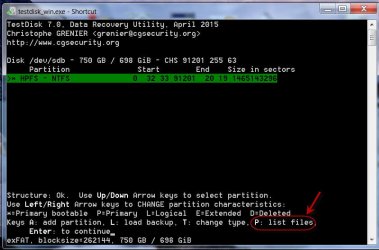
Nevertheless, you can go ahead with TestDisk. No log(Enter), select your drive[Proceed], select only [Intel] Intel /PC partition (Enter) [Analyse](enter) [Quick Search] which may take about four hours. At the end of it if you get a screen like the one below

15-07-2016 16-00-12.jpg

hit on P and check whether it shows any folders/files. ( You might have already done it but repeat it once again for my sake)( Highlight the Folders and press Enter to see the files)

If it does not, then try Photorec. Check the TestDisk website to check the file formats it can reconstruct and whether your file formats are there.
 
Last edited:

My Computer My Computer

At a glance

Windows 7 Home Premium 32 bit
OS
Windows 7 Home Premium 32 bit
Yep, referring to your post#25, those do seem to be related to exFAT but those are faraway from 2048 where the exFat should start if you had only on exFat volume. Just for info tell me how you created the exFAT volume in the first instance.
 

My Computer My Computer

At a glance

Windows 7 Home Premium 32 bit
OS
Windows 7 Home Premium 32 bit
Those screenshots I posted appear to be the only time the string "Remove disks or other media..." occur in the vicinity of the string EXFAT, which I guess isn't too hopeful. I did start searching for the volume label ("red") but I was getting too many false positives for it to be useful. I've set testdisk running but I'm not too hopeful - it's run several times without finding anything useful!

I've been doing some more reading and if I understand correctly the issue now isn't really that the MBR has been wiped, but that the exFAT bootsector has been destroyed for whatever reason? Would initialising the drive in Windows Disk Management have done that?

Unfortunately I can't recall how I created the volume in the first place. I'm fairly sure it was by simply selecting the pre-existing NTFS partition and formatting it as an exFAT drive, but whether that was from Windows Explorer or the OS X Disk Utility I simply can't remember now.
 

My Computer My Computer

At a glance

Windows 10 Pro x64i5
Computer type
PC/Desktop
Computer Manufacturer/Model Number
Intel NUC
OS
Windows 10 Pro x64
CPU
i5
Hard Drives
128gb SSD
WD Passport 500gb
WD Passport 1tb
WD Passport Ultra 2tb
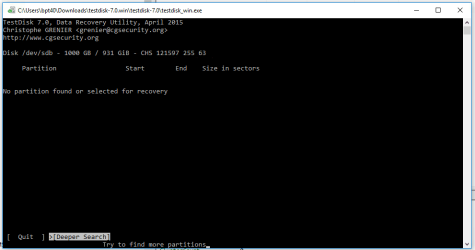
Nothing much from the first scan! I've now got a deeper search running

Screenshot 2016-07-15 11.36.01.png
 

My Computer My Computer

At a glance

Windows 10 Pro x64i5
Computer type
PC/Desktop
Computer Manufacturer/Model Number
Intel NUC
OS
Windows 10 Pro x64
CPU
i5
Hard Drives
128gb SSD
WD Passport 500gb
WD Passport 1tb
WD Passport Ultra 2tb
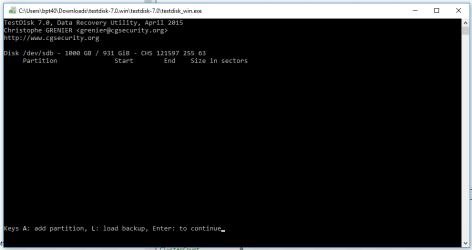
The deeper search was no more helpful

Screenshot 2016-07-15 15.30.04.png

I'm now wondering whether there may have been an issue with DMDE being open, as it's found all kinds of partitions previously (though whether it did using the Intel/PC partition table option I can't remember, I've done so many scans). I'll rescan soon but I'm trying something else at the moment - I'm attempting to get my head around how the exFAT bootsector works to see if it's feasible to reconstruct it with the information I have, at least enough to pull all the data off before reformatting.

I think I'm going to invest in an NTFS driver for my Mac and just use NTFS for everything!
 

My Computer My Computer

At a glance

Windows 10 Pro x64i5
Computer type
PC/Desktop
Computer Manufacturer/Model Number
Intel NUC
OS
Windows 10 Pro x64
CPU
i5
Hard Drives
128gb SSD
WD Passport 500gb
WD Passport 1tb
WD Passport Ultra 2tb
As for file systems, I understand that different developers have differing requirements and objectives, but given that OS X can read an NTFS volume without issue it really shouldn't be a big deal to implement basic write capability. There are drivers available to allow OSX to write to an NTFS partition but they seem to get mixed reviews, because they're not properly integrated into the system. I never tried reading HFS with a Windows machine, but it shouldn't be all that complicated. It's just quite frustrating as someone who uses both systems!

Quite a bold statement to make if you don't understand OS level programming. Just food for thought. I found this on Wikipedia. Apparently enabling write support on a mac causes it to crash so perhaps Apple tried and ran into problems they couldn't fix so they avoided them altogether by disabling it (not surprising considering Apple's history). I don't think that either company is in a hurry to make their systems inter-operable considering how much money that they are already making. If you think about it you can't (without an illegal hack) put mac on a pc and most that buy a mac aren't going to put windows on it so there isn't much of a demand for them to do so.

Mac OS X 10.3 and later include read-only support for NTFS-formatted partitions...Native NTFS write support has been discovered in Mac OS X 10.6 and later, but is not activated by default, although workarounds do exist to enable the functionality. However, user reports indicate the functionality is unstable and tends to cause kernel panics, probably the reason why write support has not been enabled or advertised.
https://en.wikipedia.org/wiki/NTFS#Interoperability
 

My Computers My Computers

  • At a glance

    Windows 7 pro/Windows 10 ProIntel i7 860 Quad core 2.8 ghz8 gbATI Radeon HD 5770 1 gb ram
    Computer type
    PC/Desktop
    Computer Manufacturer/Model Number
    HP Pavillion Elite HPE-250f
    OS
    Windows 7 pro/Windows 10 Pro
    CPU
    Intel i7 860 Quad core 2.8 ghz
    Memory
    8 gb
    Graphics Card(s)
    ATI Radeon HD 5770 1 gb ram
    Monitor(s) Displays
    Alienware 25 AW2521HF & Viewsonic
    Screen Resolution
    1920 x1080 & 1680x1050
    Hard Drives
    WD blue 1 tb & 500 gb.
    Browser
    FF of course.
    Other Info
    https://www.bestbuy.com/site/hp-pavilion-elite-desktop-intel-core-i7-processor-8gb-memory-1tb-hard-drive/9921493.p?skuId=9921493
  • At a glance

    Windows 2012 R2 Data center/Linux Minti3 9100 3.6GHz, 8M cache, 4C/4T8GB 2666MT/s DDR4 ECC UDIMM
    Computer type
    PC/Desktop
    System Manufacturer/Model Number
    Dell Poweredge T140
    OS
    Windows 2012 R2 Data center/Linux Mint
    CPU
    i3 9100 3.6GHz, 8M cache, 4C/4T
    Memory
    8GB 2666MT/s DDR4 ECC UDIMM
    Monitor(s) Displays
    Viewsonic
    Screen Resolution
    1680x1050
    Hard Drives
    1 TB & 750 GB
    Other Info
    https://www.dell.com/en-us/work/shop/productdetailstxn/poweredge-t140?~ck=bt
As for file systems, I understand that different developers have differing requirements and objectives, but given that OS X can read an NTFS volume without issue it really shouldn't be a big deal to implement basic write capability. There are drivers available to allow OSX to write to an NTFS partition but they seem to get mixed reviews, because they're not properly integrated into the system. I never tried reading HFS with a Windows machine, but it shouldn't be all that complicated. It's just quite frustrating as someone who uses both systems!

Quite a bold statement to make if you don't understand OS level programming. Just food for thought. I found this on Wikipedia. Apparently enabling write support on a mac causes it to crash so perhaps Apple tried and ran into problems they couldn't fix so they avoided them altogether by disabling it (not surprising considering Apple's history). I don't think that either company is in a hurry to make their systems inter-operable considering how much money that they are already making. If you think about it you can't (without an illegal hack) put mac on a pc and most that buy a mac aren't going to put windows on it so there isn't much of a demand for them to do so.

Mac OS X 10.3 and later include read-only support for NTFS-formatted partitions...Native NTFS write support has been discovered in Mac OS X 10.6 and later, but is not activated by default, although workarounds do exist to enable the functionality. However, user reports indicate the functionality is unstable and tends to cause kernel panics, probably the reason why write support has not been enabled or advertised.
https://en.wikipedia.org/wiki/NTFS#Interoperability
I'll admit my idea of hardware is more hammers and spanners (I'm a mechanical engineer by training... amongst other things) but it doesn't seem to be that big an assumption to say that if the OS understands the file system well enough to read it that it's not a big leap to be able to write entries for new files. There are two relatively small companies (Tuxera and Paragon) who have implemented full read-write capability on OS X, so it doesn't seem absurd to think that Apple could do it with a little effort. I understand it's not a priority for them, but it doesn't stop me wishing it was!
 

My Computer My Computer

At a glance

Windows 10 Pro x64i5
Computer type
PC/Desktop
Computer Manufacturer/Model Number
Intel NUC
OS
Windows 10 Pro x64
CPU
i5
Hard Drives
128gb SSD
WD Passport 500gb
WD Passport 1tb
WD Passport Ultra 2tb
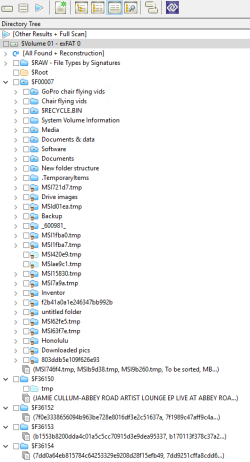
OK, so I've learned a little more about what the exFAT boot sector is saying (I created a 100mb exFAT partition on my new external hard drive to have a bit of a look at what's going on). It appears the first line stays the same for every exFAT partition, and the screenshots I posted yesterday are the only sectors where that string appears on the disk. Looking at the first few lines more closely, that sector isn't a working bootsector anyway as all the important attributes (hidden sectors, length, cluster size etc.) are all 0. So the bootsector is gone... but the FAT still exists to some extent, as DMDE was able to pull up the file structure when I was going through the recovery actions, although it didn't manage to recover everything successfully. I've attached a screenshot of the folder structure DMDE pulled out, and it's right up to date (the new folder structure directory was something I was working on the night before my mishap, ironically to make it easier for me to back up to a remote server via a VPN...)
Screenshot 2016-07-15 17.42.23.png

So far my research on the exFAT bootsector makes me think it's the red 00s in lines 04 to 07 (see next image) that are the key to the bootsector, everything else is more or less generic to an exFAT partition. I'm trying to work out whether I can get enough information from DMDE to recreate how the bootsector should have looked (the final image is some data from DMDE, though I'd like to know where it's come from before using it. However that's from the volume information for the volume which shows the correct directory structure and I recovered significant amounts of data).
Screenshot 2016-07-15 09.54.32.png
Screenshot 2016-07-15 11.40.26.png


Anyway for the time being it's getting late, so I've rebooted my PC and I've set testdisk running another deep search (Intel/PC) with nothing else running, just in case it finds anything interesting.
 

My Computer My Computer

At a glance

Windows 10 Pro x64i5
Computer type
PC/Desktop
Computer Manufacturer/Model Number
Intel NUC
OS
Windows 10 Pro x64
CPU
i5
Hard Drives
128gb SSD
WD Passport 500gb
WD Passport 1tb
WD Passport Ultra 2tb
The idea of implanting the exFat bootsector from another HDD has been on the back of my mind but I had reserved it as a final option if all else fails. That idea as conceived by me:

Buy another 1TB WD Passport. It should be the same model number, same capacity so that the total number of sectors is the same.

Format it as an exfat drive creating one single volume. Backup the bootsector at 2048 using bootice.

Restore that bootsector to sector 2048 on to sector 2048 of the drive where it is missing, again using bootice.

Will that work? I have no idea. ( I formatted my drive using Windows Disk Management. It put the bootsector at 2048. Will it be the same if I had formatted it with some other utility - say using a Mac?

You are doing some good research. You had examined the template for the NTFS bootsector. Now examine the exFat bootsector template in Bootice. Try to decipher what the fields you had marked in red denote. With more active brain cells than I have :D, you should be able to do a better job.

If TestDisk deep search also does not find a valid partition, try PhotoRec.

Keep Zero Assumption Recovery also in mind. The digital Image Recovery module in it can be used for free. It is also geared to image recovery specific to a list of cameras. Data Recovery Software, Solutions, Tutorials - ZAR Data Recovery

 

My Computer My Computer

At a glance

Windows 7 Home Premium 32 bit
OS
Windows 7 Home Premium 32 bit
...it doesn't seem absurd to think that Apple could do it with a little effort. I understand it's not a priority for them, but it doesn't stop me wishing it was!

I agree however I think that Apple is bad at fixing problems or coming up with other solutions. After installing Yosemite I started encountering graphics issues and I've since found other problems with the OS that they ignored. They seem to be fixed in the newest version (which I put on a VM) but they didn't even attempt to fix them in Yosemite so I've had to live with them. I get the feeling that their engineers' spend most of their time developing new versions rather than fixing current ones. Pertaining exfat write support as I've stated I doubt that they consider the demand to be high enough to warrant fixing it.
 

My Computers My Computers

  • At a glance

    Windows 7 pro/Windows 10 ProIntel i7 860 Quad core 2.8 ghz8 gbATI Radeon HD 5770 1 gb ram
    Computer type
    PC/Desktop
    Computer Manufacturer/Model Number
    HP Pavillion Elite HPE-250f
    OS
    Windows 7 pro/Windows 10 Pro
    CPU
    Intel i7 860 Quad core 2.8 ghz
    Memory
    8 gb
    Graphics Card(s)
    ATI Radeon HD 5770 1 gb ram
    Monitor(s) Displays
    Alienware 25 AW2521HF & Viewsonic
    Screen Resolution
    1920 x1080 & 1680x1050
    Hard Drives
    WD blue 1 tb & 500 gb.
    Browser
    FF of course.
    Other Info
    https://www.bestbuy.com/site/hp-pavilion-elite-desktop-intel-core-i7-processor-8gb-memory-1tb-hard-drive/9921493.p?skuId=9921493
  • At a glance

    Windows 2012 R2 Data center/Linux Minti3 9100 3.6GHz, 8M cache, 4C/4T8GB 2666MT/s DDR4 ECC UDIMM
    Computer type
    PC/Desktop
    System Manufacturer/Model Number
    Dell Poweredge T140
    OS
    Windows 2012 R2 Data center/Linux Mint
    CPU
    i3 9100 3.6GHz, 8M cache, 4C/4T
    Memory
    8GB 2666MT/s DDR4 ECC UDIMM
    Monitor(s) Displays
    Viewsonic
    Screen Resolution
    1680x1050
    Hard Drives
    1 TB & 750 GB
    Other Info
    https://www.dell.com/en-us/work/shop/productdetailstxn/poweredge-t140?~ck=bt
The idea of implanting the exFat bootsector from another HDD has been on the back of my mind but I had reserved it as a final option if all else fails. That idea as conceived by me:

Buy another 1TB WD Passport. It should be the same model number, same capacity so that the total number of sectors is the same.

Format it as an exfat drive creating one single volume. Backup the bootsector at 2048 using bootice.

Restore that bootsector to sector 2048 on to sector 2048 of the drive where it is missing, again using bootice.

Will that work? I have no idea. ( I formatted my drive using Windows Disk Management. It put the bootsector at 2048. Will it be the same if I had formatted it with some other utility - say using a Mac?

You are doing some good research. You had examined the template for the NTFS bootsector. Now examine the exFat bootsector template in Bootice. Try to decipher what the fields you had marked in red denote. With more active brain cells than I have :D, you should be able to do a better job.

If TestDisk deep search also does not find a valid partition, try PhotoRec.

Keep Zero Assumption Recovery also in mind. The digital Image Recovery module in it can be used for free. It is also geared to image recovery specific to a list of cameras. Data Recovery Software, Solutions, Tutorials - ZAR Data Recovery

Testdisk deep search still didn't find anything, so I've set it running using the 'none' partition table option. So far it's supposedly found a couple of HFS partitions (which I don't recall ever creating) but it will probably be running for another 24 hours or so yet. I had a quick go with Photorec but it was behaving a little strangely - at first attempt (with default file options) it was finding the CR2 image files but also a huge volume of irrelevant .apple and .plist files, so I cancelled it and just selected the file types I'm interested in. I tried a few different combinations but it was finding almost nothing, so I've abandoned that for the time being - I may try again when I have another drive large enough to extract all the files to.

I also had a look at Zero Assumption Recovery but it needs a partition to search, so I'll leave that for the time being.

I like the idea of getting another 1tb Passport drive to experiment with. I'll have a look for one.

I've got a reasonable idea so far of what the fields marked in red are. I've put my comments in italics after each one:
  • Hidden sectors
    The number of sectors prior to the bootsector, i.e. for the first bootsector 2048 (sectors 0-2047)
  • Total sectors
    For a disk with a single partition presumably total sectors - hidden sectors. I suspect nothing will go wrong if this value is too large
  • FAT offset
    Not sure yet whether this is a fixed or changing number
  • FAT size
    This could be difficult - my understanding is the FAT will increase in size as more files are added, so the FAT size of a new partition will be far smaller than that of a partition with hundreds of thousands of files
  • First cluster offset
    Not sure on this yet
  • Clusters count
    Not sure on this yet
  • Root directory first cluster
    Not sure on this yet
  • Volume serial number
    I think this is just a way of uniquely identifying the volume to the OS, so probably doesn't need to match the original
  • File system revision
    Apparently the only current revision is 00 01
  • Bytes per sector
    Will almost certainly be the default value. 512 according to DMDE
  • Sectors per cluster
    As above. 256 according to DMDE
  • Number of FATs
    I believe exFAT only uses a single FAT
  • Media descriptor
    Describes the type of drive. Can almost certainly be left at 80 (the value used in my trial exFAT partition)

So that's where I've got to so far. My thoughts on where to go next:
  • I can probably get hold of a couple more exFAT bootsectors from drives my brother has. I need to get a better understanding of which values change between partitions and which don't
  • I'm going to get another 1tb Passport drive and format it as exFAT as suggested. I'll back up the bootsector then copy all the recovered files to it and look to see how the bootsector changes, in particular the FAT size. I'll also experiment with formatting from OS X and see whether it creates a different bootsector to Windows 10.
  • I'll try and find out how DMDE has come up with some of it's information, as it's clearly found the FAT, despite not being able to correctly recover everything
  • When I've got enough information together to have a go at creating a new bootsector I'll copy it to my existing drive, then run Testdisk. I assume that if I've got the new bootsector correct (or at least close) I'll be able to list the contents of the disk before anything other than sector 2048 has been modified. If it doesn't work simply zeroing sector 2048 should return the drive to its current state

Any suggestions or criticisms welcome. I'm probably not going to be able to look at this much for the next week or two as I've got my flight instructor exams coming up and I should be doing some more studying! Although whilst I'm really annoyed at myself for causing all this hassle, I am quite enjoying learning a bit more about how the system works and the challenge of recreating it. That will turn to pure annoyance when the progress stops! :D
 

My Computer My Computer

At a glance

Windows 10 Pro x64i5
Computer type
PC/Desktop
Computer Manufacturer/Model Number
Intel NUC
OS
Windows 10 Pro x64
CPU
i5
Hard Drives
128gb SSD
WD Passport 500gb
WD Passport 1tb
WD Passport Ultra 2tb
...it doesn't seem absurd to think that Apple could do it with a little effort. I understand it's not a priority for them, but it doesn't stop me wishing it was!

I agree however I think that Apple is bad at fixing problems or coming up with other solutions. After installing Yosemite I started encountering graphics issues and I've since found other problems with the OS that they ignored. They seem to be fixed in the newest version (which I put on a VM) but they didn't even attempt to fix them in Yosemite so I've had to live with them. I get the feeling that their engineers' spend most of their time developing new versions rather than fixing current ones. Pertaining exfat write support as I've stated I doubt that they consider the demand to be high enough to warrant fixing it.

I'll happily admit my experience of using an Apple computer has been well below what I was expecting. There appears to be an issue in El Capitan where running a virtual machine from a USB drive results in exceptionally slow running. This is a bit of an issue for me as I need to run Windows for some CAD software and a few other programs, and I only have a 120gb SSD due to the hideous prices Apple charge for storage upgrades. Oh well! There's a lot I like, but I'm certainly not an Apple evangelist.
 

My Computer My Computer

At a glance

Windows 10 Pro x64i5
Computer type
PC/Desktop
Computer Manufacturer/Model Number
Intel NUC
OS
Windows 10 Pro x64
CPU
i5
Hard Drives
128gb SSD
WD Passport 500gb
WD Passport 1tb
WD Passport Ultra 2tb
Thinking about how I can work out the unknowns as listed above, it seems the thing to do is work out what the FAT should look like and then search for that. Then it doesn't really matter whether bootsector is identical to the one that's been lost, provided the FAT offset etc. are correct relative to the new bootsector. I think the best way to do that is going to be to create a new exFAT partition, completely zero it, then add some files to it and identify the FAT and its components. That's going to require a little more time than I have right now, but I'll post back when I've done so in case anyone is interested/attempting to go through the same process!

PS I'm confident the FAT is still there and at least mostly intact due to DMDE finding the correct folder structure.
 

My Computer My Computer

At a glance

Windows 10 Pro x64i5
Computer type
PC/Desktop
Computer Manufacturer/Model Number
Intel NUC
OS
Windows 10 Pro x64
CPU
i5
Hard Drives
128gb SSD
WD Passport 500gb
WD Passport 1tb
WD Passport Ultra 2tb
Returning to this thread after many days, since I stumbled on something that may interest you.

20-07-2016 20-40-05.jpg

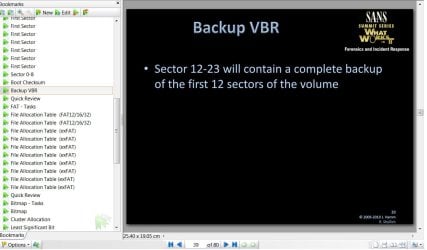
https://digital-forensics.sans.org/summit-archives/2010/10-exfat-ham.pdf -exFAT System revealed and dissected.

According to this, if the first Volume Bootsector is at 2048, the backup of sectors 2048 to 2059 will be there
at sectors 2060 to 2071

I have checked this on my trial volume examining sectors 2048-2059 and 2060-2071 with bootice. ( The trial HDD has just been quickformatted as exFAT). Sector 2048 which is the first sector of the volume is backed up in sector 2060. In my trial drive sectors 2049-2058 were all zeros as also sectors 2061-2070.Sector 2059 had some repetitive data strings and sector 2071 had the same repetitive string.
 
Last edited:

My Computer My Computer

At a glance

Windows 7 Home Premium 32 bit
OS
Windows 7 Home Premium 32 bit
Thanks jumanji, that link is interesting. I've just acquired another drive (not a 1tb unfortunately, but it will help) and I'm just in the process of cleaning the whole disk to make sure there's nothing there to confuse things. At the moment I'm struggling to work out what the FAT offset value should be - on my first trial partition the bootsector is at 2048 and the FAT offset is also 2048, which suggests to me the FAT should start at 4096, but the drive is blank between 4000 and at least 8000. I'll check the old drive for backup bootsectors but I'm fairly sure they're gone, as I searched for the first line which should be common to all exFAT bootsectors and I only found it once and that was a blank bootsector anyway. The FAT seems to start somewhere around sector 60,000 (I haven't worked out exactly where it starts) so it's possible that partition was slightly offset from the start of the drive anyway (clearly it wasn't already complicated enough!)
 

My Computer My Computer

At a glance

Windows 10 Pro x64i5
Computer type
PC/Desktop
Computer Manufacturer/Model Number
Intel NUC
OS
Windows 10 Pro x64
CPU
i5
Hard Drives
128gb SSD
WD Passport 500gb
WD Passport 1tb
WD Passport Ultra 2tb
Back
Top