
another Macrium question

harleynut97

New member
Member
VIP
Local time
7:08 PM
Messages
121
OK, I have to admit I am confused on my first attempt at a backup using Macrium reflect.

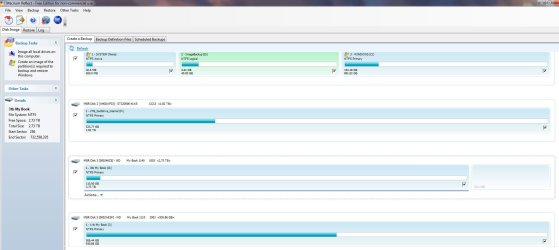
1) please take a look at the attached screenshot to see how my drives are configured

2) Neither of the WD external drives will be backed up, so I know I need to uncheck those boxes. the 3tb drive is what will store the backups. I realize I must choose that as the destination.

3) on my internal physical 1 tb c:drive, windows is loaded on it and all my programs, drivers and some data is also on this physical disc.

4) the Internal seagate drive 2 tb stores all my other data.

5) My objective is that I want everything backed up, windows, programs, data,... everything... so if my c drive or anyother drive fails, I can restore and not lose anything or have to reload programs/plugins ect.

So here is where I am confused and my questions

1) You have 2 options..." Image all local drives on this computer" or "create an image of the partitions required to back up an restore windows

2) I choose the second option, create an image ...to back up windows. The wizard only really showed my c:drive and the partitions associated with it. It made a backup that was successful.

Questions:

1) What I am not sure about is did this image I just created (when choosing the 2nd option) JUST do the windows files and nothing else on the c:drive ? Were my programs and other data imaged as well.

2) Am I now supposed to choose the first option (which brings up all the drives) and should I keep the c:drive and system stuff selected along with the other drives I want to back up?

I was hoping that you would just pick an option and it would back up everything that you have selected INCLUDING all windows files to reload the operating system. But it appears that you need to make 2 images each time you want to do a back up.

Any help in clarifying my misunderstandings using this program would be appreciated - Carl
 

Attachments
  • MR_screenshot.jpg
    MR_screenshot.jpg
    114.1 KB · Views: 17

My Computer

Computer type
PC/Desktop
Computer Manufacturer/Model Number
SYX SG-103
OS
Windows 7 home premium 64 bit sp1
CPU
Intel Core I7-2600 3.4 Ghz 1155 8M 95W CPU
Motherboard
MSI P67A-C43 (B3) ATX
Memory
16 gb DD3 1333MHZ
Graphics Card(s)
Nvidea Gforce GTX 550Ti
Sound Card
Realtek ALC892 integrated
Monitor(s) Displays
acer 23"
Screen Resolution
1920 x 1080
Hard Drives
Hitachi 1 TB 3.5" SATA 3G 7200rpm
Seagate ST32000641AS baracuda XT , 2 TB 3.5" 7200 rpm
Western digital My Book 1 tb USB2 external
Western digital My Book 3 tb USB3 external
PSU
500 Watt 80 plus
Case
Cooler Master Elite 310 RC-310-BWN1-GP
Keyboard
Logitech MK 200 Keybard
Mouse
Logitech MK200 mouse
Other Info
24x DVDRW Dual Layer SATA optical drive
3) on my internal physical 1 tb c:drive, windows is loaded on it and all my programs, drivers and some data is also on this physical disc.

5) My objective is that I want everything backed up, windows, programs, data,... everything... so if my c drive or anyother drive fails, I can restore and not lose anything or have to reload programs/plugins ect.


1) You have 2 options..." Image all local drives on this computer" or "create an image of the partitions required to back up an restore windows

2) I choose the second option, create an image ...to back up windows. The wizard only really showed my c:drive and the partitions associated with it. It made a backup that was successful.

Questions:

1) What I am not sure about is did this image I just created (when choosing the 2nd option) JUST do the windows files and nothing else on the c:drive ? Were my programs and other data imaged as well.

2) Am I now supposed to choose the first option (which brings up all the drives) and should I keep the c:drive and system stuff selected along with the other drives I want to back up?

I was hoping that you would just pick an option and it would back up everything that you have selected INCLUDING all windows files to reload the operating system. But it appears that you need to make 2 images each time you want to do a back up.

Any help in clarifying my misunderstandings using this program would be appreciated - Carl

No to both of your questions.

If the C partition was chosen to be in the image, then ALL of C is included---Windows, installed applications, licensing info, configuration info, the kitchen sink, etc. Whatever is on C is in the image.

The only reason you would need to image more than C is if you ever wanted to restore more than C via Macrium. As I understand it, you do not.

I'm not sure about your small "system" partition of about 40 MB since I don't have such a partition. It should be imaged, but I am not sure if the way to do it is to include it in the same image as C or to make a separate image of it alone.

You should make absolutely sure that you make a Linux boot disk within Macrium and that it in fact will boot and that you can thereby see both your hard drive partitions and the image file you have made. Macrium is useless without this working boot disk.

What is that on the D drive "image backup"?? I assume that is unrelated? You shouldn't store your image of C on the same physical drive as C because if that physical drive fails, you lose both C and the image of C.
 

My Computer

Computer type
PC/Desktop
Computer Manufacturer/Model Number
Ignatz Special; 4 speed manual gearbox; factory air conditioning; one of one
OS
Windows 7 Home Premium SP1, 64-bit
CPU
Intel Skylake i5-6600K, not overclocked
Motherboard
AsRock Z170M Extreme 4, micro ATX
Memory
8 GB HyperX DDR4-2666 (2 x 4 GB)
Graphics Card(s)
none; graphics are integrated on CPU
Sound Card
onboard: Realtek ALC1150; external: USB Behringer UF0-202
Monitor(s) Displays
Dell S2340M 23 inch IPS
Screen Resolution
1600 x 900
Hard Drives
System: Crucial MX100 series SSD, 128 GB;
Data: Samsung Spinpoint 103SJ, 1 TB;
Backup: WD Caviar Green WD30EZRX-00D8PB0, 3 TB
PSU
Rosewill SilentNight 500 watt fanless, semi-modular
Case
Antec Solo II
Cooling
Noctua NH-U12S; Noctua F12 intake, Noctua S12A exhaust
Keyboard
Microsoft 200 6JH-00001 USB
Mouse
Dell or Microsoft optical wired; USB
Antivirus
Microsoft Security Essentials and Malwarebytes Premium
Browser
Pale Moon
Other Info
All fans PWM; speeds at idle: CPU circa 500 rpm; intake circa 600 rpm; exhaust circa 600 rpm; CPU temps 27 idle and 47 C load in a warm room (27 C/81 F) when running Intel Extreme Tuning Utility stress test.
It would be better to choose the first option, the one that lets you choose from all disks/partitions.

When backing up your Windows system (the rightmost partition on the first disk), you should include the small leftmost partition (SYSTEM) at the same time. That's what boots Windows and if it ever goes missing, then you can use the Windows setup DVD to repair boot files but it can be a major pain in the...*cough* You know.

You're free to image the Windows partition and the SYSTEM partition separately, but you should still backup/restore them together, during the same session, just to avoid any possible inconsistencies.

All other partitions, you're free to choose which one you want to back up and whether to image them separately or along with your Windows image.

Macrium, like all imaging software, operates only on the basis of whole partitions. It'll never cherry-pick files from within a partition so you don't have to worry about files not being backed up that are on the same partition as Windows (all your installed software and data files).
 

My Computer

Computer type
PC/Desktop
Computer Manufacturer/Model Number
Custom-built
OS
Windows 7 Professional SP1 32-bit
CPU
Intel Core 2 Duo E6600 2.4GHz
Motherboard
Asus PL5D2
Memory
4GB DDR2-667 (4x1GB in dual-channel config)
Graphics Card(s)
nVidia GeForce 9800 GT
Sound Card
Creative X-Fi XtremeMusic
Monitor(s) Displays
Acer P236H
Screen Resolution
1920x1200 (DVI)
Hard Drives
OCZ SSD Vertex Plus 60GB SATA (Firmware 3.55), 64MB cache
Hitachi HD321KJ SATA, 320GB, 7200rpm, 16MB cache
PSU
Antec TruePower 2.0
Case
Cooler Master Centurion
Cooling
Too many fans
Keyboard
Standard
Mouse
Microsoft wireless optical mouse
Internet Speed
AT&T U-verse (18mbit/sec)
Antivirus
Microsoft Security Essentials
Browser
Firefox
Other Info
Other devices:
Compaq CQ-60 laptop
Google Nexus 7 (2012) tablet
Nvidia SHIELD tablet (US/LTE)
Hardkernel ODROID-XU single-board computer (Samsung Exynos 5420)
Thanks, ignatzatsonic and Corazon for clearing up my misunderstandings. To answer your question regarding that 40 mb small partition, when I bought the computer it had only 1 physical drive. I added the 2 tb seagate internal drive after purchasing. The manufacture partitioned a small section to allow the computer to be restored to "factory default" It shipped with a rescue disc. When making backups, I will always choose to include this partition as well as everything else on my physical drive which holds my operating system.

If I'm understanding everything correctly, when making my backups, I should just use that first option,"image all local drives" , make sure that all partitions and drives are checked (including the system partition) and then make the backup.

I have made a Macrium windows PE rescue disc per what the program recommended. I had to download a pretty large file from MS and then burn the disc. But I did see the Linux option you mentioned. Should I also make a linux disc as well to be on the safe side? , It's no problem to do it. I'm not sure how to test it to make sure that it does in fact boot properly. Let me know when time allows.

Thanks again for clearing things up for me. - Carl
 

My Computer

Computer type
PC/Desktop
Computer Manufacturer/Model Number
SYX SG-103
OS
Windows 7 home premium 64 bit sp1
CPU
Intel Core I7-2600 3.4 Ghz 1155 8M 95W CPU
Motherboard
MSI P67A-C43 (B3) ATX
Memory
16 gb DD3 1333MHZ
Graphics Card(s)
Nvidea Gforce GTX 550Ti
Sound Card
Realtek ALC892 integrated
Monitor(s) Displays
acer 23"
Screen Resolution
1920 x 1080
Hard Drives
Hitachi 1 TB 3.5" SATA 3G 7200rpm
Seagate ST32000641AS baracuda XT , 2 TB 3.5" 7200 rpm
Western digital My Book 1 tb USB2 external
Western digital My Book 3 tb USB3 external
PSU
500 Watt 80 plus
Case
Cooler Master Elite 310 RC-310-BWN1-GP
Keyboard
Logitech MK 200 Keybard
Mouse
Logitech MK200 mouse
Other Info
24x DVDRW Dual Layer SATA optical drive
If I'm understanding everything correctly, when making my backups, I should just use that first option,"image all local drives" , make sure that all partitions and drives are checked (including the system partition) and then make the backup.

I have made a Macrium windows PE rescue disc per what the program recommended. I had to download a pretty large file from MS and then burn the disc. But I did see the Linux option you mentioned. Should I also make a linux disc as well to be on the safe side? , It's no problem to do it. I'm not sure how to test it to make sure that it does in fact boot properly.

Re your first paragraph: if you choose "image all local drives", I would assume that will select ALL partitions on ALL internal drives (probably not externals?). Is that what you want to image and possibly restore? I would NOT want to have an image which contained BOTH C and any data partitions. You can certainly make multiple images.

You certainly ought to experiment with the process so you know exactly what is going on.

Re your second paragraph: There is no harm in having both a Windows PE rescue disk and a Linux rescue disk. Who knows when one of them might fail and it can't hurt to have another boot disc. To test them to boot properly, you set your BIOS to boot from the DVD drive first, insert the burned disc in the DVD drive, and reboot. If it doesn't boot and take you into the image restoration process where you can see all partitions and your image file, it is useless.
 

My Computer

Computer type
PC/Desktop
Computer Manufacturer/Model Number
Ignatz Special; 4 speed manual gearbox; factory air conditioning; one of one
OS
Windows 7 Home Premium SP1, 64-bit
CPU
Intel Skylake i5-6600K, not overclocked
Motherboard
AsRock Z170M Extreme 4, micro ATX
Memory
8 GB HyperX DDR4-2666 (2 x 4 GB)
Graphics Card(s)
none; graphics are integrated on CPU
Sound Card
onboard: Realtek ALC1150; external: USB Behringer UF0-202
Monitor(s) Displays
Dell S2340M 23 inch IPS
Screen Resolution
1600 x 900
Hard Drives
System: Crucial MX100 series SSD, 128 GB;
Data: Samsung Spinpoint 103SJ, 1 TB;
Backup: WD Caviar Green WD30EZRX-00D8PB0, 3 TB
PSU
Rosewill SilentNight 500 watt fanless, semi-modular
Case
Antec Solo II
Cooling
Noctua NH-U12S; Noctua F12 intake, Noctua S12A exhaust
Keyboard
Microsoft 200 6JH-00001 USB
Mouse
Dell or Microsoft optical wired; USB
Antivirus
Microsoft Security Essentials and Malwarebytes Premium
Browser
Pale Moon
Other Info
All fans PWM; speeds at idle: CPU circa 500 rpm; intake circa 600 rpm; exhaust circa 600 rpm; CPU temps 27 idle and 47 C load in a warm room (27 C/81 F) when running Intel Extreme Tuning Utility stress test.
To add ... if you purchased your copy of MR, you should look into the MR System Recovery boot option.

This comes only with the paid version, but it provides the ability to boot from your hard drive and run RM restores -- without having to use CDs. They used to bundle it separately and it was a pain to install, sometimes requiring that you download the WAIK as part of it. But they now bundle it with the paid version, and all you do is click a menu option, when you open MR, to install it.
 

My Computer

Computer type
PC/Desktop
Computer Manufacturer/Model Number
Custom
OS
Win7 Pro 32-bit, Win8 Pro 32-bit
CPU
AMD Phenom II X6 1090T
Motherboard
Gigabyte
Memory
4GB ddr3 1300
Graphics Card(s)
AMD HD 4290 onboard
Sound Card
Builtin Realtek HD Audio
Monitor(s) Displays
Samsung 24" widescreen, LG 23" widescreen
Screen Resolution
1920x1200/1920x1080
Hard Drives
Kingston 256GB SSD
Keyboard
Logitech Illuminated Keyboard
Mouse
Logitech M705 wireless mouse
Antivirus
Norton Av 2013
Browser
IE v10
Back
Top