Another SLeep problem thread. Please help.

unscodst

New member
Local time
6:49 PM
Messages
12
My computer doesnt like to go to sleep. Every time I tell it to it just wakes itself up right away. Iv been to many forums trying everything I can to sole this problem.

I have:
Updated all drivers (through manufacturer websites)
disabled magic packets, pattern match and WOL.
If told it to allow sleep while sharing media
Iv disabled wake timers
Iv made it so the only device that can wake my computer is my wireless keyboard and mouse. Iv also made it so my wireless keyboard and mouse cant wake it and it still wakes up.

What annoys me the most is that this has just started happening to me within the last month. Even worse is I decided to do my yearly computer cleaning and went ahead and did a full reformat hoping this would fix it and it still hasnt.

When i do powercfg -last wake this is what I get:
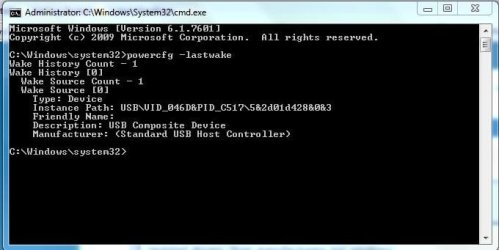
lastwake.JPG

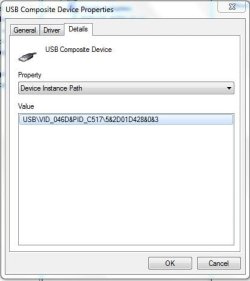
The device its telling me is this:
USB.JPG

currently my mouse and keyboard are allowed to wake my computer so when i run the query it says this. ( Disregard the PS/2 keyboard as it is only in for the time being)
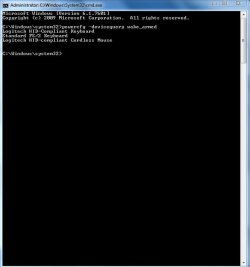
armed.JPG

The only noticeable changes iv made to my mouse and keyboard was update the driver software. Even then I only did that after reformating my computer not before.

So I dont know how as of one month ago my computer just up and decided not to sleep anymore. I can provide more pics if needed, anything that can help resolve this issue.

~Thanks
 

My Computer

Computer Manufacturer/Model Number
Custom
OS
Windows 7 Ultimate 32bit
CPU
AMD Phenom II X4 940 3.00GHz
Motherboard
ASRock K10N78M
Memory
4GB
Graphics Card(s)
onboard
Sound Card
onboard
Monitor(s) Displays
32" Dynex HDTV

My Computer

Computer type
PC/Desktop
Computer Manufacturer/Model Number
Self built custom
OS
64-bit Windows 11 Pro for Workstations
CPU
Intel i7-8700K OC'd to 5 GHz
Motherboard
ASUS ROG Maximus XI Formula Z390
Memory
64 GB (4x16GB) G.SKILL TridentZ RGB DDR4 3600 MHz
Graphics Card(s)
ASUS ROG-STRIX-GTX1080TI-O11G-GAMING
Sound Card
Integrated
Monitor(s) Displays
2 x Samsung Odyssey G7 27"
Screen Resolution
2560x1440
Hard Drives
1TB Samsung 990 PRO M.2,
4TB Samsung 990 PRO PRO M.2,
TerraMaster F8 SSD Plus NAS
PSU
Seasonic Prime Titanium 850W
Case
Thermaltake Core P3
Cooling
Corsair Hydro H115i
Keyboard
Logitech wireless K800
Mouse
Logitech MX Master 4
Internet Speed
2 Gb/s Download and 100 Mb/s Upload
Antivirus
Malwarebyte Anti-Malware Premium
Browser
Google Chrome
Other Info
Logitech Z625 speaker system,
Logitech BRIO 4K Pro webcam,
HP Color LaserJet Pro MFP M477fdn,
APC SMART-UPS RT 1000 XL - SURT1000XLI,
Galaxy S23 Plus phone
Dear Brink,
An excellent publication by you, i must say! It has helped me a lot,though we have yet to hear from the @OP! Thanks!
regards,
Sreedhav
 

My Computer

Computer Manufacturer/Model Number
Sony Vaio C series VPCCB35FN laptop
OS
MS Windows 7 Home Premium 64-bit SP1
CPU
IntelCore [email protected]; Sandy Bridge 32nm Tech.
Motherboard
Sony Vaio Version:C609NJYJ
Memory
4096Mb RAM; Single ChannelDDR3@665MHz; DRAM Freq:662MHz
Graphics Card(s)
AMD Radeon HD 6630M; GPU:Whistler;BIOS Core&mem Clock:123.36
Sound Card
REALTEK High Definition Audio Device; INTEL Display Card
Monitor(s) Displays
Generic PnP Intel HD;Resolution:1920*1040 Pixels; BPP:32bits
Screen Resolution
Current Resolution:1920*1080 Pixels; Monitor Frequency:60Hz
Hard Drives
Internal HD:TOSHIBA MK5061GSY; Real Size:488 GB;NTFS; 3 Partitions; SATA; HEADS:16

External HDD: WD Elements 1023 PORTABLE; Estimated Size: 1TB; NTFS; 3 Partitions
Cooling
Lateral Exhaust with a Cooling Pad Placed Beneath.
Keyboard
Logitech Bluetooth+ Generic Integrated K-B
Mouse
Logitech Bluetooth
Internet Speed
2MBPS
Other Info
1)Trend Micro Titanium Maximum Security Suite Version:3
2)SAS-PRO

3)MBAM--PRO


4)WATERFOX+IE9 +WOT+LINKEXTEND+ DRWEBCUREIT LINK CHECKER

5)SPYWAREBLASTER

6) WINPATROL PLUS

7) SANDBOXIE and
8) A BIT OF COMMON SENSE.
Thanks for replying. Unfortunately my computer already had the " Wake the computer to run this task" box unchecked.

Any other ideas?
 

My Computer

Computer Manufacturer/Model Number
Custom
OS
Windows 7 Ultimate 32bit
CPU
AMD Phenom II X4 940 3.00GHz
Motherboard
ASRock K10N78M
Memory
4GB
Graphics Card(s)
onboard
Sound Card
onboard
Monitor(s) Displays
32" Dynex HDTV
while im setting the SDK up i want to make sure, you want me to run the
For Standby+Resume:
xbootmgr -trace standby -traceFlags BASE+CSWITCH+DRIVERS+POWER -resultPath C:\TEMP

Right? also do you want me to build xml and link it so you can look at it? or should i just follow the guide and do what it says?
 

My Computer

Computer Manufacturer/Model Number
Custom
OS
Windows 7 Ultimate 32bit
CPU
AMD Phenom II X4 940 3.00GHz
Motherboard
ASRock K10N78M
Memory
4GB
Graphics Card(s)
onboard
Sound Card
onboard
Monitor(s) Displays
32" Dynex HDTV
Use the tutorial to try to interpret the data yourself first, then if needed zip up the etl file to post back here and PM Cluberti to help you interpret it.
 
alright thanks! ill work on it tonight if i get a chance and ill let you knw if its worked out or not.
 

My Computer

Computer Manufacturer/Model Number
Custom
OS
Windows 7 Ultimate 32bit
CPU
AMD Phenom II X4 940 3.00GHz
Motherboard
ASRock K10N78M
Memory
4GB
Graphics Card(s)
onboard
Sound Card
onboard
Monitor(s) Displays
32" Dynex HDTV
Im having a problem with the command line:
xperf /tti -i standby_BASE+CSWITCH+DRIVERS+POWER_1.etl -o summary_boot.xml -a boot

Every time I run it I get this error:
xml.JPG

When I go to open the file It says this:
IExml.JPG

So should I just go ahead and zip the file over?

Edit: Okay I have the file zipped but I do not have privileges to PM Cluberti.
 
Last edited:

My Computer

Computer Manufacturer/Model Number
Custom
OS
Windows 7 Ultimate 32bit
CPU
AMD Phenom II X4 940 3.00GHz
Motherboard
ASRock K10N78M
Memory
4GB
Graphics Card(s)
onboard
Sound Card
onboard
Monitor(s) Displays
32" Dynex HDTV
Please just post the resulting .etl file in the -resultPath directory after running the command. We don't need the summary XML or anything else. Use a free file share hoster if possible to host the .etl file (compressed, of course, recommended to use winrar or 7zip).
 

My Computer

Computer type
PC/Desktop
Computer Manufacturer/Model Number
Custom
OS
Windows 10 Pro x64
CPU
Intel Core i7 4790K @ 4.5GHz
Motherboard
Asus Maximus Hero VII
Memory
32GB DDR3
Graphics Card(s)
Nvidia GeForce GTX970
Sound Card
Realtek HD Audio
Screen Resolution
1920x1200
Hard Drives
1x Samsung 250GB SSD
4x WD RE 2TB (RAIDZ)
PSU
Corsair AX760i
Case
Fractal Design Define R4
Cooling
Noctua NH-D15

My Computer

Computer Manufacturer/Model Number
Custom
OS
Windows 7 Ultimate 32bit
CPU
AMD Phenom II X4 940 3.00GHz
Motherboard
ASRock K10N78M
Memory
4GB
Graphics Card(s)
onboard
Sound Card
onboard
Monitor(s) Displays
32" Dynex HDTV
According to the trace, there was a power event that triggered the wake:
01.png


However, looking at *all* of the power timers, there are no wake events firing once the system finishes it's sleep routine (7.321.223.640) - it just "wakes" at 8.198:
02.png


If the -lastwake command is telling you that the device is the USB root hub, this could be hardware or BIOS-related (no Windows drivers or devices are shown fielding an IRP to wake, according to this). Try unplugging all devices (including keyboards/mice) and sleeping the machine remotely over RDP (if possible). If it continues, you've got an issue much lower than Windows (and it may very well be a misbehaving USB root hub on the mobo).
 

My Computer

Computer type
PC/Desktop
Computer Manufacturer/Model Number
Custom
OS
Windows 10 Pro x64
CPU
Intel Core i7 4790K @ 4.5GHz
Motherboard
Asus Maximus Hero VII
Memory
32GB DDR3
Graphics Card(s)
Nvidia GeForce GTX970
Sound Card
Realtek HD Audio
Screen Resolution
1920x1200
Hard Drives
1x Samsung 250GB SSD
4x WD RE 2TB (RAIDZ)
PSU
Corsair AX760i
Case
Fractal Design Define R4
Cooling
Noctua NH-D15
okay ill try to do that when i get time then ill let you know.
 

My Computer

Computer Manufacturer/Model Number
Custom
OS
Windows 7 Ultimate 32bit
CPU
AMD Phenom II X4 940 3.00GHz
Motherboard
ASRock K10N78M
Memory
4GB
Graphics Card(s)
onboard
Sound Card
onboard
Monitor(s) Displays
32" Dynex HDTV
Okay so I tried it and same problem. SO its either a bad root hub, or maybe the bios?
 

My Computer

Computer Manufacturer/Model Number
Custom
OS
Windows 7 Ultimate 32bit
CPU
AMD Phenom II X4 940 3.00GHz
Motherboard
ASRock K10N78M
Memory
4GB
Graphics Card(s)
onboard
Sound Card
onboard
Monitor(s) Displays
32" Dynex HDTV
Check your ACPI Power settings in the BIOS to make sure you have S3 suspend set.

Try to remember any settings or other changes you made just before the sleep issue started, or was the computer ever able to sleep correctly?

After the clean install, did you test performance before changing out the drivers given by installer, which are quickly updated if necessary by optional Windows Updates? This is not XP. Win7 is the authority on it's drivers from the installer and Updates and they should not be changed out unless performance dictates otherwise.
 
By having S3 Suspend set im guessing you mean enabled? in which case i went in and enabled it and i still have the problem.

My computer was able to sleep up until a couple of months ago. I dont recall doing any major changes until I decided to fix the no sleep problem once it started to occur.

The major changes I have made in order to try and fix it were Update the Bios and Reformat my computer.
 

My Computer

Computer Manufacturer/Model Number
Custom
OS
Windows 7 Ultimate 32bit
CPU
AMD Phenom II X4 940 3.00GHz
Motherboard
ASRock K10N78M
Memory
4GB
Graphics Card(s)
onboard
Sound Card
onboard
Monitor(s) Displays
32" Dynex HDTV
Windows may have automatically updated them but then I went and downloaded drivers from my mobos website and installed them.
 

My Computer

Computer Manufacturer/Model Number
Custom
OS
Windows 7 Ultimate 32bit
CPU
AMD Phenom II X4 940 3.00GHz
Motherboard
ASRock K10N78M
Memory
4GB
Graphics Card(s)
onboard
Sound Card
onboard
Monitor(s) Displays
32" Dynex HDTV
Were there performance reasons for swapping out the chipset drivers?

Win7 is not XP and does not require drivers to be changed other than via installer and Updates, unless there is a performance reason for doing so.

By chance do you remember if sleep was working before changing out these drivers? Since the USB controller is flagged by the trace as last wake event, perhaps rolling back it's driver on Device Manager driver tab will allow sleep.

Besides the rollback option, you can choose to Update drivers, then Browse, then Let me pick from list, to see all installed drivers for that device to try each of them.
 
Well I updated the drivers after I reformatted my computer. So before that my drivers were the same as, well since the last time I reformatted. So these drivers were only updated after the sleep problem started to occur not before.

A weird thing happened last night though. While I was watching a movie on my TV my computer would keep attempting to sleep. I could tell because every now and then the disk drive light would come on as if it were waking from sleep. Thens all of the sudden my computer actually went to sleep and stayed sleeping until I woke it.

Well that's good and all but once I woke it my keyboard didnt work, but my mouse did. These being both wireless and using the same receiver, didnt make sense to me.

So now what? My keyboard doesn't seem to work at all now. Iv put new batteries in. Make sure its signal was being received, and tried updating the drive which was already up to date.
 

My Computer

Computer Manufacturer/Model Number
Custom
OS
Windows 7 Ultimate 32bit
CPU
AMD Phenom II X4 940 3.00GHz
Motherboard
ASRock K10N78M
Memory
4GB
Graphics Card(s)
onboard
Sound Card
onboard
Monitor(s) Displays
32" Dynex HDTV
Back
Top