Another task bar colour problem :(

daveygabc

New member
Local time
10:20 PM
Messages
7
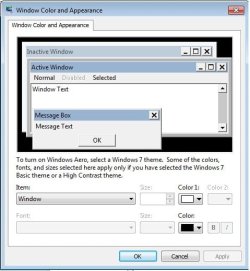
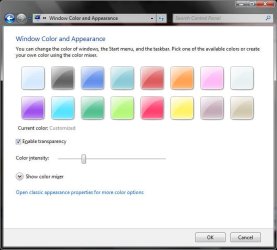
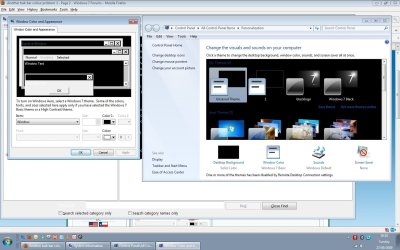
Hi, I just moved to 7 yesterday. I want to change my taskbar colour. I followed the instructions from tutorials but it but i see a completely diff screen on "window color and appearance".
I get this (see screen1 attached)
But i want to and should (?) be seeing this (screen2 attached)
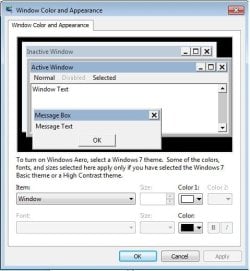
I get to this screen by clicking on "Window Color" (screen3 attached)
Im on Ultimate 64bit 7600 build. Any ideas why I dont see the other colour settings? :(

Thanks
Dave
 

Attachments

  • screen1.jpg
    screen1.jpg
    35 KB · Views: 21
  • screen2.jpg
    screen2.jpg
    57.8 KB · Views: 32
  • screen3.jpg
    screen3.jpg
    60.6 KB · Views: 28

My Computer

OS
Windows 7 Ultimate 7600 (X64)
CPU
AMd Athlon, 64 X2 Dual core 5200+
Memory
4gb ddr2 800mhz, (2x2gb running dual channel)
Graphics Card(s)
NVIDIA GeForce 8400 GS 512mb
Hi dave,

It would appear that you are using a non aero theme, which is wy you are not seeing the Aero colour screen. - this is normal.

It may be that you have selected the scheme either by accident or intent or your system is not sufficient to run aero.

Without your system specs it is difficult to proceed further
 

My Computers

System One System Two

  • Computer type
    PC/Desktop
    Computer Manufacturer/Model Number
    ChillBlast - Custom to my design
    OS
    Windows 11 Pro x64 [Latest Release and Release Preview]
    CPU
    Ryzen 9 5950X, 3.8 - 5.2 MHz
    Motherboard
    Asus Prime X570-Pro
    Memory
    64GB [2 x 32GB] DDR4 3200MHz
    Graphics Card(s)
    4GB NVIDIA GEFORCE GTX 1650 Ti
    Sound Card
    On-board SPDIF to 5.1 System + HDMI [5.1 system]
    Monitor(s) Displays
    32" UHD 32 Bit HDR Monitor + 43" UHD 4K 32Bit HDR TV
    Screen Resolution
    2 x 3840 x 2160 @60Hz
    Hard Drives
    1TB M2 SSD OS, 500GB Fast Access SSD, 2 x 8TB Data + Various Externals from 1TB to 4TB, 10TB NAS
    PSU
    NZXT C750 80 PLUS Gold 750W Modular PSU
    Case
    Workstation Case [Matt Black]
    Cooling
    NZXT Kraken X63 280mm CPU Cooler +2x Quiet Case fans
    Keyboard
    Logitech Wireless MX Keys & K400 + others
    Mouse
    Logitech Wireless MX Master 3S
    Internet Speed
    920 MB Down 50 MB Up
    Antivirus
    BitDefender Total Security Pro
    Browser
    Chrome (always run latest Non-Beta)
    Other Info
    Also run ...
    Laptop - Quad 8GB - Windows 10 Pro x64
    Nexus 7 Android tablet x2
    Samsung 10.2" tablet
    Blackview TAB 8 4G Android Tablet c/w Keyboard
    Wacom Intuos Pro Medium Pen Pad
    Wacom Intuos Pro Small Pen Pad
    Wacom Expresskeys Remote
    Loopdeck+ Graphics Controller
    Shuttle Pro v2 Control
  • Computer type
    Laptop
    System Manufacturer/Model Number
    Dell XPS 17 10750H
    OS
    Windows 11 Pro x64 Latest RP
    CPU
    Intel I7 10750H 5.0GHz
    Motherboard
    Dell XPS
    Memory
    32GB [2x16GB] DDR4 2933 MHz
    Graphics Card(s)
    nVidia GTX1650Ti 4 GB GDDR6
    Sound Card
    Stock [Realtek] 4 Speaker
    Monitor(s) Displays
    17" IPS UHD+ Infinity Edge Touchscreen
    Screen Resolution
    3840 x 2400
    Hard Drives
    2TB M2 NVMe, 4TB External + various 500GB & 1TB External NVMe (also have access to spinner HDD from
    PSU
    Stock
    Case
    Stock XPS Aluminium & Carbon Fibre
    Cooling
    Stock - Active Fan Control
    Keyboard
    Backlit + Various Logitech
    Mouse
    Stock Track Pad + Logitech MX Trackball
    Internet Speed
    72 MB Down 18MB Up
    Browser
    Chrome
    Other Info
    Also run ...
    Laptop - Quad 8GB - Windows 10 Pro x64
    Nexus 7 Android tablet x2
    10.2" tablet
    Sony Z3 Android Smartphone
    Wacom Intuos Pro Medium Pen Pad
    Wacom Intuos Pro Small Pen Pad
    Wacom Expresskeys Remote
    Loopdeck+ Graphics Controller
    Shuttle Pro v2 Control Pad
    10TB NAS
Hi, I just moved to 7 yesterday. I want to change my taskbar colour. I followed the instructions from tutorials but it but i see a completely diff screen on "window color and appearance".
I get this (see screen1 attached)
But i want to and should (?) be seeing this (screen2 attached)
I get to this screen by clicking on "Window Color" (screen3 attached)
Im on Ultimate 64bit 7600 build. Any ideas why I dont see the other colour settings? :(

Thanks
Dave

we need you to fill in your system specs (lower left corner of your posts) so we know what hardware you have. without it we cant tell if you video can run aero

ken
 

My Computer

Computer Manufacturer/Model Number
HP Pavillion dv-7 1005 Tx
OS
Win 8 Release candidate 8400
CPU
[email protected]
Memory
4 gigs
Graphics Card(s)
Nvidia 9600M
Sound Card
HD built-in
Monitor(s) Displays
17" Wxga
Screen Resolution
1440x900
Cooling
none
Internet Speed
45Mb down 5Mb up
On the start menu click control panel, click appearence and personalization, then at the top under Personalization click change window glass colors. Inorder to see screen shot 2. Or by following he same steps click on change theme screen 3. If like stated above your harware can run Areo.
 

My Computer

Computer Manufacturer/Model Number
Self Built
OS
Windows 7 ultimate 64 bit / XP Home sp3
CPU
intel Core 2 Duo E8400 3.0ghz
Motherboard
Asus P5ND bios 1401
Memory
8 gigs 1066 OCZ Fata1ty
Graphics Card(s)
EVGA GTX 580 Call of Duty Black Ops Edition
Sound Card
Creative Soundblaster Audigy 2zs
Monitor(s) Displays
Asus 24in LCD's 2MS X2
Screen Resolution
1920x1080p @60Hz
Hard Drives
WD Caviar 500 Black/ WD Caviar 200 Blue
PSU
OCZ 700W GameXtreme
Case
NZXT Apollo
Cooling
Corsair H50 CPU/120mm x3 /60mm x2 /Corsair Dominator Ram
Keyboard
Logitech Bluetooth Wireless MX5000
Mouse
Logitech Bluetooth Wireless MX1000
Internet Speed
Download 19.83 Upload 0.97
Other Info
Logitech Z2300 Speakers/ Bose Noise Cancelling Headphones/Avermedia PCI-e Hybrid TV Bravo/Epson NX415 all in one/ 4 Port Powered USB Hub/ LG 10x Bluray Burner /TSST Corp DVDRW External
I will fill specs in now , thanks,, i was able to use aero on vista. Checking specs now
 

My Computer

OS
Windows 7 Ultimate 7600 (X64)
CPU
AMd Athlon, 64 X2 Dual core 5200+
Memory
4gb ddr2 800mhz, (2x2gb running dual channel)
Graphics Card(s)
NVIDIA GeForce 8400 GS 512mb
you may need to run your system experience score again for aero to work. right click on computer in the start menu, and go properties. where it says Windows Experience Index, make sure that you computer is rated. If not, rate it again.
 

My Computer

Computer Manufacturer/Model Number
Dell Inspiron 1545
OS
Windows 7 build 7100 x86
CPU
Intel Core 2 Duo 2.1GHz
Motherboard
GM45 chipset
Memory
3GB
Graphics Card(s)
Intel(TM) Graphics Media Accelerator X4500HD
Sound Card
Realtek HD
Monitor(s) Displays
15.6" WLED 720p
Screen Resolution
1366x768
Hard Drives
320GB 5400rpm hard drive
I've filled in the required specs now. Also, I do RDP to my PC from a laptop too, but even when on the PC manually I get the same options. I will try the experience refresh now too thanks :)
 

My Computer

OS
Windows 7 Ultimate 7600 (X64)
CPU
AMd Athlon, 64 X2 Dual core 5200+
Memory
4gb ddr2 800mhz, (2x2gb running dual channel)
Graphics Card(s)
NVIDIA GeForce 8400 GS 512mb
I dont really mind if i can use aero, its just the crappy bright colour i want to change on taskbar, i just want black, that will do me.
I ran a dxdiag before just to view GFX info and it hung my machine :-O I had to button it. I clicked no on the 1st question too
 

My Computer

OS
Windows 7 Ultimate 7600 (X64)
CPU
AMd Athlon, 64 X2 Dual core 5200+
Memory
4gb ddr2 800mhz, (2x2gb running dual channel)
Graphics Card(s)
NVIDIA GeForce 8400 GS 512mb
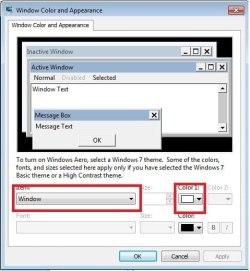
You foun d the right screen in your first post. You want to change the color for 3D objects in non-Aero themes.

Otherwise, just choose the black theme in Aero.
 
which screen ? Baring in mind I only get these 2 screenshots.

Cheers
 

Attachments

  • screen3.jpg
    screen3.jpg
    60.6 KB · Views: 10
  • screen1.jpg
    screen1.jpg
    35 KB · Views: 9

My Computer

OS
Windows 7 Ultimate 7600 (X64)
CPU
AMd Athlon, 64 X2 Dual core 5200+
Memory
4gb ddr2 800mhz, (2x2gb running dual channel)
Graphics Card(s)
NVIDIA GeForce 8400 GS 512mb
Still the same colour for taskbar, its just changed the background window colours
see screen
I'm being a complete dummass and missing something ? :-/
 

Attachments

  • Untitled.jpg
    Untitled.jpg
    140 KB · Views: 18

My Computer

OS
Windows 7 Ultimate 7600 (X64)
CPU
AMd Athlon, 64 X2 Dual core 5200+
Memory
4gb ddr2 800mhz, (2x2gb running dual channel)
Graphics Card(s)
NVIDIA GeForce 8400 GS 512mb
Still the same colour for taskbar, its just changed the background window colours
see screen
I'm being a complete dummass and missing something ? :-/

You foun d the right screen in your first post. You want to change the color for 3D objects in non-Aero themes.

Otherwise, just choose the black theme in Aero.
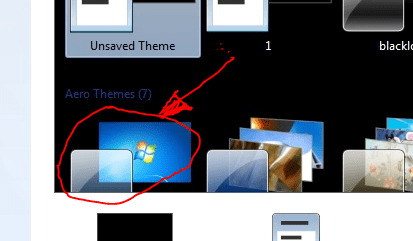
Click the drop down. Look at the top of the list.
 
From your own screenshot above ....

What do you get if you select the option in the screen below ?

Aero Theme.PNG

I have known themes to become corrupted and cause unpredictable results - this is the default aero theme so should allow you to select the correct colour selector
 

My Computers

System One System Two

  • Computer type
    PC/Desktop
    Computer Manufacturer/Model Number
    ChillBlast - Custom to my design
    OS
    Windows 11 Pro x64 [Latest Release and Release Preview]
    CPU
    Ryzen 9 5950X, 3.8 - 5.2 MHz
    Motherboard
    Asus Prime X570-Pro
    Memory
    64GB [2 x 32GB] DDR4 3200MHz
    Graphics Card(s)
    4GB NVIDIA GEFORCE GTX 1650 Ti
    Sound Card
    On-board SPDIF to 5.1 System + HDMI [5.1 system]
    Monitor(s) Displays
    32" UHD 32 Bit HDR Monitor + 43" UHD 4K 32Bit HDR TV
    Screen Resolution
    2 x 3840 x 2160 @60Hz
    Hard Drives
    1TB M2 SSD OS, 500GB Fast Access SSD, 2 x 8TB Data + Various Externals from 1TB to 4TB, 10TB NAS
    PSU
    NZXT C750 80 PLUS Gold 750W Modular PSU
    Case
    Workstation Case [Matt Black]
    Cooling
    NZXT Kraken X63 280mm CPU Cooler +2x Quiet Case fans
    Keyboard
    Logitech Wireless MX Keys & K400 + others
    Mouse
    Logitech Wireless MX Master 3S
    Internet Speed
    920 MB Down 50 MB Up
    Antivirus
    BitDefender Total Security Pro
    Browser
    Chrome (always run latest Non-Beta)
    Other Info
    Also run ...
    Laptop - Quad 8GB - Windows 10 Pro x64
    Nexus 7 Android tablet x2
    Samsung 10.2" tablet
    Blackview TAB 8 4G Android Tablet c/w Keyboard
    Wacom Intuos Pro Medium Pen Pad
    Wacom Intuos Pro Small Pen Pad
    Wacom Expresskeys Remote
    Loopdeck+ Graphics Controller
    Shuttle Pro v2 Control
  • Computer type
    Laptop
    System Manufacturer/Model Number
    Dell XPS 17 10750H
    OS
    Windows 11 Pro x64 Latest RP
    CPU
    Intel I7 10750H 5.0GHz
    Motherboard
    Dell XPS
    Memory
    32GB [2x16GB] DDR4 2933 MHz
    Graphics Card(s)
    nVidia GTX1650Ti 4 GB GDDR6
    Sound Card
    Stock [Realtek] 4 Speaker
    Monitor(s) Displays
    17" IPS UHD+ Infinity Edge Touchscreen
    Screen Resolution
    3840 x 2400
    Hard Drives
    2TB M2 NVMe, 4TB External + various 500GB & 1TB External NVMe (also have access to spinner HDD from
    PSU
    Stock
    Case
    Stock XPS Aluminium & Carbon Fibre
    Cooling
    Stock - Active Fan Control
    Keyboard
    Backlit + Various Logitech
    Mouse
    Stock Track Pad + Logitech MX Trackball
    Internet Speed
    72 MB Down 18MB Up
    Browser
    Chrome
    Other Info
    Also run ...
    Laptop - Quad 8GB - Windows 10 Pro x64
    Nexus 7 Android tablet x2
    10.2" tablet
    Sony Z3 Android Smartphone
    Wacom Intuos Pro Medium Pen Pad
    Wacom Intuos Pro Small Pen Pad
    Wacom Expresskeys Remote
    Loopdeck+ Graphics Controller
    Shuttle Pro v2 Control Pad
    10TB NAS
cooool

I tried the classic and it gave me the right option :D
I think the combination of me RDPing from Vista to 7 might have caused it. Even though I have all of the experience options ticked in the RDP shortcut i created
I'm gonna do some testing later.
Thanks alll for your help
Good forum. Im gonna stick around. :D

Cheers
Dave
 

My Computer

OS
Windows 7 Ultimate 7600 (X64)
CPU
AMd Athlon, 64 X2 Dual core 5200+
Memory
4gb ddr2 800mhz, (2x2gb running dual channel)
Graphics Card(s)
NVIDIA GeForce 8400 GS 512mb
Back
Top