Hi! I found your forum while trying to find a fix for why my version of Windows 7 was suddenly not genuine after having this computer for 8 months.
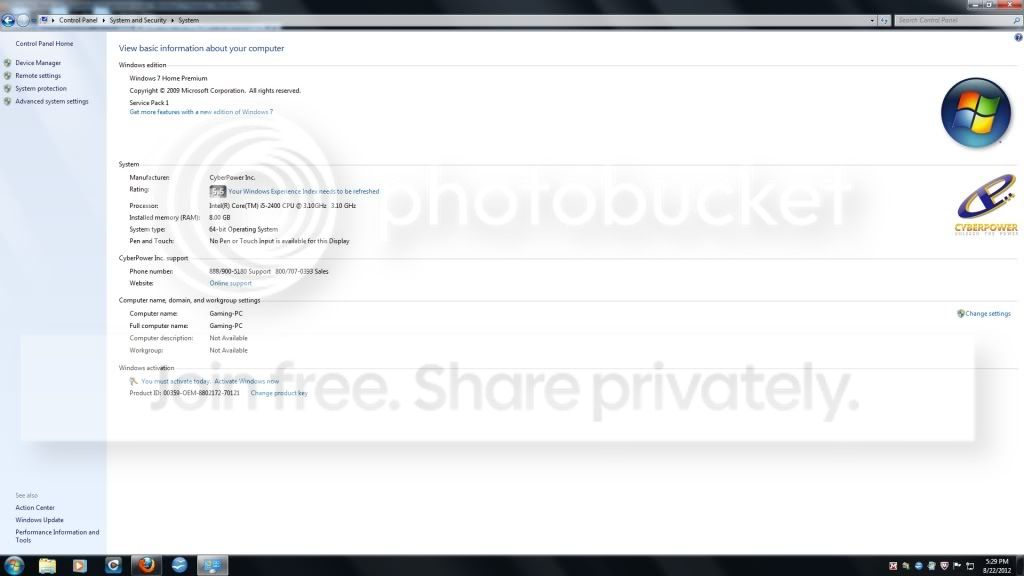
I bought the computer from TigerDirect in January 2012. It is a CyberPower Inc computer running Windows 7 home premium 64 bit edition. On Sunday, my roommate turned the computer on to have the validation error message. At the same time, Windows has 4 critical security updates it is trying to make but keeps failing on - 3 are security updates (KB2705219, KB2712808, and KB2731847) and one for IE9 for windows 7 64 bit systems (KB2722913). Every time we turn the computer off and on, it tries to make these updates and fails.
I ran malwarebytes to be sure I don't have malware causing the problem. I tried to do a system restore, but the system fails every time it tries. There was a thread that suggested trying rsop.msc, but my computer doesn't have that available. another suggestion looked at the registry editor users/1-5-20 (something like that), but that didn't work either. I saw a third suggestion on deleting a certain update, but can't find that one now that I restarted my system.
I ran the MGADaig.exe tool and got the results below. One interesting thing I noted is that when the tool ran, the product key listed agreed with the product key on the service tag on the side of the computer; however, when I go to control panel/system security/system and look at the key listed there, it doesn't agree. The system will not let me change the key to match the service tag.
Any help would be greatly appreciated!
also, I tried this solution found here: http://www.sevenforums.com/windows-...dows-7-all-sudden-saying-its-not-genuine.html
but this did not work. When I tried to re-enter my key, I get error code 0x80070426: the service has not been started.
I bought the computer from TigerDirect in January 2012. It is a CyberPower Inc computer running Windows 7 home premium 64 bit edition. On Sunday, my roommate turned the computer on to have the validation error message. At the same time, Windows has 4 critical security updates it is trying to make but keeps failing on - 3 are security updates (KB2705219, KB2712808, and KB2731847) and one for IE9 for windows 7 64 bit systems (KB2722913). Every time we turn the computer off and on, it tries to make these updates and fails.
I ran malwarebytes to be sure I don't have malware causing the problem. I tried to do a system restore, but the system fails every time it tries. There was a thread that suggested trying rsop.msc, but my computer doesn't have that available. another suggestion looked at the registry editor users/1-5-20 (something like that), but that didn't work either. I saw a third suggestion on deleting a certain update, but can't find that one now that I restarted my system.
I ran the MGADaig.exe tool and got the results below. One interesting thing I noted is that when the tool ran, the product key listed agreed with the product key on the service tag on the side of the computer; however, when I go to control panel/system security/system and look at the key listed there, it doesn't agree. The system will not let me change the key to match the service tag.
Any help would be greatly appreciated!
Code:
Diagnostic Report (1.9.0027.0):
-----------------------------------------
Windows Validation Data-->

Validation Code: 50
Cached Online Validation Code: 0x0
Windows Product Key: *****-*****-3CWJQ-MRVTW-DCPPQ
Windows Product Key Hash: neXxosy/u4lya5lkkxfmkqOm4kg=
Windows Product ID: 00359-OEM-8802172-70121
Windows Product ID Type: 3
Windows License Type: OEM System Builder
Windows OS version: 6.1.7601.2.00010300.1.0.003
ID: {3E8865BE-E016-4987-9C68-213BF6AEF8B2}(1)
Is Admin: Yes
TestCab: 0x0
LegitcheckControl ActiveX: N/A, hr = 0x80070002
Signed By: N/A, hr = 0x80070002
Product Name: Windows 7 Home Premium
Architecture: 0x00000009
Build lab: 7601.win7sp1_gdr.120503-2030
TTS Error:
Validation Diagnostic:
Resolution Status: N/A

Vista WgaER Data-->
ThreatID(s): N/A, hr = 0x80070002
Version: N/A, hr = 0x80070002

Windows XP Notifications Data-->
Cached Result: N/A, hr = 0x80070002
File Exists: No
Version: N/A, hr = 0x80070002
WgaTray.exe Signed By: N/A, hr = 0x80070002
WgaLogon.dll Signed By: N/A, hr = 0x80070002

OGA Notifications Data-->
Cached Result: N/A, hr = 0x80070002
Version: N/A, hr = 0x80070002
OGAExec.exe Signed By: N/A, hr = 0x80070002
OGAAddin.dll Signed By: N/A, hr = 0x80070002

OGA Data-->
Office Status: 109 N/A
OGA Version: N/A, 0x80070002
Signed By: N/A, hr = 0x80070002
Office Diagnostics: 025D1FF3-364-80041010_025D1FF3-229-80041010_025D1FF3-230-1_025D1FF3-517-80040154_025D1FF3-237-80040154_025D1FF3-238-2_025D1FF3-244-80070002_025D1FF3-258-3

Browser Data-->
Proxy settings: N/A
User Agent: Mozilla/4.0 (compatible; MSIE 8.0; Win32)
Default Browser: C:\Program Files (x86)\Mozilla Firefox\firefox.exe
Download signed ActiveX controls: Prompt
Download unsigned ActiveX controls: Disabled
Run ActiveX controls and plug-ins: Allowed
Initialize and script ActiveX controls not marked as safe: Disabled
Allow scripting of Internet Explorer Webbrowser control: Disabled
Active scripting: Allowed
Script ActiveX controls marked as safe for scripting: Allowed

File Scan Data-->

Other data-->
Office Details: <GenuineResults><MachineData><UGUID>{3E8865BE-E016-4987-9C68-213BF6AEF8B2}</UGUID><Version>1.9.0027.0</Version><OS>6.1.7601.2.00010300.1.0.003</OS><Architecture>x64</Architecture><PKey>*****-*****-*****-*****-DCPPQ</PKey><PID>00359-OEM-8802172-70121</PID><PIDType>3</PIDType><SID>S-1-5-21-1688581731-837907838-1233772342</SID><SYSTEM><Manufacturer>BIOSTAR Group</Manufacturer><Model>H61MHB</Model></SYSTEM><BIOS><Manufacturer>American Megatrends Inc.</Manufacturer><Version>4.6.4</Version><SMBIOSVersion major="2" minor="7"/><Date>20110517000000.000000+000</Date></BIOS><HWID>32440900010000FE</HWID><UserLCID>0409</UserLCID><SystemLCID>0409</SystemLCID><TimeZone>Eastern Standard Time(GMT-05:00)</TimeZone><iJoin>0</iJoin><SBID><stat>3</stat><msppid></msppid><name></name><model></model></SBID><OEM/><GANotification/></MachineData><Software><Office><Result>109</Result><Products/><Applications/></Office></Software></GenuineResults>

Spsys.log Content: 0x80070002

Licensing Data-->
C:\Windows\system32\slmgr.vbs(1333, 5) (null): The service has not been started.

Windows Activation Technologies-->
HrOffline: 0x00000000
HrOnline: 0xC004C533
HealthStatus: 0x0000000000000000
Event Time Stamp: 8:21:2012 19:16
ActiveX: Registered, Version: 7.1.7600.16395
Admin Service: Registered, Version: 7.1.7600.16395
HealthStatus Bitmask Output:


HWID Data-->
N/A, hr = 0x8007000d

OEM Activation 1.0 Data-->
N/A

OEM Activation 2.0 Data-->
BIOS valid for OA 2.0: yes, but no SLIC table
Windows marker version: N/A
OEMID and OEMTableID Consistent: N/A
BIOS Information:
ACPI Table Name OEMID Value OEMTableID Value
APIC ALASKA A M I
FACP ALASKA A M I
HPET ALASKA A M I
MCFG ALASKA A M I
SSDT AMICPU PROC
ASPT ALASKA PerfTune
also, I tried this solution found here: http://www.sevenforums.com/windows-...dows-7-all-sudden-saying-its-not-genuine.html
but this did not work. When I tried to re-enter my key, I get error code 0x80070426: the service has not been started.
Last edited by a moderator:
My Computer
- Computer Manufacturer/Model Number
- CyberPower Inc
- OS
- windows home premium 64
- CPU
- Intel core i5-2400 3.10GHz
- Memory
- 8 Gb
- Monitor(s) Displays
- Samsung SyncMaster E2420