
Any and All Applications Icons not showing up.

Salero

New member
Local time
9:55 AM
Messages
4
Location
State College, PA
I can provide a screen shot ~ should be below.

This problem started farther back than I can remember, I just booted this PC up one morning and all of my icons were default white pages.

Any help and support would be much appreciated.

Image added as attachment due to size.
 

Attachments
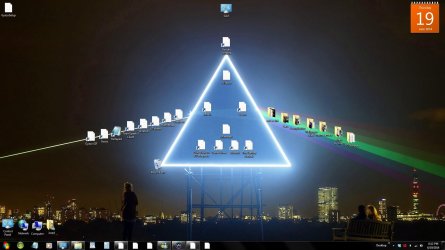
  • UdkL4I9.jpg
    UdkL4I9.jpg
    144.6 KB · Views: 6

My Computer My Computer

At a glance

Windows 7 Premium8 GB
Computer type
PC/Desktop
Computer Manufacturer/Model Number
HP Pavillion, Added Ram and GFX Card
OS
Windows 7 Premium
Memory
8 GB
Hard Drives
1TB
Antivirus
Avast
Browser
Google Chrome
ignore those folder names lmfao
 

My Computer My Computer

At a glance

Windows 7 Premium8 GB
Computer type
PC/Desktop
Computer Manufacturer/Model Number
HP Pavillion, Added Ram and GFX Card
OS
Windows 7 Premium
Memory
8 GB
Hard Drives
1TB
Antivirus
Avast
Browser
Google Chrome
Hello Salero, and welcome to Seven Forums.

If the shortcuts still work other than the icons, then see if rebuilding the icon cache may help.
If the shortcuts do not work, then check to make sure that their targets (in properties page) are correct. Possibly a drive letter got changed and broke the shortcuts from it??

Hope this helps for now, :)
Shawn
 

My Computer My Computer

At a glance

64-bit Windows 11 Pro for WorkstationsIntel i7-8700K OC'd to 5 GHz64 GB (4x16GB) G.SKILL TridentZ RGB DDR4 3600...ASUS ROG-STRIX-GTX1080TI-O11G-GAMING
Computer type
PC/Desktop
Computer Manufacturer/Model Number
Self built custom
OS
64-bit Windows 11 Pro for Workstations
CPU
Intel i7-8700K OC'd to 5 GHz
Motherboard
ASUS ROG Maximus XI Formula Z390
Memory
64 GB (4x16GB) G.SKILL TridentZ RGB DDR4 3600 MHz
Graphics Card(s)
ASUS ROG-STRIX-GTX1080TI-O11G-GAMING
Sound Card
Integrated
Monitor(s) Displays
2 x Samsung Odyssey G7 27"
Screen Resolution
2560x1440
Hard Drives
1TB Samsung 990 PRO M.2,
4TB Samsung 990 PRO PRO M.2,
TerraMaster F8 SSD Plus NAS
PSU
Seasonic Prime Titanium 850W
Case
Thermaltake Core P3
Cooling
Corsair Hydro H115i
Keyboard
Logitech wireless K800
Mouse
Logitech MX Master 4
Internet Speed
2 Gb/s Download and 100 Mb/s Upload
Antivirus
Malwarebyte Anti-Malware Premium
Browser
Google Chrome
Other Info
Logitech Z625 speaker system,
Logitech BRIO 4K Pro webcam,
HP Color LaserJet Pro MFP M477fdn,
APC SMART-UPS RT 1000 XL - SURT1000XLI,
Galaxy S23 Plus phone
Thanks for such a fast response Shawn.
So I followed the steps to rebuild the Icon Cache and it led me no where. Nothing is showing up.

Then I checked the Properties, because the shortcuts still work and again nothing.
 

My Computer My Computer

At a glance

Windows 7 Premium8 GB
Computer type
PC/Desktop
Computer Manufacturer/Model Number
HP Pavillion, Added Ram and GFX Card
OS
Windows 7 Premium
Memory
8 GB
Hard Drives
1TB
Antivirus
Avast
Browser
Google Chrome
Should I try the manual option for the Icon Cache rebuild?
 

My Computer My Computer

At a glance

Windows 7 Premium8 GB
Computer type
PC/Desktop
Computer Manufacturer/Model Number
HP Pavillion, Added Ram and GFX Card
OS
Windows 7 Premium
Memory
8 GB
Hard Drives
1TB
Antivirus
Avast
Browser
Google Chrome
You could use the manual method if you like, but it just the same as the automatic method.

As a test if you like since this is affecting all shortcuts (.lnk) files, you might see if downloading and merging the .reg file for the listed .lnk (LNK) option in the tutorial below may help. It'll restore the default registry entries and associations for shortcut files.

http://www.sevenforums.com/tutorials/19449-default-file-type-associations-restore.html
 

My Computer My Computer

At a glance

64-bit Windows 11 Pro for WorkstationsIntel i7-8700K OC'd to 5 GHz64 GB (4x16GB) G.SKILL TridentZ RGB DDR4 3600...ASUS ROG-STRIX-GTX1080TI-O11G-GAMING
Computer type
PC/Desktop
Computer Manufacturer/Model Number
Self built custom
OS
64-bit Windows 11 Pro for Workstations
CPU
Intel i7-8700K OC'd to 5 GHz
Motherboard
ASUS ROG Maximus XI Formula Z390
Memory
64 GB (4x16GB) G.SKILL TridentZ RGB DDR4 3600 MHz
Graphics Card(s)
ASUS ROG-STRIX-GTX1080TI-O11G-GAMING
Sound Card
Integrated
Monitor(s) Displays
2 x Samsung Odyssey G7 27"
Screen Resolution
2560x1440
Hard Drives
1TB Samsung 990 PRO M.2,
4TB Samsung 990 PRO PRO M.2,
TerraMaster F8 SSD Plus NAS
PSU
Seasonic Prime Titanium 850W
Case
Thermaltake Core P3
Cooling
Corsair Hydro H115i
Keyboard
Logitech wireless K800
Mouse
Logitech MX Master 4
Internet Speed
2 Gb/s Download and 100 Mb/s Upload
Antivirus
Malwarebyte Anti-Malware Premium
Browser
Google Chrome
Other Info
Logitech Z625 speaker system,
Logitech BRIO 4K Pro webcam,
HP Color LaserJet Pro MFP M477fdn,
APC SMART-UPS RT 1000 XL - SURT1000XLI,
Galaxy S23 Plus phone
Back
Top