anyone tried tuneup utilities 2010 ?

xcluded

New member
Local time
2:17 AM
Messages
33
How is it? Does it work well windows 7 ?

:)
 

My Computer My Computer

At a glance

Windows 7 Ultimate 64Biti7 860Team Xtreem 1600Mhz DDR3 4GBSapphire 5870 VaporX 1GB
OS
Windows 7 Ultimate 64Bit
CPU
i7 860
Motherboard
P55A-UD6
Memory
Team Xtreem 1600Mhz DDR3 4GB
Graphics Card(s)
Sapphire 5870 VaporX 1GB
Sound Card
Asus Xonar STX
Monitor(s) Displays
Dell U2410
Hard Drives
WD 500GB
WD 1.5TB
PSU
Seasonic M12D-750W
Case
Lian li PC-7FNWX
Yes it works.
I tried it but uninstalled it shortly because everything that tu2010 gives for customization I just done that manually.
But is as great utility.
 

My Computer My Computer

At a glance

7 Ultimate x64 sp1Intel i5-4690K16Gb HyperX furyR9-270x 2Gb
Computer type
PC/Desktop
Computer Manufacturer/Model Number
696
OS
7 Ultimate x64 sp1
CPU
Intel i5-4690K
Motherboard
GA Z97X Gaming 5
Memory
16Gb HyperX fury
Graphics Card(s)
R9-270x 2Gb
Sound Card
On Board
Monitor(s) Displays
2443NW
Screen Resolution
1920x1200
Hard Drives
WD5000 -
WD5001 -
WD1002
PSU
Cft-650-14cs
Case
Very Big Case
Cooling
stock
Keyboard
G11
Mouse
Logitech
Internet Speed
Adsl
Browser
FF
Other Info
RWD
Tune up! YEEAAAA

Yes it works.
I tried it but uninstalled it shortly because everything that tu2010 gives for customization I just done that manually.
But is as great utility.
+1 I'm using as a utility right now, its customization suite.... is less then it could be :D
Though it has a really helpful function called "Turbo Mode" Which stops a bunch of un-necessary services and other things,it's great for games/multimedia :D
 

My Computer My Computer

At a glance

7 x64/ Back-Track 4Intel Core 2 Duo CPU 8300@ 2.4 Ghz4096 MB DDR2Nvidia 8400M GS
Computer Manufacturer/Model Number
HP dv6000t CTO Entertainment Lappy |My Desktop @ Bottom
OS
7 x64/ Back-Track 4
CPU
Intel Core 2 Duo CPU 8300@ 2.4 Ghz
Motherboard
HP's Own
Memory
4096 MB DDR2
Graphics Card(s)
Nvidia 8400M GS
Sound Card
Altec Lansing (The usual on Laptops )
Monitor(s) Displays
Laptop Screen. 17' Wide.
Screen Resolution
1280 x 800
Hard Drives
150 GB HDD.
Cooling
2 External Fans, Undervolted, Coolant
Keyboard
Norm. Cheap Random Keyboard
Mouse
Norm. Cheap Random Mouse
Other Info
This is my Homemade Desktop :)
HDD: Western Digital Caviar Blue 320GB 16MB 7200RPM SATA2
And more to come in a bit! :D
Works fine for me too. Turbo Mode is pretty cool.
 

My Computer My Computer

At a glance

W7 x64 UltimateAMD Athlon 64 X2 6000+ @3100Corsair XMS2 Xtreme [1GB x4]2x 8600GTS 512MB SLI
Computer Manufacturer/Model Number
My Custom
OS
W7 x64 Ultimate
CPU
AMD Athlon 64 X2 6000+ @3100
Motherboard
Asus M2N32-SLI Deluxe BIOS Ver: 2209
Memory
Corsair XMS2 Xtreme [1GB x4]
Graphics Card(s)
2x 8600GTS 512MB SLI
Sound Card
X-Fi XtremeGamer Fatal1ty Pro
Monitor(s) Displays
Dell 2407WFP
Screen Resolution
1920x1200
Hard Drives
Primary - WD Raptor 150 SATA /
Data - WD 350 SATA, Hitachi 350 SATA
PSU
Corsair CMPSU-1000HX
Case
CoolerMaster CM 690
Cooling
Astek LCLC
Keyboard
Saitek Gamer's Keyboard Pro
Mouse
Logitech G5
Internet Speed
DL 7.89 Mb/s
I've been using it also. I'm not too happy with the interface but the various tools work pretty well.
 

My Computer My Computer

At a glance

Windows 7 Ultimate x64 (Retail)i7-Q 7206 GBnVidia GeForce GT 230M (1GB)
Computer Manufacturer/Model Number
HP DV8t quad
OS
Windows 7 Ultimate x64 (Retail)
CPU
i7-Q 720
Motherboard
Motherboard Chipset Intel Ibex Peak-M PM55, Intel Lynnfield
Memory
6 GB
Graphics Card(s)
nVidia GeForce GT 230M (1GB)
Sound Card
IDT High Definition Audio CODEC
Monitor(s) Displays
18.4 inch HP Infinity FHD (Samsung 184HT03-001)
Screen Resolution
1920 x 1080
Hard Drives
Hitachi 500GB 7200 rpm (x2)
Seagate FreeAgent 1.5 TB External USB (x2)
Thermaltake BlacX eSATA/USB 2.0 3.5/2.5 HD dock
Cooling
Zalman NC-2000 notebook cooling pad
Keyboard
laptop
Mouse
Logitech VX Revolution
Other Info
Backup Unit: Lenovo T61p
I am using it also it is great only niggle is that the selection of Logon's at the TuneUp site are not that good !
 

My Computer My Computer

At a glance

MS Windows 7 Pro64-bit SP1Intel Core i5 @ 3.10GHz16.0GB DDR3 @ 498MHz (9-9-9-24)K242HL @ 1920x1080
Computer type
PC/Desktop
Computer Manufacturer/Model Number
ZooStorm
OS
MS Windows 7 Pro64-bit SP1
CPU
Intel Core i5 @ 3.10GHz
Motherboard
Gigabyte Technology Co., Ltd. H81M-DS2V (SOCKET 0)
Memory
16.0GB DDR3 @ 498MHz (9-9-9-24)
Graphics Card(s)
K242HL @ 1920x1080
Sound Card
Realtek High Definition Audio
Monitor(s) Displays
K242HL on Intel HD Graphics 4600
Screen Resolution
1280x1024
Hard Drives
2930GB Western Digital WDC WD30EZRX-00D8PB0 SCSI Disk Device (SATA)
Keyboard
Zoostorm
Mouse
Zoostorm
Antivirus
Avast
Browser
IE 11 Firefox PaleMoon Opera
I am using it also it is great only niggle is that the selection of Logon's at the TuneUp site are not that good !

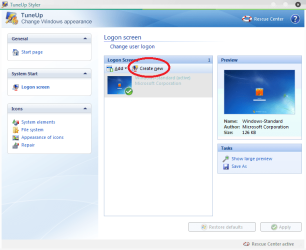
So use your own pictures. :) There's an option to create your own logon screen with the button "Create new" in the Tune-Up Styler (see attached image), using pictures on your hard drive - ie wallpapers and such like.

I use Tune-Up Utilities - it's great, works fantastic on Windows 7. The only issue I really have with it is the non-Windows theming, and the fact that it isn't obvious where to enter the key for it! I originally installed a trial version and found I really liked it. I went and got a key for it, and tried desperately to find out where to enter it so that the notifications would stop popping up telling me my trial was running out. No luck. :( Reinstalled, hoping I could enter it during the installation - no luck again. The trial installer didn't even give me the option to enter my key! :mad: Anybody got any idea how on earth to enter the key for it??

But yeah, Tune-Up Utilities is a great program.
 

Attachments

  • ILRPx.png
    ILRPx.png
    45.3 KB · Views: 398

My Computer My Computer

At a glance

Windows 7 UltimateIntel Pentium Dual CPU T23301GBMobile Intel 965 Express Chipset Family
Computer Manufacturer/Model Number
Intel (Family 6 Model 15 Level 13, Merom)
OS
Windows 7 Ultimate
CPU
Intel Pentium Dual CPU T2330
Motherboard
Hewlett-Packard 30D9
Memory
1GB
Graphics Card(s)
Mobile Intel 965 Express Chipset Family
Sound Card
Conexant High Definition
Monitor(s) Displays
Generic PnP Monitor (lol)
Screen Resolution
1280x800, 32-bit colour depth
Hard Drives
Fujitsu MHY2120BH ATA
Keyboard
Bendy Keyboard, Standard PS/2 Keyboard
Mouse
Alps Pointing Device, Logitech mouse
Other Info
I have a laptop, don't hate me. One of these days I'll build myself an awesome computer...
Very good utility program. BUT there's a lot to review and to see. Here are some problems with it.

Turbo Mode is not as special as you think it is, you can get a similar result by downloading Game Booster, dehabilitating all visual effects in system properties, and by killing svchost process with Task Manager.

For Live Optimizer, here's the problem:

You are playing a game, then you suddenly need to open a folder to look for something quick. Live Optimizer will degrade the priority of your game, by giving it to your folder, which you are not needing, hence, giving less throttle to your game.

For last, but not least. Speeding the Startup Program, at the beginning isn't as recommended as you think.

Here's why:

When you boot your computer as you normally do, the Live Optimization (LO) will start to put all of those background processes, 1 by 1 to "below normal" in the priority. But, have you ever thought about the amount of memory and energy used by the LO to optimize each startup?

I've done some tests on Assassins Creed I, having the game booster on got 3 FPS more than With Turbo Mode.

HEY, with this I don't say TU2010 is bad. For the contrary, I'm saying that you need to be careful when using those applications, since they are a 2 edge sword, which when you want to optimize you are going to be "Tuning Down" your computer.

>.< Hope this helped.
 

My Computer My Computer

At a glance

Windows 8.1 (Update 1) Both MachinesIntel Core 2 Duo T8300 - 2.4GHZ & Intel Core ...4GB @ 800 MHz DDR2 & 16GB @ 1600 MHz DDR3Nvidia Geforce 8600m GT & 750m SLI
Computer Manufacturer/Model Number
Dell XPS M1530 - Lenovo Y510p
OS
Windows 8.1 (Update 1) Both Machines
CPU
Intel Core 2 Duo T8300 - 2.4GHZ & Intel Core i7 4700MQ
Memory
4GB @ 800 MHz DDR2 & 16GB @ 1600 MHz DDR3
Graphics Card(s)
Nvidia Geforce 8600m GT & 750m SLI
Sound Card
Sigmatel High Definition Audio 5.1
Monitor(s) Displays
Samsung SyncMaster 2494
Screen Resolution
1680 x 1050 (Laptop) && 1920 x 1080
Hard Drives
Hitachi 320 GB, @7200 RPM
Internet Speed
480/100 KB/s DL/UP
Browser
Opera, Palemoon, Chrome, Internet Explorer 11
I am using it also it is great only niggle is that the selection of Logon's at the TuneUp site are not that good !

So use your own pictures. :) There's an option to create your own logon screen with the button "Create new" in the Tune-Up Styler (see attached image), using pictures on your hard drive - ie wallpapers and such like.

I use Tune-Up Utilities - it's great, works fantastic on Windows 7. The only issue I really have with it is the non-Windows theming, and the fact that it isn't obvious where to enter the key for it! I originally installed a trial version and found I really liked it. I went and got a key for it, and tried desperately to find out where to enter it so that the notifications would stop popping up telling me my trial was running out. No luck. :( Reinstalled, hoping I could enter it during the installation - no luck again. The trial installer didn't even give me the option to enter my key! :mad: Anybody got any idea how on earth to enter the key for it??

But yeah, Tune-Up Utilities is a great program.


Help and support -> Register product
 

My Computer My Computer

At a glance

Windows 8.1 (Update 1) Both MachinesIntel Core 2 Duo T8300 - 2.4GHZ & Intel Core ...4GB @ 800 MHz DDR2 & 16GB @ 1600 MHz DDR3Nvidia Geforce 8600m GT & 750m SLI
Computer Manufacturer/Model Number
Dell XPS M1530 - Lenovo Y510p
OS
Windows 8.1 (Update 1) Both Machines
CPU
Intel Core 2 Duo T8300 - 2.4GHZ & Intel Core i7 4700MQ
Memory
4GB @ 800 MHz DDR2 & 16GB @ 1600 MHz DDR3
Graphics Card(s)
Nvidia Geforce 8600m GT & 750m SLI
Sound Card
Sigmatel High Definition Audio 5.1
Monitor(s) Displays
Samsung SyncMaster 2494
Screen Resolution
1680 x 1050 (Laptop) && 1920 x 1080
Hard Drives
Hitachi 320 GB, @7200 RPM
Internet Speed
480/100 KB/s DL/UP
Browser
Opera, Palemoon, Chrome, Internet Explorer 11
I'm gonna have to take a screenshot for you at some stage, because I don't have that option and it won't let me register the product...
 

My Computer My Computer

At a glance

Windows 7 UltimateIntel Pentium Dual CPU T23301GBMobile Intel 965 Express Chipset Family
Computer Manufacturer/Model Number
Intel (Family 6 Model 15 Level 13, Merom)
OS
Windows 7 Ultimate
CPU
Intel Pentium Dual CPU T2330
Motherboard
Hewlett-Packard 30D9
Memory
1GB
Graphics Card(s)
Mobile Intel 965 Express Chipset Family
Sound Card
Conexant High Definition
Monitor(s) Displays
Generic PnP Monitor (lol)
Screen Resolution
1280x800, 32-bit colour depth
Hard Drives
Fujitsu MHY2120BH ATA
Keyboard
Bendy Keyboard, Standard PS/2 Keyboard
Mouse
Alps Pointing Device, Logitech mouse
Other Info
I have a laptop, don't hate me. One of these days I'll build myself an awesome computer...
Great Program

Good program, don't have any major complaints. I just wish I could stop Tune-Up Utilities 2010 from starting up when windows starts up. It drives me nuts.

I have tried startup registry keys from CCleaner, Tune-Up, AND msconfig. There is not tune-up reg key. I emailed their support about the issue with the following...

Remember to start reading from bottom and I am waiting on a reply....

Dear Customer,

thank you for your inquiry.

This is needed to check system status and changes made so TU can function
properly. If you disable this , the full functionality of TU is not granted
anymore. You can disable manually in Task manager but as mentioned before
functionality is not granted.


If you have any further questions, please feel free to contact me by email.
To avoid delays in processing your request, please do not change the subject
field of your email, and use the reply function in your email program.
Best regards,

Michaela Novak

Software Support

TuneUp Distribution GmbH
Rheinstrasse 97
64295 Darmstadt
Germany

Managing directors: Tibor Schiemann, Christoph Laumann
Registry office: AG Darmstadt, HRB Nr. 85074
VAT ID: DE 248 867 070

Andy Mathias <[email protected]> schrieb:


> Useful information for the TuneUp Support Team: TuneUp version: 2010
> Test-, download or CD-version: Downlaod
> Operating system: Windows 7 32-bit
> Windows service pack version: N/A
> Module, in which the error occurs: N/A
> Error message: N/A
> Steps that led to the problem: Error description: N/A
>
> I have a question about startup. Tune-Up Utilities 2010 starts up when Windows
> 7 starts up. I have looked in the Startup Registry Keys from both Tune-up
> Utilities, CCleaner, AND the Windows Startup Registry manually. Tune-up
> utilities 2010 does not appear in the start up keys. So, I am assuming it
> starts up via a start up folder.
>
> My Questions is, how do I disable this? I do not want Tune-Up Utilities
> starting up when Windows starts. I have looked around in several menu's, and
> settings but cannot seem to find it.
>
>
> Thanks,
> - Andy
>
>
>
>

 

My Computer My Computer

At a glance

Windows 7 32-BitAMD Turion X2 2.1ghz4gb 800mhzATI 3200HD onboard
Computer Manufacturer/Model Number
HP Pavilion Dv7 Notebook
OS
Windows 7 32-Bit
CPU
AMD Turion X2 2.1ghz
Motherboard
N/A
Memory
4gb 800mhz
Graphics Card(s)
ATI 3200HD onboard
Sound Card
Altec Lansing
Monitor(s) Displays
17" widesreen
Hard Drives
320gb
PSU
N/A
Case
N/A
Cooling
N/A
Disable Live Optimization. That thing sucks, it will only work if you have lots of works to do at the same time. Plus, the computer loads (at least mine) 10 secs slower with it turned on.
 

My Computer My Computer

At a glance

Windows 8.1 (Update 1) Both MachinesIntel Core 2 Duo T8300 - 2.4GHZ & Intel Core ...4GB @ 800 MHz DDR2 & 16GB @ 1600 MHz DDR3Nvidia Geforce 8600m GT & 750m SLI
Computer Manufacturer/Model Number
Dell XPS M1530 - Lenovo Y510p
OS
Windows 8.1 (Update 1) Both Machines
CPU
Intel Core 2 Duo T8300 - 2.4GHZ & Intel Core i7 4700MQ
Memory
4GB @ 800 MHz DDR2 & 16GB @ 1600 MHz DDR3
Graphics Card(s)
Nvidia Geforce 8600m GT & 750m SLI
Sound Card
Sigmatel High Definition Audio 5.1
Monitor(s) Displays
Samsung SyncMaster 2494
Screen Resolution
1680 x 1050 (Laptop) && 1920 x 1080
Hard Drives
Hitachi 320 GB, @7200 RPM
Internet Speed
480/100 KB/s DL/UP
Browser
Opera, Palemoon, Chrome, Internet Explorer 11
Forgot to tell you something. Are you sure you have "Show TuneUp icon in certain cases", in the notification area? If not that's your problem:

Go to Start Center, then click "all functions" on "Increase Performance", click then "Configure Live Optimization", and be sure, that below "Show TuneUp icon" is checked "only in certain cases" otherwise it will always appear, even if you do registry tweaks and disable it from startup.
 

My Computer My Computer

At a glance

Windows 8.1 (Update 1) Both MachinesIntel Core 2 Duo T8300 - 2.4GHZ & Intel Core ...4GB @ 800 MHz DDR2 & 16GB @ 1600 MHz DDR3Nvidia Geforce 8600m GT & 750m SLI
Computer Manufacturer/Model Number
Dell XPS M1530 - Lenovo Y510p
OS
Windows 8.1 (Update 1) Both Machines
CPU
Intel Core 2 Duo T8300 - 2.4GHZ & Intel Core i7 4700MQ
Memory
4GB @ 800 MHz DDR2 & 16GB @ 1600 MHz DDR3
Graphics Card(s)
Nvidia Geforce 8600m GT & 750m SLI
Sound Card
Sigmatel High Definition Audio 5.1
Monitor(s) Displays
Samsung SyncMaster 2494
Screen Resolution
1680 x 1050 (Laptop) && 1920 x 1080
Hard Drives
Hitachi 320 GB, @7200 RPM
Internet Speed
480/100 KB/s DL/UP
Browser
Opera, Palemoon, Chrome, Internet Explorer 11
Forgot to tell you something. Are you sure you have "Show TuneUp [COLOR=#0072BC ! important][COLOR=#0072BC ! important]icon[/COLOR][/COLOR] in certain cases", in the notification area? If not that's your problem:

Go to Start Center, then click "all functions" on "Increase Performance", click then "Configure Live Optimization", and be sure, that below "Show TuneUp icon" is checked "only in certain cases" otherwise it will always appear, even if you do registry tweaks and disable it from startup.

It is not the icon I am worried about. I would like THE WHOLE PROGRAM to not start with windows. I just got back another reply from Tune-Up Support and they claim it cannot be done yet:

Dear Customer,

thank you for your inquiry.

This is not possible at this time. We are working on a solution to be
distributed via update.


If you have any further questions, please feel free to contact me by email.
To avoid delays in processing your request, please do not change the subject
field of your email, and use the reply function in your email program.
Best regards,

Michaela Novak

Software Support

TuneUp Distribution GmbH
Rheinstrasse 97
64295 Darmstadt
Germany

Managing directors: Tibor Schiemann, Christoph Laumann
Registry office: AG Darmstadt, HRB Nr. 85074
VAT ID: DE 248 867 070
 

My Computer My Computer

At a glance

Windows 7 32-BitAMD Turion X2 2.1ghz4gb 800mhzATI 3200HD onboard
Computer Manufacturer/Model Number
HP Pavilion Dv7 Notebook
OS
Windows 7 32-Bit
CPU
AMD Turion X2 2.1ghz
Motherboard
N/A
Memory
4gb 800mhz
Graphics Card(s)
ATI 3200HD onboard
Sound Card
Altec Lansing
Monitor(s) Displays
17" widesreen
Hard Drives
320gb
PSU
N/A
Case
N/A
Cooling
N/A
Tuneup 2010 has made a lot of customization of Windows 7 a little easier, but I'm having some problems with it. When I create a logon screen and apply it, Tuneup's interface says that the newly created logon screen is applied, yet Windows 7 default still shows up when I login.

My other problem is that Tuneup shows certain icons, such as my "User" folder icon, Control Panel icon, and Libraries icon, as changed, yet they still show their default icon settings in explorer.

I've tried repairing the icon cache and reloading them to no avail. Are there any alternate programs that I could use for Windows 7 that will do this successfully?
 

My Computer My Computer

At a glance

Windows 7
OS
Windows 7
Tuneup Utilities 2010 works well on my Win 7 x64 Gateway laptop. However, I am disappointed that they've actually removed some features. I believe older versions had a start up manager and customization seems more limited than in earlier versions. In the current version it seems I can only change icons. I believe past versions allowed you to change the task bar and Start menu. Even though it works well, I feel a little cheated with this upgrade.
 

My Computer My Computer

At a glance

Windows 7 Home PremiumCore 2 Duo 2.2GHz T66004gb
Computer Manufacturer/Model Number
Gateway NV7802U
OS
Windows 7 Home Premium
CPU
Core 2 Duo 2.2GHz T6600
Memory
4gb
Tuneup Utilities 2010 works well on my Win 7 x64 Gateway laptop. However, I am disappointed that they've actually removed some features. I believe older versions had a start up manager and customization seems more limited than in earlier versions. In the current version it seems I can only change icons. I believe past versions allowed you to change the task bar and Start menu. Even though it works well, I feel a little cheated with this upgrade.


You are not cheated, it seems that Windows 7 does not support this feature. Try doing this, execute TuneUp utilities in compatibility mode for Win XP, and see it for yourself
 

My Computer My Computer

At a glance

Windows 8.1 (Update 1) Both MachinesIntel Core 2 Duo T8300 - 2.4GHZ & Intel Core ...4GB @ 800 MHz DDR2 & 16GB @ 1600 MHz DDR3Nvidia Geforce 8600m GT & 750m SLI
Computer Manufacturer/Model Number
Dell XPS M1530 - Lenovo Y510p
OS
Windows 8.1 (Update 1) Both Machines
CPU
Intel Core 2 Duo T8300 - 2.4GHZ & Intel Core i7 4700MQ
Memory
4GB @ 800 MHz DDR2 & 16GB @ 1600 MHz DDR3
Graphics Card(s)
Nvidia Geforce 8600m GT & 750m SLI
Sound Card
Sigmatel High Definition Audio 5.1
Monitor(s) Displays
Samsung SyncMaster 2494
Screen Resolution
1680 x 1050 (Laptop) && 1920 x 1080
Hard Drives
Hitachi 320 GB, @7200 RPM
Internet Speed
480/100 KB/s DL/UP
Browser
Opera, Palemoon, Chrome, Internet Explorer 11
You're right, thanks superjose! The startup manager functionality is there and seems to work. The visual style function is there too but when I tried downloading and installing some of the themes from the Tuneup Utilities site, the program would not allow me to install them as they are not compatible with Windows 7.

Also, now I get warnings every time I run any of the TU modules asking if I want to continue and/o disable the compatibility function - a minor annoyance. Hopefully this will not cause any system problems. I wish TU would come up with compatible versions of all modules. Not having them makes it seem like they rushed the 2010 version out the door.

Anyway, thanks again for the tip!
 

My Computer My Computer

At a glance

Windows 7 Home PremiumCore 2 Duo 2.2GHz T66004gb
Computer Manufacturer/Model Number
Gateway NV7802U
OS
Windows 7 Home Premium
CPU
Core 2 Duo 2.2GHz T6600
Memory
4gb
Lol. I just want to tell you that you can always find cool themes in DevianArt, were you can get tons of really cool visual styles for Win 7 and others:

Browsing Visual Styles on deviantART

There are some that need patching - UxTheme Patching, google for it. This is only needed if the styles you are trying to use aren't displayed, otherwise enjoy!
 

My Computer My Computer

At a glance

Windows 8.1 (Update 1) Both MachinesIntel Core 2 Duo T8300 - 2.4GHZ & Intel Core ...4GB @ 800 MHz DDR2 & 16GB @ 1600 MHz DDR3Nvidia Geforce 8600m GT & 750m SLI
Computer Manufacturer/Model Number
Dell XPS M1530 - Lenovo Y510p
OS
Windows 8.1 (Update 1) Both Machines
CPU
Intel Core 2 Duo T8300 - 2.4GHZ & Intel Core i7 4700MQ
Memory
4GB @ 800 MHz DDR2 & 16GB @ 1600 MHz DDR3
Graphics Card(s)
Nvidia Geforce 8600m GT & 750m SLI
Sound Card
Sigmatel High Definition Audio 5.1
Monitor(s) Displays
Samsung SyncMaster 2494
Screen Resolution
1680 x 1050 (Laptop) && 1920 x 1080
Hard Drives
Hitachi 320 GB, @7200 RPM
Internet Speed
480/100 KB/s DL/UP
Browser
Opera, Palemoon, Chrome, Internet Explorer 11
Back
Top