Anyone Using Revo Uninstaller ?

I haven't had any disasters with Revo yet, but I thought that I nearly did. When I decided to upgrade my sound card drivers a bit ago, instead of uninstalling each, one at a time, I highlighted all of them, hoping that it would handle them sequentially. Actually, it only uninstalled the first item, but also removed the uninstall icons for the rest of the items in Revo. Fortunately, the Creative driver installation detected each of these and uninstalled them, before proceeding with each install. I won't blame Revo for this, just a fickle fingered operator.
 

My Computer My Computer

Computer Manufacturer/Model Number
DIY
OS
W7x64 Pro, SuSe 12.1/** W7 x64 Pro, XP MCE
CPU
Phenom II 1090T w/Noctua NH-D14 /**4400+ X2 w/CM Hyper TX 3
Motherboard
ASRock 890FX Deluxe 4/**A8N-SLI
Memory
2 x 2GB Patriot PGS34g1600LLKA/**4x1GB Corsair VS
Graphics Card(s)
EVGA GTX460 SC/**EVGA 8800GTS
Sound Card
Asus Xonar D2X/**Xonar D1
Monitor(s) Displays
Acer X233H, Dell E152FPc /**LG M237-WD
Screen Resolution
1920x1080 & 1024x768/**1980x1080
Hard Drives
WDC 2TB, 1.5TB, 1TB, 500GB,Seagate 500GB , Maxtor 80GB /**500GB Seagate & WDC 1TB Black
PSU
CM RS600 w/ APC BX1000G/**Antec 500 TP w/ APC BX1000
Case
HAF922/**Antec 1040IIB
Cooling
3x200mm, 1x140 and 1x120mm/**5x80mm fans
Keyboard
Logitech Media USB/**Saitek Eclipse
Mouse
Cordless Trackman Wheel/**Ditto
Internet Speed
3.3Mbps
Other Info
SB 560 5.1 w/ Sennheiser RS140/**Creative T20 speakers, Dvico FusionHDTV7 Gold RT, Cisco E3000, HP 5510V AIO, Linksys E3000, Belkin F5U237 hub and **F5D8055 adapter
(** = 2nd rig)
These programs make me wonder what to add to powdered water. I mean, what do I use to uninstall it?

smiley-computer012.gif
 

My Computer My Computer

Computer Manufacturer/Model Number
HP Media Center
OS
Windows 7 32 bit
CPU
AMD 5200+ dual core
Memory
2 GB
Graphics Card(s)
NVidia GeForce 6150SE 128 MB
Monitor(s) Displays
CRT
Screen Resolution
1280x1024
Hard Drives
500 GB Sata internal :

SIIG USB 3.0 docking stations w/WD Caviar Black 6 Gb/s drives
Keyboard
PS/2
Mouse
PS/2 Wheel Mouse
Other Info
SIIG USB 3.0 PCIexpress card.
Registry Backup ?

Hi,

I have a new HP PC.

When I did the initial backup to an external HD, which took several hours the first time, and I believe it was an "image" type of backup, does this also backup (all) the registry settings ?

Or, should I do something else now ?

Guess I'll avoid Revo Uninstaller !
BTW: anyone else have this experience ?

Thanks,
Bob
 

My Computer My Computer

OS
Windows 7 64bit
An image backup will include all of your registry settings. You can also backup the registry manually.
 

My Computer My Computer

Computer type
PC/Desktop
Computer Manufacturer/Model Number
Ignatz Special; 4 speed manual gearbox; factory air conditioning; one of one
OS
Windows 7 Home Premium SP1, 64-bit
CPU
Intel Skylake i5-6600K, not overclocked
Motherboard
AsRock Z170M Extreme 4, micro ATX
Memory
8 GB HyperX DDR4-2666 (2 x 4 GB)
Graphics Card(s)
none; graphics are integrated on CPU
Sound Card
onboard: Realtek ALC1150; external: USB Behringer UF0-202
Monitor(s) Displays
Dell S2340M 23 inch IPS
Screen Resolution
1600 x 900
Hard Drives
System: Crucial MX100 series SSD, 128 GB;
Data: Samsung Spinpoint 103SJ, 1 TB;
Backup: WD Caviar Green WD30EZRX-00D8PB0, 3 TB
PSU
Rosewill SilentNight 500 watt fanless, semi-modular
Case
Antec Solo II
Cooling
Noctua NH-U12S; Noctua F12 intake, Noctua S12A exhaust
Keyboard
Microsoft 200 6JH-00001 USB
Mouse
Dell or Microsoft optical wired; USB
Antivirus
Microsoft Security Essentials and Malwarebytes Premium
Browser
Pale Moon
Other Info
All fans PWM; speeds at idle: CPU circa 500 rpm; intake circa 600 rpm; exhaust circa 600 rpm; CPU temps 27 idle and 47 C load in a warm room (27 C/81 F) when running Intel Extreme Tuning Utility stress test.
An image backup will include all of your registry settings. You can also backup the registry manually.

Also that reminds me there's a nice free utility for backing up the important hives in the registry called ERUNT. There's an autobackup utility that comes with it. Put a shortcut to the autobackup in the Startup folder. In the Target line, if you use these parameters.. %SystemRoot%\ERDNT\#Date# sysreg curuser otherusers /days:7

you will end up with a revolving backup for the last 7 days(assuming you reboot or log off every day.) After 7 days the oldest entry is deleted. The space used is nearly constant once you have a week of backups in the folder. It checks the dates of the backups it makes so that you don't get yet another backup on every system start or login. Just the first time that day.


ERUNT works on every NT based Windows flavor.

Just google for the download link. It's probably in the free programs list for W7 too.
 

My Computer My Computer

Computer Manufacturer/Model Number
HP Media Center
OS
Windows 7 32 bit
CPU
AMD 5200+ dual core
Memory
2 GB
Graphics Card(s)
NVidia GeForce 6150SE 128 MB
Monitor(s) Displays
CRT
Screen Resolution
1280x1024
Hard Drives
500 GB Sata internal :

SIIG USB 3.0 docking stations w/WD Caviar Black 6 Gb/s drives
Keyboard
PS/2
Mouse
PS/2 Wheel Mouse
Other Info
SIIG USB 3.0 PCIexpress card.
I have been using Revo since more than a year. Its a must have tool for Windows.
 

My Computer My Computer

Computer Manufacturer/Model Number
Samsung NP530U4B-S02IN
OS
Windows® 8 Pro (64-bit)
CPU
Intel® Core™ i5 Processor 2467M (1.60GHz, 3MB L3 Cache)
Motherboard
Samsung Electronics
Memory
6GB DDR3 System Memory at 1,333MHz (on BD 4GB + 2GB x 1)
Graphics Card(s)
AMD Radeon™ HD7550M 1GB DDR3 (Ext. Graphic)
Sound Card
Realtek High Definition Audio
Monitor(s) Displays
35.56cm (14.0) SuperBright 300nit HD LED Display
Screen Resolution
1366x768
Hard Drives
1TB S-ATA II Hard Drive (5400RPM) with ExpressCache 16GB SSD
Internet Speed
sucks
Antivirus
Microsoft Security Essentials
Browser
Google Chrome (Sync enabled)
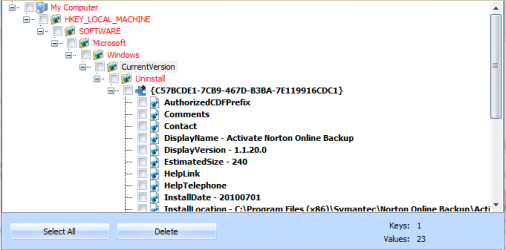
Do I check the Bolded stuff or just hit "select all"

or do I just use De-Crapifier then CCLeaner since I know more about that
 

Attachments

  • Capture.PNG
    Capture.PNG
    10.5 KB · Views: 28

My Computer My Computer

Computer Manufacturer/Model Number
HP p6270z
OS
Windows 7 Home Premium x64
CPU
AMD Athlon II X4 620
Motherboard
Foxconn ALOE (CPU 1)
Memory
4.00GB Dual Channel DDR3 @ 666Mhz (9-9-9-24)
Graphics Card(s)
HD Radeon 4200 (Integrated)
Sound Card
Realtek High Definition Audio
Monitor(s) Displays
HP 2311 (1920x1080) @ 60Hz
Screen Resolution
1920x1080
Hard Drives
488GB Seagate ST3500418AS SCSI Disk Device (RAID)
I just select all...
 

My Computer My Computer

Computer type
PC/Desktop
Computer Manufacturer/Model Number
LENOVO K450 @3.0GHZ
OS
64-bit Windows 8.1 Pro
CPU
Core(TM) i5 CPU 4330 Haswell @ 3.20GHz
Motherboard
LENOVO
Memory
12.00 GB
Graphics Card(s)
Intel(R) HD Graphics
Sound Card
Intel HD integtrated
Monitor(s) Displays
HP 25' ISP Monitor
Screen Resolution
1900/1020
Hard Drives
(1) ST1000DM003-1CH162 (2) Generic STORAGE DEVICE USB Device (3) Generic STORAGE DEVICE USB Device
Internet Speed
100mb down/10mb up
Long time Revo User. I now use the pro version which is a little better laid out and rather quicker. Obviously I think this is an excellent program, never, not once, has it removed something which has caused a problem - and I use it a lot. I suspect some of the competitors do a similar job. I have used Smarty Uninstaller too. It was excellent also - no issues at all. Smarty comes bundled with lots of other goodies (like a startup and a process manager and a shortcut cleaner) - no hesitation recommending it.
 

My Computer My Computer

Computer Manufacturer/Model Number
AMD Athlon 64 3200+, Lenovo G560 i3
OS
Windows 7 Ultimate, Ubuntu
Motherboard
Gigabyte K8T8000
Memory
DDR 2Gb (!)
Graphics Card(s)
6600GT
Monitor(s) Displays
MultiMonitor (2) LCD
Hard Drives
Old Seagate 75
Big Western Digital
Samsung 500Gb pulled out of an external drive and installed
Ext: Maxtor (Firewire), 1Gb Lacie (Samsung)
Mouse
Logitech MX620 Cordless
Hello,
I am going to explain an event and let you all decide what it means. I had SuperAntispyware and Revo Free. Revo did not show the SAS program, so I used windows uninstaller. Well it left a stopped process which was causing errors. I reloaded SAS and tried IObit Uninstaller. It did not show the program, but lets you browse to the folder and pick the program. It too did not work. I downloaded and installed Revo Pro 30 trial, and reinstalled SAS. When I ran Revo Pro it showed SAS which is a 64 bit program, which I believe Revo Free will not do, and it using the Advanced mode created a restore point, IIRC a registry backup and then uninstalled SAS. I let it scan for leftovers and deleted them. On reboot the SAS program was gone as was the stopped process that had caused my error events. I have not noticed any faults with W7 as of yet. Been maybe a week. If it doesn't mess up, I am going to buy it. Beats Restore Points which the two times I needed them, they didn't work and a System Image which up until now was the only true way for my feeling of security to undelete a program. YMMV
glennc
 

My Computer My Computer

Computer type
PC/Desktop
Computer Manufacturer/Model Number
Self-Built
OS
Windows 7 Ultimate
CPU
AMD Phenom-II X4 965
Motherboard
Gigabyte GA-MA785GM-US2H
Memory
8192 MB DDR2-SDRAM
Graphics Card(s)
ATI Radeon HD 4200
Sound Card
ATI Radeon HD 4200 High Definition Audo
Monitor(s) Displays
LG Electronics W1943
Screen Resolution
1360 X 768
Hard Drives
C: 500 GB Caviar Black SATA
E: 500 GB Caviar Black SATA
PSU
Ultra LSP 750
Case
Ultra XBlaster
Cooling
2 Fans, CPU Fan, PS Fan
Keyboard
Acer
Mouse
Logitech
Internet Speed
6 MB
@glennc - very instructive. Confirms that Revo is top of the line and in its pro version, particularly capable. I install and uninstall a lot. I often use the dangerous clean-up option. In about a year using the pro version I have never once had a problem of any sort after using Revo. It failed to recognise only one program to uninstall - i don't remember what that was or know why.
 

My Computer My Computer

Computer Manufacturer/Model Number
AMD Athlon 64 3200+, Lenovo G560 i3
OS
Windows 7 Ultimate, Ubuntu
Motherboard
Gigabyte K8T8000
Memory
DDR 2Gb (!)
Graphics Card(s)
6600GT
Monitor(s) Displays
MultiMonitor (2) LCD
Hard Drives
Old Seagate 75
Big Western Digital
Samsung 500Gb pulled out of an external drive and installed
Ext: Maxtor (Firewire), 1Gb Lacie (Samsung)
Mouse
Logitech MX620 Cordless
Hello Charles Kane,
I just wanted people to know of my particular situation. It was questioned why Revo Free didn't see SAS to the point of asking for a screen shot. Maybe my experience is unusual, I really don't know. System still appears to be running well. I liked it and wish there were more positive experienced reviews, like yours. An anxiety ridden with this Windows 7 64 Bit OS.
Glad to pass on my findings. Hope it helps someone. Or is explained as to why it worked.
glennc
 

My Computer My Computer

Computer type
PC/Desktop
Computer Manufacturer/Model Number
Self-Built
OS
Windows 7 Ultimate
CPU
AMD Phenom-II X4 965
Motherboard
Gigabyte GA-MA785GM-US2H
Memory
8192 MB DDR2-SDRAM
Graphics Card(s)
ATI Radeon HD 4200
Sound Card
ATI Radeon HD 4200 High Definition Audo
Monitor(s) Displays
LG Electronics W1943
Screen Resolution
1360 X 768
Hard Drives
C: 500 GB Caviar Black SATA
E: 500 GB Caviar Black SATA
PSU
Ultra LSP 750
Case
Ultra XBlaster
Cooling
2 Fans, CPU Fan, PS Fan
Keyboard
Acer
Mouse
Logitech
Internet Speed
6 MB
Revo Riva

I liked it so well I bought a copy. I run it in advanced mode even though I don't consider myself advanced. I think with a some good judgement it will not let you down.
 

My Computer My Computer

Computer Manufacturer/Model Number
BGC (Bob's Garage Crew)
OS
win 7 X64 Ultimate SP1
CPU
I3770K
Motherboard
Asus P8Z77-V Deluxe
Memory
G Skill F3-14900CL9-4GBXL x 4
Graphics Card(s)
NVIDIA GeForce GTX670 + Intel 4000
Sound Card
Realtek HD 5.1 (MOB)
Monitor(s) Displays
Asus VW224T (1)
Screen Resolution
1920 x 1080
Hard Drives
SATA Corsair Force GT 2.5" 180GB (System) Sata 3
OCZ Vertex3 120GB
OCZ Vertex 2 120GB 2.5" SATA II
ST31000524AS 1000.2GB
WD15EARS (External)
PSU
CoolerMaster 1000 Watt
Case
CoolerMaster HAF X
Cooling
CPU -- CoolerMaster 520N
Keyboard
MS Wireless 3000 V2
Mouse
MS Wireless 3000 V2
Internet Speed
Cable
Antivirus
Norton Internet Security
Browser
IE9
Other Info
AMI Bios 1805
OC'd 3%
I've used the free version of Revo for about 3 years now. I'm a little feckless I suppose but I've just followed the procedure and deleted everything bolded in the registry and I haven't had a problem.
Maybe I've been lucky.
I can think of several times it has uninstalled things that didn't want to go:)
I have noticed though that some programmes show up in Revo and not in Add/Remove and vice versa.
On the whole I think it's a great piece of kit.
 

My Computer My Computer

Computer Manufacturer/Model Number
The Monolith. 3.1
OS
Windows 7 Home Premium 64 bit
CPU
i7 [email protected]
Motherboard
Gigabyte Z77-D3H
Memory
2x4GB Corsair Vegeance DDR3
Graphics Card(s)
XFX GTX 260 Black Edition
Sound Card
none-through large stereo hi fi
Monitor(s) Displays
Croosover 27MDP LED IPS Dell 2408 WFP
Screen Resolution
2560x1440 1920x1200
Hard Drives
1x Samsung 840Pro 128GB SSD
1x Samsung Spinpoint F1 1TB
PSU
Corsair AX 850 Watt
Case
Cooler Master ACTS 840
Cooling
Be Quiet! Dark Rock Pro
Keyboard
Enermax Aurora
Mouse
Logitech Ballmouse
Internet Speed
20MBPS
I have used REVO for years with XP-PRO and Windows 64 bit with not one problem. I have removed SAS with it and installed it again without any problems. There is a back up under options, uninstall. You can also set to remove to Recycle bin and save them there as long as you want to. Now make sure you only check the darkened lines, double make sure. If you check other than them you could cause all kinds of problems. This morning I remove 3 Revo backups that were months old. I can understand the concerns with this program it is very complete when removing a program. When and or if you use this product and don't use the backup or Recycle bin what you removed is gone for ever unless you install it again. As always read the Help section and instructions first.
 

My Computer My Computer

Computer type
PC/Desktop
Computer Manufacturer/Model Number
Home made Desktop
OS
Windows 10 Pro. 64/ version 1709 Windows 7 Pro/64
CPU
Intel i7-6800K @ 4.3
Motherboard
ASUS X-99 Deluxe II
Memory
Corsair Platinum 16 gig @2400
Graphics Card(s)
EVGA GTX 1070 OC
Monitor(s) Displays
Asus 27" LED LCD/VE278Q
Screen Resolution
1920-1080 or 1280-720 HDMI
Hard Drives
INTEL SSD 730-240 Gb Sata 3.0/
PSU
EVGA Platium 1200W
Case
Phanteks Luxe Tempered Glass 8 fans/ one radiator
Cooling
XSPC/ Water Cooled CPU
Keyboard
Das 4 Professional
Mouse
Logitech M705/MX Anywhere 2-S
Internet Speed
100 mbits
Antivirus
Microsoft Security Essentials/ Malwarebytes Premium 3.0/ SAS
Browser
I.E. 11 default/Firefox/ ISP Time Warner Cable/Spectrum
Other Info
LG BluRay Burner/
Sound system-KLipsch-THX/
Icy Dock ssd Hot Swap bays.
Hello Layback Bear,
I am glad to hear from someone who has been using it regularly for a good time. Excellent. I like it and it was the only alternative to doing a System Image restore, or a clean reinstall. Now that I know it works, I will definitely buy it.
Maybe you would be able to answer this question, when you do the scan after the uninstall, it gives you paths to the bolded out leftovers of the uninstalled program in the advanced mode. I had previously been just checking the box of the bold character, but thought that wouldn't that leave the file structure to the leftover still on your drive. So I began doing a select all and delete. This just checkmarks the file structure path to the bold leftover and if I am correct in my thinking, removes all the folders and references to the item.
Can you or anyone explain if I am wrong or right?
Thanks
glennc
 

My Computer My Computer

Computer type
PC/Desktop
Computer Manufacturer/Model Number
Self-Built
OS
Windows 7 Ultimate
CPU
AMD Phenom-II X4 965
Motherboard
Gigabyte GA-MA785GM-US2H
Memory
8192 MB DDR2-SDRAM
Graphics Card(s)
ATI Radeon HD 4200
Sound Card
ATI Radeon HD 4200 High Definition Audo
Monitor(s) Displays
LG Electronics W1943
Screen Resolution
1360 X 768
Hard Drives
C: 500 GB Caviar Black SATA
E: 500 GB Caviar Black SATA
PSU
Ultra LSP 750
Case
Ultra XBlaster
Cooling
2 Fans, CPU Fan, PS Fan
Keyboard
Acer
Mouse
Logitech
Internet Speed
6 MB
Glenn, I have been using Revo for about a year and half. It does the job quite well for me. I installl and play around with things and uninstall frequently.
 

My Computer My Computer

Computer Manufacturer/Model Number
Home built
OS
Windows 7 Ultimate 32 bit
CPU
Intel(R) Pentium(R) 4 CPU 3.00GHz
Motherboard
ASUS P4P800-VM Motherboard Chipset: Intel 865G + ICH5
Memory
2.50 GB RAM
Graphics Card(s)
NVIDIA GeForce 7600 GS
Sound Card
SoundMax Integrated Digital Audio (Chip)
Monitor(s) Displays
ViewSonic VX 1962 wm
Screen Resolution
1680 X 1050
Hard Drives
Seagate Barracuda 7200.10 80 GB
ST380215A ATA Device 18.6 GB
Western Digital "My Book" external hard drive 750 GB
Cooling
Fan based
Keyboard
Microsoft Comfort Curve Keyboard 2000 v10 USB
Mouse
Logitec optic USB
Internet Speed
3.01 Mb/s download 0.64 Mb/s upload
Glenn, I have been using Revo for about a year and half. It does the job quite well for me. I installl and play around with things and uninstall frequently.

Howdy CarlTR6,
Nice to hear of another happy user. It seems very good. Saves me a lot of trouble.
I to do a lot of trying and uninstalling programs and before Revo Pro it got me quite the headache. As a side note, knowing your experience, as I was doing malware scan I happened to look at the screen and see SuperantiSpyware directory. Now I Revo Pro'ed it off, but I think this is a hidden directory on the root of my system drive. Should I worry about it, or is it and gosh knows what else safely left there?
Thanks for the confirmation on Revo!
glennc
 

My Computer My Computer

Computer type
PC/Desktop
Computer Manufacturer/Model Number
Self-Built
OS
Windows 7 Ultimate
CPU
AMD Phenom-II X4 965
Motherboard
Gigabyte GA-MA785GM-US2H
Memory
8192 MB DDR2-SDRAM
Graphics Card(s)
ATI Radeon HD 4200
Sound Card
ATI Radeon HD 4200 High Definition Audo
Monitor(s) Displays
LG Electronics W1943
Screen Resolution
1360 X 768
Hard Drives
C: 500 GB Caviar Black SATA
E: 500 GB Caviar Black SATA
PSU
Ultra LSP 750
Case
Ultra XBlaster
Cooling
2 Fans, CPU Fan, PS Fan
Keyboard
Acer
Mouse
Logitech
Internet Speed
6 MB
Glenn, I suggest you delete it manually. Anti-malware programs are as tenacious as malware and intertwine into your system in much the same manner as malware. They are hard to get rid of. To remove any anti-malware software, it is best to use the uninstall tool provided by the manufacture if they have one is available. This is one of the big reasons that I despise and avoid security suites. They literally infect your system.
 

My Computer My Computer

Computer Manufacturer/Model Number
Home built
OS
Windows 7 Ultimate 32 bit
CPU
Intel(R) Pentium(R) 4 CPU 3.00GHz
Motherboard
ASUS P4P800-VM Motherboard Chipset: Intel 865G + ICH5
Memory
2.50 GB RAM
Graphics Card(s)
NVIDIA GeForce 7600 GS
Sound Card
SoundMax Integrated Digital Audio (Chip)
Monitor(s) Displays
ViewSonic VX 1962 wm
Screen Resolution
1680 X 1050
Hard Drives
Seagate Barracuda 7200.10 80 GB
ST380215A ATA Device 18.6 GB
Western Digital "My Book" external hard drive 750 GB
Cooling
Fan based
Keyboard
Microsoft Comfort Curve Keyboard 2000 v10 USB
Mouse
Logitec optic USB
Internet Speed
3.01 Mb/s download 0.64 Mb/s upload
Hi glennc. I only remove the (check mark) the ones in the bold and remove them. I don't remove anything else. Because a improper check mark can cause problems is the only reason I double check before deleting. I also keep backups for about 2 months. Because there is always a risk with a program like this, I also keep a repair disk using Windows 7 and a backup and restore DVD using Windows 7. As far as I know when checking the bold ones Revo removes everything concerning the program removed where ever it might be hiding. I use Revo to remove Adobe programs before updating to new Adobe programs. The updates go very smooth for me doing it this way. Here is a simple way to put it. If done correctly Revo cleans all out; if done incorrectly you can end up with a door stop. Follow the instructions exactly.
 

My Computer My Computer

Computer type
PC/Desktop
Computer Manufacturer/Model Number
Home made Desktop
OS
Windows 10 Pro. 64/ version 1709 Windows 7 Pro/64
CPU
Intel i7-6800K @ 4.3
Motherboard
ASUS X-99 Deluxe II
Memory
Corsair Platinum 16 gig @2400
Graphics Card(s)
EVGA GTX 1070 OC
Monitor(s) Displays
Asus 27" LED LCD/VE278Q
Screen Resolution
1920-1080 or 1280-720 HDMI
Hard Drives
INTEL SSD 730-240 Gb Sata 3.0/
PSU
EVGA Platium 1200W
Case
Phanteks Luxe Tempered Glass 8 fans/ one radiator
Cooling
XSPC/ Water Cooled CPU
Keyboard
Das 4 Professional
Mouse
Logitech M705/MX Anywhere 2-S
Internet Speed
100 mbits
Antivirus
Microsoft Security Essentials/ Malwarebytes Premium 3.0/ SAS
Browser
I.E. 11 default/Firefox/ ISP Time Warner Cable/Spectrum
Other Info
LG BluRay Burner/
Sound system-KLipsch-THX/
Icy Dock ssd Hot Swap bays.
Back
Top