
Greetings,
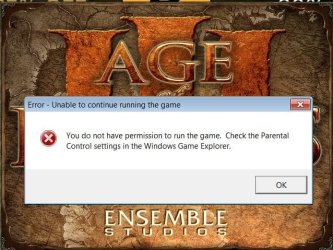
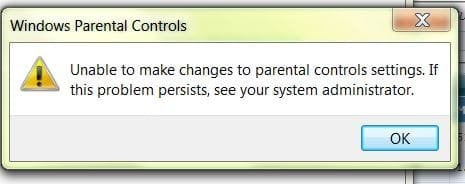
I am experiencing Parental Control issues on my Dell XPS L502X laptop featuring Windows 7 Home Premium 64-bit OS. After I purchased Age of Empires 3: Complete Collection on Steam and installed it I noticed that the game does not launch via Steam nor the executable file. An error box is displayed with the following message in the header "Error-Unable to continue running the game." and I have to click okay. Considering I have only one administrator account on my laptop Parental Controls should not interfere with my gaming preferences and this reasoning is confirmed when I try to apply parental control setting on my own account. Furthermore I have tried creating another standard account and applying parental controls on it; this attempt also failed with the message "Unable to make changes to parental controls settings. If this problem persists, see your system administrator."
I have tried launching the AoE 3 base game and the two expansion packs by altering the compatibility settings accessible under properties of the executable and I have disabled UAC up to no avail. I would also like to state that Steam fails to verify 1 game file but since installation is not final I do not this is the cause of the issue. Do you have any suggestions on this matter? Any help and/or recommendation is appreciated.
Thanks in advance
I am experiencing Parental Control issues on my Dell XPS L502X laptop featuring Windows 7 Home Premium 64-bit OS. After I purchased Age of Empires 3: Complete Collection on Steam and installed it I noticed that the game does not launch via Steam nor the executable file. An error box is displayed with the following message in the header "Error-Unable to continue running the game." and I have to click okay. Considering I have only one administrator account on my laptop Parental Controls should not interfere with my gaming preferences and this reasoning is confirmed when I try to apply parental control setting on my own account. Furthermore I have tried creating another standard account and applying parental controls on it; this attempt also failed with the message "Unable to make changes to parental controls settings. If this problem persists, see your system administrator."
I have tried launching the AoE 3 base game and the two expansion packs by altering the compatibility settings accessible under properties of the executable and I have disabled UAC up to no avail. I would also like to state that Steam fails to verify 1 game file but since installation is not final I do not this is the cause of the issue. Do you have any suggestions on this matter? Any help and/or recommendation is appreciated.
Thanks in advance
Attachments
My Computer
At a glance
Microsoft Windows 7 Home Premium 64-bit 7601 ...Intel(R) Core(TM) i7-2630QM CPU @ 2.00GHz4.000 GB(1) Intel(R) HD Graphics Family (2) NVIDIA Ge...
- Computer type
- Laptop
- Computer Manufacturer/Model Number
- Dell XPS L502X
- OS
- Microsoft Windows 7 Home Premium 64-bit 7601 Multiprocessor Free Service Pack 1
- CPU
- Intel(R) Core(TM) i7-2630QM CPU @ 2.00GHz
- Motherboard
- Dell Inc. 0NJT03
- Memory
- 4.000 GB
- Graphics Card(s)
- (1) Intel(R) HD Graphics Family (2) NVIDIA GeForce GT 540M
- Sound Card
- (1) Realtek High Definition Audio (2) Intel(R) Display Aud
- Screen Resolution
- 0 x 0 x 0 bits (0 colors) @ 0 Hz
- Hard Drives
- TOSHIBA MK5061GSY


