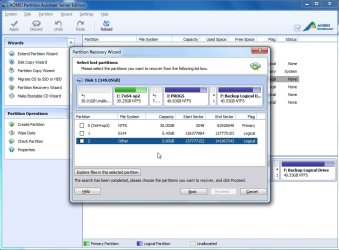
Aomei Partition Assistant.

SIW2

YTS GEEK
Guru
Gold Member
SF Team
Local time
4:35 AM
Messages
16,784

My Computers

System One System Two

  • Computer type
    PC/Desktop
    OS
    7 X64
    CPU
    i5 8400
    Motherboard
    gigabyte b365m ds3h
    Memory
    2x8gb 3200mhz
    Hard Drives
    various
    PSU
    pure power 11 400w cm
    Case
    Coolermaster
    Cooling
    cryorig m9i
  • Computer type
    PC/Desktop
    OS
    7x64
    CPU
    g5400
    Motherboard
    ga b365m ds3h
    Memory
    8gb ddr4 2400
    PSU
    xfx pro 450w
  • Like
Reactions: Arc
A very good program indeed that I have on my PC for a long time.

Perhaps worth recommending for partition recovery too in place of MT Partition Wizard, based on your experience.

I faintly remember having read somewhere that the original team or part of the original team of PowerQuest Partition Magic is involved in the development of AOMEI software.

The best part is one can create a bootable WinPE CD quite easily within minutes.

EDIT: I just now created the WinPE ISO and bootable pendrive with it using Rufus.

A snapshot:

100_3171.JPG

Oh! Disk 2 is the bootable pendrive. Rufus gives it the volume label CDROM by default.

Running MiniTools Partition Wizard from a pendrive is a little bit tricky but possible, if one remembers to type linux0 against the command prompt to boot it. Yep, MT Partition Wizard bootable is Linux.
 
Last edited:

My Computer

OS
Windows 7 Home Premium 32 bit
I pop it in my own hand made pe media.

It will make one for you - but like most programs - it requires the WAIK download to do that.

Aomei also have a good free imaging program . Interestingly, the imaging program makes pe media without WAIK download.

I believe Aomei will be incorporating that non WAIK pe building in to Partition Assistant in future.
 

My Computers

System One System Two

  • Computer type
    PC/Desktop
    OS
    7 X64
    CPU
    i5 8400
    Motherboard
    gigabyte b365m ds3h
    Memory
    2x8gb 3200mhz
    Hard Drives
    various
    PSU
    pure power 11 400w cm
    Case
    Coolermaster
    Cooling
    cryorig m9i
  • Computer type
    PC/Desktop
    OS
    7x64
    CPU
    g5400
    Motherboard
    ga b365m ds3h
    Memory
    8gb ddr4 2400
    PSU
    xfx pro 450w
Nope, it does not need WAIK. That is why I said it can make the WinPE in minutes ( without downloading the large WAIK which may take hours, depending upon one's internet speed.)

Anyway, I would like you to confirm this - just in case I am wrong. ( I do have WAIK on my PC but it did not ask for its path and the ISO created in just under 2 minutes.)

Given that the imaging program does not require WAIK download, even this Partition Assistant may not. ( I have version 5.1)
 

My Computer

OS
Windows 7 Home Premium 32 bit
Part Assist does require WAIK - you already have it - so it didn't ask.

I have spoken to Aomei about this and other suggestions.

They are a very friendly bunch. I believe they are planning a new version.

I have 5.2 - there will be another version as soon as they can get it ready. No idea how long that will be.
 

My Computers

System One System Two

  • Computer type
    PC/Desktop
    OS
    7 X64
    CPU
    i5 8400
    Motherboard
    gigabyte b365m ds3h
    Memory
    2x8gb 3200mhz
    Hard Drives
    various
    PSU
    pure power 11 400w cm
    Case
    Coolermaster
    Cooling
    cryorig m9i
  • Computer type
    PC/Desktop
    OS
    7x64
    CPU
    g5400
    Motherboard
    ga b365m ds3h
    Memory
    8gb ddr4 2400
    PSU
    xfx pro 450w
Yep,you are right.

I just installed the latest version 5.1.2 - that is what I could get and not 5.2 - on my laptop which does not have WAIK and it asked for WAIK when I wanted to create the WinPE ISO.:D
 

My Computer

OS
Windows 7 Home Premium 32 bit
Back
Top