- Local time
- 1:38 AM
- Messages
- 152
Hello,
I'm trying to help someone who's saved several pdf files in the following manner:
The funny thing is, when I follow the path, there is no >Temporary Internet Files subfolder! I have further discovered that when I search for one of these documents (visible in the >Save As dialog), *if* there are search results for a particular document and I open it, it opens as an Outlook message, even though it's saved as a pdf file.
What is going on here? How can the user retrieve these files saved in a non-existent location? And does he even want to, considering they've saved as Outlook messages???
I'm trying to help someone who's saved several pdf files in the following manner:
1. Received in Outlook as an attachment
2. Opened in Adobe Reader or Acrobat
3. >File >Save as >"document name".pdf
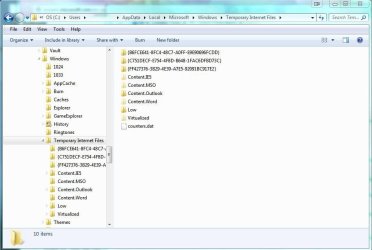
The user then cannot find the files. In providing assistance, I duplicated the steps taken, and found that the files are being saved to >"User", >App Data, >Local, >Microsoft, >Windows, >Temporary Internet Files, >Content Outlook, >CP6DU2Q6.2. Opened in Adobe Reader or Acrobat
3. >File >Save as >"document name".pdf
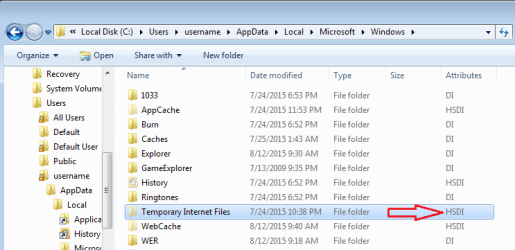
The funny thing is, when I follow the path, there is no >Temporary Internet Files subfolder! I have further discovered that when I search for one of these documents (visible in the >Save As dialog), *if* there are search results for a particular document and I open it, it opens as an Outlook message, even though it's saved as a pdf file.
What is going on here? How can the user retrieve these files saved in a non-existent location? And does he even want to, considering they've saved as Outlook messages???
My Computer
- Computer type
- PC/Desktop
- Computer Manufacturer/Model Number
- Lenovo ThinkPad E545 / Dell Optiplex 980
- OS
- Windows 7 Pro 64-bit
- CPU
- AMD 2.9GHz / Intel 3.2GHz
- Memory
- 8GB / 4GB
- Antivirus
- AVG / Norton 360
- Browser
- Firefox & Chrome


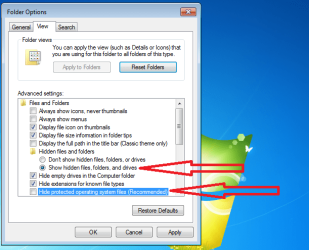
 In any event, the user's computer is now set to show hidden files & hide protected files; however, the >Temporary Internet Files folder continues to be elusive.