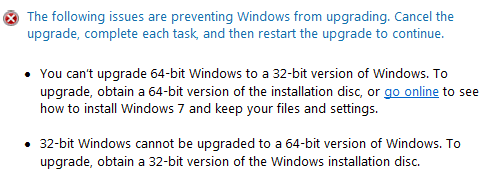
Apparently my system is both a 32 bit and a 64 bit system...?

ET1993

New member
Local time
12:11 AM
Messages
2
When I run setup and select the upgrade method, the compatibility thing comes back saying;

The following issues are preventing Windows from upgrading. Cancel the upgrade, complete each task, and then restart the upgrade to continue.

  • You can’t upgrade 64-bit Windows to a 32-bit version of Windows. To upgrade, obtain a 64-bit version of the installation disc, or go online to see how to install Windows 7 and keep your files and settings.

  • 32-bit Windows cannot be upgraded to a 64-bit version of Windows. To upgrade, obtain a 32-bit version of the Windows installation disc.
My issue here is that I was attempting to upgrade a 64-bit Vista home premium to a 64-bit Windows 7 Ultimate. So really I shouldn't be getting this message at all.

My system is an Acer AM5620-E5203A with a few upgrades

  • Intel Core 2 Quad Q6600 Quad Core Desktop Processor
  • 4GB PC2-5300 DDR2 Memory
  • 750GB 7200rpm SATA Hard Drive **Upgraded with a new 2 terabyte Hitachi harddrive** (so two hard drives)
  • 16x DVD+/-RW Dual Layer Burner
  • ATI Radeon HD 2600 Pro 256MB Graphics Card ** Upgraded ATI Radeon HD 5450**
Acer Aspire AM5620-E5203 Mainstream Desktop Review

Any help is appreciated. Complete wipe isn't preferable as either that means wiping the 750 gig drive (Which is a mess) or booting off my 2 terabyte drive (which means I'll have to clean it up a bit.
 

My Computer My Computer

At a glance

Vista
OS
Vista
Welcome to Windows Seven Forum.

Press the Windows+Prt Scr key combo to bring up the System window and double-check which version of Vista you have on your system.

If it is the 32-bit version, then you can't upgrade to the 64-bit version of Win 7.

OSVER.PNG

If you have Vista 64-bit then we need to be finding out from Microsoft why you're getting this message.​
 

My Computer My Computer

At a glance

Windows 7 Ultimate SP1 64-BitIntel Core i7 870 @ 2.93GHz8Gb Dual-Channel DDR3 @ 664MHznVidia GeForce GTX 460 1024MB dedicated RAM
Computer Manufacturer/Model Number
HP Pavilion Elite 495UK
OS
Windows 7 Ultimate SP1 64-Bit
CPU
Intel Core i7 870 @ 2.93GHz
Motherboard
MSI 2A9C (CPU1)
Memory
8Gb Dual-Channel DDR3 @ 664MHz
Graphics Card(s)
nVidia GeForce GTX 460 1024MB dedicated RAM
Sound Card
Realtek HD Audio
Monitor(s) Displays
HP2310i
Screen Resolution
1920 x 1080
Hard Drives
1x1954GB Hitachi HDS22020ALA 330 (RAID), 1x1954GB Hitachi External for backup and storage
PSU
460W
Case
HP Elite
Cooling
Air cooled
Keyboard
Logitech K750 solar-powered keyboard
Mouse
Logitech Wireless M180 mouse
Internet Speed
2Mb
Other Info
Pure Avanti Flow Internet Radio with iPod Dock, 64Gb iPod, HP USB Speakers, Sony MDR-V500 Headphones, Sony Vaio F-Series Laptop

My Computer My Computer

At a glance

Vista, Windows7, Mint Mate, Zorin, Windows 8from 1.6GHz Duo to i7
Computer Manufacturer/Model Number
HP, Dell, Gateway, Toshiba - 4 laptops and 2 desktops
OS
Vista, Windows7, Mint Mate, Zorin, Windows 8
CPU
from 1.6GHz Duo to i7
Monitor(s) Displays
2x HP w2207
Hard Drives
5x HDD, 7x SSD, 12x Externals
Keyboard
with trackball - no mices
Mouse
Trackball mice
Internet Speed
DSL 6000
Hello ET1993, welcome to Seven Forums!


If you are in-fact using 32-bit Vista and you need to go to 64-bit Windows 7, there is no upgrade path for that and a clean install is in order, it would be best to do a complete wipe secure erase of the SSD first, have a look at these tutorials linked below and be sure to post back with any further questions you may have and to keep us informed.


My Computer My Computer

At a glance

W 7 64-bit UltimateIntel Q9550 Yorkfield8GB Dominator 8500C5DATI : XFX 5870
Computer Manufacturer/Model Number
* BFK Customs *
OS
W 7 64-bit Ultimate
CPU
Intel Q9550 Yorkfield
Motherboard
ASUS P5Q Pro
Memory
8GB Dominator 8500C5D
Graphics Card(s)
ATI : XFX 5870
Sound Card
Realtek HD Audio 7-1
Monitor(s) Displays
1x 47" LCD HDMI & 3x 26" LCD HDMI
Screen Resolution
1920x1080P & 1920x1200
Hard Drives
1x 80GB Intel X25-M G2 SSD : 1x 500GB & 1x 640GB WD Caviar Black(s)
PSU
Corsair 620HX
Case
Cooler Master RC-690
Cooling
Tuniq Tower 120, 2x 140mm and 3x 120mm case fans
Keyboard
Microsoft 500
Mouse
Razer Diamondback 3G
Internet Speed
14 Mb/s
Other Info
1x Koutech 3Gb/s SATA HDD Hot Swap Rack
Are you sure the Windows 7 DVD you are using to do the upgrade is the 64 bit version? Retail boxes I believe come with both disks 32 bit and 64 bit. maybe you grabbed the wrong one? If it's OEM make sure you didn't get the wrong disk by accident.
 

My Computer My Computer

At a glance

Windows 10 Education 64 bitAMD Phenom II X4 980 Black Edition Deneb 3.7GHz8GB 4GBx2 Kingston PC10600 DDR3 1333 MemoryZotac NVIDIA Geforce GT640 2 Gig DDR3 PCIe
Computer type
PC/Desktop
Computer Manufacturer/Model Number
Home Built
OS
Windows 10 Education 64 bit
CPU
AMD Phenom II X4 980 Black Edition Deneb 3.7GHz
Motherboard
Asus M4N68T-M V2 µATX Motherboard
Memory
8GB 4GBx2 Kingston PC10600 DDR3 1333 Memory
Graphics Card(s)
Zotac NVIDIA Geforce GT640 2 Gig DDR3 PCIe
Sound Card
VIA VT1708s High Definition Audio 8-channel Onboard
Monitor(s) Displays
22" LG E2242 1080p and 2 19" I-INC AG191D
Screen Resolution
1280x1024 - 1920x1080 - 1280x1024
Hard Drives
Crucial M100 256 GB SSD and 500 GB WD Blue SATA
PSU
Thermaltake TR 620
Case
Power Up Black ATX Mid-Tower Case
Cooling
Stock heatsink and fan
Keyboard
Logitech Wireless K350 Wave
Mouse
Logitech Wireless M570 Trackman Wheel
Internet Speed
80 Mbps Down 30 Mbps Up
Antivirus
Windows Defender
Browser
Internet Explorer 11
Other Info
HP DVD1040e Lightscribe - External USB2
Alright, so I'll reply in order.

@seavixen32
when I bring up the systems menu, it says 64 bit. I was under the impression that this was Microsoft though, where would you recommend I go to ask this question then?

@theog
I suppose the reviewers PC had 32 bit then. I have a 64 as seavixen there helped me confirm.

@WHS
When I run the install, it offers both an option just to upgrade, or an option for a clean install. Thanks though!

@ Bare Foot Kid
Thanks for the help, but I'm running 64bit.

@alphanumeric
While that may be true (and I checked) the issue here is the apparent paradox provided is that I can't upgrade 64 bit to 32 bit AND i can't upgrade 32 bit to 64 bit. The fact that both messages came up is what confused me and caused me to post.

Also, how do you post pictures. I don't use message boards often, and tried to post a screen shot of my system window but all i got was a long URL.
 

My Computer My Computer

At a glance

Vista
OS
Vista

My Computer My Computer

At a glance

W 7 64-bit UltimateIntel Q9550 Yorkfield8GB Dominator 8500C5DATI : XFX 5870
Computer Manufacturer/Model Number
* BFK Customs *
OS
W 7 64-bit Ultimate
CPU
Intel Q9550 Yorkfield
Motherboard
ASUS P5Q Pro
Memory
8GB Dominator 8500C5D
Graphics Card(s)
ATI : XFX 5870
Sound Card
Realtek HD Audio 7-1
Monitor(s) Displays
1x 47" LCD HDMI & 3x 26" LCD HDMI
Screen Resolution
1920x1080P & 1920x1200
Hard Drives
1x 80GB Intel X25-M G2 SSD : 1x 500GB & 1x 640GB WD Caviar Black(s)
PSU
Corsair 620HX
Case
Cooler Master RC-690
Cooling
Tuniq Tower 120, 2x 140mm and 3x 120mm case fans
Keyboard
Microsoft 500
Mouse
Razer Diamondback 3G
Internet Speed
14 Mb/s
Other Info
1x Koutech 3Gb/s SATA HDD Hot Swap Rack
I realize this is a year old now, but I could really use some help for this same issue. I have searched the internet high and low for a solution and have found nothing. I have a computer that is giving me the exact same error message (Attached a screenshot). I am trying to fix an issue with .NET 3.5 which is built into windows 7 but when i try and run sfc /scannow it wont work. After doing a large amount of research and trying a number of things i am left with a repair installation of windows which i apparently cannot do. A clean install is not completely out of the question but i would rather leave that for an absolute last resort as it requires a large amount of work to get this computer back to where it was. Thank you so much in advance for any help at all!
 

Attachments

  • screen.png
    screen.png
    5.5 KB · Views: 16

My Computer My Computer

At a glance

Windows 7 Pro 64-bit
OS
Windows 7 Pro 64-bit
So i tried using the DVD i have, burnt a new DVD using a different image, tried it from a USB drive and the thing that worked was downloading a new image of windows 7 pro SP1 from microsoft and ran the upgrade from the ISO. Also had to clear a pending file operation in the registry relating to .NET. Setup randomly crashes now after it begins file copy so there is something very wrong and i am now leaning toward clean install....thank you for your help its much appreciated!
 

My Computer My Computer

At a glance

Windows 7 Pro 64-bit
OS
Windows 7 Pro 64-bit
Hi jcolton08, I agree that it's better to go down the Clean Install route.

I've never used an upgrade version. I prefer to clean install from scratch.

As Bare Foot Kid and Greg have said, You'll probably run into less issues doing a clean install. You'll have a fresh new Windows to tweak away at! :)
 

My Computer My Computer

At a glance

Win 7 Ultimate, Win 8.1 Pro, Linux Mint 19 Ci...Intel i5 4690KCorsair Vengeance LP 32GB DDR3MSI GTX 1060 GAMING X 6GB
Computer type
PC/Desktop
Computer Manufacturer/Model Number
Custom Build
OS
Win 7 Ultimate, Win 8.1 Pro, Linux Mint 19 Cinnamon (All 64-Bit)
CPU
Intel i5 4690K
Motherboard
Gigabyte Z97X-UD3H
Memory
Corsair Vengeance LP 32GB DDR3
Graphics Card(s)
MSI GTX 1060 GAMING X 6GB
Sound Card
Onboard
Hard Drives
Samsung 850 EVO 250GB SSD (x2)
Samsung 860 EVO 1TB SSD (x2)
Crucial MX300 525GB SSD
WD Blue 2TB 5400rpm Intellipark Disabled (x2)
PSU
Corsair HX750i
Case
Phanteks Enthoo Pro
Cooling
CM Hyper 212 EVO on CPU, Noctua Redux NF-P14S 1500rpm (x6)
Keyboard
Corsair K70 RGB LUX
Mouse
Corsair Sabre RGB
Antivirus
Avast Free, MalwareBytes, SAS & CryptoPrevent
Browser
Chrome
Other Info
StarTech PEXESAT322I 2 Port PCI-E SATA Card
ASUS PCE-AC56 Dual-band AC1300 Wireless Card
Akasa FC.Six Manual Fan Controller
And a Partridge in a Pear Tree!
Back
Top