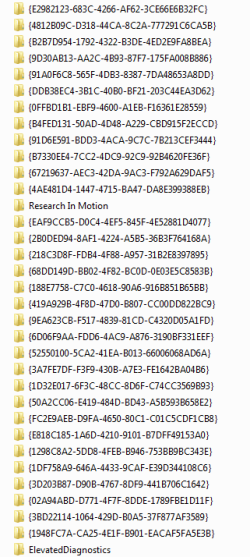
AppData\Local - Folders with random characters

Will2K9

New member
Local time
10:33 AM
Messages
14
I have scanned the computer and believe it not a virus and maybe something updating causes many folder with random characters in the AppData\Local directory, picture attached do you think its safe to delete.
 

Attachments

  • Capture.PNG
    Capture.PNG
    40.7 KB · Views: 307

My Computer

Computer Manufacturer/Model Number
Me
OS
Windows 7 Ultimate [64Bit]
CPU
E6400 OC @ 2.8Ghz
Motherboard
Asus P5QL-EM
Memory
2X2GB Corsair DDR2 [4GB] OC
Graphics Card(s)
PowerColor 3870Xtreme
Sound Card
Realtek 7.1 Onboard
Monitor(s) Displays
Daewoo 17"
Screen Resolution
1280X1024
Hard Drives
2XSamsung 80GB (Sata)
1XSamsung 250GB (Sata)
1xSamsung 400GB (IDE)
PSU
550 Watt
Case
Akasa Zen
Cooling
Zalman CNPS9500 AT
Keyboard
Logitech LX 710 Cordless Keyboard
Mouse
Logitech LX 7 Cordless Laser Mouse
Internet Speed
10MB
I am also getting these folders. They shouldn't be there.

It appears that it could be the latest version of Windows Live Messenger.
 

My Computer

OS
Windows 7 Ultimate (64-bit)
I have them as well, but I only installed the latest messenger today and the folders are dated from about 5 days ago.
 

My Computer

Computer Manufacturer/Model Number
Custom
OS
Windows 7 Ultimate RTM (Technet)
CPU
3.00 gigahertz Intel Core2 Duo E8400
Motherboard
ASUSTeK Computer INC. P5K/EPU Rev 1.xx
Memory
4GB
Graphics Card(s)
ATI Radeon X1950 Pro
Sound Card
Built in HD Audio
Monitor(s) Displays
22" Gateway LCD
Screen Resolution
1920 x 1200
Hard Drives
ST3160023A [Hard drive] (160.04 GB) -- drive 0, rev 8.01, ST3500630AS [Hard drive] (500.11 GB) -- drive 2, rev 3.AAK
ST3500630AS [Hard drive] (500.11 GB) -- drive 1, rev 3.AAK
Keyboard
Logitech G11
Mouse
Microsoft Wireless Laser Mouse 5000
Internet Speed
13.44 Mbps
I have them as well, but I only installed the latest messenger today and the folders are dated from about 5 days ago.
But have you installed any other application from the Windows Live Essentials suite previously. e.g. Windows Live Mail?
 

My Computer

OS
Windows 7 Ultimate (64-bit)
I have them as well, but I only installed the latest messenger today and the folders are dated from about 5 days ago.
But have you installed any other application from the Windows Live Essentials suite previously. e.g. Windows Live Mail?

I've been using Windows Live Mesh for quite awhile.
 

My Computer

Computer Manufacturer/Model Number
Custom
OS
Windows 7 Ultimate RTM (Technet)
CPU
3.00 gigahertz Intel Core2 Duo E8400
Motherboard
ASUSTeK Computer INC. P5K/EPU Rev 1.xx
Memory
4GB
Graphics Card(s)
ATI Radeon X1950 Pro
Sound Card
Built in HD Audio
Monitor(s) Displays
22" Gateway LCD
Screen Resolution
1920 x 1200
Hard Drives
ST3160023A [Hard drive] (160.04 GB) -- drive 0, rev 8.01, ST3500630AS [Hard drive] (500.11 GB) -- drive 2, rev 3.AAK
ST3500630AS [Hard drive] (500.11 GB) -- drive 1, rev 3.AAK
Keyboard
Logitech G11
Mouse
Microsoft Wireless Laser Mouse 5000
Internet Speed
13.44 Mbps
Yes, I think it could cause it also.
 

My Computer

OS
Windows 7 Ultimate (64-bit)
I have seen it also. I have deleted them with no problems and looking at the date and times its seems to happen when I boot up but I need to keep a record and see.

Jim :geek:
 

My Computer

Computer type
PC/Desktop
Computer Manufacturer/Model Number
Home Built
OS
Windows 8.1 Pro w/Media Center 64bit, Windows 7 HP 64bit
CPU
Phenom II X6 1100T
Motherboard
ASUS M5A99X EVO
Memory
Crucial Balistic 8gb DDR3-1866 CL9
Graphics Card(s)
MSI R6850 Cyclone IGD5 PE
Sound Card
On Board
Monitor(s) Displays
ASUS VE258Q 25" LED with DVI-HDMI-DisplayPort
Screen Resolution
1920 x 1080
Hard Drives
Two WD Cavier Black 2TB Sata III, WD My Book Essential 2TB USB 3.0
PSU
Seasonic X650 80 Plus GOLD Modular
Case
Corsair 400R
Cooling
Antec Kuhler H2O 620, Two 120mm and four 140mm
Keyboard
Logitech K120
Mouse
Logitech Marble Mouse USB, Logitech Precision Game Pad
Internet Speed
15MB
Antivirus
Norton IS 2013, Malwarebytes Pro Beta 2
Browser
IE-11, FF-27
Other Info
APC UPS ES 750, Netgear WNR3500L Gigabit & Wireless N Router with SamKnows Test Program, Motorola SB6120 Gigabit Cable Modem. Brother HL-2170W Laser Printer, Epson V300 Scanner
There is a currently a discussion about this issue on a different forum. A user on that forum pointed out the discussion here, so I thought it would help to share the main points from that other thread on this forum. Here is the link in case anyone wants to read it directly: Mysterious folders in my AppData>Local folder

It's a fairly long thread, so I'll sum it up here: So far, we were able to determine that (as noted above), some of the Windows Live Essentials components are creating these folders. So far, it was confirmed that both WL Mail and WL Messenger could create them, but there may be other WL apps that do the same thing (again, as noted above.) Apparently, WL Mail (or other WL apps) create these folders whenever the program has not been run in a while. This generally results in one folder per day, but if enough time passes without the WL app being run (perhaps 12 or more hours), more than one of these folders can be created on the same day.

It was also determined that for the people that are only running WL Mail, this issue showed up with the most recent version of that program. Version 2011 (Build 15.4.3508.1109) of WL Mail has this issue, but the previous version -- Version 2011 (Build 15.4.3502.0922) -- does not. One user that was not having this issue updated to the newer version of WL Mail and reported that the issue then started. I do not know how the versions of WL Messenger effect this issue (I personally only use WL Mail), but it's quite possible that as with WL Mail, this showed up with a recent version change.

My best guess at this point is that these folders are simply being placed in the wrong folder by the WL apps. It seems logical that they should be placed in the "AppData\Local\Temp" folder instead of the "AppData\Local" folder. Regardless of this, however, the fact remains that these are temp folders, the app creating them is not cleaning them up, and Windows does not know to clean them up because they are not being placed in a proper temp folder location. The result is an ever-growing collection of "nuisance" folders in the "Local" folder.

The folders are not, however, anything malicious.

I assume that it's safe to delete them, but I have not personally done so yet.

Larry

 

My Computer

OS
Windows 7 Professional 64 bit
Looks like I get one a day. I use the newest Windows Live Mail. I delete them and no problems.

Jim :geek:
 

My Computer

Computer type
PC/Desktop
Computer Manufacturer/Model Number
Home Built
OS
Windows 8.1 Pro w/Media Center 64bit, Windows 7 HP 64bit
CPU
Phenom II X6 1100T
Motherboard
ASUS M5A99X EVO
Memory
Crucial Balistic 8gb DDR3-1866 CL9
Graphics Card(s)
MSI R6850 Cyclone IGD5 PE
Sound Card
On Board
Monitor(s) Displays
ASUS VE258Q 25" LED with DVI-HDMI-DisplayPort
Screen Resolution
1920 x 1080
Hard Drives
Two WD Cavier Black 2TB Sata III, WD My Book Essential 2TB USB 3.0
PSU
Seasonic X650 80 Plus GOLD Modular
Case
Corsair 400R
Cooling
Antec Kuhler H2O 620, Two 120mm and four 140mm
Keyboard
Logitech K120
Mouse
Logitech Marble Mouse USB, Logitech Precision Game Pad
Internet Speed
15MB
Antivirus
Norton IS 2013, Malwarebytes Pro Beta 2
Browser
IE-11, FF-27
Other Info
APC UPS ES 750, Netgear WNR3500L Gigabit & Wireless N Router with SamKnows Test Program, Motorola SB6120 Gigabit Cable Modem. Brother HL-2170W Laser Printer, Epson V300 Scanner
There is a currently a discussion about this issue on a different forum. A user on that forum pointed out the discussion here, so I thought it would help to share the main points from that other thread on this forum. Here is the link in case anyone wants to read it directly: Mysterious folders in my AppData>Local folder

Larry

After reading that thread I'm glad I don't belong to that forum. Two of those Moderators sure are condescending. Telling everyone they are stupid to be concerned about the problem, even after many members stated why they were concerned.
For now I will just keep deleting them on a weekly basis until MS issues a fix. Thanks for the link. Keep us informed as I won't be back over there.

Jim :geek:
 

My Computer

Computer type
PC/Desktop
Computer Manufacturer/Model Number
Home Built
OS
Windows 8.1 Pro w/Media Center 64bit, Windows 7 HP 64bit
CPU
Phenom II X6 1100T
Motherboard
ASUS M5A99X EVO
Memory
Crucial Balistic 8gb DDR3-1866 CL9
Graphics Card(s)
MSI R6850 Cyclone IGD5 PE
Sound Card
On Board
Monitor(s) Displays
ASUS VE258Q 25" LED with DVI-HDMI-DisplayPort
Screen Resolution
1920 x 1080
Hard Drives
Two WD Cavier Black 2TB Sata III, WD My Book Essential 2TB USB 3.0
PSU
Seasonic X650 80 Plus GOLD Modular
Case
Corsair 400R
Cooling
Antec Kuhler H2O 620, Two 120mm and four 140mm
Keyboard
Logitech K120
Mouse
Logitech Marble Mouse USB, Logitech Precision Game Pad
Internet Speed
15MB
Antivirus
Norton IS 2013, Malwarebytes Pro Beta 2
Browser
IE-11, FF-27
Other Info
APC UPS ES 750, Netgear WNR3500L Gigabit & Wireless N Router with SamKnows Test Program, Motorola SB6120 Gigabit Cable Modem. Brother HL-2170W Laser Printer, Epson V300 Scanner
There is a currently a discussion about this issue on a different forum. A user on that forum pointed out the discussion here, so I thought it would help to share the main points from that other thread on this forum. Here is the link in case anyone wants to read it directly: Mysterious folders in my AppData>Local folder

Larry

After reading that thread I'm glad I don't belong to that forum. Two of those Moderators sure are condescending. Telling everyone they are stupid to be concerned about the problem, even after many members stated why they were concerned.

Jim :geek:
Yeah, the Mods sure seem difficult to get through to over there. :)
 

My Computer

OS
Windows 7 Ultimate (64-bit)
Yeah, the Mods sure seem difficult to get through to over there. :)

I hear you, but there are definitely some good people over there as well, like the Mod who took the time to install the newer version of WL Mail in order to confirm that it would result in this behavior. In other words, even though he was not currently having the issue, he was willing to create the problem on his system for the sake of troubleshooting.

There are also some users on that forum who are waiting to hear back for MS on this issue, so hopefully we'll have more information on this soon. If and when this happens, I'll pass the info along to this thread.

Stay tuned,

Larry
 

My Computer

OS
Windows 7 Professional 64 bit
I have such folders, all empty, in Appdata\Local\Temp, they are created each time I open a Windows Live Movie Maker project. Hence my guess: it's a glitch in some part of Windows Live Essentials, these folders belong to Appdata\Local\Temp, not to Appdata\Local
 

My Computer

OS
Windows 7 Home Premium 32bit
I verified that I get one a day the first time I open Windows Live Mail. I know others have refereed it to MS but don't expect a fix anytime soon. I just delete them once a week.

Jim :geek:
 

My Computer

Computer type
PC/Desktop
Computer Manufacturer/Model Number
Home Built
OS
Windows 8.1 Pro w/Media Center 64bit, Windows 7 HP 64bit
CPU
Phenom II X6 1100T
Motherboard
ASUS M5A99X EVO
Memory
Crucial Balistic 8gb DDR3-1866 CL9
Graphics Card(s)
MSI R6850 Cyclone IGD5 PE
Sound Card
On Board
Monitor(s) Displays
ASUS VE258Q 25" LED with DVI-HDMI-DisplayPort
Screen Resolution
1920 x 1080
Hard Drives
Two WD Cavier Black 2TB Sata III, WD My Book Essential 2TB USB 3.0
PSU
Seasonic X650 80 Plus GOLD Modular
Case
Corsair 400R
Cooling
Antec Kuhler H2O 620, Two 120mm and four 140mm
Keyboard
Logitech K120
Mouse
Logitech Marble Mouse USB, Logitech Precision Game Pad
Internet Speed
15MB
Antivirus
Norton IS 2013, Malwarebytes Pro Beta 2
Browser
IE-11, FF-27
Other Info
APC UPS ES 750, Netgear WNR3500L Gigabit & Wireless N Router with SamKnows Test Program, Motorola SB6120 Gigabit Cable Modem. Brother HL-2170W Laser Printer, Epson V300 Scanner
I just deleted the folders

thanks for all the replys Im going to try reinstalling live essentials and see if the folders still get created its annoying to see the app data local folder full of useless folders
 

My Computer

Computer Manufacturer/Model Number
Me
OS
Windows 7 Ultimate [64Bit]
CPU
E6400 OC @ 2.8Ghz
Motherboard
Asus P5QL-EM
Memory
2X2GB Corsair DDR2 [4GB] OC
Graphics Card(s)
PowerColor 3870Xtreme
Sound Card
Realtek 7.1 Onboard
Monitor(s) Displays
Daewoo 17"
Screen Resolution
1280X1024
Hard Drives
2XSamsung 80GB (Sata)
1XSamsung 250GB (Sata)
1xSamsung 400GB (IDE)
PSU
550 Watt
Case
Akasa Zen
Cooling
Zalman CNPS9500 AT
Keyboard
Logitech LX 710 Cordless Keyboard
Mouse
Logitech LX 7 Cordless Laser Mouse
Internet Speed
10MB
thanks for all the replys Im going to try reinstalling live essentials and see if the folders still get created its annoying to see the app data local folder full of useless folders

Based on previous tests done by various people, I'm pretty confident that you'll still see this issue, assuming that you use the latest version of WL Mail -- Version 2011 (Build 15.4.3508.1109).

Either way, could you let us know what version you end up with after the re-install? It's the top line of the "about" screen, which can be found in the dropdown list at the top left corner of the WL screen.

Thanks,

Larry
 

My Computer

OS
Windows 7 Professional 64 bit
There is a currently a discussion about this issue on a different forum. A user on that forum pointed out the discussion here, so I thought it would help to share the main points from that other thread on this forum. Here is the link in case anyone wants to read it directly: Mysterious folders in my AppData>Local folder

Larry

After reading that thread I'm glad I don't belong to that forum. Two of those Moderators sure are condescending. Telling everyone they are stupid to be concerned about the problem, even after many members stated why they were concerned.
For now I will just keep deleting them on a weekly basis until MS issues a fix. Thanks for the link. Keep us informed as I won't be back over there.

Jim :geek:

I have found these forums to be one of the best windows based communities I've ever found. I ask for help, and I get it. No one tells me I'm an idiot for doing things the way I do them.

And now for some on topic, I've seen these folders before but only in a previous install of Win7. I just made them hidden. But I guess if they keep popping up, deleting them would be the best way. You could always write a batch script to delete them and have it run on startup. Other then that I've got no solutions.
 

My Computer

Computer Manufacturer/Model Number
Asus G73JH-A2
OS
Windows 7 Ultimate x64
CPU
Intel Core i7 720QM
Memory
8GB factory installed
Graphics Card(s)
ATI Mobility Radeon 5870 W/ Flashed VBIOS to fix GSOD
Screen Resolution
1920x1080
Hard Drives
1 500GB 1 250GB
Keyboard
G15
Mouse
G9x
Internet Speed
Rogers extreme/Bell fibe25 depending on where I am.
Fyi

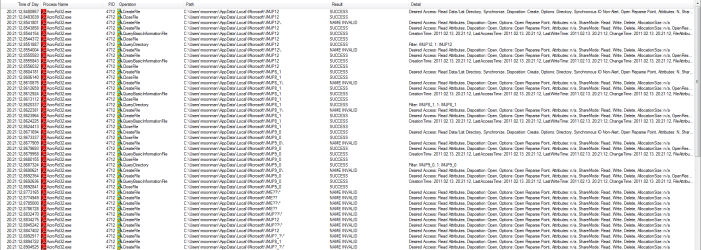
I have found the application(s) which creates these folders. :)
 

Attachments

  • acroread.png
    acroread.png
    226.6 KB · Views: 1,143
  • msnmsgr.png
    msnmsgr.png
    57.1 KB · Views: 607

My Computer

OS
Windows 7 Enterprise x64
Hence msnmsgr.exe, the MSN Messenger program from Microsoft. Which md5 sum has your file, is it one of the files listed here ?
 

My Computer

OS
Windows 7 Home Premium 32bit
It's important to note that even though msnmsgr.exe created those folders on moonman's system, this program is apparently not the only culprit. On my system, it is clearly Windows Live Mail that is creating the folders, and after doing a full search, I found that msnmsgr.exe is not even present on my system.

Larry
 

My Computer

OS
Windows 7 Professional 64 bit
Back
Top