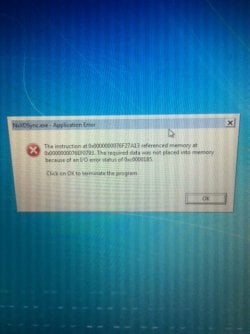
Application error message after starting up windows.

ryanod

New member
Local time
11:23 PM
Messages
2
Hey guys and gals,

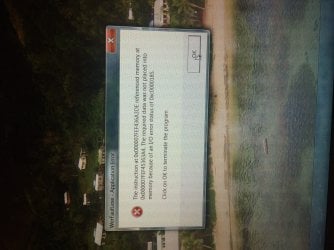
i'm getting this error message on my screen everytime i start windows (see attachment). i typed it into google but i couldn't get a result. does anyone know what it is and how i can resolve the problem?

background info: a few weeks ago i did a system update and it made my computer go completely retarded. i had to turn off my anti-virus program and then shit really hit the fan. i was getting blue screens with error messages, the computer would start up then shut itself down etc. after hours of too-ing and fro-ing i was finally able to start windows normally and turn the anti-virus software back on.

once it was back on there wasn't so many issues, just the error message that i keep getting after start up and the whole system is actually running slower.

Can anyone offer some suggestion on how to rectify the problem?

Thanks for your help,

Ryan
 

Attachments
  • IMG_4743.JPG
    IMG_4743.JPG
    268.4 KB · Views: 3

My Computer

Computer type
Laptop
Computer Manufacturer/Model Number
Dell xps 15z
OS
Windows 7 professional 64bit
Antivirus
Sophos
Browser
Firefox
Hi and welcome to the Forum. To say that your computer went completely retarded is no help at all to anyone trying to help you. Please be more specific. You could try this:
Open an elevated command prompt and run this "sfc /scannow" note the space after the "c". Let that run until it finishes and report result back here.
 

My Computer

Computer type
PC/Desktop
OS
Microsoft Windows 7 Home Premium 64-bit 7601 Multiprocessor Free Service Pack 1
CPU
Intel(R) Core(TM) i7-3770 CPU @ 3.40GHz
Motherboard
ASUSTeK COMPUTER INC. P8H77-M
Memory
8.00 GB
Graphics Card(s)
Intel(R) HD Graphics 4000
Sound Card
On Board
Monitor(s) Displays
Dell 24"
Screen Resolution
1920 x 1080
Hard Drives
(1) INTEL SSDSC2CT180A3 ATA Device (2) ST500DM002-1BD142 ATA Device (3) WDC WD3200AAKS-75L9A0 ATA Device (4) Generic- Compact Flash USB Device (5) Generic- MS/MS-Pro USB Device (6) Generic- SD/MMC USB Device (7) Generic- SM/xD-Picture USB
PSU
500w Corsair
Case
Cooler Master
Cooling
3 Fans
Keyboard
Logitech MK300
Mouse
Logitech WOM
Internet Speed
75Mb
Antivirus
Norton 360
Browser
Firefox, Opera, IE
Thanks Mitch

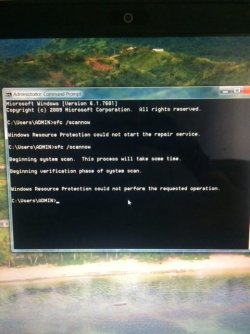
Thanks heaps for the advice mitch, i tried what you suggested and didn't have much luck. see pics below.

in reference to my computer going completely retarded, i'll try and describe what happened. hope it doesn't confuse.

So i went to do a windows update, my computer crashed mid-update, i re-booted and got a blue screen, computer crashed again after a couple of seconds (was still on but blank screen) pressed the power button to put it into hibernate mode. pressed again a few minutes later and it started ok but extremely slow and when it finally got me onto my desktop i had the following error messages. now every time i shut down and re-start it will either take me straight to the desktop (after about 10 minutes of booting up) or take me to the blue screen again, crash as like before, i will have to hibernate it and start it back up again, then get taken back to desktop with the attached error messages.

also intermittently it will not recognize my wifi adapter and i won't be able to connect to any network (not even my router) and the anti-virus software will have stopped working.
 

Attachments

  • image1(1).JPG
    image1(1).JPG
    55.8 KB · Views: 5
  • image2(1).JPG
    image2(1).JPG
    49.8 KB · Views: 5
  • image3.JPG
    image3.JPG
    53.2 KB · Views: 5

My Computer

Computer type
Laptop
Computer Manufacturer/Model Number
Dell xps 15z
OS
Windows 7 professional 64bit
Antivirus
Sophos
Browser
Firefox
Now we know that your problem accured after an update malfunction. Suggest you do a system restore to a point before the last update. You might need to do this is Safe Mode.

Then go on to this:
But you didn't open an elevated command prompt. If you didn't know how to do this then it is best to come back and ask. Saves time but never mind here's how.
Left click your Start button. In the search box type "cmd" without the quotes. In the context menu that opens RIGHT click on cmd.exe and left click on "Run as Administrator" That will open a command prompt window like this (compare with your image of the cmd for reference):
cmd.PNG
Then do the sfc /scannow
 

My Computer

Computer type
PC/Desktop
OS
Microsoft Windows 7 Home Premium 64-bit 7601 Multiprocessor Free Service Pack 1
CPU
Intel(R) Core(TM) i7-3770 CPU @ 3.40GHz
Motherboard
ASUSTeK COMPUTER INC. P8H77-M
Memory
8.00 GB
Graphics Card(s)
Intel(R) HD Graphics 4000
Sound Card
On Board
Monitor(s) Displays
Dell 24"
Screen Resolution
1920 x 1080
Hard Drives
(1) INTEL SSDSC2CT180A3 ATA Device (2) ST500DM002-1BD142 ATA Device (3) WDC WD3200AAKS-75L9A0 ATA Device (4) Generic- Compact Flash USB Device (5) Generic- MS/MS-Pro USB Device (6) Generic- SD/MMC USB Device (7) Generic- SM/xD-Picture USB
PSU
500w Corsair
Case
Cooler Master
Cooling
3 Fans
Keyboard
Logitech MK300
Mouse
Logitech WOM
Internet Speed
75Mb
Antivirus
Norton 360
Browser
Firefox, Opera, IE
Back
Top