Arbitrary Processor Downclock

conn

New member
Local time
6:24 AM
Messages
7
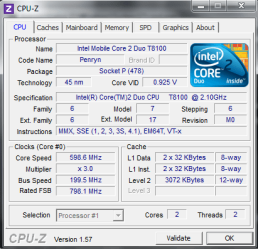
Here is the CPU-Z screen:
Untitled.png

I am running Windows 7 Pro, 32 bit.
The performance I should be getting from my two cores is around 2.2 GHz, but the clock speed has been reduced to 600 MHz for reasons unknown to me.
The problem happened randomly. Upon sleeping and then awakening my laptop, I noticed a drastic performance drop. It should be noted that this problem has cropped up before; a system restore to before the problem resolved it. Since, however, it has now happened again, I would like any suggestions on how to find the root of the problem. I don't run any utilities for overclocking, and the power management settings in Windows are not causing the problem. Thanks in advance for your help.
 

My Computer

Computer Manufacturer/Model Number
HP dv6t Quad Edition
OS
Windows 7 Home Premium 64 bit
CPU
Intel core i7 2630QM @ 2.0 GHz
Memory
6 GB RAM
Graphics Card(s)
AMD Radeon HD 6770M, 1GB GDDR5
Screen Resolution
1920 x 1080
Hard Drives
750GB 7200rpm
Internet Speed
sloooooooooow
It is probably Intel speed step kicking in. It will lower your process speeds (CPU clock multiplier), depending on the load of the cores, in order to conserve power - which is something you want on a laptop. It will ramp up the clock when you need it.

To see if this is the case, go to your power options from in control panel, choose change plan settings then choose change advanced power settings.

I forget what the setting is under there (it does not show up on mine because I have speedstep disabled), but somewhere there should be a setting for the minimum process speed in percent. You can basically disable speedstep by setting it to 100%, but that probably would drain your battery pretty quickly.
 

My Computer

Computer type
PC/Desktop
Computer Manufacturer/Model Number
Home built (GeneO industries)/Model 4
OS
Windows 10 Pro. EFI boot partition, full EFI boot
CPU
i7 4770k 4.4GHz (44-44-43-43 turbo) @ 1.248V
Motherboard
ASUS Maximus VI Hero
Memory
16GB (8GBx2) @2200 MHz G.skill Sniper 10-11-10-30-1, 1.6V
Graphics Card(s)
MSI GTX 970 Gaming 4G
Sound Card
Onboard SupremeFX Audio
Monitor(s) Displays
NEC Spectraview 2490WUXi-SV
Screen Resolution
1920 x 1200
Hard Drives
Samsung 850 Pro 256GB (OS), Samsung 2x 128GB 840 Pro SSD in RAID0, 3x WD Blue 6Gb/s 1TB RAID0, WD 2TB Black external USB 3.0, 2TB WD20EARS Green external USB 3.0, 2x 500GB Seagate and 1 750 GB external USB, 1x 350GB external USB3
PSU
Seasonic X-850 (2012 KM3 model)
Case
Fractal Design Define R4
Cooling
NH-D14, NF-F12, NF-A15; NF-P14, NF-P12,NF-A14, S12A PWM
Keyboard
Cooler Master Storm Quickfire Rapid - Brown
Mouse
Logitech G602
Internet Speed
126.4 Mb/s down, 24.3 Mb/s up
Other Info
USB 3.0 x8 , SATA III x8, eSATA, USB 2.0 x6. Samsung DVD R/W drive.

WEI: CPU 7.8, Memory 7.9, Graphics 7.9, Disk 7.9
That was the first thing I checked. I made a new thread because I suspect that Speedstep isn't the culprit; The power settings are as they should be, and the processor performance isn't ramped up when there is a load on it.
 

My Computer

Computer Manufacturer/Model Number
HP dv6t Quad Edition
OS
Windows 7 Home Premium 64 bit
CPU
Intel core i7 2630QM @ 2.0 GHz
Memory
6 GB RAM
Graphics Card(s)
AMD Radeon HD 6770M, 1GB GDDR5
Screen Resolution
1920 x 1080
Hard Drives
750GB 7200rpm
Internet Speed
sloooooooooow
The problem is fixed. It looks like running sfc (System File Checker) from the command line fixed the problem. Running it once when I found the problem didn't work, but I ran it again, and voila. I suspected that the problem stemmed from a downclock in the BIOS, for possible thermal reasons, but I guess not.
 

My Computer

Computer Manufacturer/Model Number
HP dv6t Quad Edition
OS
Windows 7 Home Premium 64 bit
CPU
Intel core i7 2630QM @ 2.0 GHz
Memory
6 GB RAM
Graphics Card(s)
AMD Radeon HD 6770M, 1GB GDDR5
Screen Resolution
1920 x 1080
Hard Drives
750GB 7200rpm
Internet Speed
sloooooooooow
I thought the minimum multiplier for this CPU was 6, top 10.5. That is the maximum bus speed of the processor (200MHz). Do you actually see a performance degradation? Could CPU-Z be mis-reporting?
 

My Computer

Computer type
PC/Desktop
Computer Manufacturer/Model Number
Home built (GeneO industries)/Model 4
OS
Windows 10 Pro. EFI boot partition, full EFI boot
CPU
i7 4770k 4.4GHz (44-44-43-43 turbo) @ 1.248V
Motherboard
ASUS Maximus VI Hero
Memory
16GB (8GBx2) @2200 MHz G.skill Sniper 10-11-10-30-1, 1.6V
Graphics Card(s)
MSI GTX 970 Gaming 4G
Sound Card
Onboard SupremeFX Audio
Monitor(s) Displays
NEC Spectraview 2490WUXi-SV
Screen Resolution
1920 x 1200
Hard Drives
Samsung 850 Pro 256GB (OS), Samsung 2x 128GB 840 Pro SSD in RAID0, 3x WD Blue 6Gb/s 1TB RAID0, WD 2TB Black external USB 3.0, 2TB WD20EARS Green external USB 3.0, 2x 500GB Seagate and 1 750 GB external USB, 1x 350GB external USB3
PSU
Seasonic X-850 (2012 KM3 model)
Case
Fractal Design Define R4
Cooling
NH-D14, NF-F12, NF-A15; NF-P14, NF-P12,NF-A14, S12A PWM
Keyboard
Cooler Master Storm Quickfire Rapid - Brown
Mouse
Logitech G602
Internet Speed
126.4 Mb/s down, 24.3 Mb/s up
Other Info
USB 3.0 x8 , SATA III x8, eSATA, USB 2.0 x6. Samsung DVD R/W drive.

WEI: CPU 7.8, Memory 7.9, Graphics 7.9, Disk 7.9
No, there was a significant performance degradation. The clock seen by CPU-Z was the same as another clocking utility I have.
 

My Computer

Computer Manufacturer/Model Number
HP dv6t Quad Edition
OS
Windows 7 Home Premium 64 bit
CPU
Intel core i7 2630QM @ 2.0 GHz
Memory
6 GB RAM
Graphics Card(s)
AMD Radeon HD 6770M, 1GB GDDR5
Screen Resolution
1920 x 1080
Hard Drives
750GB 7200rpm
Internet Speed
sloooooooooow
Odd. Now how do you think the something in Windows affects how the the hardware runs? I expect that somehow it was misreporting due to some windows interface.

Well, in any case, good you have it resolved.
 

My Computer

Computer type
PC/Desktop
Computer Manufacturer/Model Number
Home built (GeneO industries)/Model 4
OS
Windows 10 Pro. EFI boot partition, full EFI boot
CPU
i7 4770k 4.4GHz (44-44-43-43 turbo) @ 1.248V
Motherboard
ASUS Maximus VI Hero
Memory
16GB (8GBx2) @2200 MHz G.skill Sniper 10-11-10-30-1, 1.6V
Graphics Card(s)
MSI GTX 970 Gaming 4G
Sound Card
Onboard SupremeFX Audio
Monitor(s) Displays
NEC Spectraview 2490WUXi-SV
Screen Resolution
1920 x 1200
Hard Drives
Samsung 850 Pro 256GB (OS), Samsung 2x 128GB 840 Pro SSD in RAID0, 3x WD Blue 6Gb/s 1TB RAID0, WD 2TB Black external USB 3.0, 2TB WD20EARS Green external USB 3.0, 2x 500GB Seagate and 1 750 GB external USB, 1x 350GB external USB3
PSU
Seasonic X-850 (2012 KM3 model)
Case
Fractal Design Define R4
Cooling
NH-D14, NF-F12, NF-A15; NF-P14, NF-P12,NF-A14, S12A PWM
Keyboard
Cooler Master Storm Quickfire Rapid - Brown
Mouse
Logitech G602
Internet Speed
126.4 Mb/s down, 24.3 Mb/s up
Other Info
USB 3.0 x8 , SATA III x8, eSATA, USB 2.0 x6. Samsung DVD R/W drive.

WEI: CPU 7.8, Memory 7.9, Graphics 7.9, Disk 7.9
The problem is fixed. It looks like running sfc (System File Checker) from the command line fixed the problem. Running it once when I found the problem didn't work, but I ran it again, and voila. I suspected that the problem stemmed from a downclock in the BIOS, for possible thermal reasons, but I guess not.

If it comes back.

Check your CPU temp with Real Temp.
If it's running hot it will throttle down the CPU.

Check your battery and PSU.
Is the PSU hot when plugged in?
 

My Computer

Computer type
PC/Desktop
Computer Manufacturer/Model Number
76~2.0
OS
Windows 7 Ult x64 - SP1/ Windows 8 Pro x64
CPU
Intel Core i5-3570K 4.6GHz
Motherboard
Gigabyte GA-Z77X UD3H, f18
Memory
8GB (2X4GB) DDR3 1600 Corsair Vengeance CL8 1.5v
Graphics Card(s)
Sapphire HD 7770 Vapor-X OC 1GB DDR5
Sound Card
Onboard VIA VT2021
Monitor(s) Displays
22" LCD Dell
Screen Resolution
1680x1050
Hard Drives
Samsung 840Pro 128GB SSD,
Seagate Barracuda 500GB SATA2 7200rpm 32MB cache, Seagate Barracuda 1TB SATA2 7200rpm 32MB cache,
PSU
Corsair HX650W
Case
Cooler Master Storm Scout
Cooling
Corsair H80 2x12cm Noctua NF P12 , 2x14cm case fans
Keyboard
Logitech Wave
Mouse
CM Sentinel
Internet Speed
Dismal
Antivirus
Avast
Browser
Opera Next
Other Info
Haswell laptop: HP Envy 17t-j, i7-4700MQ, GeForce 740M 2GB DDR3, 17.3" Full HD 1920x1080, 16GB RAM, Samsung 840 Pro 128GB, 1TB Hitachi 7200 HDD,
Desktop: eSATA ports,
External eSATA Seagate 500GB SATA2 7200rpm,
External WD USB 500GB
Untitled.png

The PSU isn't overly hot, no.
I'm posting now because the problem came back today. After a cold boot, the performance dropped to the same levels I saw before, again inexplicably.
Is it possible that the temperature is being mis-reported, maybe because of a bad temp. reading?
 

My Computer

Computer Manufacturer/Model Number
HP dv6t Quad Edition
OS
Windows 7 Home Premium 64 bit
CPU
Intel core i7 2630QM @ 2.0 GHz
Memory
6 GB RAM
Graphics Card(s)
AMD Radeon HD 6770M, 1GB GDDR5
Screen Resolution
1920 x 1080
Hard Drives
750GB 7200rpm
Internet Speed
sloooooooooow
Back
Top