Solved Arrggh! I'm having 'Permission' problems! Help!

marco772

New member
Member
Local time
12:49 PM
Messages
41
HI,

My Windows 7 Ultimate has just done something really annoying...for the second time.
Both times this has occurred in the same way.

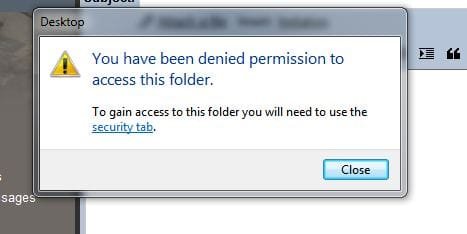
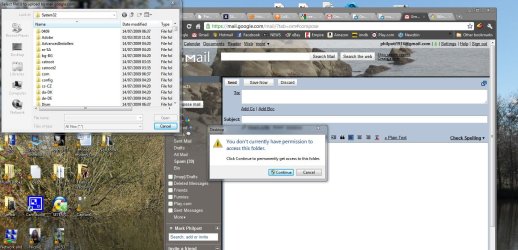
I was using gmail, direct on the web, and wanted to attach a file I'd saved to my desktop. Usually I would just drag it in, but this time I clicked on the "Attach a file" button and the browsing window popped up so I clicked on Desktop and then it says, "You don't currently have permission to access this folder" (See pic 'Deny1')

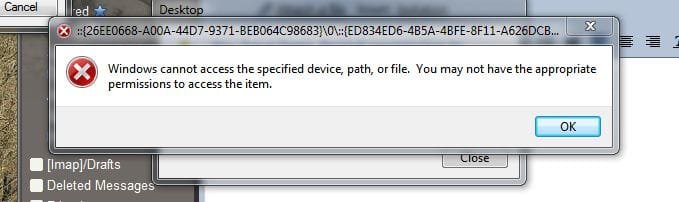
So I click on 'Continue' and get what you see in photo "Deny2".

I click on the highlighted "Security tab" and then get photo "Deny3" pop up!

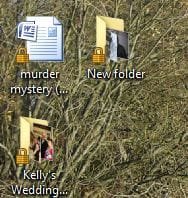
So I closed that and now all the files on my desktop have this little padlock on them! As is photo "Deny4"!

When I simply dragged the file from the desktop into gmail, it worked fine!


The only way I could solve this before was to do a System Restore but it's very annoying.
I looked into "permissions" and "administrators" before but don't really understand it.

Is there a easy to follow way I can stop this from happening. The computer is only used by me so I would like to think I should have access to most of it!
 

Attachments
  • Deny1.JPG
    Deny1.JPG
    193.1 KB · Views: 14
  • deny2.JPG
    deny2.JPG
    19.6 KB · Views: 4
  • Deny3.JPG
    Deny3.JPG
    28.4 KB · Views: 4
  • Deny4.JPG
    Deny4.JPG
    20.6 KB · Views: 193

My Computer My Computer

OS
Windows 7 Ultimate
Memory
4 GB Corsair
Graphics Card(s)
NVIDIA GT9800
Hello, Marco772. Welcome.

Security was just doing its job in the first 3 'deny' examples. Not a good idea to allow a web app access to your System32 folder!!

As far as the locks on the icons, here is a link that lists some various reasons why this could occur, including changing permissions for system folders/drives:

how do I get a lock icon on my folder to come off?

James
 

My Computer My Computer

OS
Win7U 64 RTM
CPU
Q9550
Motherboard
GA-EP45-UD3R
Memory
8GB Gskill
Graphics Card(s)
ASUS|EAH4850/HTDI/1GD3/A
Sound Card
xfi Plat
Monitor(s) Displays
Dell 2405fpw
Screen Resolution
1920x1200
Hard Drives
Seagate & WD sata Drives
PSU
Antec
Case
Antec
Keyboard
MS Natural Ergonomic 4000
Mouse
Logitech MX610 USB Cordless
Thanks for the link, James.
I used this bit of info on the 'Desktop' folder and it has got rid of all the locks.

1) Right-click the folder or drive that has a lock icon and select "Properties".

2) Click on the "Security" tab, then select "Edit..." to change permissions. Click "Add.."

3) In the text field for "Object Name", enter in "Users" (without quotations). Hit "OK".

4) "Apply", "OK", and voila, the padlock next to the icons should be gone.


Odd that it should all freak out from using something as popular as Gmail though...hopefully this has sorted it out now!

Mark
 

My Computer My Computer

OS
Windows 7 Ultimate
Memory
4 GB Corsair
Graphics Card(s)
NVIDIA GT9800
Gld you got it sorted, Mark. :geek:
 

My Computer My Computer

OS
Win7U 64 RTM
CPU
Q9550
Motherboard
GA-EP45-UD3R
Memory
8GB Gskill
Graphics Card(s)
ASUS|EAH4850/HTDI/1GD3/A
Sound Card
xfi Plat
Monitor(s) Displays
Dell 2405fpw
Screen Resolution
1920x1200
Hard Drives
Seagate & WD sata Drives
PSU
Antec
Case
Antec
Keyboard
MS Natural Ergonomic 4000
Mouse
Logitech MX610 USB Cordless
Thanks for the link, James.
I used this bit of info on the 'Desktop' folder and it has got rid of all the locks.

1) Right-click the folder or drive that has a lock icon and select "Properties".

2) Click on the "Security" tab, then select "Edit..." to change permissions. Click "Add.."

3) In the text field for "Object Name", enter in "Users" (without quotations). Hit "OK".

4) "Apply", "OK", and voila, the padlock next to the icons should be gone.


Odd that it should all freak out from using something as popular as Gmail though...hopefully this has sorted it out now!

Mark

The only problem is that for users with multiple accounts on their systems, this would open up their desktop to be visible to any other user on the computer. It's not a good idea security-wise. There has to be some other reason and solution for the lock icon.
 

My Computer My Computer

Computer Manufacturer/Model Number
Custom
OS
Windows 7 Ultimate RTM (Technet)
CPU
3.00 gigahertz Intel Core2 Duo E8400
Motherboard
ASUSTeK Computer INC. P5K/EPU Rev 1.xx
Memory
4GB
Graphics Card(s)
ATI Radeon X1950 Pro
Sound Card
Built in HD Audio
Monitor(s) Displays
22" Gateway LCD
Screen Resolution
1920 x 1200
Hard Drives
ST3160023A [Hard drive] (160.04 GB) -- drive 0, rev 8.01, ST3500630AS [Hard drive] (500.11 GB) -- drive 2, rev 3.AAK
ST3500630AS [Hard drive] (500.11 GB) -- drive 1, rev 3.AAK
Keyboard
Logitech G11
Mouse
Microsoft Wireless Laser Mouse 5000
Internet Speed
13.44 Mbps
I assume, as I'm the only user of THIS computer, that I needn't worry though?
 

My Computer My Computer

OS
Windows 7 Ultimate
Memory
4 GB Corsair
Graphics Card(s)
NVIDIA GT9800
Back
Top