Arrow keys not scrolling in windows explorer

Are you guys talking about the list view or details view, in both of those I can use up/down to go up and down and right /left to change columns or rows in list view. I have not themed anything on mine.

Icons view
 

My Computer My Computer

Computer type
Laptop
Computer Manufacturer/Model Number
Dell Inspiron 1564
OS
Microsoft Windows 7 Ultimate 64-bit 7601 Multiprocessor Free Service Pack 1
CPU
Intel(R) Core(TM) i3 CPU M 330 @ 2.13GHz
Motherboard
Dell Inc. 08CNC9
Memory
2.00 GB
Graphics Card(s)
Intel(R) HD Graphics
Sound Card
(1) Realtek High Definition Audio (2) Intel(R) Display Aud
Screen Resolution
1366x768
Hard Drives
SAMSUNG HM250HI ATA Device 232.88 GB
Antivirus
Avast
4. I'm also hearing a brief chirping kind of sound (like one produced by old dialup modems when dialing) at bootup and when photo viewer is opening the other image (as mentioned in 2).

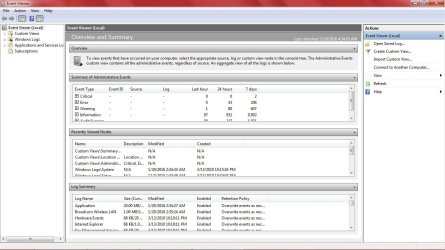
If i had those issues i would look in Event Viewer to see if there are any error messages that might help.

In the Start button / Search field, type in Event, and click on the Event Viewer program.

OK I'm inside event viewer (first time ever), what exactly am I looking for?
 

My Computer My Computer

Computer type
Laptop
Computer Manufacturer/Model Number
Dell Inspiron 1564
OS
Microsoft Windows 7 Ultimate 64-bit 7601 Multiprocessor Free Service Pack 1
CPU
Intel(R) Core(TM) i3 CPU M 330 @ 2.13GHz
Motherboard
Dell Inc. 08CNC9
Memory
2.00 GB
Graphics Card(s)
Intel(R) HD Graphics
Sound Card
(1) Realtek High Definition Audio (2) Intel(R) Display Aud
Screen Resolution
1366x768
Hard Drives
SAMSUNG HM250HI ATA Device 232.88 GB
Antivirus
Avast
Ah, ok, new info.
I use details view.

I just tested Icons view, and the left/right arrow keys do switch to a new row.
So, i guess you do have a problem i don't have.
 

My Computer My Computer

Computer type
PC/Desktop
Computer Manufacturer/Model Number
home built
OS
Multi-Boot W7_Pro_x64 W8.1_Pro_x64 W10_Pro_x64 +Linux_VMs +Chromium_VM
CPU
AMD Athlon II x4 620
Motherboard
Gigabyte GA-MA785G-UD3H
Memory
6GB GSkill DDR2 800
Graphics Card(s)
AMD 4670 GPU + AMD 4200 IGP
Sound Card
on board Realtek ALC889A
Monitor(s) Displays
RCA 40" LCD TV, Insignia 32" LCD TV, HP 15" LCD monitor
Screen Resolution
1680 x 1050
Hard Drives
OCZ Vertex 3 120GB,
Samsung F3 1TB (3),
Several others - WD, Seagate, Hitachi, ...
PSU
Corsair 500 W
Case
Rosewill mid tower
Cooling
CM 90mm rifle
Keyboard
Gyration wireless, Logitech wireless, Dell USB wired
Mouse
Gyration wireless, Logitech wireless, V7 USB wired
Internet Speed
Spectrum - 100Mbps D / 10Mbps U
Antivirus
Avast, MBAM3, EMET, WinPatrol
Browser
Pale Moon, Firefox, IE
Other Info
2 multi-boot PC's
Mainly HTPC/Office/Gen purpose (no gaming).
Trendnet USB KVM.
LG DVD burner/Blue Ray Player.
Tray system for removable SATA backup drives.

Not currently OCd, under-volted.
I use Hybrid sleep, rarely re-boot or shutdown.

Hauppauge HD-PVR, Avermedia PCIe TV Tuner, Hauppauge PCI TV Tuner.
Ah, ok, new info.
I use details view.

I just tested Icons view, and the left/right arrow keys do switch to a new row.
So, i guess you do have a problem i don't have.

:D yes I knew I have a problem, well more than one...
 

My Computer My Computer

Computer type
Laptop
Computer Manufacturer/Model Number
Dell Inspiron 1564
OS
Microsoft Windows 7 Ultimate 64-bit 7601 Multiprocessor Free Service Pack 1
CPU
Intel(R) Core(TM) i3 CPU M 330 @ 2.13GHz
Motherboard
Dell Inc. 08CNC9
Memory
2.00 GB
Graphics Card(s)
Intel(R) HD Graphics
Sound Card
(1) Realtek High Definition Audio (2) Intel(R) Display Aud
Screen Resolution
1366x768
Hard Drives
SAMSUNG HM250HI ATA Device 232.88 GB
Antivirus
Avast
Are you guys talking about the list view or details view, in both of those I can use up/down to go up and down and right /left to change columns or rows in list view. I have not themed anything on mine.

Icons view

Yeah you do have an issue are you sure the uxstyle restored your old uxtheme.dll when it was removed? I would think SFC would find that but who knows. EDIT: did not know that uxstyles does not replace the dll sorry.
 

My Computer My Computer

Computer type
PC/Desktop
Computer Manufacturer/Model Number
Custom
OS
10 Pro x64
CPU
Ryzen 9 3900X
Motherboard
Asrock x370 Tachi
Memory
64GB(4x16GB) DDR4
Graphics Card(s)
EVGA 1080ti FTW3
Sound Card
ASUS Xonar Essence STX (V4 Bursons), ODAC rev B, NFB-11, O2
Monitor(s) Displays
3xASUS PB278Q/R, Optoma HD142X
Screen Resolution
3x1440p, 1080p
Hard Drives
512GB 850 EVO(OS, Programs)
4TB (Movies)
3TB (Downloads)
3TB (Programs)
1TB HDD (Games)
2x6TB R1 (videos)
PSU
AX760
Case
Fractal Define R5
Cooling
NH-D15S
Keyboard
Massdrop Ctrl with Box Navy's
Mouse
G903, Alioth XXL Mat
Internet Speed
280/40
Antivirus
MBAM, ESET
Browser
Canary 64 Bit
Other Info
I also own a Thinkpad P50 Xeon 4K, X220T, X1C5
OK I'm inside event viewer (first time ever), what exactly am I looking for?

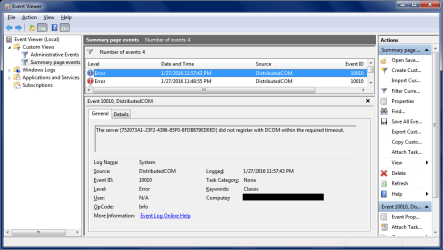
If you see any errors or warnings post a screen print of the event(s) like this, so folks here can see some details.

Event_Error_01.png
 

My Computer My Computer

Computer type
PC/Desktop
Computer Manufacturer/Model Number
home built
OS
Multi-Boot W7_Pro_x64 W8.1_Pro_x64 W10_Pro_x64 +Linux_VMs +Chromium_VM
CPU
AMD Athlon II x4 620
Motherboard
Gigabyte GA-MA785G-UD3H
Memory
6GB GSkill DDR2 800
Graphics Card(s)
AMD 4670 GPU + AMD 4200 IGP
Sound Card
on board Realtek ALC889A
Monitor(s) Displays
RCA 40" LCD TV, Insignia 32" LCD TV, HP 15" LCD monitor
Screen Resolution
1680 x 1050
Hard Drives
OCZ Vertex 3 120GB,
Samsung F3 1TB (3),
Several others - WD, Seagate, Hitachi, ...
PSU
Corsair 500 W
Case
Rosewill mid tower
Cooling
CM 90mm rifle
Keyboard
Gyration wireless, Logitech wireless, Dell USB wired
Mouse
Gyration wireless, Logitech wireless, V7 USB wired
Internet Speed
Spectrum - 100Mbps D / 10Mbps U
Antivirus
Avast, MBAM3, EMET, WinPatrol
Browser
Pale Moon, Firefox, IE
Other Info
2 multi-boot PC's
Mainly HTPC/Office/Gen purpose (no gaming).
Trendnet USB KVM.
LG DVD burner/Blue Ray Player.
Tray system for removable SATA backup drives.

Not currently OCd, under-volted.
I use Hybrid sleep, rarely re-boot or shutdown.

Hauppauge HD-PVR, Avermedia PCIe TV Tuner, Hauppauge PCI TV Tuner.

Attachments

  • untitled1.jpg
    untitled1.jpg
    110.9 KB · Views: 4

My Computer My Computer

Computer type
Laptop
Computer Manufacturer/Model Number
Dell Inspiron 1564
OS
Microsoft Windows 7 Ultimate 64-bit 7601 Multiprocessor Free Service Pack 1
CPU
Intel(R) Core(TM) i3 CPU M 330 @ 2.13GHz
Motherboard
Dell Inc. 08CNC9
Memory
2.00 GB
Graphics Card(s)
Intel(R) HD Graphics
Sound Card
(1) Realtek High Definition Audio (2) Intel(R) Display Aud
Screen Resolution
1366x768
Hard Drives
SAMSUNG HM250HI ATA Device 232.88 GB
Antivirus
Avast
Ok, then whatever is happening is not getting logged to Event Viewer.
As far as I know a chirping sound indicates some type of error.
If you don't get an error message displayed, and it's not listed in Event Viewer, I'm not sure how else to find where the error came from, what it means, and how to fix it. :(
 

My Computer My Computer

Computer type
PC/Desktop
Computer Manufacturer/Model Number
home built
OS
Multi-Boot W7_Pro_x64 W8.1_Pro_x64 W10_Pro_x64 +Linux_VMs +Chromium_VM
CPU
AMD Athlon II x4 620
Motherboard
Gigabyte GA-MA785G-UD3H
Memory
6GB GSkill DDR2 800
Graphics Card(s)
AMD 4670 GPU + AMD 4200 IGP
Sound Card
on board Realtek ALC889A
Monitor(s) Displays
RCA 40" LCD TV, Insignia 32" LCD TV, HP 15" LCD monitor
Screen Resolution
1680 x 1050
Hard Drives
OCZ Vertex 3 120GB,
Samsung F3 1TB (3),
Several others - WD, Seagate, Hitachi, ...
PSU
Corsair 500 W
Case
Rosewill mid tower
Cooling
CM 90mm rifle
Keyboard
Gyration wireless, Logitech wireless, Dell USB wired
Mouse
Gyration wireless, Logitech wireless, V7 USB wired
Internet Speed
Spectrum - 100Mbps D / 10Mbps U
Antivirus
Avast, MBAM3, EMET, WinPatrol
Browser
Pale Moon, Firefox, IE
Other Info
2 multi-boot PC's
Mainly HTPC/Office/Gen purpose (no gaming).
Trendnet USB KVM.
LG DVD burner/Blue Ray Player.
Tray system for removable SATA backup drives.

Not currently OCd, under-volted.
I use Hybrid sleep, rarely re-boot or shutdown.

Hauppauge HD-PVR, Avermedia PCIe TV Tuner, Hauppauge PCI TV Tuner.
the chirping sound could be coming from the hard drive just a guess here. I would try running a live cd like Ubuntu so when the computer boot its running off the disk and not the hard drive am thinking you could remove the hard drive before you boot to the cd to see if the chirp noise is still their when booting to the live cd.
 

My Computer My Computer

Computer type
PC/Desktop
Computer Manufacturer/Model Number
dell xps 9000
OS
win 10
the chirping sound could be coming from the hard drive just a guess here. I would try running a live cd like Ubuntu so when the computer boot its running off the disk and not the hard drive am thinking you could remove the hard drive before you boot to the cd to see if the chirp noise is still their when booting to the live cd.

I'll try that but as mentioned earlier chirping sound is my fourth concern, I want to solve first three first.
 

My Computer My Computer

Computer type
Laptop
Computer Manufacturer/Model Number
Dell Inspiron 1564
OS
Microsoft Windows 7 Ultimate 64-bit 7601 Multiprocessor Free Service Pack 1
CPU
Intel(R) Core(TM) i3 CPU M 330 @ 2.13GHz
Motherboard
Dell Inc. 08CNC9
Memory
2.00 GB
Graphics Card(s)
Intel(R) HD Graphics
Sound Card
(1) Realtek High Definition Audio (2) Intel(R) Display Aud
Screen Resolution
1366x768
Hard Drives
SAMSUNG HM250HI ATA Device 232.88 GB
Antivirus
Avast
In my opinion this should be done first if it is your hard drive making the noise. Would be a sign of a hard drive failure. And you could loose all your files.
 

My Computer My Computer

Computer type
PC/Desktop
Computer Manufacturer/Model Number
dell xps 9000
OS
win 10
I would say the HDD is a concern, but there is a problem with the OS specifically Explorer.
I had only one automatic system restore point dated before these problems occurred and I ran system restore from safe mode, and after it finished and logged on normally windows said something like "system restore wasn't successful, could not retrieve the file because it was corrupt or deleted during the restore".
What bothers me is the part about the file being corrupt or deleted.

Before you start any more scans, can you get into Advanced Boot Options and run "Last Known Good Configuration"? Follow step #2 if you multi-boot or step #3 if single boot, then step #4.
When machine has finished rebooting test the arrow behaviour in Explorer.

If still corrupt, a triple run of SFC may fix it, if not try the system update readiness tool mentioned at the second bullet, but if you're still getting the error messages after all that a CHKDSK scan may replace the deleted file, rerun SFC to confirm. Be forewarned a CHKDSK can take awhile, mine takes several hours, see note at link.

   Tip

Have you tried to run the SFC scan in Safe Mode at least three or more times with restarts in between?

See Note after Option Two step #4:
   Note

  • If SFC could not fix something, then run the command again to see if it may be able to the next time. Sometimes it may take running the sfc /scannow command 3 or more times to completely fix everything that it's able to.
  • If not, then download and run the 32-bit (x86) or 64-bit (x64) System Update Readiness Tool for your same installed 32-bit or 64-bit Windows 7, restart the PC afterwards, and try the sfc /scannow command again.
  • If still not, then you can attempt to run a System Restore using a restore point dated before the bad file occured to fix it. You may need to repeat doing a System Restore until you find a older restore point that may work.
  • If still not, then you can use the steps in the TIP box in the OPTION THREE section below to manually replace the files that SFC could not fix.

If a run of "Last Known Good Configuration" nor neither scan can fix the error then I would say a Repair Install is indicated; Do you have a disk?


Related:
I had thought a Folder View - Reset All Folders may help, but that won't work for Library Folders.

I also thought of restarting Explorer while the system was up just to see if that would make a difference, but I'm not sure it would.

1: I'm talking about switching between rows, not selecting them. And its nothing new, I used to do it before.
2: I also mentioned this later that when I'm double clicking open an image (in Windows Photo Viewer) from bottom most rows (about 3) it opens the first image in the folder instead. This is happening in one disk drive only.
3. Once I rename an image in the folder (by F2) and hit Enter, another image is automatically selected simultaneously, thus window shows "2 objects selected".
4. I'm also hearing a brief chirping kind of sound (like one produced by old dialup modems when dialing) at bootup and when photo viewer is opening the other image (as mentioned in 2).
Concerning #4. Describing anything to someone else is always an exercise in objectivity frm, there are some sounds in this list from various hard drives that sound like a chirp, see if it narrows it down for you: http://Failing Hard drive Sounds | datacent.com I would have myself, but your system specs are not fully filled out: http://www.sevenforums.com/tutorials/180324-system-info-see-your-system-specs.html

 

My Computer My Computer

Computer type
PC/Desktop
Computer Manufacturer/Model Number
Gateway DX4831-01e (Mid-Tower Desktop)
OS
Originally Win 7 Hm Prem x64 Ver 6.1.7600 Build 7601-SP1 | Upgraded to Windows 10 December 14, 2019
CPU
Intel i3 530 2.93GHz, 2933MHz 2 Cores 4 Logical Processors
Motherboard
Gateway H57M01 133 megahertz
Memory
6GB of 1,333MHz DDR3 SDRAM
Graphics Card(s)
32MB Intel Graphics Media Accelerator HD IGChip
Sound Card
Realtek High Definition Audio
Monitor(s) Displays
Gateway HX2000 20inch TFT active matrix TN
Screen Resolution
1600 x 900 x 59 hertz
Hard Drives
WDC WD10EADS-00M2B0 [HDD] (1000.20 GB) -- drive 0,
HL-DT-ST DVDRAM GH41N [CD-ROM dr]
Four card readers, and Four USB 2.0
PSU
300watts.
Case
Mid-Tower Desktop
Cooling
Stock from Gateway
Keyboard
Natural Ergonomic Keyboard 4000, see Other Info
Mouse
Orig. Gateway wore out now using Insignia USB wired optical
Internet Speed
Vz FIOS 10ms png 57.64Mbps down 65.53Mbps up Speedtest.org
Antivirus
Zamana Anti-logger with Anti-malware, MSE, Windows Firewall,
Browser
IE11.0.9600.19399-Upd ver11.0.135, Firefox 68.0.1 x64
Other Info
System Specs by Belarc.

BIOS: American Megatrends Inc. P01-A0 11/17/2009

Replaced the MS 'Natural' Standard PS/2 Enhanced 101-102 Keyboard with a new Natural Ergonomic Keyboard 4000 on August 1st 2014.

Canon Pixma MG3222 Printer.

Updated to IE11 on 12102015 | Fios Quantum Router g1100

Additional AV: SpywareBlaster, manual Mbam, SAS
In my opinion this should be done first if it is your hard drive making the noise. Would be a sign of a hard drive failure. And you could loose all your files.

OK it turns out that the chirp sound at bootup is from DVD combo, there is none when I remove the combo and it is back when I insert the combo back in.

And I tried to listen carefully and it seems that the very low sound while opening image file and at some other instances is coming from processor not the hard disk, not very sure though.
 

My Computer My Computer

Computer type
Laptop
Computer Manufacturer/Model Number
Dell Inspiron 1564
OS
Microsoft Windows 7 Ultimate 64-bit 7601 Multiprocessor Free Service Pack 1
CPU
Intel(R) Core(TM) i3 CPU M 330 @ 2.13GHz
Motherboard
Dell Inc. 08CNC9
Memory
2.00 GB
Graphics Card(s)
Intel(R) HD Graphics
Sound Card
(1) Realtek High Definition Audio (2) Intel(R) Display Aud
Screen Resolution
1366x768
Hard Drives
SAMSUNG HM250HI ATA Device 232.88 GB
Antivirus
Avast
I haven't heard of any processor problems with the I1564.

In the meantime, have you?

  • Dropped the machine.

  • Given it any sharp jolts, (oops! I got it).

  • Spilled any liquids on the machine.

  • Is there rough handling with the unit, (toss it here, toss it there).

  • Performed any mechanical alterations, (gotten inside).

  • Have you loaned the machine to anyone else.
frm; I ask because of your second paragraph in the quote, if any of the aforementioned conditions are met it could cause a problem, and we have to rule them out:

In my opinion this should be done first if it is your hard drive making the noise. Would be a sign of a hard drive failure. And you could loose all your files.

OK it turns out that the chirp sound at bootup is from DVD combo, there is none when I remove the combo and it is back when I insert the combo back in.

And I tried to listen carefully and it seems that the very low sound while opening image file and at some other instances is coming from processor not the hard disk, not very sure though.
Leave the DVD combo out for now, if possible.

When you request the operating system (OS) to do something for you, the processor will react and the added energy could produce a "very low sound", stay vigilant.

I gave you a lot to chew on in my last post with all that scanning or starting up this way or that way so take your time try what you may and keep us updated, okay?

p.s....Thanks for filling out your system specs! :thumbsup:


Related:

Looking for processor sounds scrounged up another possibility for low sounds the: PSU, check the first answer
 

My Computer My Computer

Computer type
PC/Desktop
Computer Manufacturer/Model Number
Gateway DX4831-01e (Mid-Tower Desktop)
OS
Originally Win 7 Hm Prem x64 Ver 6.1.7600 Build 7601-SP1 | Upgraded to Windows 10 December 14, 2019
CPU
Intel i3 530 2.93GHz, 2933MHz 2 Cores 4 Logical Processors
Motherboard
Gateway H57M01 133 megahertz
Memory
6GB of 1,333MHz DDR3 SDRAM
Graphics Card(s)
32MB Intel Graphics Media Accelerator HD IGChip
Sound Card
Realtek High Definition Audio
Monitor(s) Displays
Gateway HX2000 20inch TFT active matrix TN
Screen Resolution
1600 x 900 x 59 hertz
Hard Drives
WDC WD10EADS-00M2B0 [HDD] (1000.20 GB) -- drive 0,
HL-DT-ST DVDRAM GH41N [CD-ROM dr]
Four card readers, and Four USB 2.0
PSU
300watts.
Case
Mid-Tower Desktop
Cooling
Stock from Gateway
Keyboard
Natural Ergonomic Keyboard 4000, see Other Info
Mouse
Orig. Gateway wore out now using Insignia USB wired optical
Internet Speed
Vz FIOS 10ms png 57.64Mbps down 65.53Mbps up Speedtest.org
Antivirus
Zamana Anti-logger with Anti-malware, MSE, Windows Firewall,
Browser
IE11.0.9600.19399-Upd ver11.0.135, Firefox 68.0.1 x64
Other Info
System Specs by Belarc.

BIOS: American Megatrends Inc. P01-A0 11/17/2009

Replaced the MS 'Natural' Standard PS/2 Enhanced 101-102 Keyboard with a new Natural Ergonomic Keyboard 4000 on August 1st 2014.

Canon Pixma MG3222 Printer.

Updated to IE11 on 12102015 | Fios Quantum Router g1100

Additional AV: SpywareBlaster, manual Mbam, SAS
I would say the HDD is a concern, but there is a problem with the OS specifically Explorer.
I had only one automatic system restore point dated before these problems occurred and I ran system restore from safe mode, and after it finished and logged on normally windows said something like "system restore wasn't successful, could not retrieve the file because it was corrupt or deleted during the restore".
What bothers me is the part about the file being corrupt or deleted.

Before you start any more scans, can you get into Advanced Boot Options and run "Last Known Good Configuration"? Follow step #2 if you multi-boot or step #3 if single boot, then step #4.
When machine has finished rebooting test the arrow behaviour in Explorer.

If still corrupt, a triple run of SFC may fix it, if not try the system update readiness tool mentioned at the second bullet, but if you're still getting the error messages after all that a CHKDSK scan may replace the deleted file, rerun SFC to confirm. Be forewarned a CHKDSK can take awhile, mine takes several hours, see note at link.

   Tip

Have you tried to run the SFC scan in Safe Mode at least three or more times with restarts in between?

See Note after Option Two step #4:
   Note

  • If SFC could not fix something, then run the command again to see if it may be able to the next time. Sometimes it may take running the sfc /scannow command 3 or more times to completely fix everything that it's able to.
  • If not, then download and run the 32-bit (x86) or 64-bit (x64) System Update Readiness Tool for your same installed 32-bit or 64-bit Windows 7, restart the PC afterwards, and try the sfc /scannow command again.
  • If still not, then you can attempt to run a System Restore using a restore point dated before the bad file occured to fix it. You may need to repeat doing a System Restore until you find a older restore point that may work.
  • If still not, then you can use the steps in the TIP box in the OPTION THREE section below to manually replace the files that SFC could not fix.

If a run of "Last Known Good Configuration" nor neither scan can fix the error then I would say a Repair Install is indicated; Do you have a disk?


Related:
I had thought a Folder View - Reset All Folders may help, but that won't work for Library Folders.

I also thought of restarting Explorer while the system was up just to see if that would make a difference, but I'm not sure it would.

1: I'm talking about switching between rows, not selecting them. And its nothing new, I used to do it before.
2: I also mentioned this later that when I'm double clicking open an image (in Windows Photo Viewer) from bottom most rows (about 3) it opens the first image in the folder instead. This is happening in one disk drive only.
3. Once I rename an image in the folder (by F2) and hit Enter, another image is automatically selected simultaneously, thus window shows "2 objects selected".
4. I'm also hearing a brief chirping kind of sound (like one produced by old dialup modems when dialing) at bootup and when photo viewer is opening the other image (as mentioned in 2).
Concerning #4. Describing anything to someone else is always an exercise in objectivity frm, there are some sounds in this list from various hard drives that sound like a chirp, see if it narrows it down for you: http://Failing Hard drive Sounds | datacent.com I would have myself, but your system specs are not fully filled out: http://www.sevenforums.com/tutorials/180324-system-info-see-your-system-specs.html

OK I tried advanced boot last known good configuration, triple SFC, CHKDSK /r, reset all folders but nothing worked. I don't have a windows disk, even if I had my DVD combo is now too weak to read anything, and I've no system restore point available now, and due to an internet problem I can't download that tool you mentioned. And I have a Samsung hard drive but none of the Samsung drive sounds (on that page you mentioned) matches mine. Those sounds there sound too troublesome.

But I opened my device manager and it shows error (driver problem) on an IDE controller in Other Devices, can this be the reason? I tried to search internet for driver but no luck.
 

My Computer My Computer

Computer type
Laptop
Computer Manufacturer/Model Number
Dell Inspiron 1564
OS
Microsoft Windows 7 Ultimate 64-bit 7601 Multiprocessor Free Service Pack 1
CPU
Intel(R) Core(TM) i3 CPU M 330 @ 2.13GHz
Motherboard
Dell Inc. 08CNC9
Memory
2.00 GB
Graphics Card(s)
Intel(R) HD Graphics
Sound Card
(1) Realtek High Definition Audio (2) Intel(R) Display Aud
Screen Resolution
1366x768
Hard Drives
SAMSUNG HM250HI ATA Device 232.88 GB
Antivirus
Avast
Ok well I have already suggested the simple stuff like sfc diskcheck and a system restore but I don't know if any notice was taken.

Now if the disk is on the way out then retrieve the data using this
BOOTABLE UBUNTU
Make a bootable Ubuntu disk Download Ubuntu Desktop | Download | Ubuntu
Set the BIOS to boot from the optical when the machine boots it will show you a screen with TRY or INSTALL > select TRY not INSTALL
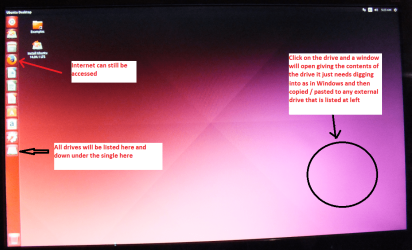
When it is finished - it takes very little time you will get a screen like in the pic .
Open the drive you want > User and dig down until you get to the data / settings you may be able to copy / paste the material you want to an external source or other installed drive doing this.
I am not sure if it will but I have recovered tons of data etc using this method both on "dead" or just plain drives that you cannot get data from using Windows.
You can use the Linux Mint Mate method but my Ubuntu ditty is quick and easy to use.
http://www.sevenforums.com/tutorials/287439-emergency-kit-save-your-files-dead-os.html

I would also suggest a run with this too Kaspersky Rescue Disk 10 and I would even go as far as doing this
http://www.sevenforums.com/tutorials/105647-ram-test-memtest86.html for good measure but at least 8 passes please or it not wortth trying to use it.
 

Attachments

  • UBUNTU SCREEN X2.PNG
    UBUNTU SCREEN X2.PNG
    272.7 KB · Views: 1

My Computer My Computer

Computer type
PC/Desktop
Computer Manufacturer/Model Number
Own build (new) Desk1 / Asus ROG Win 7 / Desk2 1st build
OS
Desk1 7 Home Prem / Desk2 10 Pro / Main lap Asus ROG 10 Pro 2 laptop Toshiba 7 Pro Asus P2520 7 & 10
CPU
Desk1 i5 3750K / Laptop i7 GTX 860M / Desk2 i5 2500
Motherboard
Desk1 Asus P877-V / Desk2 Gigabyte H67 UD3H / Laptop ?
Memory
Desk1 8GB (1866) / Desk2 16GB (1333) / Laptop 8Gb DDR3
Graphics Card(s)
Desk 1& 2NVidia GTX 650 & Laptops on board Intel
Sound Card
Desk 1 & 2 -XONAR DG Realtek High Def audio Laptop
Monitor(s) Displays
Desk 1 Benq HD 2450 / Desk2 Philips 24" / Laptop 17.5"
Screen Resolution
1920x1080 D1 & D2 & Laptop 1
Hard Drives
Desk1 Samsung 120GB 830 SSD
Asus ROG 256GB 850 Pro SSD
Desk2 Samsung 840 256 SSD
Toshiba 120GB EVO
PSU
Desk 1 Corsair HX 1050/ Laptop ? / Desk 2 Corsair HX 650
Case
Desk 1 Cooler HAF XM ? Toshiba laptop / Desk2 Coolermaster
Cooling
Fans on all Desk1 -2 Desk2 - all Coolermasters 5 Laptop ?
Keyboard
Desk 1 MS Sidewinder X6 Desk 2 MS Sidewinder X 4
Mouse
Desk 1&2 - Gigabyte MS 900 gamer - laptop - Logitec wireless
Internet Speed
ADSL2+
Other Info
One other Desktop (tester) and spare Toshba laptop both with SSD's
Running Kaspersky 2016 ISS on all machines config'd identically
Logitec audio stereo systems on each machine (x3)
Canon MG5250MFC
Router/modem TP-Link running WPA2SK
Ok well I have already suggested the simple stuff like sfc diskcheck and a system restore but I don't know if any notice was taken.

Now if the disk is on the way out then retrieve the data using this
BOOTABLE UBUNTU
Make a bootable Ubuntu disk Download Ubuntu Desktop | Download | Ubuntu
Set the BIOS to boot from the optical when the machine boots it will show you a screen with TRY or INSTALL > select TRY not INSTALL
When it is finished - it takes very little time you will get a screen like in the pic .
Open the drive you want > User and dig down until you get to the data / settings you may be able to copy / paste the material you want to an external source or other installed drive doing this.
I am not sure if it will but I have recovered tons of data etc using this method both on "dead" or just plain drives that you cannot get data from using Windows.
You can use the Linux Mint Mate method but my Ubuntu ditty is quick and easy to use.
http://www.sevenforums.com/tutorials/287439-emergency-kit-save-your-files-dead-os.html

I would also suggest a run with this too Kaspersky Rescue Disk 10 and I would even go as far as doing this
http://www.sevenforums.com/tutorials/105647-ram-test-memtest86.html for good measure but at least 8 passes please or it not wortth trying to use it.

Did you read my last reply? I've tried sfc 3 times, chkdsk /r, system restore etc that was suggested by all the fellas here but nothing worked, checked the hard drive failure sounds but none matches mine. Though I've noticed a driver error in Device Manager for IDE controller but can't find the driver.
 

My Computer My Computer

Computer type
Laptop
Computer Manufacturer/Model Number
Dell Inspiron 1564
OS
Microsoft Windows 7 Ultimate 64-bit 7601 Multiprocessor Free Service Pack 1
CPU
Intel(R) Core(TM) i3 CPU M 330 @ 2.13GHz
Motherboard
Dell Inc. 08CNC9
Memory
2.00 GB
Graphics Card(s)
Intel(R) HD Graphics
Sound Card
(1) Realtek High Definition Audio (2) Intel(R) Display Aud
Screen Resolution
1366x768
Hard Drives
SAMSUNG HM250HI ATA Device 232.88 GB
Antivirus
Avast
I suggest creating a new account and test to see if the arrow key problem exists or not. If yes you can keep the new account and copy everything except some account specific files from the old to the new. Continue testing until you are satisfied all is working correctly then delete the old account. If no difference just delete the new account.

Fix a corrupted user profile
 

My Computer My Computer

Computer type
PC/Desktop
Computer Manufacturer/Model Number
Lenovo IdeaCenter 450
OS
Windows 10 Pro X64
CPU
Intel Quad Core i7-4770 @ 3.4Ghz
Memory
16.0GB PC3-12800 DDR3 SDRAM 1600 MHz
Graphics Card(s)
Intel Integrated HD Graphics
Sound Card
Realtek HD Audio
Monitor(s) Displays
HP 22" LCD
Screen Resolution
1680 x 1050
Hard Drives
250GB Samsung EVO SATA-3 SSD
2TB Seagate ST2000DM001 SATA-2
1.5TB Seagate ST3150041AS SATA
Keyboard
Dell USB
Mouse
Lenovo USB
Internet Speed
Cable via Road Runner 3MB Upload, 30MB Download
Antivirus
Windows Defender, MBAM Pro, MBAE
Browser
Seamonkey
Other Info
UEFI/GPT
PLDS DVD-RW DH16AERSH
Did you read my last reply? I've tried sfc 3 times, chkdsk /r, system restore etc that was suggested by all the fellas here but nothing worked, checked the hard drive failure sounds but none matches mine. Though I've noticed a driver error in Device Manager for IDE controller but can't find the driver.[/QUOTE]


try reinstalling the chipset drivers from the dell support site.
 

My Computer My Computer

Computer type
PC/Desktop
Computer Manufacturer/Model Number
dell xps 9000
OS
win 10
Ok well I have already suggested the simple stuff like sfc diskcheck and a system restore but I don't know if any notice was taken.

Now if the disk is on the way out then retrieve the data using this
BOOTABLE UBUNTU
Make a bootable Ubuntu disk Download Ubuntu Desktop | Download | Ubuntu
Set the BIOS to boot from the optical when the machine boots it will show you a screen with TRY or INSTALL > select TRY not INSTALL
When it is finished - it takes very little time you will get a screen like in the pic .
Open the drive you want > User and dig down until you get to the data / settings you may be able to copy / paste the material you want to an external source or other installed drive doing this.
I am not sure if it will but I have recovered tons of data etc using this method both on "dead" or just plain drives that you cannot get data from using Windows.
You can use the Linux Mint Mate method but my Ubuntu ditty is quick and easy to use.
http://www.sevenforums.com/tutorials/287439-emergency-kit-save-your-files-dead-os.html

I would also suggest a run with this too Kaspersky Rescue Disk 10 and I would even go as far as doing this
http://www.sevenforums.com/tutorials/105647-ram-test-memtest86.html for good measure but at least 8 passes please or it not wortth trying to use it.

Did you read my last reply? I've tried sfc 3 times, chkdsk /r, system restore etc that was suggested by all the fellas here but nothing worked, checked the hard drive failure sounds but none matches mine. Though I've noticed a driver error in Device Manager for IDE controller but can't find the driver.
Yes I did actually but I didn't get a reply from when I suggested them earlier but you do what you must my friend - I am sure the others are more capable than I to sort it out. :sarc:
 

My Computer My Computer

Computer type
PC/Desktop
Computer Manufacturer/Model Number
Own build (new) Desk1 / Asus ROG Win 7 / Desk2 1st build
OS
Desk1 7 Home Prem / Desk2 10 Pro / Main lap Asus ROG 10 Pro 2 laptop Toshiba 7 Pro Asus P2520 7 & 10
CPU
Desk1 i5 3750K / Laptop i7 GTX 860M / Desk2 i5 2500
Motherboard
Desk1 Asus P877-V / Desk2 Gigabyte H67 UD3H / Laptop ?
Memory
Desk1 8GB (1866) / Desk2 16GB (1333) / Laptop 8Gb DDR3
Graphics Card(s)
Desk 1& 2NVidia GTX 650 & Laptops on board Intel
Sound Card
Desk 1 & 2 -XONAR DG Realtek High Def audio Laptop
Monitor(s) Displays
Desk 1 Benq HD 2450 / Desk2 Philips 24" / Laptop 17.5"
Screen Resolution
1920x1080 D1 & D2 & Laptop 1
Hard Drives
Desk1 Samsung 120GB 830 SSD
Asus ROG 256GB 850 Pro SSD
Desk2 Samsung 840 256 SSD
Toshiba 120GB EVO
PSU
Desk 1 Corsair HX 1050/ Laptop ? / Desk 2 Corsair HX 650
Case
Desk 1 Cooler HAF XM ? Toshiba laptop / Desk2 Coolermaster
Cooling
Fans on all Desk1 -2 Desk2 - all Coolermasters 5 Laptop ?
Keyboard
Desk 1 MS Sidewinder X6 Desk 2 MS Sidewinder X 4
Mouse
Desk 1&2 - Gigabyte MS 900 gamer - laptop - Logitec wireless
Internet Speed
ADSL2+
Other Info
One other Desktop (tester) and spare Toshba laptop both with SSD's
Running Kaspersky 2016 ISS on all machines config'd identically
Logitec audio stereo systems on each machine (x3)
Canon MG5250MFC
Router/modem TP-Link running WPA2SK
Back
Top