Assigning an icon to a Truecrypt/Veracrypt volume

MycroftHolmes

New member
Member
Local time
8:02 PM
Messages
24
I used an external hard disk with an Autorun.inf file in the root directory to assign a label and an icon to the volume. But now I encrypted it with Truecrypt, and when I mount it, the Autorun.inf doesn't work and the label and the icon doesn't appear. I have been able to assign the label using LABEL command from command prompt. However, I cannot assign the icon. Is there any way to assign the icon to the volume? I have tried autorun.inf approach as well as desktop.inf approach, but they don't work. Desktop.inf only works in case of folders, I guess. Any help would be appreciated. Also, the solution should not be a registry tweak. The icon should appear, irrespective of the PC it is mounted on.

OS Used: Windows 7 Professional 32-bit
 

My Computer My Computer

Computer type
PC/Desktop
Computer Manufacturer/Model Number
Custom Build
OS
Windows 7 Professional 32-Bit
CPU
Intel i3-530
Motherboard
Intel DH55TC
Memory
4GB DDR3
Graphics Card(s)
XFX Radeon 5770 1GB DDR5
Hard Drives
1TB WD Caviar Blue,
2TB WD Elements Portable USB3,
1TB WD Elements Portable USB3,
1TB WD My Passport USB3,
500GB WD Elements USB2,
1TB Seagate Expansion Portable
Antivirus
MS Security Essentials
Browser
Chrome, Mozilla Firefox, Opera
Assigning Icon to Encrypted Volume

I take it that you mean an encrypted partition rather than a container?

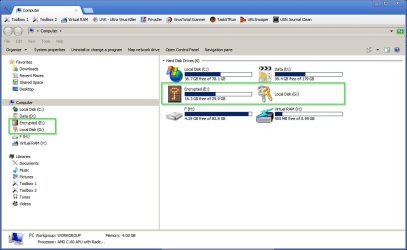
See screenshot from my machine:

Encrypted.jpg

E is a Truecrypt volume on an internal drive and is mounted. G is a Veracrypt volume on an external drive and is not currently mounted. Both have custom icons. I used software "Drive Icon Changer" and I will try to remember where I got it from if you're interested.
 

My Computer My Computer

Computer type
Laptop
Computer Manufacturer/Model Number
ASUS
OS
Microsoft Windows 7 Home Premium 64-bit 7601 Multiprocessor Free Service Pack 1
CPU
AMD C-60 APU with Radeon(tm) HD Graphics
Motherboard
ASUSTeK COMPUTER INC. X501U
Memory
4.00 GB
Graphics Card(s)
AMD Radeon HD 6290 Graphics
Sound Card
(1) AMD High Definition Audio Device (2) Realtek High Defi
Screen Resolution
1366 x 768 x 32 bits (4294967296 colors) @ 60 Hz
Hard Drives
Hitachi HTS545050A7E380 SATA Disk Device
Antivirus
Comodo CIS & FW, SecureAplus App Whitelisting, Threatfire
Browser
Cyberfox 64bit, Opera 64bit, Airfox
Other Info
Spy-The-Spy, HitmanPro.Alert, Norton Connect Safe, MJRegWatcher, BitDefender TrafficLight, Voodoo Shield, Zemana AntiMalware
Yes. It's an encrypted partition. Question is, does the icon appear even when mounted on a different computer? If so, then please share me the details of the software.
 

My Computer My Computer

Computer type
PC/Desktop
Computer Manufacturer/Model Number
Custom Build
OS
Windows 7 Professional 32-Bit
CPU
Intel i3-530
Motherboard
Intel DH55TC
Memory
4GB DDR3
Graphics Card(s)
XFX Radeon 5770 1GB DDR5
Hard Drives
1TB WD Caviar Blue,
2TB WD Elements Portable USB3,
1TB WD Elements Portable USB3,
1TB WD My Passport USB3,
500GB WD Elements USB2,
1TB Seagate Expansion Portable
Antivirus
MS Security Essentials
Browser
Chrome, Mozilla Firefox, Opera
And as a side note, does it also work on mounted containers?
 

My Computer My Computer

Computer type
PC/Desktop
Computer Manufacturer/Model Number
Custom Build
OS
Windows 7 Professional 32-Bit
CPU
Intel i3-530
Motherboard
Intel DH55TC
Memory
4GB DDR3
Graphics Card(s)
XFX Radeon 5770 1GB DDR5
Hard Drives
1TB WD Caviar Blue,
2TB WD Elements Portable USB3,
1TB WD Elements Portable USB3,
1TB WD My Passport USB3,
500GB WD Elements USB2,
1TB Seagate Expansion Portable
Antivirus
MS Security Essentials
Browser
Chrome, Mozilla Firefox, Opera
Don't know about mounting on a different computer - never tried it. I doubt that it will work.

http://www.sevenforums.com/tutorials/65828-drive-icon-change.html

Tried searching both encrypted drives for autorun.inf with all hidden files and system files displayed and nothing shows up so the software must work in a different way.
 

My Computer My Computer

Computer type
Laptop
Computer Manufacturer/Model Number
ASUS
OS
Microsoft Windows 7 Home Premium 64-bit 7601 Multiprocessor Free Service Pack 1
CPU
AMD C-60 APU with Radeon(tm) HD Graphics
Motherboard
ASUSTeK COMPUTER INC. X501U
Memory
4.00 GB
Graphics Card(s)
AMD Radeon HD 6290 Graphics
Sound Card
(1) AMD High Definition Audio Device (2) Realtek High Defi
Screen Resolution
1366 x 768 x 32 bits (4294967296 colors) @ 60 Hz
Hard Drives
Hitachi HTS545050A7E380 SATA Disk Device
Antivirus
Comodo CIS & FW, SecureAplus App Whitelisting, Threatfire
Browser
Cyberfox 64bit, Opera 64bit, Airfox
Other Info
Spy-The-Spy, HitmanPro.Alert, Norton Connect Safe, MJRegWatcher, BitDefender TrafficLight, Voodoo Shield, Zemana AntiMalware
I don't use encrypted containers except on USB drives but again I use different software for that.
 

My Computer My Computer

Computer type
Laptop
Computer Manufacturer/Model Number
ASUS
OS
Microsoft Windows 7 Home Premium 64-bit 7601 Multiprocessor Free Service Pack 1
CPU
AMD C-60 APU with Radeon(tm) HD Graphics
Motherboard
ASUSTeK COMPUTER INC. X501U
Memory
4.00 GB
Graphics Card(s)
AMD Radeon HD 6290 Graphics
Sound Card
(1) AMD High Definition Audio Device (2) Realtek High Defi
Screen Resolution
1366 x 768 x 32 bits (4294967296 colors) @ 60 Hz
Hard Drives
Hitachi HTS545050A7E380 SATA Disk Device
Antivirus
Comodo CIS & FW, SecureAplus App Whitelisting, Threatfire
Browser
Cyberfox 64bit, Opera 64bit, Airfox
Other Info
Spy-The-Spy, HitmanPro.Alert, Norton Connect Safe, MJRegWatcher, BitDefender TrafficLight, Voodoo Shield, Zemana AntiMalware
I already tried this approach, but it uses a registry tweak, so it's no good. Why doesn't Autorun.inf run when a partition is mounted?
 

My Computer My Computer

Computer type
PC/Desktop
Computer Manufacturer/Model Number
Custom Build
OS
Windows 7 Professional 32-Bit
CPU
Intel i3-530
Motherboard
Intel DH55TC
Memory
4GB DDR3
Graphics Card(s)
XFX Radeon 5770 1GB DDR5
Hard Drives
1TB WD Caviar Blue,
2TB WD Elements Portable USB3,
1TB WD Elements Portable USB3,
1TB WD My Passport USB3,
500GB WD Elements USB2,
1TB Seagate Expansion Portable
Antivirus
MS Security Essentials
Browser
Chrome, Mozilla Firefox, Opera

My Computer My Computer

Computer type
Laptop
Computer Manufacturer/Model Number
ASUS
OS
Microsoft Windows 7 Home Premium 64-bit 7601 Multiprocessor Free Service Pack 1
CPU
AMD C-60 APU with Radeon(tm) HD Graphics
Motherboard
ASUSTeK COMPUTER INC. X501U
Memory
4.00 GB
Graphics Card(s)
AMD Radeon HD 6290 Graphics
Sound Card
(1) AMD High Definition Audio Device (2) Realtek High Defi
Screen Resolution
1366 x 768 x 32 bits (4294967296 colors) @ 60 Hz
Hard Drives
Hitachi HTS545050A7E380 SATA Disk Device
Antivirus
Comodo CIS & FW, SecureAplus App Whitelisting, Threatfire
Browser
Cyberfox 64bit, Opera 64bit, Airfox
Other Info
Spy-The-Spy, HitmanPro.Alert, Norton Connect Safe, MJRegWatcher, BitDefender TrafficLight, Voodoo Shield, Zemana AntiMalware
The drive icon link I posted isn't the method that I use.
 

My Computer My Computer

Computer type
Laptop
Computer Manufacturer/Model Number
ASUS
OS
Microsoft Windows 7 Home Premium 64-bit 7601 Multiprocessor Free Service Pack 1
CPU
AMD C-60 APU with Radeon(tm) HD Graphics
Motherboard
ASUSTeK COMPUTER INC. X501U
Memory
4.00 GB
Graphics Card(s)
AMD Radeon HD 6290 Graphics
Sound Card
(1) AMD High Definition Audio Device (2) Realtek High Defi
Screen Resolution
1366 x 768 x 32 bits (4294967296 colors) @ 60 Hz
Hard Drives
Hitachi HTS545050A7E380 SATA Disk Device
Antivirus
Comodo CIS & FW, SecureAplus App Whitelisting, Threatfire
Browser
Cyberfox 64bit, Opera 64bit, Airfox
Other Info
Spy-The-Spy, HitmanPro.Alert, Norton Connect Safe, MJRegWatcher, BitDefender TrafficLight, Voodoo Shield, Zemana AntiMalware
Could you please share your method of assigning icons? It's easy to assign labels, but it's so difficult to assign the icons! I've been trying this for the past 2 days, but no one could come up with any solution other than registry tweak.
 

My Computer My Computer

Computer type
PC/Desktop
Computer Manufacturer/Model Number
Custom Build
OS
Windows 7 Professional 32-Bit
CPU
Intel i3-530
Motherboard
Intel DH55TC
Memory
4GB DDR3
Graphics Card(s)
XFX Radeon 5770 1GB DDR5
Hard Drives
1TB WD Caviar Blue,
2TB WD Elements Portable USB3,
1TB WD Elements Portable USB3,
1TB WD My Passport USB3,
500GB WD Elements USB2,
1TB Seagate Expansion Portable
Antivirus
MS Security Essentials
Browser
Chrome, Mozilla Firefox, Opera
I'll PM you a link to the software. Suggest testing it on something unimportant first. Like create a small volume just for test purposes.
 

My Computer My Computer

Computer type
Laptop
Computer Manufacturer/Model Number
ASUS
OS
Microsoft Windows 7 Home Premium 64-bit 7601 Multiprocessor Free Service Pack 1
CPU
AMD C-60 APU with Radeon(tm) HD Graphics
Motherboard
ASUSTeK COMPUTER INC. X501U
Memory
4.00 GB
Graphics Card(s)
AMD Radeon HD 6290 Graphics
Sound Card
(1) AMD High Definition Audio Device (2) Realtek High Defi
Screen Resolution
1366 x 768 x 32 bits (4294967296 colors) @ 60 Hz
Hard Drives
Hitachi HTS545050A7E380 SATA Disk Device
Antivirus
Comodo CIS & FW, SecureAplus App Whitelisting, Threatfire
Browser
Cyberfox 64bit, Opera 64bit, Airfox
Other Info
Spy-The-Spy, HitmanPro.Alert, Norton Connect Safe, MJRegWatcher, BitDefender TrafficLight, Voodoo Shield, Zemana AntiMalware
Can't PM you. Left you a link. Let us know if it works.
 

My Computer My Computer

Computer type
Laptop
Computer Manufacturer/Model Number
ASUS
OS
Microsoft Windows 7 Home Premium 64-bit 7601 Multiprocessor Free Service Pack 1
CPU
AMD C-60 APU with Radeon(tm) HD Graphics
Motherboard
ASUSTeK COMPUTER INC. X501U
Memory
4.00 GB
Graphics Card(s)
AMD Radeon HD 6290 Graphics
Sound Card
(1) AMD High Definition Audio Device (2) Realtek High Defi
Screen Resolution
1366 x 768 x 32 bits (4294967296 colors) @ 60 Hz
Hard Drives
Hitachi HTS545050A7E380 SATA Disk Device
Antivirus
Comodo CIS & FW, SecureAplus App Whitelisting, Threatfire
Browser
Cyberfox 64bit, Opera 64bit, Airfox
Other Info
Spy-The-Spy, HitmanPro.Alert, Norton Connect Safe, MJRegWatcher, BitDefender TrafficLight, Voodoo Shield, Zemana AntiMalware
Umm, where's the link?
 

My Computer My Computer

Computer type
PC/Desktop
Computer Manufacturer/Model Number
Custom Build
OS
Windows 7 Professional 32-Bit
CPU
Intel i3-530
Motherboard
Intel DH55TC
Memory
4GB DDR3
Graphics Card(s)
XFX Radeon 5770 1GB DDR5
Hard Drives
1TB WD Caviar Blue,
2TB WD Elements Portable USB3,
1TB WD Elements Portable USB3,
1TB WD My Passport USB3,
500GB WD Elements USB2,
1TB Seagate Expansion Portable
Antivirus
MS Security Essentials
Browser
Chrome, Mozilla Firefox, Opera
Check your messages. It should be there.
 

My Computer My Computer

Computer type
Laptop
Computer Manufacturer/Model Number
ASUS
OS
Microsoft Windows 7 Home Premium 64-bit 7601 Multiprocessor Free Service Pack 1
CPU
AMD C-60 APU with Radeon(tm) HD Graphics
Motherboard
ASUSTeK COMPUTER INC. X501U
Memory
4.00 GB
Graphics Card(s)
AMD Radeon HD 6290 Graphics
Sound Card
(1) AMD High Definition Audio Device (2) Realtek High Defi
Screen Resolution
1366 x 768 x 32 bits (4294967296 colors) @ 60 Hz
Hard Drives
Hitachi HTS545050A7E380 SATA Disk Device
Antivirus
Comodo CIS & FW, SecureAplus App Whitelisting, Threatfire
Browser
Cyberfox 64bit, Opera 64bit, Airfox
Other Info
Spy-The-Spy, HitmanPro.Alert, Norton Connect Safe, MJRegWatcher, BitDefender TrafficLight, Voodoo Shield, Zemana AntiMalware
Thanks. Tested the software. It binds an icon to the drive letter only. Mounting the partition on a different drive letter defeats the process. But, thanks anyway.
 

My Computer My Computer

Computer type
PC/Desktop
Computer Manufacturer/Model Number
Custom Build
OS
Windows 7 Professional 32-Bit
CPU
Intel i3-530
Motherboard
Intel DH55TC
Memory
4GB DDR3
Graphics Card(s)
XFX Radeon 5770 1GB DDR5
Hard Drives
1TB WD Caviar Blue,
2TB WD Elements Portable USB3,
1TB WD Elements Portable USB3,
1TB WD My Passport USB3,
500GB WD Elements USB2,
1TB Seagate Expansion Portable
Antivirus
MS Security Essentials
Browser
Chrome, Mozilla Firefox, Opera
Thanks for letting us know!
 

My Computer My Computer

Computer type
Laptop
Computer Manufacturer/Model Number
ASUS
OS
Microsoft Windows 7 Home Premium 64-bit 7601 Multiprocessor Free Service Pack 1
CPU
AMD C-60 APU with Radeon(tm) HD Graphics
Motherboard
ASUSTeK COMPUTER INC. X501U
Memory
4.00 GB
Graphics Card(s)
AMD Radeon HD 6290 Graphics
Sound Card
(1) AMD High Definition Audio Device (2) Realtek High Defi
Screen Resolution
1366 x 768 x 32 bits (4294967296 colors) @ 60 Hz
Hard Drives
Hitachi HTS545050A7E380 SATA Disk Device
Antivirus
Comodo CIS & FW, SecureAplus App Whitelisting, Threatfire
Browser
Cyberfox 64bit, Opera 64bit, Airfox
Other Info
Spy-The-Spy, HitmanPro.Alert, Norton Connect Safe, MJRegWatcher, BitDefender TrafficLight, Voodoo Shield, Zemana AntiMalware
I take it that you mean an encrypted partition rather than a container?

See screenshot from my machine:

View attachment 356774

E is a Truecrypt volume on an internal drive and is mounted. G is a Veracrypt volume on an external drive and is not currently mounted. Both have custom icons. I used software "Drive Icon Changer" and I will try to remember where I got it from if you're interested.
hi
i have a file container
how did you change the icon?
with autorun.inf + icon?
i don't want to use a external software , i would like to use autorun.inf + icon
thanks
 

My Computer My Computer

Computer type
PC/Desktop
OS
windows 7 ultimate 64bit
Back
Top