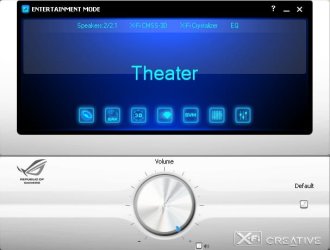
Asus SupremeFX X-FI

solution

Hi everyone,

I;ve been reading all of the posts around the net about this problem and having the same problem myself.

I have just got it all to work.

You can see my system specs, nothing out of the ordinary- i know this worked for my maximus II formula for win 7 professional X64

I seems that asus have recently updated their website drivers and they seem to work this time i installed the sound max drivers under the audio section marked "2009/11/05 update"

and then found a recently updates XFi sb driver package labelled:
e

Description Sound Blaster X-Fi Utility V1.0(R19) for Windows XP 32/64bit & Vista 32/64bit & Windows7 32/64bit.(WHQL)
Sound Blaster X-Fi Utility V1.0(R19) for Windows XP 32/64bit & Vista
32/64bit & Windows7 32/64bit.(WHQL)


I FOUND THIS UNDER THE UTILITIES SECTION not the audio ( which would have made more sense of course)

It all seems to work, crystalliser and 3D sound and all that.

I hope this brings the relief to you guys that it did to me.

Cheers
 

My Computer

OS
win7 pro x64
CPU
Q6600 (GO) @3.0Ghz
Motherboard
Maximus II formula
Memory
4Gb corsair dominator 1066Mhz
Graphics Card(s)
HD4890
Sound Card
Xfi Mb sound blaster bundled card
It Just don't work

Hi ppl ive already downloaded the updated driver for maximus II formula and it just don't work do i need to download the new soundmax driver for this mobo??? any other idea???
 

My Computer

Computer Manufacturer/Model Number
Asus
OS
Windows 7 x64
CPU
Q6600 @3.6Ghz
Motherboard
Maximus II Formula
Memory
4GB DDR 2 1066
Graphics Card(s)
XFX GTX285
Sound Card
Supreme Fx
Monitor(s) Displays
Samsung T240
Hard Drives
Many...
PSU
Gigabyte 720w
Case
Cooler Master HAF 932
Cooling
Thermal Right IFX-14
Hi ppl, problem solved The PhisicsT solution is the way to go,

1. Download the updated soundmax driver on the asus website
2. Download SB Xfi onasus website u can find it in utilities and its done u will be able to unleash the supreme Fx power...
 

My Computer

Computer Manufacturer/Model Number
Asus
OS
Windows 7 x64
CPU
Q6600 @3.6Ghz
Motherboard
Maximus II Formula
Memory
4GB DDR 2 1066
Graphics Card(s)
XFX GTX285
Sound Card
Supreme Fx
Monitor(s) Displays
Samsung T240
Hard Drives
Many...
PSU
Gigabyte 720w
Case
Cooler Master HAF 932
Cooling
Thermal Right IFX-14
I'm having the same problem

I'm having the same problem but I have a bigger problem.. I could not find the cd key included in my crosshair III installation cd. Is there a way to retrieve it? Maybe purchase only the key?
 

My Computer

OS
windows 7 ultimate 7600 build
CPU
AMD Phenom II x4 955 black ed
Motherboard
ASUS Crosshair III Formula
Memory
4gb Corsair Dominator 1600
Graphics Card(s)
Power Color HD 5770
Sound Card
SupremeFX X-FI MB
Monitor(s) Displays
AOC 2230
Hard Drives
WDC 640 gb Green
PSU
Corsair TX750 750 watts
Case
CoolerMaster Storm Scout
Cooling
CoolerMasdter V8
Hi Mbrian09,

I had the same problem with the software key for a while- but fortunately it turned up. I contacted asus directly and there was nothing they could do for me without the key unfortunately. If you dont have the origional CD Key then you cannot activate the software :(

I was very close to buying a new card based on not being able to find the CD key- such was the futility of my plight...

Although...having said that, when i was installing the drivers which I mentioned in my original post- there was no prompt for a CD key?! That was for the Maximus II Formula board though. Have a look around the forum and find out weather both boards use the same riser card and perhaps try the drivers i suggested.

Cheers,
Tom
 

My Computer

OS
win7 pro x64
CPU
Q6600 (GO) @3.0Ghz
Motherboard
Maximus II formula
Memory
4Gb corsair dominator 1066Mhz
Graphics Card(s)
HD4890
Sound Card
Xfi Mb sound blaster bundled card
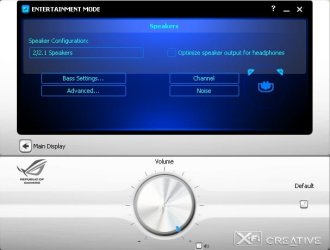
Well, turns out it doesn't support the chip on my Rampage II Gene.
Maybe a mix of both the new and old packages could produce some positive results, but I don't have time to try it out :(

29660d1254048619t-asus-supremefx-x-fi-


After following physicsT's instructions, I was able to install and control my SoundBlaster without having problems with the cd key. However, I get the same error. Does this mean the chip on my Crosshair III is not supported? How can i make this work?
 
Last edited:

My Computer

OS
windows 7 ultimate 7600 build
CPU
AMD Phenom II x4 955 black ed
Motherboard
ASUS Crosshair III Formula
Memory
4gb Corsair Dominator 1600
Graphics Card(s)
Power Color HD 5770
Sound Card
SupremeFX X-FI MB
Monitor(s) Displays
AOC 2230
Hard Drives
WDC 640 gb Green
PSU
Corsair TX750 750 watts
Case
CoolerMaster Storm Scout
Cooling
CoolerMasdter V8
i think u need to find the proper driver for ur card asus updated the website maybe u can find something useful there...
 

My Computer

Computer Manufacturer/Model Number
Asus
OS
Windows 7 x64
CPU
Q6600 @3.6Ghz
Motherboard
Maximus II Formula
Memory
4GB DDR 2 1066
Graphics Card(s)
XFX GTX285
Sound Card
Supreme Fx
Monitor(s) Displays
Samsung T240
Hard Drives
Many...
PSU
Gigabyte 720w
Case
Cooler Master HAF 932
Cooling
Thermal Right IFX-14
No update yet...

It seems that Asus have no update yet on the Asus Crosshair III for their SoundBlaster Driver. The one that's there requires me to put the cd key which i don't have.
 

My Computer

OS
windows 7 ultimate 7600 build
CPU
AMD Phenom II x4 955 black ed
Motherboard
ASUS Crosshair III Formula
Memory
4gb Corsair Dominator 1600
Graphics Card(s)
Power Color HD 5770
Sound Card
SupremeFX X-FI MB
Monitor(s) Displays
AOC 2230
Hard Drives
WDC 640 gb Green
PSU
Corsair TX750 750 watts
Case
CoolerMaster Storm Scout
Cooling
CoolerMasdter V8
was initially having some problems and could not make it work, but then i was using the drivers and utils from the support cd. so i downloaded the driver and util from the asus site and it worked like a charm =p

1-52.jpg


um.jpg
 

My Computer

Computer Manufacturer/Model Number
AMD
OS
Win 7 x64
CPU
unlocked 720
Motherboard
Asus Crosshair III Formula
Memory
OCZ Platinum 2000
Graphics Card(s)
Sapphire 5850
Sound Card
SupremeFX X-Fi
Monitor(s) Displays
LG 23"
Hard Drives
2 WD 640 Caviar Black on Raid 0
PSU
Corsair HX 620
Case
Cooler Master 690 II
ok,

i have an issuse with this mobo and sound as well, thought id start a new thread as it was diffrent. tho no one bothered replying.
windows 7 is not seeing my audio card and when i place the cd rom in, i don't get options for the sound card drivers. still evan better is when i go to asus and download there drivers driect i get an issuse with them installing and i get an error that they are not for the os: WNT_6.IP_64_MCE
ps they are from the win7 64 list of drivers

any suggestion please.

ps. i had no trouble using this on the evaluation edition of windows 7
 

My Computer

Computer Manufacturer/Model Number
custom
OS
Win7 Ultima
CPU
Phemom II X4 965
Motherboard
ASUS Crosshair III
Memory
8GB Kingson 1333
Graphics Card(s)
ATI x1900
Sound Card
SupremeFX x-Fi
1) You tried to disable your onboard soundcard (if available) in BIOS?
2) Try to deplug your soundcard, blow into the slots to get the dust out of it. And finnaley plug it back again.
3) Still not working? Try another PCI port? Make sure its good connected.
4) Try the driver I added the link at the bottom of this message.
5) The latest option is to reinstall Windows... (deinstall all current drivers of this sound-card)
6) Soundcard is broken, however that will be very unlikely.
Download Driver Mirror:

  1. 2shared - download SoundMax_V51026605_XPVistaWin7.zip
  2. http://rapidshare.com/files/424815186/SoundMax_V51026605_XPVistaWin7.zip
 

My Computer

OS
Windows 7
"There are no supported audio device available. You need to close the application. Click OK to close the application now."

I've got a Sound Blaster X-Fi 5.1 Surround and that bug is driving me nuts; tried EVERY SINGLE solution provided here but alas, to no avail!

Ideas?
 

My Computer

OS
Windows 7x64
CPU
AMD Phenom II x3 720 @2.80
Memory
4GB RAM DDR2 Kingston
Graphics Card(s)
XFX GeForce 9800GT 512mb DDR3
Sound Card
Creative X-Fi USB
Hard Drives
Two Samsung 320 gb, a Western Digital 320 gb and a 1 TB Western Digital 1tb.
PSU
Corsair 400w
Case
Antec
Cooling
Fan
Bump?
 

My Computer

OS
Windows 7x64
CPU
AMD Phenom II x3 720 @2.80
Memory
4GB RAM DDR2 Kingston
Graphics Card(s)
XFX GeForce 9800GT 512mb DDR3
Sound Card
Creative X-Fi USB
Hard Drives
Two Samsung 320 gb, a Western Digital 320 gb and a 1 TB Western Digital 1tb.
PSU
Corsair 400w
Case
Antec
Cooling
Fan
Nevermind, installing Pax Drivers did the trick... problem solved ^^
 

My Computer

OS
Windows 7x64
CPU
AMD Phenom II x3 720 @2.80
Memory
4GB RAM DDR2 Kingston
Graphics Card(s)
XFX GeForce 9800GT 512mb DDR3
Sound Card
Creative X-Fi USB
Hard Drives
Two Samsung 320 gb, a Western Digital 320 gb and a 1 TB Western Digital 1tb.
PSU
Corsair 400w
Case
Antec
Cooling
Fan
Нужна Ваша помощь...
У меня win 7 x64 и не отображается подключение 5.1 в Volume Panel SB X-Fi MB...
Вот что показывает....
????.jpg

???? 2.jpg

Что делать?
 

My Computer

Computer Manufacturer/Model Number
Windows 7 Ultimate x64
OS
Windows 7 Ultimate x64
CPU
QuadCore Intel Core i7 860, 3666 MHz
Motherboard
Asus Maximus III Formula
Memory
4086 Мб (DDR3-1066 DDR3 SDRAM)
Graphics Card(s)
ATI Radeon HD 5870
Sound Card
Asus SupremeFX X-Fi
Monitor(s) Displays
Samsung SyncMaster 226CW (Digital) [22" LCD]
Screen Resolution
1680x1050
Hard Drives
WDC WD1001FALS-00J7B1 ATA Device (931 Гб, IDE)
PSU
Zalman ZM850-HP
Keyboard
Logitech Wireless Keyboard K350
Mouse
Logitech G5 Laser Mouse
Internet Speed
100 Mbps
Нужна Ваша помощь...
У меня win 7 x64 и не отображается подключение 5.1 в Volume Panel SB X-Fi MB...
Вот что показывает....
View attachment 134271

View attachment 134272

Что делать?

Do you have a set of 5.1 speakers connected?
If Im not mistaken, the options for 2,4,5,and 7.1 only appear if you do.
This may be why its not allowing it to be changed.

If this is the ASUS X-Fi that came with the board, it may also be slightly different. Im not sure, although it should be the same.

Oh, and English please. :)
 

My Computer

Computer Manufacturer/Model Number
Custom (Self Build)
OS
Windows 7 Home Premium 64bit
CPU
Intel Core i7 2700k
Motherboard
eVGA P67 SLI
Memory
8GB Mushkin Redline Ridgebacks @1866
Graphics Card(s)
EVGA GTX570 SC
Sound Card
XiFi Titanium HD
Monitor(s) Displays
LG W2453V
Screen Resolution
1920x1080
Hard Drives
Intel 320 80GB -- Intel X25-V 40GB --WD Black 1TB x2 -- WD Blue 640GB
PSU
Seasonic x750
Case
Corsair 600T SE White
Cooling
eVGA Superclocked CPU Cooler
Keyboard
Saitek Cyborg
Antivirus
Kaspersky
Browser
IE
Other Info
LG BD/DVD
I have a redundant system is Logitech Z-5500 DIGITAL, I hooked it through the optics Spdf into your sound card ...
Tested on the redundant system Win xn - all without a problem as you and writing appears different connection, up to 7.1 ....
And then only 2/2.1 and all, and even choose not ... But you saw the picture ....
Why not see the connection 5.1?
 

My Computer

Computer Manufacturer/Model Number
Windows 7 Ultimate x64
OS
Windows 7 Ultimate x64
CPU
QuadCore Intel Core i7 860, 3666 MHz
Motherboard
Asus Maximus III Formula
Memory
4086 Мб (DDR3-1066 DDR3 SDRAM)
Graphics Card(s)
ATI Radeon HD 5870
Sound Card
Asus SupremeFX X-Fi
Monitor(s) Displays
Samsung SyncMaster 226CW (Digital) [22" LCD]
Screen Resolution
1680x1050
Hard Drives
WDC WD1001FALS-00J7B1 ATA Device (931 Гб, IDE)
PSU
Zalman ZM850-HP
Keyboard
Logitech Wireless Keyboard K350
Mouse
Logitech G5 Laser Mouse
Internet Speed
100 Mbps
Back
Top