Asus SupremeFX X-FI

Update: The Sound Blaster driver that was offical for W7 is different than the one in the Maximus II Formula page. the SB app will not work with the new audio driver unless you update it with the M-II-F app. The app version is the same for some reason...but it obviously is not. Perhaps that is the same for your R-II board? Look the same but not!
 

My Computer

OS
Windows 7 (Build 7068)
There is a more recent version here :
http://dlcdnet.asus.com/pub/ASUS/misc/utils/SB_X-Fi_MB_for_Asus_R14.zip

Some files are 4-5 months newer than in SB_XFi_V10_XPVistaWin7.zip
For example, ALchemy goes from v1.25.02 to v1.26.04, SB Properties goes from v1.02.00 to v1.02.03
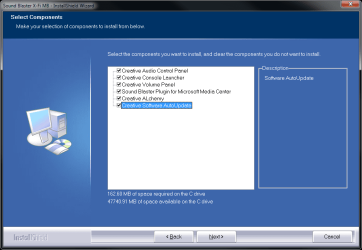
A plugin for Media Center seems to have been added.

Total compressed size is smaller though, because the AddOn folder with a 30MB AddOn.exe is not included.

Haven't tried it yet.
 

My Computer

OS
Windows 7 Ultimate x64
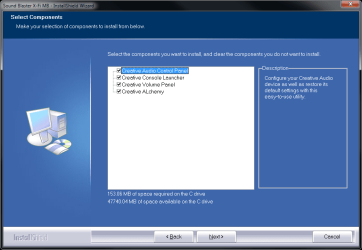
See attached screenshot for what gets installed :)
 

Attachments

  • sbxfi_old.png
    sbxfi_old.png
    87.4 KB · Views: 309
  • sbxfi_new.png
    sbxfi_new.png
    87.6 KB · Views: 269

My Computer

OS
Windows 7 Ultimate x64
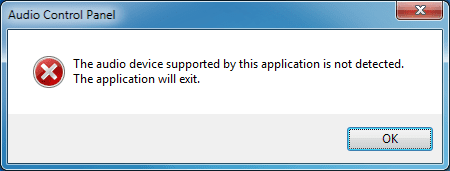
Well, turns out it doesn't support the chip on my Rampage II Gene.
Maybe a mix of both the new and old packages could produce some positive results, but I don't have time to try it out :(
 

Attachments

  • sbxfi_unsupported.png
    sbxfi_unsupported.png
    26.7 KB · Views: 30

My Computer

OS
Windows 7 Ultimate x64
Yep did the same thing as ZoZo2 tried. Also the same error message. I think it's a mix of a old & new drivers. So you need a clean Windows 7 installation I guess.
Or the driver still doesn't fit good together with your/me soundcard & Windows 7.

PS.
I got a ASUS Rampage II Exterme MB.
 

My Computer

OS
Windows 7
Well guys you did not get the point of what i posted, i said that i tried the latest drivers/utilities for W7 but when i try to click on speakers from the entertainment mode it crashes and I get the error "The program has stopped working". I managed to get the sb x-fi utility provided with the cd working except that i have no sound from my subwoofer. What should I do?
 

My Computer

OS
Windows 7
CPU
Core 2 Quad Q9450 @ 2,67 GHz
Motherboard
Asus Maximus II Formula
Memory
Corsair DD 2x1024@ 1066Mhz+Corsair DD 2x2048@ 1066 Mhz
Graphics Card(s)
Sapphire HD3850
Sound Card
SB X-Fi SupremeFX II
Monitor(s) Displays
Samsung LCD T240HD
Guys, the Gene version board is a different sound card!!!!! It is a VIA, not a SoundMax, as is the Maximus III versions. Eddy, sounds like you have a corrupt registry or perhaps installation of windows 7? Maybe you should do a full format of the drive (as a quick on only deletes the index meaning you overwrite data that you can not see). That way it clears up any issues involving bad sectors or corrupt data. When TuneUp Utilities makes their program W7 ready, you could always uninstall everything sound related, run the 1-click cleaner, then after that, run Windows 7 Manager (even the demo) and clean your registry again. Then re-install the sound card, reboot, then the creative app. As for the version ZoZo2 posted, it is probably a beta build for a future release.
 

My Computer

OS
Windows 7 (Build 7068)
Guys, the Gene version board is a different sound card!!!!! It is a VIA, not a SoundMax, as is the Maximus III versions.

I have a Rampage II Gene, and it has a SoundMax chipset, not VIA :)
 

My Computer

OS
Windows 7 Ultimate x64
Bumping this thread with my hi-hi-hi-hilarious experience with this troublesome issue. To make it clear. I'm using the Asus Maximus II Formula with it's included SupremeFX-Fi riser audio based on ADI AD2000BX (according to the manual) chipset running it with Windows 7 build 7057 64-bits. And honestly i actually most likely should be asking Asus for support. But reading the Asus forum on this issue. I recog there is more experience on this board specifically for this issue and solution how to fix it. Ow and this is a fairly long post, so get a cup of tea or coffee or something if you intend to read this :p

I'm not sure what i'm doing wrong now. I read the solutions provided in this thread and the thread posted on xtremesystems.org (this). And a few weeks ago i had SoundMax drivers and the Creative X-Fi software 'working'. I can't recall exactly the steps i did to make X-Fi software to see a "SB X-Fi MB" hardware installed in the system (i tried various solutions and when it worked, i was just glad to have it _finally_ working) for the X-Fi software to work. But this setup i did would cause the OS to lock up and crash whenever 2 applications would access the microphone at the same time. e.g. Skype and a videogame with build-in voice chat or just Skype and have the "Recording devices" sound panel opened.

This problem didn't existed prior to trying to get the X-Fi software working. So i decided to remove all the audio drivers and related (Creative) software i had installed on my system to do a fresh reinstallation of my audio component software. Hoping to find the cause of it. This turned out to be a bad call.

Because now, i just cant get the Creative X-Fi software functionality to work anymore. Neither will it recognize a "SB X-Fi MB" hardware installed for it to work.
And ok i know, i'm still running Windows 7 build 7057. I ought to be upgrading or get the final retail now it's released. Hell, i ought to get myself a more quality soundcard like a Sonar D2X or HDAV Deluxe or an Auzentech Forte. But since my budget ain't allowing me to do that just yet. I'll have to keep using what i have right now until i can upgrade and reinstall (whoops, needs a new harddrive too as mine is currently filled up).

Anyway, to sum up what i have tried already. I hope someone can fill me in on where i did wrong.

Attempt 1:
- Removed all the Creative/Soundblaster software and SoundMax drivers
- Reboot
- Installed the Asus SB_XFi_V10_XPVistaWin7.zip software for Windows 7 as Admin
- Reboot
results: X-Fi software sees a SB X-Fi MB audio device, but no X-Fi features enabled (no EAX, no CMSS, no Crystalizer) and it crashes all the time.
- Installed the Asus SoundMAXAD1988B_Audio_V610X6585_Win7.zip drivers for Windows 7 as Admin
- Reboot
results: X-Fi software no longer sees a SB X-Fi MB audio device. Neither will the X-Fi software function anymore (no proper hardware device found error)

Attempt 2:
- Removed all the Creative/Soundblaster software and SoundMax drivers
- Reboot
- Installed the Asus SoundMAXAD1988B_Audio_V610X6585_Win7.zip drivers for Windows 7 as Admin
- Reboot
- Installed the Asus SB_XFi_V10_XPVistaWin7.zip software for Windows 7 as Admin
- Reboot
results: X-Fi does not sees a SB X-Fi MB audio device. Neither will the X-Fi software function (no proper hardware device found error) ... ok not entirely true. The Creative SB X-Fi MB registration software works tho! (and no uninstall available for this ..) :sarc:

Attempt 3:
- Removed all the Creative/Soundblaster software and SoundMax drivers
- Reboot
- Installed the Asus SoundMAX2000B_Audio_V610X6585_Windows7 designed for P5Q3 Deluxe/WiFi-AP @n for Windows 7 (suggested by an individual on one of the forums i have been reading) as Admin
- Reboot
- Installed the Asus SB_XFi_V10_XPVistaWin7.zip software for Windows 7 as Admin
- Reboot
results: X-Fi does not sees a SB X-Fi MB audio device. Neither will the X-Fi software function (no proper hardware device found error)

Attempt 4:
- Removed all the Creative/Soundblaster software and SoundMax drivers
- Reboot
- Installed the Asus SoundMAXAD1988B_Audio_V610X6585_Win7.zip drivers for Windows 7 as Admin
- Reboot
- Installed the X-Fi software posted on XtremeSystem.org thread. Installed the Realtek HD Audio drivers as Admin (why do i need Realtek drivers for ADI chipset?? anyway...) and than the X-Fi software as Admin
- Reboot
results: X-Fi does not sees a SB X-Fi MB audio device. Neither will the X-Fi software function (no proper hardware device found error)

Attempt 4b:
- The same as above except without installing the Realtek HD audio drivers.
results: X-Fi does not sees a SB X-Fi MB audio device. Neither will the X-Fi software function (no proper hardware device found error)

Attempt 5:
- Removed all the Creative/Soundblaster software and SoundMax drivers
- Reboot
- Installed the Asus SoundMAX2000B_Audio_V610X6585_Windows7 designed for P5Q3 Deluxe/WiFi-AP @n for Windows 7 (suggested by an individual on one of the forums i have been reading) as Admin
- Reboot
- Installed the X-Fi software posted on XtremeSystem.org thread. Installed the Realtek HD Audio drivers as Admin (why do i need Realtek drivers for ADI chipset?? anyway...) and than the X-Fi software as Admin
- Reboot
results: X-Fi does not sees a SB X-Fi MB audio device. Neither will the X-Fi software function (no proper hardware device found error)

Attempt 6:

- Removed all the Creative/Soundblaster software and SoundMax drivers
- Reboot
- Installed the Asus SoundMAXAD1988B_Audio_V610X6585_Win7.zip drivers for Windows 7 as Admin
- Reboot
- Installed the Asus SB_XFi_V10_XPVistaWin7.zip software for Windows 7 as Admin in compatibility mode for Vista SP1
- Reboot
results: X-Fi does not sees a SB X-Fi MB audio device. But no X-Fi features enabled (no EAX, no CMSS, no Crystalizer) and it crashes all the time.

Attempt 7:
- Removed all the Creative/Soundblaster software and SoundMax drivers
- Reboot
- Installed the Asus SoundMAXAD1988B_Audio_V610X6585_Win7.zip drivers for Windows 7 as Admin
- Reboot
- Installed the Asus SB_XFi_V10_XPVistaWin7.zip software designed for Rampage Extreme II for Windows 7 as Admin
- Reboot
results: X-Fi does not sees a SB X-Fi MB audio device. Neither will the X-Fi software function (no proper hardware device found error)

Attempt 7b:
- Same as above except installing the Asus SB_XFi_V10_XPVistaWin7.zip software designed for Rampage Extreme II for Windows 7 as Admin in compatibility mode for Vista SP1
results: X-Fi does not sees a SB X-Fi MB audio device. But no X-Fi features enabled (no EAX, no CMSS, no Crystalizer) and it crashes all the time.

Ok ... at this point. I'm quite fed up. Even tho i know this OS is a beta. I did had the all the advertised features working at some point. Al tho it might not have been stable, but it did 'worked'. Quoting the 'worked' as i couldn't actually hear the differences with regards to X-Fi CMSS-3D and Crystalizer. The SoundMax Sound Sonic feature was far more noticeable audio 'improvement'. But the EAX functionality support was however noticeable present (if properly setup with Alchemy) with video games that supported it: for example Quake 4 with EAX HD enabled was noticeable better or Call of Duty 2 with EAX 3 support.


Much appreciation if anyone could steer me toward a working solution for this. :huh:
Anyway, i'm going to think about i should be trying for the 8th and last attempt ... and thanks for reading

 

My Computer

OS
Windows 7
CPU
Intel Core 2 Duo E8600
Motherboard
Asus Maximus II Formula
Memory
4GB G.Skill
Graphics Card(s)
Sapphire ATI HD4870
Sound Card
SupremeFX-Fi
Monitor(s) Displays
Philips Brilliance 220CW
PSU
Coolermaster Real-Power 620
Case
Antec 300
Cooling
Noctua NF-S12's
Wow, you have had a heck of a time. I am wondering if your copy of windows 7 is not messed up...not the installation, but your actual image. I simply installed the drivers from the cd in compatibility mode, and it sorta worked. Later when the beta drivers for the Maximus II Formula came out...I installed them, no hitch, 100%. I didn't even need compatibility. You should seriously get the full version now, as they resolved some driver issues in it. I just got a Maximus III Formula, which has a windows 7 driver cd with it. Sorry you had all these troubles, but get a new build and hopefully you have luck with that.
 

My Computer

OS
Windows 7 (Build 7068)
Heh, yeah. As i posted before, I know it can work. That's the reason i was so persistent in trying. But at least i did managed to do fix my microphone issue that causes Windows to lock up :cool:.
But anyway, i can't do a upgrade/reinstall yet till i get a new harddrive to make a backup of my data.
And no need to be sorry. The instruction you and other has posted on the net did helped me to get it working before. Plus I'm somewhat used to beta software/OS's. Used to be running latest bleeding edge (not just beta's, but i'm talking about stuff still in cvs/svn) with Linux, kinda got used to go thru many many hoops to get things working properly.

The only thing i'm really frustrated about is the lack of knowing what the X-Fi software installation does exactly and what the X-Fi software requires to function properly.
 

My Computer

OS
Windows 7
CPU
Intel Core 2 Duo E8600
Motherboard
Asus Maximus II Formula
Memory
4GB G.Skill
Graphics Card(s)
Sapphire ATI HD4870
Sound Card
SupremeFX-Fi
Monitor(s) Displays
Philips Brilliance 220CW
PSU
Coolermaster Real-Power 620
Case
Antec 300
Cooling
Noctua NF-S12's
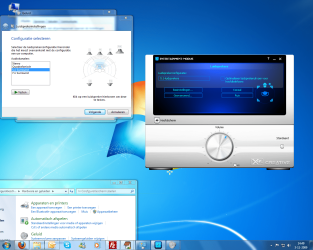
So i finally (after 13 times) managed to get the audio component working as it should be (for 2.0/Stereo headphone/5.1) in my beta version of Windows 7. And this time not in between quotes :D

Specifications:

  • Windows 7 build 7057 (beta)
  • Asus Maximus II Formula with SupremeFX-Fi (ADI AD2000BX)
What i did:
- Uninstalled all Creative X-Fi, SoundMax and additional host OpenAL software (by SoundMax and/or Creative)
- Reboot
- Install the audio drivers that came with the Maximus II Formula board CD. They are in X:\Drivers\Audio\Vista (X: is your optical drive) and run setup.exe as Administrator (not AsusSetup.exe).
- Reboot
- Get the modded SB X-Fi MB software made by Daniel_K specifically the ones posted in this thread.
- Extract the zip archive and run the SupremeFX X-Fi MB\X-Fi\setup.exe as Administrator (skip the X-Fi fix stuff entirely)
- Reboot
- Enjoy

win7sbxfimbad2000b.jpg


There was other methods which did managed to allow me to utilizes the X-Fi software. But the functionality of them weren't working. E.G. enabling CMSS-3D or Crystalizer had no audible effects.
This way i did manage to have actually full functionality working provided by the X-Fi software: CMSS-3D, Crystalizer, Alchemy, Karaoke player. The 'down side' was the SoundMax Sound Sonic functionality is replaced by the Sound Blaster enhancements. But putting the audio quality to 24bits and 192khz removes the need for this in my opinion.

Anyway, i doubt there would be still many people around that still run this beta Windows 7 as i'm running currently. But i figure i should post my findings in case someone does run into the same problem as i had.
 

My Computer

OS
Windows 7
CPU
Intel Core 2 Duo E8600
Motherboard
Asus Maximus II Formula
Memory
4GB G.Skill
Graphics Card(s)
Sapphire ATI HD4870
Sound Card
SupremeFX-Fi
Monitor(s) Displays
Philips Brilliance 220CW
PSU
Coolermaster Real-Power 620
Case
Antec 300
Cooling
Noctua NF-S12's
Serious! :eek:
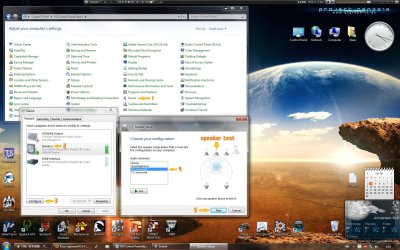
How did you manage to set-up the 5.1 surround sound? I also running the beta drivers. But i got only the opportunity for 2.1.

---

Erg goed gedaan. Hoe heb jij die 5.1 surround sound gefixed? Ik krijg het enkel voor elkaar met een 2.1 opstelling. Daarnaast draai ik ook de beta sound drivers.

Ps.
Ik draai/I Run Windows 7 RTM

Gr,
Melroy
 

Attachments

  • Asus SupremeFX X-FI.png
    Asus SupremeFX X-FI.png
    685.2 KB · Views: 354

My Computer

OS
Windows 7
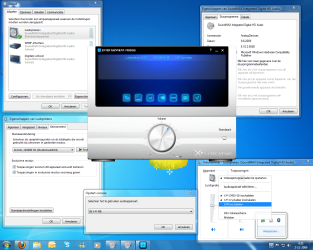
How did you manage to set-up the 5.1 surround sound?
See the included image attachment.

PS: Don't forget to enable CMSS and select the proper upmix mode that you prefer (see my previous screenshot with audio console).

I also running the beta drivers. But i got only the opportunity for 2.1.
My SoundMax drivers are 6.10.2.6480 (20-3-2008) meant for Vista and not Windows 7. But they serve their purpose better than the Windows 7 drivers i tried on my beta Windows 7.

---
Erg goed gedaan. Hoe heb jij die 5.1 surround sound gefixed? Ik krijg het enkel voor elkaar met een 2.1 opstelling. Daarnaast draai ik ook de beta sound drivers.

Ps.
Ik draai/I Run Windows 7 RTM

Gr,
Melroy
Erg veel moeite voor gedaan ook :p maar zie de plaatje voor 5.1 geluid configuratie en ik wens je veel succes! ;)

Gr, Nex
 

Attachments

  • sbxfimb51.jpg
    sbxfimb51.jpg
    557.1 KB · Views: 369

My Computer

OS
Windows 7
CPU
Intel Core 2 Duo E8600
Motherboard
Asus Maximus II Formula
Memory
4GB G.Skill
Graphics Card(s)
Sapphire ATI HD4870
Sound Card
SupremeFX-Fi
Monitor(s) Displays
Philips Brilliance 220CW
PSU
Coolermaster Real-Power 620
Case
Antec 300
Cooling
Noctua NF-S12's
Heel erg bedankt! Die laatste screenshot van jouw had ik NET nodig :D

----------

I fixed it, thank you.
 

Attachments

  • opgelost.png
    opgelost.png
    1,014.3 KB · Views: 252

My Computer

OS
Windows 7
Your soundcard has nothing to do with SupremeFX.
 

My Computer

OS
Windows 7
CPU
Intel Core 2 Duo E8600
Motherboard
Asus Maximus II Formula
Memory
4GB G.Skill
Graphics Card(s)
Sapphire ATI HD4870
Sound Card
SupremeFX-Fi
Monitor(s) Displays
Philips Brilliance 220CW
PSU
Coolermaster Real-Power 620
Case
Antec 300
Cooling
Noctua NF-S12's
Anybody has a solution to make the remote works again in windows 7 ?

thank you as much. :p

Unfortunately, you're in the wrong thread. People who have the answer won't be looking here. Either search the forum to see if your problem has been dealt with, or start a new thread.

Bon courage ;)
 

My Computer

OS
Windows 7 Ultimate x64
yup, thanks all for reply, i will start a new thread.

merci zozo2 :D
 

My Computer

Computer Manufacturer/Model Number
Dell XPS - nomore, now i just have his case
OS
windows 7 Entreprise x64
CPU
Q9550
Motherboard
P5Q-E
Memory
8Go DDR2 Corsair 6400 HMX
Graphics Card(s)
4870HD
Sound Card
creative Fatality extreme
Monitor(s) Displays
Samsung 2x19w
Screen Resolution
2x 1440*900
Hard Drives
Seagate 500G 32Mo SATA2 (OS)
WD 1T Green 32mo SATA2
Hitachi 500G 32Mo SATA2
PSU
Dell 700W From my XPS 630i - modded
Case
Dell XPS 630i
Cooling
Dell
Keyboard
Dell multimédia
Mouse
IE 3 Microsoft
Internet Speed
Cable connection - slow speed :(
Other Info
6 Noctua in working condition ^^
Back
Top