asus x541 win 7 install problems

joeyc100

New member
Member
VIP
Local time
4:07 PM
Messages
102
Touchpad does not work when trying to install win7x64 ultimate from dvd. Mouse does not work either even tho plugged into USB2.0 port. So, can't get past opening screen.
Any help?
 

My Computer

Computer type
Laptop
Computer Manufacturer/Model Number
asus x541sa
OS
windows 7 ultimatex64
Hi joeyc100,

Welcome to SevenForums!

Touchpad does not work when trying to install win7x64 ultimate from dvd. Mouse does not work either even tho plugged into USB2.0 port. So, can't get past opening screen.

It's a driver problem. It sounds like the drivers you need for the Touchpad, Keyboard and Mouse are not included in the installation media!

[1] Have you got a Recovery Partition [reset to factory]?
[2] Have you got a PS2 keyboard and mouse?
[3] Have you got a Drivers disk that came with the computer?
[4] Have you repeatedly pressed F9 at Boot [I think that is what it is for a Asus] as soon as the Asus logo screen appears to Restore the OS back to Factory Settings using their Recovery Partition.
 

My Computer

Computer type
Laptop
Computer Manufacturer/Model Number
Fujitsu LIFEBOOK
OS
Win 7 HP SP1 64-bit Vista HB SP2 32-bit Linux Mint 18.3
CPU
Intel(R) Pentium(R) CPU P6200 @ 2.13GHz
Motherboard
FUJITSU FJNBB06
Memory
4.00 GB
Graphics Card(s)
Intel(R) Graphics Media Accelerator HD
Sound Card
[1] Realtek High Definition Audio [2] Intel(R) Display Audio
Screen Resolution
1366 x 768 x 32 bits (4294967296 colors) @ 59 Hz
Hard Drives
TOSHIBA MK5076GSX
Antivirus
AVG FREE
Thanks for your response.
I have a new ASUS X541SA laptop with Win10 home preinstalled.
I want to install Win7x64 from the DVD.
I can always load a USB3.0 driver afterwards from the DVD, but I need the touchpad to navigate thru the installation.
 

My Computer

Computer type
Laptop
Computer Manufacturer/Model Number
asus x541sa
OS
windows 7 ultimatex64
Hi joeyc100,

Thanks for your response.
I have a new ASUS X541SA laptop with Win10 home preinstalled.
I want to install Win7x64 from the DVD.
I can always load a USB3.0 driver afterwards from the DVD, but I need the touchpad to navigate thru the installation.

What you need to do is to inject/slipstream the drivers into the ISO and create a new ISO. Here is a detailed method [created and written by SIW2] => Update your Win 7 installation media.

I hope this helps!
 

My Computer

Computer type
Laptop
Computer Manufacturer/Model Number
Fujitsu LIFEBOOK
OS
Win 7 HP SP1 64-bit Vista HB SP2 32-bit Linux Mint 18.3
CPU
Intel(R) Pentium(R) CPU P6200 @ 2.13GHz
Motherboard
FUJITSU FJNBB06
Memory
4.00 GB
Graphics Card(s)
Intel(R) Graphics Media Accelerator HD
Sound Card
[1] Realtek High Definition Audio [2] Intel(R) Display Audio
Screen Resolution
1366 x 768 x 32 bits (4294967296 colors) @ 59 Hz
Hard Drives
TOSHIBA MK5076GSX
Antivirus
AVG FREE

My Computers

System One System Two

  • Computer type
    PC/Desktop
    OS
    7 X64
    CPU
    i5 8400
    Motherboard
    gigabyte b365m ds3h
    Memory
    2x8gb 3200mhz
    Hard Drives
    various
    PSU
    pure power 11 400w cm
    Case
    Coolermaster
    Cooling
    cryorig m9i
  • Computer type
    PC/Desktop
    OS
    7x64
    CPU
    g5400
    Motherboard
    ga b365m ds3h
    Memory
    8gb ddr4 2400
    PSU
    xfx pro 450w
Yes, BIOS v303.
 

My Computer

Computer type
Laptop
Computer Manufacturer/Model Number
asus x541sa
OS
windows 7 ultimatex64
Further, Paul Black pointed me to your installation media update thread, but after trying to follow it I bogged down with a runaway cmd screen. I put my copy from a dvd iso into a hard drive folder, extracted the 7updaterv17a and ran it. It could not find SetWimdirpath.cmd in the bin folder and kept looping. Did I miss something?
 

My Computer

Computer type
Laptop
Computer Manufacturer/Model Number
asus x541sa
OS
windows 7 ultimatex64
I will have alook.
 

My Computers

System One System Two

  • Computer type
    PC/Desktop
    OS
    7 X64
    CPU
    i5 8400
    Motherboard
    gigabyte b365m ds3h
    Memory
    2x8gb 3200mhz
    Hard Drives
    various
    PSU
    pure power 11 400w cm
    Case
    Coolermaster
    Cooling
    cryorig m9i
  • Computer type
    PC/Desktop
    OS
    7x64
    CPU
    g5400
    Motherboard
    ga b365m ds3h
    Memory
    8gb ddr4 2400
    PSU
    xfx pro 450w
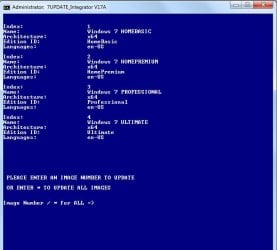
Working fine for me. No trouble browsing to the folder containing installation media


v17a.jpg

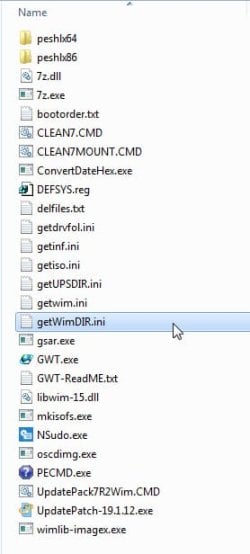
Did you extract the zip file properly? Check in the bin folder for Getwimdir.ini

getwimdir.jpg
 

My Computers

System One System Two

  • Computer type
    PC/Desktop
    OS
    7 X64
    CPU
    i5 8400
    Motherboard
    gigabyte b365m ds3h
    Memory
    2x8gb 3200mhz
    Hard Drives
    various
    PSU
    pure power 11 400w cm
    Case
    Coolermaster
    Cooling
    cryorig m9i
  • Computer type
    PC/Desktop
    OS
    7x64
    CPU
    g5400
    Motherboard
    ga b365m ds3h
    Memory
    8gb ddr4 2400
    PSU
    xfx pro 450w
Hi joeyc100, SIW2 just beat me to it. I have just tested it and it is working for me too!
 

My Computer

Computer type
Laptop
Computer Manufacturer/Model Number
Fujitsu LIFEBOOK
OS
Win 7 HP SP1 64-bit Vista HB SP2 32-bit Linux Mint 18.3
CPU
Intel(R) Pentium(R) CPU P6200 @ 2.13GHz
Motherboard
FUJITSU FJNBB06
Memory
4.00 GB
Graphics Card(s)
Intel(R) Graphics Media Accelerator HD
Sound Card
[1] Realtek High Definition Audio [2] Intel(R) Display Audio
Screen Resolution
1366 x 768 x 32 bits (4294967296 colors) @ 59 Hz
Hard Drives
TOSHIBA MK5076GSX
Antivirus
AVG FREE
Getwimdir.ini is present; 17 files/folders in all. But setwimdirpath.cmd can't be found.
 

My Computer

Computer type
Laptop
Computer Manufacturer/Model Number
asus x541sa
OS
windows 7 ultimatex64
A lot of people have used it successfully. You are the only one to have that issue.

Extract the zip file again. Something wrong at your end.

Where did you put the extracted iso? What is the full path to install.wim?

For example, mine is:

"M:\EXTRACTED-ISO\sources\install.wim"

Therefore the folder I browse to is EXTRACTED-ISO
 

My Computers

System One System Two

  • Computer type
    PC/Desktop
    OS
    7 X64
    CPU
    i5 8400
    Motherboard
    gigabyte b365m ds3h
    Memory
    2x8gb 3200mhz
    Hard Drives
    various
    PSU
    pure power 11 400w cm
    Case
    Coolermaster
    Cooling
    cryorig m9i
  • Computer type
    PC/Desktop
    OS
    7x64
    CPU
    g5400
    Motherboard
    ga b365m ds3h
    Memory
    8gb ddr4 2400
    PSU
    xfx pro 450w
Got it. This is an MSDOS program: no blanks in the file folder name.
 

My Computer

Computer type
Laptop
Computer Manufacturer/Model Number
asus x541sa
OS
windows 7 ultimatex64
I put together a usb stick with win7x64 on it, and the intel usb3.0 driver files(.inf and .sys, et.al.) on a cd.
The installation progressed to the "where are the unknown drivers" screen, which gives options to point to them including the cd/dvd drive..
The cd's usb drivers were accepted, the mouse turned on(!) and the everything loaded in followed by the Realtek audio and Atheros wifi drivers.
After a shutdown it was impossible to restart the unit. It would not go past the logo splash screen with F2, or boot.
The laptop restarted several times during the Win7 installation and after the drivers, but now is a doorstop.
Is it possible that Win10 modifies the bios to prevent this downgrade?

 

My Computer

Computer type
Laptop
Computer Manufacturer/Model Number
asus x541sa
OS
windows 7 ultimatex64
BIOS > I/O Security > Card Reader > Lock . Save and exit

I am assuming you have CSM enabled in the bios.
 

My Computers

System One System Two

  • Computer type
    PC/Desktop
    OS
    7 X64
    CPU
    i5 8400
    Motherboard
    gigabyte b365m ds3h
    Memory
    2x8gb 3200mhz
    Hard Drives
    various
    PSU
    pure power 11 400w cm
    Case
    Coolermaster
    Cooling
    cryorig m9i
  • Computer type
    PC/Desktop
    OS
    7x64
    CPU
    g5400
    Motherboard
    ga b365m ds3h
    Memory
    8gb ddr4 2400
    PSU
    xfx pro 450w
Yes, and secure boot off and card reader locked. That was necessary to install Win7 according to many souces.
But now after the installation is complete I can't even get into the bios.
 

My Computer

Computer type
Laptop
Computer Manufacturer/Model Number
asus x541sa
OS
windows 7 ultimatex64
"I can't even get into the bios"

I had a similar problem. Turns out it was a faulty hard drive preventing access to bios. Detached the HD and bios was fine.

No idea what is causing your strange issue. Try detaching the HD or any other peripherals - usb attached devices, etc and see if you can get into bios
 

My Computers

System One System Two

  • Computer type
    PC/Desktop
    OS
    7 X64
    CPU
    i5 8400
    Motherboard
    gigabyte b365m ds3h
    Memory
    2x8gb 3200mhz
    Hard Drives
    various
    PSU
    pure power 11 400w cm
    Case
    Coolermaster
    Cooling
    cryorig m9i
  • Computer type
    PC/Desktop
    OS
    7x64
    CPU
    g5400
    Motherboard
    ga b365m ds3h
    Memory
    8gb ddr4 2400
    PSU
    xfx pro 450w
This is a laptop with zero access. Yes, it probably is the hard drive but I would have to disassemble the keyboard, clamshell, and ribbons to get anywhere near the hard drive. It is under warranty so I will send it back to ASUS.
Thank you for all of your help.
Joe.
 

My Computer

Computer type
Laptop
Computer Manufacturer/Model Number
asus x541sa
OS
windows 7 ultimatex64
Wow. I got the laptop back from ASUS repair. They replaced the hard drive.
They installed Win 10 on the new drive.
I installed Win 7 just as I had in the past and after they first few reboots following the audio, wlan drivers, the laptop locked up just as before: no boot and no entry to the bios.
I complained to ASUS and they paid to ship it back. They initially said it was not only the hard drive but the motherboard as well.
I just got it back a second time, but with only the hard drive replaced. No mention of the motherboard.
Win 10 is installed and works.
I am afraid to install Win 7.
Does Win 10 modify the bios with a poison pill?
 

My Computer

Computer type
Laptop
Computer Manufacturer/Model Number
asus x541sa
OS
windows 7 ultimatex64
Back
Top