At times, IE stops and freezses till it gets data from the website

albertf

New member
Member
Local time
7:04 PM
Messages
44
I am using IE 10 on my Windows 7 X64 machine. I have 16 GB ram and all the latest drivers installed including the latest Ethernet - network adapters. I spoke to my motherboard manufacture of Intel today and there are no settings in the Ethernet drivers to change of Intel 82579V Gigabit Network Connection.

At times, when I am on the internet going to any webpages all of sudden IE stops working and I can not move my mouse or ctl, alt, and delete.

I have scanned my machine for virus's, Trojans, and spyware many times with superantispyware and malwarebytes anti malware and my machine is clean.

When I am on a program - listening to music, or just in IE, there is nothing I can do till IE responds from the website I am on and then my mouse works and windows resumes what I was domnh.


I am looking for advice on what to do to fix this issue.

Thanks
 

My Computer My Computer

At a glance

WIndows 7 x64
Computer type
PC/Desktop
OS
WIndows 7 x64
Hi and welcome to SevenForums,

Try Clean boot,
http://www.sevenforums.com/tutorials/179159-troubleshoot-application-conflicts-performing-clean-startup.html
Click Start and type in the search box,
msconfig
Click on the suggestion on top or hit the Enter key,
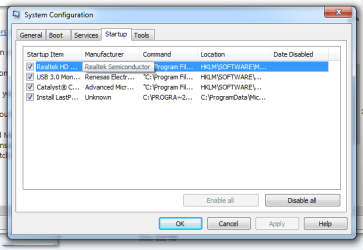
Go to the Startup section and take some screen shots fora complete list,
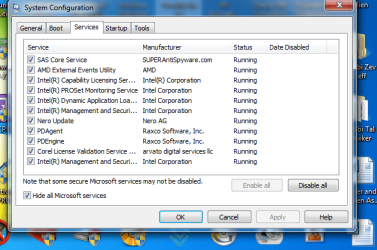
Go to the Services section and on the bottom left Checkthe box to Hide All Microsoft services,
Repeat the screen shots,
See the links above my signature on how to take andupload screen shots here,
Cheers.
 

My Computer My Computer

At a glance

Win-7-Pro64bit 7-H-Prem-64biti7-5930K 2nd i9-9940x both water blocked VRM'...Trident-z 3200C14 2nd Trident-z 3600C16EVGA 1080ti ftw3 2nd Titan Xp both water blocked
Computer type
PC/Desktop
Computer Manufacturer/Model Number
Custom assembled by me :}
OS
Win-7-Pro64bit 7-H-Prem-64bit
CPU
i7-5930K 2nd i9-9940x both water blocked VRM's too
Motherboard
ASUS SABERTOOTH X99 2nd ASUS x299 Apex
Memory
Trident-z 3200C14 2nd Trident-z 3600C16
Graphics Card(s)
EVGA 1080ti ftw3 2nd Titan Xp both water blocked
Sound Card
Built-in Realtek
Monitor(s) Displays
1-AOC G2460PG 24"G-Sync 144Hz/ 2nd 1-ASUS VG248QE 24" 144Hz
Screen Resolution
1920 x 1080 144Hz
Hard Drives
2-Samsung M.2 Evo & Evo Plus
2-Samsung 850 EVO 500GB SSD's/ 3-2.5 W.D. Black 1tb-&3-1tb/3-3.5 WD Black 1tb hdd's
PSU
EVGA SuperNOVA 1000-P2 2nd 1200-P2
Case
2-Corsair Obsidian Series 450D Black ATX Mid Tower
Cooling
Custom water loops
Keyboard
Logitech G710+/ 2nd Logitech G910
Mouse
2-RedDragon M901 Perdition 16400 dpi Gaming mouse = wired
Internet Speed
Comcast Ping 19ms 89.31mbps download speed 6.12mbps upload
Antivirus
Malwarebytes Pro/ Superantispyware Pro
Browser
FireFox & Pale moon
Other Info
2nd ASUS X299 Apex/Intel i9-9940x with Custom water loop/7H-Prem-x64/Corsair 450D case/Ram Trident-z 3600C16 4x8gb / Samsung970Evo plus 500gb SSD/Dual ssd EZ swap evo/PSU EVGA SuperNova 1200w-P2 80+Platinum/GPU Titan Xp /8-ML-140 on push-pull on 2-280GTX rads
I have followed ure instructions and gone to MSconfig, then services, and hide all Microsoft

I have attached a picture to this report of what services are running

Let me know what else to do
 

Attachments

  • Services.png
    Services.png
    36.1 KB · Views: 20

My Computer My Computer

At a glance

WIndows 7 x64
Computer type
PC/Desktop
OS
WIndows 7 x64
I have an update, I was now able to remove the Corel license validation from startup.


Any ideas of what is causing the issue?
 

My Computer My Computer

At a glance

WIndows 7 x64
Computer type
PC/Desktop
OS
WIndows 7 x64
Hi thanks for the additional information,
You forgot the Startup section :(
I doubt Corel has anything to do with your issue,

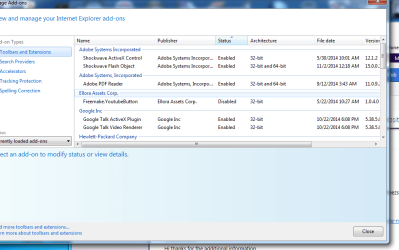
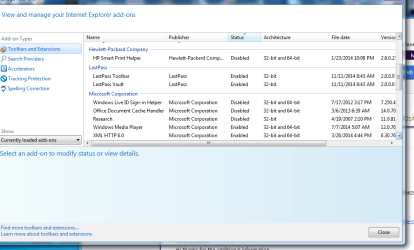
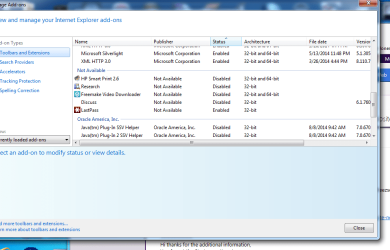
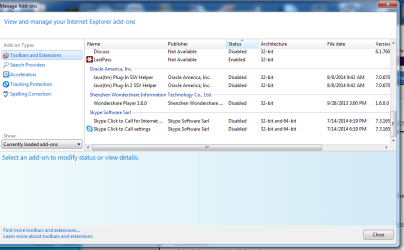
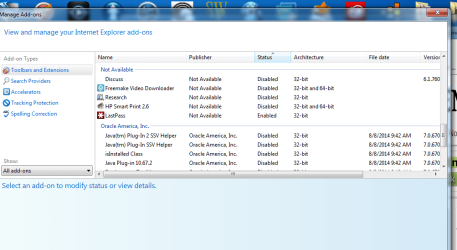
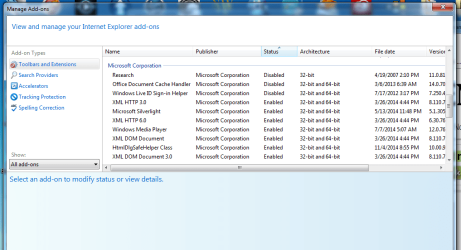
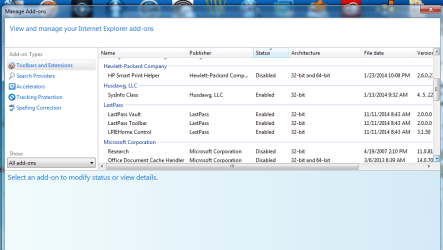
Also lets see what browser add-ons you have installed,
Open ie,
Use Gear symbol on the top right and Manage add-ons,
On the left column Toolbars and extensions,
On the bottom of the left column switch to Show All add-ons,
Repeat the screen shots,
Cheers.
 

My Computer My Computer

At a glance

Win-7-Pro64bit 7-H-Prem-64biti7-5930K 2nd i9-9940x both water blocked VRM'...Trident-z 3200C14 2nd Trident-z 3600C16EVGA 1080ti ftw3 2nd Titan Xp both water blocked
Computer type
PC/Desktop
Computer Manufacturer/Model Number
Custom assembled by me :}
OS
Win-7-Pro64bit 7-H-Prem-64bit
CPU
i7-5930K 2nd i9-9940x both water blocked VRM's too
Motherboard
ASUS SABERTOOTH X99 2nd ASUS x299 Apex
Memory
Trident-z 3200C14 2nd Trident-z 3600C16
Graphics Card(s)
EVGA 1080ti ftw3 2nd Titan Xp both water blocked
Sound Card
Built-in Realtek
Monitor(s) Displays
1-AOC G2460PG 24"G-Sync 144Hz/ 2nd 1-ASUS VG248QE 24" 144Hz
Screen Resolution
1920 x 1080 144Hz
Hard Drives
2-Samsung M.2 Evo & Evo Plus
2-Samsung 850 EVO 500GB SSD's/ 3-2.5 W.D. Black 1tb-&3-1tb/3-3.5 WD Black 1tb hdd's
PSU
EVGA SuperNOVA 1000-P2 2nd 1200-P2
Case
2-Corsair Obsidian Series 450D Black ATX Mid Tower
Cooling
Custom water loops
Keyboard
Logitech G710+/ 2nd Logitech G910
Mouse
2-RedDragon M901 Perdition 16400 dpi Gaming mouse = wired
Internet Speed
Comcast Ping 19ms 89.31mbps download speed 6.12mbps upload
Antivirus
Malwarebytes Pro/ Superantispyware Pro
Browser
FireFox & Pale moon
Other Info
2nd ASUS X299 Apex/Intel i9-9940x with Custom water loop/7H-Prem-x64/Corsair 450D case/Ram Trident-z 3600C16 4x8gb / Samsung970Evo plus 500gb SSD/Dual ssd EZ swap evo/PSU EVGA SuperNova 1200w-P2 80+Platinum/GPU Titan Xp /8-ML-140 on push-pull on 2-280GTX rads
Hi

Sorry I forgot the startup

I just tool the pics of start up and manage add ons and attached them to this correspondence.
 

Attachments

  • STartup.png
    STartup.png
    16.3 KB · Views: 16
  • pic 1.png
    pic 1.png
    35.2 KB · Views: 0
  • pic 2.png
    pic 2.png
    31.1 KB · Views: 0
  • pic 3.png
    pic 3.png
    36.7 KB · Views: 0
  • pic 4.png
    pic 4.png
    37.3 KB · Views: 0

My Computer My Computer

At a glance

WIndows 7 x64
Computer type
PC/Desktop
OS
WIndows 7 x64
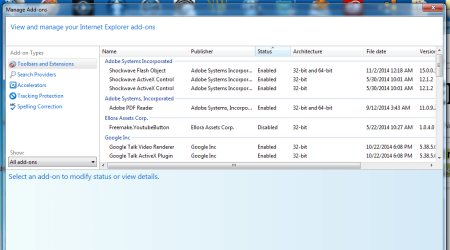
Here are the "all the add ons" from manage
 

Attachments

  • all ad on 5.png
    all ad on 5.png
    41.1 KB · Views: 0
  • all add on 4.png
    all add on 4.png
    40.2 KB · Views: 0
  • All ad ons 3.png
    All ad ons 3.png
    41.2 KB · Views: 0
  • All ad ons 2.png
    All ad ons 2.png
    42.2 KB · Views: 0
  • ALl add ons 1.png
    ALl add ons 1.png
    38.8 KB · Views: 0

My Computer My Computer

At a glance

WIndows 7 x64
Computer type
PC/Desktop
OS
WIndows 7 x64
I hope this helps !!!! :)
 

My Computer My Computer

At a glance

WIndows 7 x64
Computer type
PC/Desktop
OS
WIndows 7 x64

My Computer My Computer

At a glance

Win-7-Pro64bit 7-H-Prem-64biti7-5930K 2nd i9-9940x both water blocked VRM'...Trident-z 3200C14 2nd Trident-z 3600C16EVGA 1080ti ftw3 2nd Titan Xp both water blocked
Computer type
PC/Desktop
Computer Manufacturer/Model Number
Custom assembled by me :}
OS
Win-7-Pro64bit 7-H-Prem-64bit
CPU
i7-5930K 2nd i9-9940x both water blocked VRM's too
Motherboard
ASUS SABERTOOTH X99 2nd ASUS x299 Apex
Memory
Trident-z 3200C14 2nd Trident-z 3600C16
Graphics Card(s)
EVGA 1080ti ftw3 2nd Titan Xp both water blocked
Sound Card
Built-in Realtek
Monitor(s) Displays
1-AOC G2460PG 24"G-Sync 144Hz/ 2nd 1-ASUS VG248QE 24" 144Hz
Screen Resolution
1920 x 1080 144Hz
Hard Drives
2-Samsung M.2 Evo & Evo Plus
2-Samsung 850 EVO 500GB SSD's/ 3-2.5 W.D. Black 1tb-&3-1tb/3-3.5 WD Black 1tb hdd's
PSU
EVGA SuperNOVA 1000-P2 2nd 1200-P2
Case
2-Corsair Obsidian Series 450D Black ATX Mid Tower
Cooling
Custom water loops
Keyboard
Logitech G710+/ 2nd Logitech G910
Mouse
2-RedDragon M901 Perdition 16400 dpi Gaming mouse = wired
Internet Speed
Comcast Ping 19ms 89.31mbps download speed 6.12mbps upload
Antivirus
Malwarebytes Pro/ Superantispyware Pro
Browser
FireFox & Pale moon
Other Info
2nd ASUS X299 Apex/Intel i9-9940x with Custom water loop/7H-Prem-x64/Corsair 450D case/Ram Trident-z 3600C16 4x8gb / Samsung970Evo plus 500gb SSD/Dual ssd EZ swap evo/PSU EVGA SuperNova 1200w-P2 80+Platinum/GPU Titan Xp /8-ML-140 on push-pull on 2-280GTX rads
Thanks for the quick reply

I downloaded and ran the temp files delete program

Here is the report that I got after it ran
Getting user folders.

Stopping running processes.

Emptying Temp folders.


User: Administrator

User: All Users

User: Default
->Temp folder emptied: 0 bytes
->Temporary Internet Files folder emptied: 0 bytes
->Flash cache emptied: 0 bytes

User: Default User
->Temp folder emptied: 0 bytes
->Temporary Internet Files folder emptied: 0 bytes
->Flash cache emptied: 0 bytes

User: Guest

User: HomeGroupUser$

User: Public

User: ReuvenA
->Temp folder emptied: 0 bytes
->Temporary Internet Files folder emptied: 106218658 bytes
->Java cache emptied: 0 bytes
->Google Chrome cache emptied: 1953200 bytes
->Flash cache emptied: 506 bytes

%systemdrive% .tmp files removed: 0 bytes
%systemroot% .tmp files removed: 0 bytes
%systemroot%\System32 .tmp files removed: 0 bytes
%systemroot%\System32 (64bit) .tmp files removed: 0 bytes
%systemroot%\System32\drivers .tmp files removed: 0 bytes
Windows Temp folder emptied: 48974 bytes
%systemroot%\system32\config\systemprofile\AppData\Local\Microsoft\Windows\Temporary Internet Files folder emptied: 128 bytes
%systemroot%\sysnative\config\systemprofile\AppData\Local\Microsoft\Windows\Temporary Internet Files folder emptied: 33298 bytes

Emptying RecycleBin. Do not interrupt.

RecycleBin emptied: 0 bytes
Process complete!

Total Files Cleaned = 103.00 mb

Is it safe to have java uninstalled? DO I need Java?
 

My Computer My Computer

At a glance

WIndows 7 x64
Computer type
PC/Desktop
OS
WIndows 7 x64
Hi,
Good question "do I need Java"
I don't but then again I don't need the Shockwave active x control either which you also have in addition to Shockwave flash object more commonly referred to as Adobe flash player which I suppose the active x plugin is for another browser installed ?
Either way the control version should be disabled unless prompted to activate via a game,
Shockwave flash object can be enabled or disabled it's redundant when you have the x control version installed,
html5 browsers do not need flash object to watch youtube videos ;)
So you obviously do some gaming

TFC will at least keep some of the build up removed and the other Java related links might help with the "do I need Java" question ;)
103mg isn't bad I've seen allot more found :)

I didn't notice any BHO browser add-ons so that's a good thing
 

My Computer My Computer

At a glance

Win-7-Pro64bit 7-H-Prem-64biti7-5930K 2nd i9-9940x both water blocked VRM'...Trident-z 3200C14 2nd Trident-z 3600C16EVGA 1080ti ftw3 2nd Titan Xp both water blocked
Computer type
PC/Desktop
Computer Manufacturer/Model Number
Custom assembled by me :}
OS
Win-7-Pro64bit 7-H-Prem-64bit
CPU
i7-5930K 2nd i9-9940x both water blocked VRM's too
Motherboard
ASUS SABERTOOTH X99 2nd ASUS x299 Apex
Memory
Trident-z 3200C14 2nd Trident-z 3600C16
Graphics Card(s)
EVGA 1080ti ftw3 2nd Titan Xp both water blocked
Sound Card
Built-in Realtek
Monitor(s) Displays
1-AOC G2460PG 24"G-Sync 144Hz/ 2nd 1-ASUS VG248QE 24" 144Hz
Screen Resolution
1920 x 1080 144Hz
Hard Drives
2-Samsung M.2 Evo & Evo Plus
2-Samsung 850 EVO 500GB SSD's/ 3-2.5 W.D. Black 1tb-&3-1tb/3-3.5 WD Black 1tb hdd's
PSU
EVGA SuperNOVA 1000-P2 2nd 1200-P2
Case
2-Corsair Obsidian Series 450D Black ATX Mid Tower
Cooling
Custom water loops
Keyboard
Logitech G710+/ 2nd Logitech G910
Mouse
2-RedDragon M901 Perdition 16400 dpi Gaming mouse = wired
Internet Speed
Comcast Ping 19ms 89.31mbps download speed 6.12mbps upload
Antivirus
Malwarebytes Pro/ Superantispyware Pro
Browser
FireFox & Pale moon
Other Info
2nd ASUS X299 Apex/Intel i9-9940x with Custom water loop/7H-Prem-x64/Corsair 450D case/Ram Trident-z 3600C16 4x8gb / Samsung970Evo plus 500gb SSD/Dual ssd EZ swap evo/PSU EVGA SuperNova 1200w-P2 80+Platinum/GPU Titan Xp /8-ML-140 on push-pull on 2-280GTX rads
Hi Ya

I do not do any gaming either. So I should disable Shockwave - Adobe player as per my not playing games.

Should I completely remove JAVA off my machine. I heard not good thinsg about this.

Anything else I need to do?
 

My Computer My Computer

At a glance

WIndows 7 x64
Computer type
PC/Desktop
OS
WIndows 7 x64
Just wanted u to know that I have completely removed Java from my machine. Its been uninstalled.

Anything else I need to uninstall?
 

My Computer My Computer

At a glance

WIndows 7 x64
Computer type
PC/Desktop
OS
WIndows 7 x64
Hi,
I'm still not sure why you have the Shockwave active x control add-on it seems out of date 5/30/14 it could be part of google talk but talk has it's own active x control add-on :/
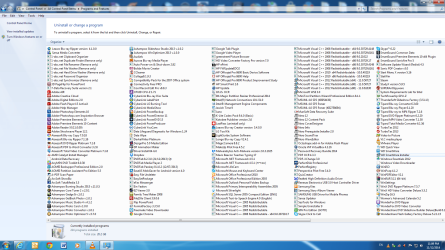
Lets see your programs list to see if it has a separate listing,
Go to Uninstall a program,
On the top right next to the question mark change the view of the page to List,
Post a screen shot,
Cheers.
 

My Computer My Computer

At a glance

Win-7-Pro64bit 7-H-Prem-64biti7-5930K 2nd i9-9940x both water blocked VRM'...Trident-z 3200C14 2nd Trident-z 3600C16EVGA 1080ti ftw3 2nd Titan Xp both water blocked
Computer type
PC/Desktop
Computer Manufacturer/Model Number
Custom assembled by me :}
OS
Win-7-Pro64bit 7-H-Prem-64bit
CPU
i7-5930K 2nd i9-9940x both water blocked VRM's too
Motherboard
ASUS SABERTOOTH X99 2nd ASUS x299 Apex
Memory
Trident-z 3200C14 2nd Trident-z 3600C16
Graphics Card(s)
EVGA 1080ti ftw3 2nd Titan Xp both water blocked
Sound Card
Built-in Realtek
Monitor(s) Displays
1-AOC G2460PG 24"G-Sync 144Hz/ 2nd 1-ASUS VG248QE 24" 144Hz
Screen Resolution
1920 x 1080 144Hz
Hard Drives
2-Samsung M.2 Evo & Evo Plus
2-Samsung 850 EVO 500GB SSD's/ 3-2.5 W.D. Black 1tb-&3-1tb/3-3.5 WD Black 1tb hdd's
PSU
EVGA SuperNOVA 1000-P2 2nd 1200-P2
Case
2-Corsair Obsidian Series 450D Black ATX Mid Tower
Cooling
Custom water loops
Keyboard
Logitech G710+/ 2nd Logitech G910
Mouse
2-RedDragon M901 Perdition 16400 dpi Gaming mouse = wired
Internet Speed
Comcast Ping 19ms 89.31mbps download speed 6.12mbps upload
Antivirus
Malwarebytes Pro/ Superantispyware Pro
Browser
FireFox & Pale moon
Other Info
2nd ASUS X299 Apex/Intel i9-9940x with Custom water loop/7H-Prem-x64/Corsair 450D case/Ram Trident-z 3600C16 4x8gb / Samsung970Evo plus 500gb SSD/Dual ssd EZ swap evo/PSU EVGA SuperNova 1200w-P2 80+Platinum/GPU Titan Xp /8-ML-140 on push-pull on 2-280GTX rads
Here is the screen shot from my list of which shows adobe shockwave

Let me know what I need to do
 

Attachments

  • list.png
    list.png
    192.4 KB · Views: 5

My Computer My Computer

At a glance

WIndows 7 x64
Computer type
PC/Desktop
OS
WIndows 7 x64
I checked the adobe shockwave and the version with 5/30/2014 is 12.1.2 which is the latest version. This is the correct version
 

My Computer My Computer

At a glance

WIndows 7 x64
Computer type
PC/Desktop
OS
WIndows 7 x64
Hi thanks,
Unless you game that particular version of shockwave is not needed :/
Just wondering why it's there if you don't game ?
If you have a antivirus program I don't see it listed ?
Cheers.
 

My Computer My Computer

At a glance

Win-7-Pro64bit 7-H-Prem-64biti7-5930K 2nd i9-9940x both water blocked VRM'...Trident-z 3200C14 2nd Trident-z 3600C16EVGA 1080ti ftw3 2nd Titan Xp both water blocked
Computer type
PC/Desktop
Computer Manufacturer/Model Number
Custom assembled by me :}
OS
Win-7-Pro64bit 7-H-Prem-64bit
CPU
i7-5930K 2nd i9-9940x both water blocked VRM's too
Motherboard
ASUS SABERTOOTH X99 2nd ASUS x299 Apex
Memory
Trident-z 3200C14 2nd Trident-z 3600C16
Graphics Card(s)
EVGA 1080ti ftw3 2nd Titan Xp both water blocked
Sound Card
Built-in Realtek
Monitor(s) Displays
1-AOC G2460PG 24"G-Sync 144Hz/ 2nd 1-ASUS VG248QE 24" 144Hz
Screen Resolution
1920 x 1080 144Hz
Hard Drives
2-Samsung M.2 Evo & Evo Plus
2-Samsung 850 EVO 500GB SSD's/ 3-2.5 W.D. Black 1tb-&3-1tb/3-3.5 WD Black 1tb hdd's
PSU
EVGA SuperNOVA 1000-P2 2nd 1200-P2
Case
2-Corsair Obsidian Series 450D Black ATX Mid Tower
Cooling
Custom water loops
Keyboard
Logitech G710+/ 2nd Logitech G910
Mouse
2-RedDragon M901 Perdition 16400 dpi Gaming mouse = wired
Internet Speed
Comcast Ping 19ms 89.31mbps download speed 6.12mbps upload
Antivirus
Malwarebytes Pro/ Superantispyware Pro
Browser
FireFox & Pale moon
Other Info
2nd ASUS X299 Apex/Intel i9-9940x with Custom water loop/7H-Prem-x64/Corsair 450D case/Ram Trident-z 3600C16 4x8gb / Samsung970Evo plus 500gb SSD/Dual ssd EZ swap evo/PSU EVGA SuperNova 1200w-P2 80+Platinum/GPU Titan Xp /8-ML-140 on push-pull on 2-280GTX rads
Hi

Just a quick update

I temporarly took off my antivirus since I have been trying to deal with IE and to make sure its not an antivirus issue, I just removed it but will put it back soon.

I do not play games much. SO I should remove shockwave? Is it need on my machine

Again IE just stopped working and froze with windows until the printing starting of a Pdf file

I opened a pdf file in IE and it opened fine
Yet when I tried to print, it just froze until it rendered the pages and then started working again.

Any ideas of why this is happening. Any help would be super
 

My Computer My Computer

At a glance

WIndows 7 x64
Computer type
PC/Desktop
OS
WIndows 7 x64
Hi no you don't need shockwave 12....
Try this
Gear symbol on the top right and Internet options,
Advanced section and check the top box to use software rendering instead of gpu rendering,
Apply and okay,
Close ie and boot your computer/ restart.

If still no joy uninstall ie11 and roll back to hopefully ie10 and test the issue,
Surfing without an still unknown antivirus is not recommended
What do you use again I still missed it's name :confused: it might be there are known a-v's which interfere with Internet explorer's new security features MSE is recommended if you have mbam pro/ premium installed I have this combo myself and have for a very long time now ;)

Properly removing an a-v is the key most will need a developers removal utility to accomplish the task,
Cheers.
 

My Computer My Computer

At a glance

Win-7-Pro64bit 7-H-Prem-64biti7-5930K 2nd i9-9940x both water blocked VRM'...Trident-z 3200C14 2nd Trident-z 3600C16EVGA 1080ti ftw3 2nd Titan Xp both water blocked
Computer type
PC/Desktop
Computer Manufacturer/Model Number
Custom assembled by me :}
OS
Win-7-Pro64bit 7-H-Prem-64bit
CPU
i7-5930K 2nd i9-9940x both water blocked VRM's too
Motherboard
ASUS SABERTOOTH X99 2nd ASUS x299 Apex
Memory
Trident-z 3200C14 2nd Trident-z 3600C16
Graphics Card(s)
EVGA 1080ti ftw3 2nd Titan Xp both water blocked
Sound Card
Built-in Realtek
Monitor(s) Displays
1-AOC G2460PG 24"G-Sync 144Hz/ 2nd 1-ASUS VG248QE 24" 144Hz
Screen Resolution
1920 x 1080 144Hz
Hard Drives
2-Samsung M.2 Evo & Evo Plus
2-Samsung 850 EVO 500GB SSD's/ 3-2.5 W.D. Black 1tb-&3-1tb/3-3.5 WD Black 1tb hdd's
PSU
EVGA SuperNOVA 1000-P2 2nd 1200-P2
Case
2-Corsair Obsidian Series 450D Black ATX Mid Tower
Cooling
Custom water loops
Keyboard
Logitech G710+/ 2nd Logitech G910
Mouse
2-RedDragon M901 Perdition 16400 dpi Gaming mouse = wired
Internet Speed
Comcast Ping 19ms 89.31mbps download speed 6.12mbps upload
Antivirus
Malwarebytes Pro/ Superantispyware Pro
Browser
FireFox & Pale moon
Other Info
2nd ASUS X299 Apex/Intel i9-9940x with Custom water loop/7H-Prem-x64/Corsair 450D case/Ram Trident-z 3600C16 4x8gb / Samsung970Evo plus 500gb SSD/Dual ssd EZ swap evo/PSU EVGA SuperNova 1200w-P2 80+Platinum/GPU Titan Xp /8-ML-140 on push-pull on 2-280GTX rads
Hi Ya

Thanks for the email. I did your suggestion and checked off the software rendering instead of gpu rendering and the issue happened many times. I have unchecked and the issue still persists. I have currently installed IE10 as IE11 did not work out so good for me and it was very sluggish. I can try IE9 if u would like.

I have MSE uninstalled and will be putting it back in soon.

I have moved to chrome today and was wondering if u have any other ideas of whats happening to IE.
 

My Computer My Computer

At a glance

WIndows 7 x64
Computer type
PC/Desktop
OS
WIndows 7 x64
Back
Top