ATI drivers refuse to install

schwim

New member
Local time
12:23 AM
Messages
26
Hi there

Win 7 64bit
Aspire 5251-1513 laptop
ATI Mobility Radeon HD 4250


I downloaded Catalyst drivers 11.1(1/26/11)
I removed the display adapter and related drivers in the hardware panel
(reboot into safe-mode)
I ran Driver Sweeper and selected ATI
(reboot)
I ran the Catalyst executable as administrator.
(reboot)
I have no driver.

I have tried this many different ways(both the individual driver and the whole shebang), but the end result is the same. I am now running on the stock Win 7 driver.

I'm not sure what else to try and would love some suggestions on how I might get some drivers installed for this card.

thanks,
json
 

My Computer

OS
Multiple
In device manager, under Display Adapters, is it showing your ATI card correctly? If so, when you right click it and select properties, what driver is it showing?

I've used ATI cards for years, and from time to time a new version will be borked up. I haven't downloaded this latest one yet so I don't know if it's got problems.

A possibility is when you select properties, then check "Roll Back Driver" and see if it will take you to the one you were last using. Unless you use the Catalyst Control Center, you could just download the driver itself and try installing that.

When I'm installing new versions I don't remove the display adapter or drivers. I run Driver Sweeper, as you did, then run the new download.
 

My Computer

Computer type
PC/Desktop
Computer Manufacturer/Model Number
Self build
OS
Windows 10 Home
CPU
Intel Core i5 3550
Motherboard
ASUS P8Z77-V LX (LGA1155)
Memory
Corsair Vengeance DDR3 16GB
Graphics Card(s)
Nvidia GEForce GTX 970 SSC
Monitor(s) Displays
Hanns-G 23.6", Acer 17"
Screen Resolution
1920x1080, 1440x900
Hard Drives
Sandisk SSD 256 GB
WD500GB
WD640GB
Seagage Ultra + 1TB ext.
BWD 800GB
WD 1TB ext
PSU
Antec 650w
Case
Cooler Master Centurion 534
Cooling
COOLER MASTER GeminII S524, 3 120 mm case fans.
Keyboard
Logitech MK300
Mouse
Logitech MK300
Internet Speed
Cable
Antivirus
MSSE, Malwarebytes
Browser
IE 10, Chrome
Sounds like Driver Sweeper removed more than it should, which it can and does do from time to time. Hope you can do a system restore or have a backup image from before you ran DS, as usually the only way to fix what you are describing is to re-install Windows to replace the missing files.
 

My Computer

Computer type
PC/Desktop
Computer Manufacturer/Model Number
Me
OS
Win 7 Ultimate x64
CPU
FX-8350 @ 4.6 GHz so far
Motherboard
Asus M5A97 EVO
Memory
ADATA XPG V1 Series Black 8GB DDR3 1600
Graphics Card(s)
Sapphire R9 270x Dual-X
Sound Card
Xonar DGX w/ Corsair Vengence 1300
Monitor(s) Displays
Acer S232HL Abid
Screen Resolution
1920x1080
Hard Drives
120 GB OCZ Vertex 3
500 GB Seagate 7200.12
PSU
Antec Earthwatts 650W Green
Case
Antec Three Hundred
Cooling
Cooler Master 212 EVO
Keyboard
Logitech G510
Mouse
Logitech G500s
Internet Speed
35000/3000
In device manager, under Display Adapters, is it showing your ATI card correctly?

No longer. Now it's just a standard VGA adapter. Starting up Catalyst now tells me that there's no applicable ATI device installed.

When I'm installing new versions I don't remove the display adapter or drivers. I run Driver Sweeper, as you did, then run the new download.

I tried it this way the first time. Upon reboot, it was still using the old drivers. Removing the display adapter was an attempt to get it to stop using the old drivers.

Rolling it back will not solve my issue(later drivers), so is there any way out of my pickle besides that? I find it surprising that today's technological marvel of an OS has no way to detect the card that on-board and that I'm locked into the driver that shipped with the machine.

Thanks very much for your time.
 

My Computer

OS
Multiple
Hello Schwim

I had similar issues initially with 11.1 on Windows 7 x64.

As a last resort I redownloaded the Drivers from ATI and it worked.

So, try redownloading the Drivers from ATI and see if that helps.

Kevin
 

My Computer

Computer Manufacturer/Model Number
Custom Build
OS
Windows 7 Ultimate x64
CPU
Intel Core 2 Quad 3.0Ghz OC @ 3.6Ghz
Motherboard
Gigabyte GA-EP45-DS3P
Memory
8GB Crucial Ballistix Tracer
Graphics Card(s)
2 x ATI HD 5770 CrossFireX
Sound Card
Onboard
Monitor(s) Displays
Dell SP2309W
Screen Resolution
2048x1152 32 Bit
Hard Drives
2 x 1TB WD Caviar Black
PSU
CORSAIR CMPSU-850HXUK
Keyboard
Microsoft Wireless Laser 7000
Mouse
Microsoft Wireless Laser 7000
Internet Speed
8Mbit
Hi there everyone and thanks very much for all of your suggestions.

As suggested, I downloaded the driver package from the Acer site, which got me my old driver back as well as a recognized ATI card in the device manager.

Upon starting CCC, I get a Windows error that Catalyst has stopped working. I can't get it to start up to try to update drivers that way.

Device managers "internet update" tells me that Windows has determined that my one year old driver is up to date.

I don't know how I will go about with a local update via the device manager, as I only have the Catalyst executables and don't seem to be able to get the necessary driver files to update through that method.

So to clarify, I'm back to having an ATI card with one year old drivers, a Catalyst app that refuses to run and a device manager that I don't know how to update the drivers through.

[EDIT]I even tried running the updated ATI driver package again, in hopes that it would update Catalyst, allowing it to run. Even after that, I still get the "Catalyst Command Line Interface has stopped working" error.[/EDIT]

Any thoughts concerning where I might go from here?

Thanks to all very much for your time so far.
json
 

My Computer

OS
Multiple
I would think if you unistalled CCC through the Control Panel then downloaded the drivers only from AMD, without the Catalyst Control Center, you would be able to then install them.

I personally don't have a need for CCC, so I just get the stand alone drivers when I update them.
 

My Computer

Computer type
PC/Desktop
Computer Manufacturer/Model Number
Self build
OS
Windows 10 Home
CPU
Intel Core i5 3550
Motherboard
ASUS P8Z77-V LX (LGA1155)
Memory
Corsair Vengeance DDR3 16GB
Graphics Card(s)
Nvidia GEForce GTX 970 SSC
Monitor(s) Displays
Hanns-G 23.6", Acer 17"
Screen Resolution
1920x1080, 1440x900
Hard Drives
Sandisk SSD 256 GB
WD500GB
WD640GB
Seagage Ultra + 1TB ext.
BWD 800GB
WD 1TB ext
PSU
Antec 650w
Case
Cooler Master Centurion 534
Cooling
COOLER MASTER GeminII S524, 3 120 mm case fans.
Keyboard
Logitech MK300
Mouse
Logitech MK300
Internet Speed
Cable
Antivirus
MSSE, Malwarebytes
Browser
IE 10, Chrome
I would think if you unistalled CCC through the Control Panel then downloaded the drivers only from AMD, without the Catalyst Control Center, you would be able to then install them.

I personally don't have a need for CCC, so I just get the stand alone drivers when I update them.

Hi there cato and thanks for the help.

I am only allowed the option to "repair" the CCC install via "remove software". I can't find any way to actually uninstall the application. I found this same problem on my brother's computer as well. In fact, his CCC install also errored out upon startup.

I tried the standalone version first as well, since I don't like the bloat("play lotro free!!!!"), but when that didn't work, I went with the whole package, in hopes that it would get me an updated driver.

So, I'm out of ideas on getting an up-to-date driver on this computer.

thanks,
json
 

My Computer

OS
Multiple
Can you locate Catalyst install manager in Add/remove programs? Or is that what're you're already talking about, you need to select custom uninstall (not express), that'll show up all catalyst stuff on the computer.

Can you post a snipshot of what exactly shows up in Add/remove features?
 

My Computer

Computer Manufacturer/Model Number
Too many to describe...
OS
Windows 7 x64 pro/ Windows 7 x86 Pro/ XP SP3 x86
I would think if you unistalled CCC through the Control Panel then downloaded the drivers only from AMD, without the Catalyst Control Center, you would be able to then install them.

I personally don't have a need for CCC, so I just get the stand alone drivers when I update them.

Hi there cato and thanks for the help.

I am only allowed the option to "repair" the CCC install via "remove software". I can't find any way to actually uninstall the application. I found this same problem on my brother's computer as well. In fact, his CCC install also errored out upon startup.

I tried the standalone version first as well, since I don't like the bloat("play lotro free!!!!"), but when that didn't work, I went with the whole package, in hopes that it would get me an updated driver.

So, I'm out of ideas on getting an up-to-date driver on this computer.

thanks,
json

Are you downloading it from here: http://www.amd.com/us/Pages/AMDHomePage.aspx ?

I've never seen the bloat that you're talking about at anytime. It's either something new on that site, or there is something weird going on here. In fact, I'm going to go download the latest version now just to see.

I'll be checking back.
 

My Computer

Computer type
PC/Desktop
Computer Manufacturer/Model Number
Self build
OS
Windows 10 Home
CPU
Intel Core i5 3550
Motherboard
ASUS P8Z77-V LX (LGA1155)
Memory
Corsair Vengeance DDR3 16GB
Graphics Card(s)
Nvidia GEForce GTX 970 SSC
Monitor(s) Displays
Hanns-G 23.6", Acer 17"
Screen Resolution
1920x1080, 1440x900
Hard Drives
Sandisk SSD 256 GB
WD500GB
WD640GB
Seagage Ultra + 1TB ext.
BWD 800GB
WD 1TB ext
PSU
Antec 650w
Case
Cooler Master Centurion 534
Cooling
COOLER MASTER GeminII S524, 3 120 mm case fans.
Keyboard
Logitech MK300
Mouse
Logitech MK300
Internet Speed
Cable
Antivirus
MSSE, Malwarebytes
Browser
IE 10, Chrome
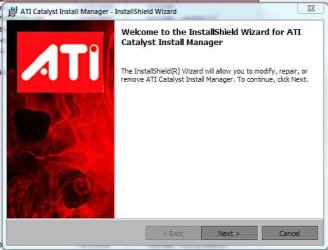
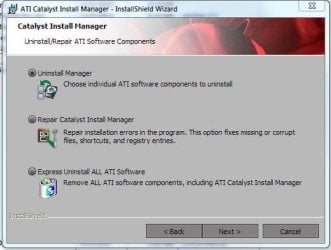
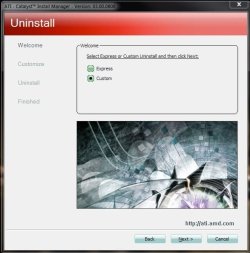
Okay, downloaded the latest driver and installed it. I don't mean to sound condescending here, but only showing you the steps I went through while uninstalling from the Control Panel. If you double click ATI Catalyst Install Manager you will go to the first Capture. Click to Uninstall Manager, then the next screen click on Custom. You will then be given options of what to uninstall, which should be everything that shows up.

When you install your latest driver, click Custom again so you can select what you want to install. Here's where the bloatware comes in that you were talking about. In my case it has an option to install a trial version of Lord of the Rings. I've de-selected it so many times I had forgotten about it. If you don't do the Custom install, it, or I guess in your case the Lottery thing, will be installed.

I used to run Driver Sweeper more than I do these days. AMD has begun cleaning up after themselves more than they did when it was just ATI, so I don't really feel it's necessary anymore.

Try to remember to create a restore point before you start all this. At least you can go back to where you are right now if something doesn't go right.

Hope this will help. If not, just keep asking and someone will surely come through for you.

EDIT: If you notice in the second snip there is an option to Express Uninstall ALL ATI Software. If you uninstalled from the Control Panel this isn't necessary. I usually prefer to use the Control Panel to uninstall anything.
 

Attachments

  • Capture.JPG
    Capture.JPG
    32.3 KB · Views: 2
  • Capture2.JPG
    Capture2.JPG
    33.9 KB · Views: 3
  • Capture3.JPG
    Capture3.JPG
    45.9 KB · Views: 2

My Computer

Computer type
PC/Desktop
Computer Manufacturer/Model Number
Self build
OS
Windows 10 Home
CPU
Intel Core i5 3550
Motherboard
ASUS P8Z77-V LX (LGA1155)
Memory
Corsair Vengeance DDR3 16GB
Graphics Card(s)
Nvidia GEForce GTX 970 SSC
Monitor(s) Displays
Hanns-G 23.6", Acer 17"
Screen Resolution
1920x1080, 1440x900
Hard Drives
Sandisk SSD 256 GB
WD500GB
WD640GB
Seagage Ultra + 1TB ext.
BWD 800GB
WD 1TB ext
PSU
Antec 650w
Case
Cooler Master Centurion 534
Cooling
COOLER MASTER GeminII S524, 3 120 mm case fans.
Keyboard
Logitech MK300
Mouse
Logitech MK300
Internet Speed
Cable
Antivirus
MSSE, Malwarebytes
Browser
IE 10, Chrome
Dear schwim,
I have read the query you posted and the many educative responses you got! So, i went Googling as to "what is the proper procedural steps to be followed when installing ATI drivers"!

I implore you to kindly read this article :
How to Completely Remove ATI Drivers | eHow.com
I knew from your first post that you know what you're doing, except for this one step:
QUOTE "Download and run the ATI Driver Uninstall application to remove any registry keys that the drivers may have left behind in the System Registry. Reboot the computer in Safe Mode and attempt to install the new drivers for the video card." UNQUOTE (courtesy the above link). Kindly look into it and see if it helps!


Hope is as vital as breath! You take away the very last teeny-weeny bit of hope from a person and that's it!:(


Best wishes,
DR.Sreedhav:)
PS: A small un-asked for advise:pPlease use Macrium Reflect (Free)to take backup and restore,before any such major changes! Website : Macrium Reflect FREE Edition - Information and download
Macrium Reflect - Blogs and News
 

My Computer

Computer Manufacturer/Model Number
Sony Vaio C series VPCCB35FN laptop
OS
MS Windows 7 Home Premium 64-bit SP1
CPU
IntelCore [email protected]; Sandy Bridge 32nm Tech.
Motherboard
Sony Vaio Version:C609NJYJ
Memory
4096Mb RAM; Single ChannelDDR3@665MHz; DRAM Freq:662MHz
Graphics Card(s)
AMD Radeon HD 6630M; GPU:Whistler;BIOS Core&mem Clock:123.36
Sound Card
REALTEK High Definition Audio Device; INTEL Display Card
Monitor(s) Displays
Generic PnP Intel HD;Resolution:1920*1040 Pixels; BPP:32bits
Screen Resolution
Current Resolution:1920*1080 Pixels; Monitor Frequency:60Hz
Hard Drives
Internal HD:TOSHIBA MK5061GSY; Real Size:488 GB;NTFS; 3 Partitions; SATA; HEADS:16

External HDD: WD Elements 1023 PORTABLE; Estimated Size: 1TB; NTFS; 3 Partitions
Cooling
Lateral Exhaust with a Cooling Pad Placed Beneath.
Keyboard
Logitech Bluetooth+ Generic Integrated K-B
Mouse
Logitech Bluetooth
Internet Speed
2MBPS
Other Info
1)Trend Micro Titanium Maximum Security Suite Version:3
2)SAS-PRO

3)MBAM--PRO


4)WATERFOX+IE9 +WOT+LINKEXTEND+ DRWEBCUREIT LINK CHECKER

5)SPYWAREBLASTER

6) WINPATROL PLUS

7) SANDBOXIE and
8) A BIT OF COMMON SENSE.
Go to catalyst in add remove select change in top menu and choose custom uninstall.

Mobile cats

ATI Catalyst

If you don't won't windows to install a default driver, right click computer, properties, hardware, deivce installation settings button, choose no, let me choose what to do and click last radio button, Never install driver software form windows update.

Check the lower box Replace generic device icons with enhanced.
 
Last edited:

My Computer

Computer Manufacturer/Model Number
Asus
OS
Windows 7 x64 Ultimate SP1
CPU
I5 875K Unlocked
Motherboard
P7P55D-E-PRO
Memory
Kingston HyperX Genesis DDR3-1600MHz 9-9-9-27 @ 1.65V XMP
Graphics Card(s)
EVGA GeForce GTX 570 HD 732 MHz GPU 1280 MB, 152 GB Mem
Sound Card
Onboard Via 1828S
Monitor(s) Displays
Samsung T240 HD
Screen Resolution
Dual 1920X1200 1027X768
Hard Drives
OCZ Vertex II Extended Sandforce SSD 60 Gig 2X WD Black Caviar 1 terabyte 6GBS Transer Sata 3 Marvell Chip
PSU
Corsair Gold fully Modular 80 Plus 850
Case
Coolermaster Half X Full Tower
Cooling
Noctua NH-U12P
Keyboard
MS
Mouse
MS
Internet Speed
Fast enough
Other Info
My fridge has a water tap
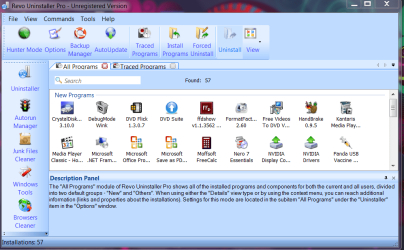
Trying to remove registry keys "safely" is uncharted waters for a non-Geek! In fact using either the free or the trial version of "Revo uninstaller" is better than the add-remove interface as the latter does not do a thorough job of removing the left-overs in the registry of the program!

kindly download the trial version (30 days) (if you have not done already) of the Revo-professional from : Revo Uninstaller Pro - Uninstall Software, Remove Programs easily
You will find the ATI drivers there and click on "uninstall"! The one thing to remember "is place a tick mark"only on the highlighted black items as in this post and i can assure you an extremely safe and efficient way of getting rid of the old ATI driver lock, stock and barrel! I guess you will succeed! Create a system restore point before the surgery as is the norm!
Regards,
Sreedhav.


My Computer

Computer Manufacturer/Model Number
Sony Vaio C series VPCCB35FN laptop
OS
MS Windows 7 Home Premium 64-bit SP1
CPU
IntelCore [email protected]; Sandy Bridge 32nm Tech.
Motherboard
Sony Vaio Version:C609NJYJ
Memory
4096Mb RAM; Single ChannelDDR3@665MHz; DRAM Freq:662MHz
Graphics Card(s)
AMD Radeon HD 6630M; GPU:Whistler;BIOS Core&mem Clock:123.36
Sound Card
REALTEK High Definition Audio Device; INTEL Display Card
Monitor(s) Displays
Generic PnP Intel HD;Resolution:1920*1040 Pixels; BPP:32bits
Screen Resolution
Current Resolution:1920*1080 Pixels; Monitor Frequency:60Hz
Hard Drives
Internal HD:TOSHIBA MK5061GSY; Real Size:488 GB;NTFS; 3 Partitions; SATA; HEADS:16

External HDD: WD Elements 1023 PORTABLE; Estimated Size: 1TB; NTFS; 3 Partitions
Cooling
Lateral Exhaust with a Cooling Pad Placed Beneath.
Keyboard
Logitech Bluetooth+ Generic Integrated K-B
Mouse
Logitech Bluetooth
Internet Speed
2MBPS
Other Info
1)Trend Micro Titanium Maximum Security Suite Version:3
2)SAS-PRO

3)MBAM--PRO


4)WATERFOX+IE9 +WOT+LINKEXTEND+ DRWEBCUREIT LINK CHECKER

5)SPYWAREBLASTER

6) WINPATROL PLUS

7) SANDBOXIE and
8) A BIT OF COMMON SENSE.
Same keys are replaced with new install.
 

My Computer

Computer Manufacturer/Model Number
Asus
OS
Windows 7 x64 Ultimate SP1
CPU
I5 875K Unlocked
Motherboard
P7P55D-E-PRO
Memory
Kingston HyperX Genesis DDR3-1600MHz 9-9-9-27 @ 1.65V XMP
Graphics Card(s)
EVGA GeForce GTX 570 HD 732 MHz GPU 1280 MB, 152 GB Mem
Sound Card
Onboard Via 1828S
Monitor(s) Displays
Samsung T240 HD
Screen Resolution
Dual 1920X1200 1027X768
Hard Drives
OCZ Vertex II Extended Sandforce SSD 60 Gig 2X WD Black Caviar 1 terabyte 6GBS Transer Sata 3 Marvell Chip
PSU
Corsair Gold fully Modular 80 Plus 850
Case
Coolermaster Half X Full Tower
Cooling
Noctua NH-U12P
Keyboard
MS
Mouse
MS
Internet Speed
Fast enough
Other Info
My fridge has a water tap
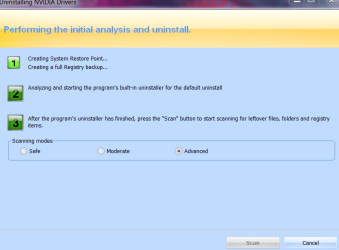
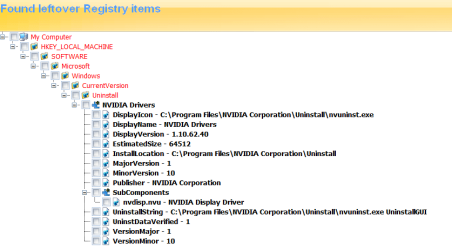
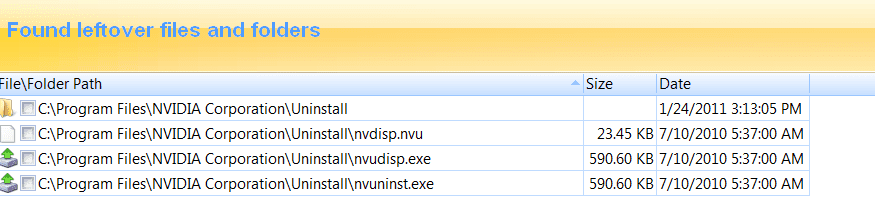
These snapshots below of Nvidia drivers and Revo Professional uninstalling them is displayed. You will have to reboot to complete the process.
Regards,
Sreedhav
 

Attachments

  • REVO-1.png
    REVO-1.png
    57.2 KB · Views: 11
  • REVO-2.png
    REVO-2.png
    21.6 KB · Views: 7
  • REVO-3.png
    REVO-3.png
    18.1 KB · Views: 9
  • REVO-4.png
    REVO-4.png
    13.1 KB · Views: 6

My Computer

Computer Manufacturer/Model Number
Sony Vaio C series VPCCB35FN laptop
OS
MS Windows 7 Home Premium 64-bit SP1
CPU
IntelCore [email protected]; Sandy Bridge 32nm Tech.
Motherboard
Sony Vaio Version:C609NJYJ
Memory
4096Mb RAM; Single ChannelDDR3@665MHz; DRAM Freq:662MHz
Graphics Card(s)
AMD Radeon HD 6630M; GPU:Whistler;BIOS Core&mem Clock:123.36
Sound Card
REALTEK High Definition Audio Device; INTEL Display Card
Monitor(s) Displays
Generic PnP Intel HD;Resolution:1920*1040 Pixels; BPP:32bits
Screen Resolution
Current Resolution:1920*1080 Pixels; Monitor Frequency:60Hz
Hard Drives
Internal HD:TOSHIBA MK5061GSY; Real Size:488 GB;NTFS; 3 Partitions; SATA; HEADS:16

External HDD: WD Elements 1023 PORTABLE; Estimated Size: 1TB; NTFS; 3 Partitions
Cooling
Lateral Exhaust with a Cooling Pad Placed Beneath.
Keyboard
Logitech Bluetooth+ Generic Integrated K-B
Mouse
Logitech Bluetooth
Internet Speed
2MBPS
Other Info
1)Trend Micro Titanium Maximum Security Suite Version:3
2)SAS-PRO

3)MBAM--PRO


4)WATERFOX+IE9 +WOT+LINKEXTEND+ DRWEBCUREIT LINK CHECKER

5)SPYWAREBLASTER

6) WINPATROL PLUS

7) SANDBOXIE and
8) A BIT OF COMMON SENSE.
Same keys are replaced with new install.

Dear Zardoc,
I too belong to the Rad,Mad,Dad squad and thank God,i realize it!;)
regards,
Sreedhav
 

My Computer

Computer Manufacturer/Model Number
Sony Vaio C series VPCCB35FN laptop
OS
MS Windows 7 Home Premium 64-bit SP1
CPU
IntelCore [email protected]; Sandy Bridge 32nm Tech.
Motherboard
Sony Vaio Version:C609NJYJ
Memory
4096Mb RAM; Single ChannelDDR3@665MHz; DRAM Freq:662MHz
Graphics Card(s)
AMD Radeon HD 6630M; GPU:Whistler;BIOS Core&mem Clock:123.36
Sound Card
REALTEK High Definition Audio Device; INTEL Display Card
Monitor(s) Displays
Generic PnP Intel HD;Resolution:1920*1040 Pixels; BPP:32bits
Screen Resolution
Current Resolution:1920*1080 Pixels; Monitor Frequency:60Hz
Hard Drives
Internal HD:TOSHIBA MK5061GSY; Real Size:488 GB;NTFS; 3 Partitions; SATA; HEADS:16

External HDD: WD Elements 1023 PORTABLE; Estimated Size: 1TB; NTFS; 3 Partitions
Cooling
Lateral Exhaust with a Cooling Pad Placed Beneath.
Keyboard
Logitech Bluetooth+ Generic Integrated K-B
Mouse
Logitech Bluetooth
Internet Speed
2MBPS
Other Info
1)Trend Micro Titanium Maximum Security Suite Version:3
2)SAS-PRO

3)MBAM--PRO


4)WATERFOX+IE9 +WOT+LINKEXTEND+ DRWEBCUREIT LINK CHECKER

5)SPYWAREBLASTER

6) WINPATROL PLUS

7) SANDBOXIE and
8) A BIT OF COMMON SENSE.
Latest cats don't override keys and still cause issues either by not displaying proper cat version or creating bsod. I stopped using Revo for a few years.

Here is a command line that works well to clean old ati files.

First you must remove latest drivers.

Right click computer, properties, hardware, device installation settings button, choose no, let me choose what to do and click last radio button, Never install driver software form windows update.

Check the lower box Replace generic device icons with enhanced.

Reboot and use gpucleaner command line (link below). You must run as an administrator for it to clean (Read instructions included)

Once finished, install new drivers
 

Attachments

Last edited:

My Computer

Computer Manufacturer/Model Number
Asus
OS
Windows 7 x64 Ultimate SP1
CPU
I5 875K Unlocked
Motherboard
P7P55D-E-PRO
Memory
Kingston HyperX Genesis DDR3-1600MHz 9-9-9-27 @ 1.65V XMP
Graphics Card(s)
EVGA GeForce GTX 570 HD 732 MHz GPU 1280 MB, 152 GB Mem
Sound Card
Onboard Via 1828S
Monitor(s) Displays
Samsung T240 HD
Screen Resolution
Dual 1920X1200 1027X768
Hard Drives
OCZ Vertex II Extended Sandforce SSD 60 Gig 2X WD Black Caviar 1 terabyte 6GBS Transer Sata 3 Marvell Chip
PSU
Corsair Gold fully Modular 80 Plus 850
Case
Coolermaster Half X Full Tower
Cooling
Noctua NH-U12P
Keyboard
MS
Mouse
MS
Internet Speed
Fast enough
Other Info
My fridge has a water tap
Go to catalyst in add remove select change in top menu and choose express uninstall.

If I may please change that to custom uninstall, and only uninstall the video driver. If someone has an AMD chipset as in the case of schwim's Acer,

Acer Support: Acer Aspire 5251 Notebook Series Specifications

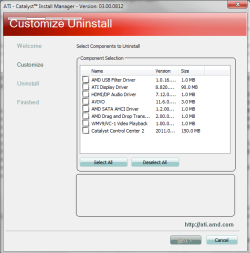
it will also uninstall the chipset drivers, which can lead to an unbootable OS. Just to give an idea as too what can be removed, this is everything that an express uninstall would remove on mine,

catuninstall.png
 

My Computer

Computer type
PC/Desktop
Computer Manufacturer/Model Number
Me
OS
Win 7 Ultimate x64
CPU
FX-8350 @ 4.6 GHz so far
Motherboard
Asus M5A97 EVO
Memory
ADATA XPG V1 Series Black 8GB DDR3 1600
Graphics Card(s)
Sapphire R9 270x Dual-X
Sound Card
Xonar DGX w/ Corsair Vengence 1300
Monitor(s) Displays
Acer S232HL Abid
Screen Resolution
1920x1080
Hard Drives
120 GB OCZ Vertex 3
500 GB Seagate 7200.12
PSU
Antec Earthwatts 650W Green
Case
Antec Three Hundred
Cooling
Cooler Master 212 EVO
Keyboard
Logitech G510
Mouse
Logitech G500s
Internet Speed
35000/3000
Back
Top