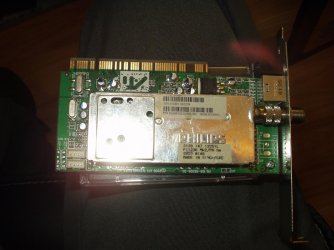
ATi TV wonder pro x64

Hi,

Keep the external line in plugged into your sound card, that's correct. Also, could you tell me if you are using the tuner or svideo, composite. What type of tv tuner do you have-1238mk5 1236mk3 or the pal version?

I'm using the tuner, I've not tried the S-Video. I'm not sure which type it is, it might be the 1236mk3. How can i tell for sure, I took the card from a friends old PC when he was scraping in it so I don't have any documentation. I had it working with linux prior to installing windows, so I know everything should be good. If it was the PAL version I wouldn't expect to see the picture, so it must be one of the other two.

Thanks for you help with this.
 

My Computer My Computer

At a glance

Windows 7 Home Premium x64
OS
Windows 7 Home Premium x64
I have the ATI Cable Card HD box and that needed a firmware update to work in Windows 7. When I pluged it in for the first time it automaticly downloaded the firmware flashed it and I was good to go.

Hi,

This is an ati tv wonder pro pci tv tuner video capture card that I made a driver packagae for that works by way of driver not firmware, it is not supported officially by amd/ati on windows vista 32/64 bit, 7 32/64 bit and all x64 windows.
 

My Computer My Computer

At a glance

Windows 10 x64 ProfessionalAMD FX 6300 Black EditionPatriot Viper 8gbx2 DDR3EVGA Nvidia GeForce GTX 680
Computer type
PC/Desktop
Computer Manufacturer/Model Number
Custom
OS
Windows 10 x64 Professional
CPU
AMD FX 6300 Black Edition
Motherboard
MSI 970a SLI Krait Edition
Memory
Patriot Viper 8gbx2 DDR3
Graphics Card(s)
EVGA Nvidia GeForce GTX 680
Sound Card
Realtek onboard
Monitor(s) Displays
LG, Dynex 24" LCD TV
Screen Resolution
2560x1400 1920x1080
Hard Drives
Western Digital Velociraptor 500 GB WD5000HHTZ
PSU
Corsair CX850M
Case
Azza Solano 1000
Cooling
Extra intake antec 120mm blue led fan, thermaltake frio sile
Keyboard
Thermaltake
Mouse
Saitek Desktop Gaming Mouse
Other Info
ATi TV Wonder Pro PCI tv tuner video capture card,
Roxio Game Capture HD Pro
Yes, most likely it is the 1236 mk3 as I have the 1238 mk5 and have not properly found a way to use the tuner portion, but I only use composite and svideo so I'm fine. Can you tell me what program you are using with the card and did you follow these steps in case the program is like adobe flash media encoder?

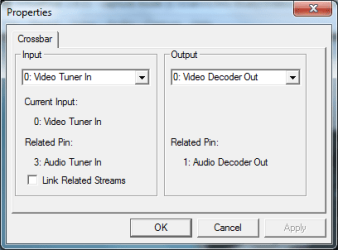
(Some applications using the card will not automatically match the sound with the video. In this case you will have to go the crossbar properties to change this. For the tv tuner, in the crossbar settings, under "output" select "1:audio decoder out", under "Input", select "3:audio Tuner In". For the composite and svideo inputs, in the crossbar settings, under ""output" select "1:audio decoder out", under "Input" select 4: Audio Line In.)

Lastly, try using virtualdub portable as it matches the sound to video, and be sure to have the windows volume properties or sound card properties for line in turned up almost all the way.
 

My Computer My Computer

At a glance

Windows 10 x64 ProfessionalAMD FX 6300 Black EditionPatriot Viper 8gbx2 DDR3EVGA Nvidia GeForce GTX 680
Computer type
PC/Desktop
Computer Manufacturer/Model Number
Custom
OS
Windows 10 x64 Professional
CPU
AMD FX 6300 Black Edition
Motherboard
MSI 970a SLI Krait Edition
Memory
Patriot Viper 8gbx2 DDR3
Graphics Card(s)
EVGA Nvidia GeForce GTX 680
Sound Card
Realtek onboard
Monitor(s) Displays
LG, Dynex 24" LCD TV
Screen Resolution
2560x1400 1920x1080
Hard Drives
Western Digital Velociraptor 500 GB WD5000HHTZ
PSU
Corsair CX850M
Case
Azza Solano 1000
Cooling
Extra intake antec 120mm blue led fan, thermaltake frio sile
Keyboard
Thermaltake
Mouse
Saitek Desktop Gaming Mouse
Other Info
ATi TV Wonder Pro PCI tv tuner video capture card,
Roxio Game Capture HD Pro
I've tried a couple of programs, Windows 7 Media Center and VirtualPVR. Both have the same issue, picture is great but no sound. I'm not sure what you mean by crossbar settings, is that an ATI application? If so where can I get it from?
 

My Computer My Computer

At a glance

Windows 7 Home Premium x64
OS
Windows 7 Home Premium x64
No, it is a setting in some programs that use the card, like in windows media encoder 9, adobe flash media encoder, virtualdub, have you tried out the virtualdub portable yet?
 

My Computer My Computer

At a glance

Windows 10 x64 ProfessionalAMD FX 6300 Black EditionPatriot Viper 8gbx2 DDR3EVGA Nvidia GeForce GTX 680
Computer type
PC/Desktop
Computer Manufacturer/Model Number
Custom
OS
Windows 10 x64 Professional
CPU
AMD FX 6300 Black Edition
Motherboard
MSI 970a SLI Krait Edition
Memory
Patriot Viper 8gbx2 DDR3
Graphics Card(s)
EVGA Nvidia GeForce GTX 680
Sound Card
Realtek onboard
Monitor(s) Displays
LG, Dynex 24" LCD TV
Screen Resolution
2560x1400 1920x1080
Hard Drives
Western Digital Velociraptor 500 GB WD5000HHTZ
PSU
Corsair CX850M
Case
Azza Solano 1000
Cooling
Extra intake antec 120mm blue led fan, thermaltake frio sile
Keyboard
Thermaltake
Mouse
Saitek Desktop Gaming Mouse
Other Info
ATi TV Wonder Pro PCI tv tuner video capture card,
Roxio Game Capture HD Pro
Just downloaded it, but I have to head out so i'll try it when I get back in a couple of hours. Thanks for your help with this.
 

My Computer My Computer

At a glance

Windows 7 Home Premium x64
OS
Windows 7 Home Premium x64
No problem, let me know how it works.
 

My Computer My Computer

At a glance

Windows 10 x64 ProfessionalAMD FX 6300 Black EditionPatriot Viper 8gbx2 DDR3EVGA Nvidia GeForce GTX 680
Computer type
PC/Desktop
Computer Manufacturer/Model Number
Custom
OS
Windows 10 x64 Professional
CPU
AMD FX 6300 Black Edition
Motherboard
MSI 970a SLI Krait Edition
Memory
Patriot Viper 8gbx2 DDR3
Graphics Card(s)
EVGA Nvidia GeForce GTX 680
Sound Card
Realtek onboard
Monitor(s) Displays
LG, Dynex 24" LCD TV
Screen Resolution
2560x1400 1920x1080
Hard Drives
Western Digital Velociraptor 500 GB WD5000HHTZ
PSU
Corsair CX850M
Case
Azza Solano 1000
Cooling
Extra intake antec 120mm blue led fan, thermaltake frio sile
Keyboard
Thermaltake
Mouse
Saitek Desktop Gaming Mouse
Other Info
ATi TV Wonder Pro PCI tv tuner video capture card,
Roxio Game Capture HD Pro
Ok, so I've tried VirtualDub Portable and this has the same symptoms. The video displays and records perfectly but no sound. I found the crossbar properties and it appears to be setup as you suggested. I messed around with a few combinations but without any luck.
 

My Computer My Computer

At a glance

Windows 7 Home Premium x64
OS
Windows 7 Home Premium x64
Alright, could you send me some screenshots of some of your configuration settings like when you use virtualdub, etc. Also, do you have a sound card or onboard sound like realtek? Have you checked the realtek audio line in properties yet, make sure to turn up volume if not done so already. Also, when using the card, check windows volume properties line in to see if the volume bar is moving or not. Do you have the rev 5 driver package installed?
 

My Computer My Computer

At a glance

Windows 10 x64 ProfessionalAMD FX 6300 Black EditionPatriot Viper 8gbx2 DDR3EVGA Nvidia GeForce GTX 680
Computer type
PC/Desktop
Computer Manufacturer/Model Number
Custom
OS
Windows 10 x64 Professional
CPU
AMD FX 6300 Black Edition
Motherboard
MSI 970a SLI Krait Edition
Memory
Patriot Viper 8gbx2 DDR3
Graphics Card(s)
EVGA Nvidia GeForce GTX 680
Sound Card
Realtek onboard
Monitor(s) Displays
LG, Dynex 24" LCD TV
Screen Resolution
2560x1400 1920x1080
Hard Drives
Western Digital Velociraptor 500 GB WD5000HHTZ
PSU
Corsair CX850M
Case
Azza Solano 1000
Cooling
Extra intake antec 120mm blue led fan, thermaltake frio sile
Keyboard
Thermaltake
Mouse
Saitek Desktop Gaming Mouse
Other Info
ATi TV Wonder Pro PCI tv tuner video capture card,
Roxio Game Capture HD Pro
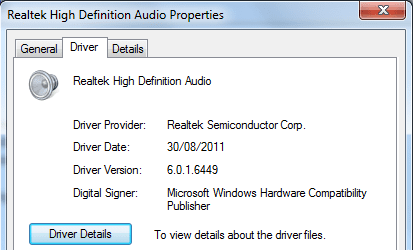
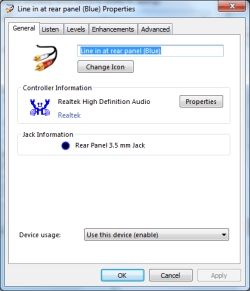
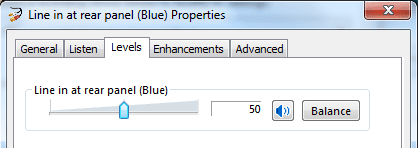
Firstly I am using onboard realtek sound, on an ASUS M3N78-EM motherboard. I have attached the driver version screenshot and a couple of screenshots showing the line-in properties. As you can see from the image the volume is at 50%, if I change this to 100% it makes no difference. Finally I have included a screenshot of the VirtualDubPortable crossbar settings.
 

Attachments

  • Realtek driver.png
    Realtek driver.png
    9.5 KB · Views: 46
  • Line in properties.png
    Line in properties.png
    14 KB · Views: 46
  • Line in properties 2.png
    Line in properties 2.png
    7.7 KB · Views: 45
  • VirtualDubPortable Crossbar.png
    VirtualDubPortable Crossbar.png
    9 KB · Views: 47

My Computer My Computer

At a glance

Windows 7 Home Premium x64
OS
Windows 7 Home Premium x64
Hi,

I meant which driver package for the tv tuner card do you have installed? Also, I meant when viewing the recording tab of the windows sound properties where you can select to enable or disable the line in, do you see the volume bar moving up and down as if there was sound when you are using the card?
 

My Computer My Computer

At a glance

Windows 10 x64 ProfessionalAMD FX 6300 Black EditionPatriot Viper 8gbx2 DDR3EVGA Nvidia GeForce GTX 680
Computer type
PC/Desktop
Computer Manufacturer/Model Number
Custom
OS
Windows 10 x64 Professional
CPU
AMD FX 6300 Black Edition
Motherboard
MSI 970a SLI Krait Edition
Memory
Patriot Viper 8gbx2 DDR3
Graphics Card(s)
EVGA Nvidia GeForce GTX 680
Sound Card
Realtek onboard
Monitor(s) Displays
LG, Dynex 24" LCD TV
Screen Resolution
2560x1400 1920x1080
Hard Drives
Western Digital Velociraptor 500 GB WD5000HHTZ
PSU
Corsair CX850M
Case
Azza Solano 1000
Cooling
Extra intake antec 120mm blue led fan, thermaltake frio sile
Keyboard
Thermaltake
Mouse
Saitek Desktop Gaming Mouse
Other Info
ATi TV Wonder Pro PCI tv tuner video capture card,
Roxio Game Capture HD Pro
Oh right, yeah I downloaded the last tv tuner driver package you posted, rev 5. In the sound properties, nothing happens. The line in is enabled and the bar doesn't move.
 

My Computer My Computer

At a glance

Windows 7 Home Premium x64
OS
Windows 7 Home Premium x64
Ok, maybe you should try to uninstall the driver following the directions in the readmefirst file provided in the driver package and reinstall the driver. Also, to review, you have the card in a pci slot, not connected by internal audio cable but by the outside green port of the card to the line in blue port of the motherboard of your computer, with the latest realtek drivers, (recommend the motherboard manufacturers one), and the sound turned up on your computer and the speakers attached the at least the green audio port on your motherboard (please send me setup/screenshots pictures of actual speaker setup, hardware and software that would help), and have tested various tv tuner apps like virtualdub, flash media encoder, windows media encoder, etc.? Let me know, and do you have the composite svideo breakout box to test the sound/video? If you want to, try testing your blue line in port with another device like a portable media player to see if you hear sound from that device.
 

My Computer My Computer

At a glance

Windows 10 x64 ProfessionalAMD FX 6300 Black EditionPatriot Viper 8gbx2 DDR3EVGA Nvidia GeForce GTX 680
Computer type
PC/Desktop
Computer Manufacturer/Model Number
Custom
OS
Windows 10 x64 Professional
CPU
AMD FX 6300 Black Edition
Motherboard
MSI 970a SLI Krait Edition
Memory
Patriot Viper 8gbx2 DDR3
Graphics Card(s)
EVGA Nvidia GeForce GTX 680
Sound Card
Realtek onboard
Monitor(s) Displays
LG, Dynex 24" LCD TV
Screen Resolution
2560x1400 1920x1080
Hard Drives
Western Digital Velociraptor 500 GB WD5000HHTZ
PSU
Corsair CX850M
Case
Azza Solano 1000
Cooling
Extra intake antec 120mm blue led fan, thermaltake frio sile
Keyboard
Thermaltake
Mouse
Saitek Desktop Gaming Mouse
Other Info
ATi TV Wonder Pro PCI tv tuner video capture card,
Roxio Game Capture HD Pro
I tried installing the drivers per your directions but windows 7 doesn't recognize the file as a driver for the tuner card and says none were found even after directing it to the folder where the driver is. My tuner card has the following printed on it.

fl1236 mk2/ph hm

I pressed F8 and disabled the driver signature enforcement mode and made sure to be logged on as administrator but unable to get Windows 7 to recognize the driver.
 
Last edited:

My Computer My Computer

At a glance

Windows 7 Premium x64AMD Phenom II 4x8 GB DDR2
Computer Manufacturer/Model Number
Custom build
OS
Windows 7 Premium x64
CPU
AMD Phenom II 4x
Motherboard
ASUS M3A78
Memory
8 GB DDR2
Monitor(s) Displays
HP S2031
Hi, are you sure the card is a ati tv wonder pro pci card? Are you using the latest driver I posted?
 

My Computer My Computer

At a glance

Windows 10 x64 ProfessionalAMD FX 6300 Black EditionPatriot Viper 8gbx2 DDR3EVGA Nvidia GeForce GTX 680
Computer type
PC/Desktop
Computer Manufacturer/Model Number
Custom
OS
Windows 10 x64 Professional
CPU
AMD FX 6300 Black Edition
Motherboard
MSI 970a SLI Krait Edition
Memory
Patriot Viper 8gbx2 DDR3
Graphics Card(s)
EVGA Nvidia GeForce GTX 680
Sound Card
Realtek onboard
Monitor(s) Displays
LG, Dynex 24" LCD TV
Screen Resolution
2560x1400 1920x1080
Hard Drives
Western Digital Velociraptor 500 GB WD5000HHTZ
PSU
Corsair CX850M
Case
Azza Solano 1000
Cooling
Extra intake antec 120mm blue led fan, thermaltake frio sile
Keyboard
Thermaltake
Mouse
Saitek Desktop Gaming Mouse
Other Info
ATi TV Wonder Pro PCI tv tuner video capture card,
Roxio Game Capture HD Pro
I'm posting a picture. It has ATI stamped on it. My focus on the camera is going bad.

Matt
 

Attachments

  • P1240241.jpg
    P1240241.jpg
    174.1 KB · Views: 59
  • P1240240.jpg
    P1240240.jpg
    133.5 KB · Views: 19

My Computer My Computer

At a glance

Windows 7 Premium x64AMD Phenom II 4x8 GB DDR2
Computer Manufacturer/Model Number
Custom build
OS
Windows 7 Premium x64
CPU
AMD Phenom II 4x
Motherboard
ASUS M3A78
Memory
8 GB DDR2
Monitor(s) Displays
HP S2031
I'm not sure that is a tv wonder pro pci but can you reply back to see if it has on the card printed philips conexant broadcast decoder cx23883-19
 

My Computer My Computer

At a glance

Windows 10 x64 ProfessionalAMD FX 6300 Black EditionPatriot Viper 8gbx2 DDR3EVGA Nvidia GeForce GTX 680
Computer type
PC/Desktop
Computer Manufacturer/Model Number
Custom
OS
Windows 10 x64 Professional
CPU
AMD FX 6300 Black Edition
Motherboard
MSI 970a SLI Krait Edition
Memory
Patriot Viper 8gbx2 DDR3
Graphics Card(s)
EVGA Nvidia GeForce GTX 680
Sound Card
Realtek onboard
Monitor(s) Displays
LG, Dynex 24" LCD TV
Screen Resolution
2560x1400 1920x1080
Hard Drives
Western Digital Velociraptor 500 GB WD5000HHTZ
PSU
Corsair CX850M
Case
Azza Solano 1000
Cooling
Extra intake antec 120mm blue led fan, thermaltake frio sile
Keyboard
Thermaltake
Mouse
Saitek Desktop Gaming Mouse
Other Info
ATi TV Wonder Pro PCI tv tuner video capture card,
Roxio Game Capture HD Pro
It has a Conexant chip on the back side that has the following stamped on top.....


Bt878KHF
25878-12
CB0996.3
0003 KOREA
 

My Computer My Computer

At a glance

Windows 7 Premium x64AMD Phenom II 4x8 GB DDR2
Computer Manufacturer/Model Number
Custom build
OS
Windows 7 Premium x64
CPU
AMD Phenom II 4x
Motherboard
ASUS M3A78
Memory
8 GB DDR2
Monitor(s) Displays
HP S2031
Yes, this card is not a "tv wonder pro pci" more likely it is a "tv wonder" the driver I posted will not work for this card. I think there is a driver for that chipset BT878, let me look into that.
 

My Computer My Computer

At a glance

Windows 10 x64 ProfessionalAMD FX 6300 Black EditionPatriot Viper 8gbx2 DDR3EVGA Nvidia GeForce GTX 680
Computer type
PC/Desktop
Computer Manufacturer/Model Number
Custom
OS
Windows 10 x64 Professional
CPU
AMD FX 6300 Black Edition
Motherboard
MSI 970a SLI Krait Edition
Memory
Patriot Viper 8gbx2 DDR3
Graphics Card(s)
EVGA Nvidia GeForce GTX 680
Sound Card
Realtek onboard
Monitor(s) Displays
LG, Dynex 24" LCD TV
Screen Resolution
2560x1400 1920x1080
Hard Drives
Western Digital Velociraptor 500 GB WD5000HHTZ
PSU
Corsair CX850M
Case
Azza Solano 1000
Cooling
Extra intake antec 120mm blue led fan, thermaltake frio sile
Keyboard
Thermaltake
Mouse
Saitek Desktop Gaming Mouse
Other Info
ATi TV Wonder Pro PCI tv tuner video capture card,
Roxio Game Capture HD Pro
OK thanks
 

My Computer My Computer

At a glance

Windows 7 Premium x64AMD Phenom II 4x8 GB DDR2
Computer Manufacturer/Model Number
Custom build
OS
Windows 7 Premium x64
CPU
AMD Phenom II 4x
Motherboard
ASUS M3A78
Memory
8 GB DDR2
Monitor(s) Displays
HP S2031
Back
Top