Solved Attention: cottonball, virus deleted all SD photos

ducat1base,


Immunizing with the Panda USB Vaccine is a good idea, but, not fail-safe. A second round of malware showed up, even after having Panda. Have never used the program, and do not know if the type of malware presented can find its way to your computer, regardless of Panda. The malware appears to use rundll32.exe to execute a malicious file and avoid detection.

In any event, let’s do the following, and then take a look at the contents of infected SD card #2, and the external drive…


:info: To stop the Autorun feature, download and run the following:
Microsoft Fix It 50471: http://support.microsoft.com/kb/967715
Scroll down to: How to disable or enable all Autorun features in Windows 7 and other operating systems
ClickRun in the File Download dialog box, and follow the steps in the wizard.


Note: There is an option to disable or enable Autorun automatically. You can do so later, but, consider whether other SD cards or USB drives, etc. will be plugged in.

:info: Reboot the system after applying the Microsoft FixIt.

:info: Next, let’s go back to: USBFix
Right-click the USBFix.exe file and select: Run as Administrator
Plug in SD card #2, and the external/removable drive to the computer..

Press: Listing

Once the program is done, a UsbFix.txt file is found at C:\UsbFix.txt

:ar: Please post the UsbFix.txt (Listing Mode) in your reply.
 

My Computer My Computer

At a glance

Windows 7 Home Premium
Computer type
PC/Desktop
Computer Manufacturer/Model Number
An ol' eMachines
OS
Windows 7 Home Premium
Internet Speed
Fine for me...I'm retired!

My Computer My Computer

At a glance

Windows 7 Home Premium 64bitAMD
Computer type
Laptop
Computer Manufacturer/Model Number
HP
OS
Windows 7 Home Premium 64bit
CPU
AMD
Interesting. USBFix is showing G:\, which may be an SD card, as infected.

Presuming the other SD card is J:\

Is I:\ the external hard drive?


The Farbar Recovery Scan Tool (FRST) is updated once again, and we need to use it.

:info: Please remove your copy of FRST, and get a new one:
Farbar Recovery Scan Tool Download
Save to the Desktop.
Now, please open Notepad once again (Start > All Programs > Accessories > Notepad)
Copy the entire contents of the code box below to Notepad:
Save it on the Desktop, and name it: fixlist.txt

Code:
start
G:\_WY.init
G:\desktop.ini
G:\Thumbs.db
G:\Removable Disk (4GB).lnk
CMD: attrib /d /s -s -h G:\*.*
end

Run FRST, and press the Fix button, just once, and wait.
The tool creates a report on the Desktop called: Fixlog.txt

:ar: Please post the Fixlog.txt in your reply.

:info: Also run USBFix once again.
Right-click the USBFix.exe file and select: Run as Administrator
Plug in the SD cards, and the external/removable drive to the same port as before.
Press: Listing

Once the program is done, a UsbFix.txt file is found at C:\UsbFix.txt
:ar: Please post the new UsbFix.txt (Listing Mode) in your reply.
 

My Computer My Computer

At a glance

Windows 7 Home Premium
Computer type
PC/Desktop
Computer Manufacturer/Model Number
An ol' eMachines
OS
Windows 7 Home Premium
Internet Speed
Fine for me...I'm retired!
When running FRST, should I have the external and SD cards plugged in?

G -- SD card
J -- SD card
I -- External
 

My Computer My Computer

At a glance

Windows 7 Home Premium 64bitAMD
Computer type
Laptop
Computer Manufacturer/Model Number
HP
OS
Windows 7 Home Premium 64bit
CPU
AMD
Yes, please.
 

My Computer My Computer

At a glance

Windows 7 Home Premium
Computer type
PC/Desktop
Computer Manufacturer/Model Number
An ol' eMachines
OS
Windows 7 Home Premium
Internet Speed
Fine for me...I'm retired!
..........Immunizing with the Panda USB Vaccine is a good idea, but, not fail-safe. A second round of malware showed up, even after having Panda. Have never used the program, and do not know if the type of malware presented can find its way to your computer, regardless of Panda. The malware appears to use rundll32.exe to execute a malicious file and avoid detection.......

Absolutely. Panda USB vaccine - which disables Autorun from inserted devices - can only protect against Autorun Shortcut virus commonly propagated from pen drives. Not any other type of virus that propagate out of Autorun. Those can flow in and out ,in spite of Panda. :)
 

My Computer My Computer

At a glance

Windows 7 Home Premium 32 bit
OS
Windows 7 Home Premium 32 bit
Actually, I left out an entry on the last fixlist. :o

Will you use the following fixlist, run FRST and press: fix

Code:
start
CMD: attrib /d /s -s -h G:\*.*
Folder: G:
end

Please post the fixlog.txt in order to get a final listing of G:


Also, run Malwarebytes Anti-Malware
Update the program.
Select: Perform Full Scan
When given the option to scan other drives, select G:, I:, and J:
Please post its results when done.
 
Last edited:

My Computer My Computer

At a glance

Windows 7 Home Premium
Computer type
PC/Desktop
Computer Manufacturer/Model Number
An ol' eMachines
OS
Windows 7 Home Premium
Internet Speed
Fine for me...I'm retired!
On the UsbFix [Listing] report dated 29/08/2013, there is the following info:
G:\ -> Removable drive # 4 Gb (4 Mb free - 99%) [] # FAT32
I:\ -> Fixed drive # 298 Gb (284 Mb free - 95%) [] # NTFS
J:\ -> Removable drive # 4 Gb (732 Mb free - 19%) [] # FAT32

Presuming this is the previously infected drive which was formatted, and now has the Panda Vaccination.
[17/08/2013 - 05:59:12 | H | 16] G:\AUTORUN.INF

This is the External drive:
[28/08/2013 - 23:07:46 | D ] I:\$RECYCLE.BIN
[04/06/2013 - 16:36:52 | D ] I:\App_Mat
[04/06/2013 - 16:38:00 | D ] I:\Blog
[11/08/2013 - 17:35:50 | D ] I:\College
[04/06/2013 - 16:36:54 | D ] I:\Extracurricular
[04/06/2013 - 16:40:17 | D ] I:\Kindle
[11/08/2013 - 17:35:24 | D ] I:\PCV
[25/08/2013 - 09:06:10 | D ] I:\Photos
[15/08/2013 - 10:49:15 | D ] I:\Scholarships for Burma
[26/07/2013 - 19:37:15 | SHD ] I:\System Volume Information
[27/08/2013 - 13:23:36 | D ] I:\Well Survey
[29/04/2013 - 19:47:00 | D ] J:\DCIM

Take action to vaccinate this External drive with Panda.
USBFix can also vaccinate it, but, since you already used Panda, stay with it, just in case there are problems.

After vaccinating, are you able to open the external and see any images in the DCIM folder?


This drive should be the second SD card. Apparently, you plug this card into a MAC machine.
The .Trashes, ._.Trashes, are the same as the Recycle.Bin in Windows.
[22/07/2012 - 10:57:00 | AH | 4096] J:\._.Trashes
[22/07/2012 - 10:57:00 | HD ] J:\.Trashes
[22/07/2012 - 10:57:00 | SHD ] J:\.fseventsd
[30/09/2012 - 23:49:52 | AH | 4] J:\_disk_id.pod
[09/05/2013 - 13:19:10 | A | 1467] J:\.fseventsd.lnk
[29/08/2013 - 09:34:10 | H | 16] J:\AUTORUN.INF

The new fixlist.txt, now shows the contents of G:!!
2013-08-07 15:00 - 2013-08-07 15:00 - 0000000 ____D () G:\
2011-10-06 20:09 - 2011-10-06 20:09 - 0000000 ____D () G:\ \DCIM
2012-06-28 01:47 - 2012-06-28 01:47 - 0000000 ____D () G:\ \DCIM\107___06
2013-08-17 05:59 - 2013-08-17 05:59 - 0000016 ____H () G:\AUTORUN.INF
2012-11-18 07:11 - 2012-11-18 07:11 - 0000004 ____A () G:\ \_disk_id.pod
2013-08-07 15:00 - 2013-08-24 22:31 - 0000126 ____A () G:\ \desktop.ini
2012-06-29 03:33 - 2012-06-29 19:27 - 1637585 ____A () G:\ \DCIM\107___06\IMG_2014.JPG
2012-06-29 03:33 - 2012-06-29 19:27 - 1636839 ____A () G:\ \DCIM\107___06\IMG_2015.JPG
2012-06-29 04:35 - 2012-06-29 19:27 - 1762389 ____A () G:\ \DCIM\107___06\IMG_2016.JPG
2012-06-29 04:35 - 2012-06-29 19:28 - 1604709 ____A () G:\ \DCIM\107___06\IMG_2017.JPG
2012-06-29 04:36 - 2012-06-29 04:36 - 1368280 ____A () G:\ \DCIM\107___06\IMG_2018.JPG
2012-06-29 04:36 - 2012-06-29 04:36 - 1501613 ____A () G:\ \DCIM\107___06\IMG_2019.JPG
2012-06-29 04:36 - 2012-06-29 19:28 - 1820398 ____A () G:\ \DCIM\107___06\IMG_2020.JPG
2012-06-29 04:36 - 2012-06-29 19:28 - 1454799 ____A () G:\ \DCIM\107___06\IMG_2021.JPG
2012-06-29 04:37 - 2012-06-29 19:28 - 1446210 ____A () G:\ \DCIM\107___06\IMG_2022.JPG
2012-06-29 04:37 - 2012-06-29 04:37 - 1516152 ____A () G:\ \DCIM\107___06\IMG_2023.JPG
2012-06-29 04:38 - 2012-06-29 19:28 - 1929643 ____A () G:\ \DCIM\107___06\IMG_2024.JPG
2012-06-29 04:38 - 2012-06-29 19:28 - 1814626 ____A () G:\ \DCIM\107___06\IMG_2025.JPG
2012-06-29 04:38 - 2012-06-29 19:28 - 1582525 ____A () G:\ \DCIM\107___06\IMG_2026.JPG
2012-06-29 04:38 - 2012-06-29 04:38 - 1614540 ____A () G:\ \DCIM\107___06\IMG_2027.JPG
2012-06-29 04:43 - 2012-06-29 19:29 - 2002291 ____A () G:\ \DCIM\107___06\IMG_2028.JPG
2012-06-29 04:43 - 2012-06-29 19:29 - 2011520 ____A () G:\ \DCIM\107___06\IMG_2029.JPG
2012-06-29 04:43 - 2012-06-29 19:29 - 1940839 ____A () G:\ \DCIM\107___06\IMG_2030.JPG
2012-06-29 04:43 - 2012-06-29 04:43 - 2375814 ____A () G:\ \DCIM\107___06\IMG_2031.JPG
2012-06-29 04:44 - 2012-06-29 04:44 - 2380575 ____A () G:\ \DCIM\107___06\IMG_2032.JPG
2012-06-29 05:07 - 2012-06-29 19:29 - 1495368 ____A () G:\ \DCIM\107___06\IMG_2033.JPG

:info: Open this card, and check out whether you can see the images.


With the SD cards and the External plugged into the same ports...

:info: Also, use the following fixlist, run FRST and press: Fix

Code:
start
CMD: attrib /d /s -s -h J:\*.*
Folder: J:
end

:ar: Please post the fixlog.txt in order to get a final listing of J:

:info: Also run USBFix once again.
Right-click the USBFix.exe file and select: Run as Administrator
Press: Listing

:ar: Please post the new UsbFix.txt (Listing Mode) in your reply.
 

My Computer My Computer

At a glance

Windows 7 Home Premium
Computer type
PC/Desktop
Computer Manufacturer/Model Number
An ol' eMachines
OS
Windows 7 Home Premium
Internet Speed
Fine for me...I'm retired!
Both SD cards are different than the one formatted. I left the formatted one out since there's nothing on it now anyway. The G:/ should have photos on it though!

I can see all my photos in J:/ though--great!! Am I in the clear now with this and able to delete these extra folders?

j_drive.JPG

G:/ on the other hand only displays a handful of the original ones I had. :-/

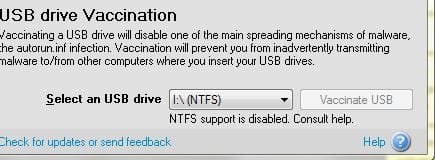
And for some reason I'm not able to vaccinate I:/ with Panda. I get this "NTFS Disabled" screen when I try:

panda_vac.JPG

I went ahead and used USBFix and it said it was able to vaccinate the external.

View attachment Fixlog.txt

Here is the new FRST report:
View attachment UsbFix [Listing 4 ] OWNER-HP.txt

And the new Fixlog:
View attachment Fixlog.txt
 

My Computer My Computer

At a glance

Windows 7 Home Premium 64bitAMD
Computer type
Laptop
Computer Manufacturer/Model Number
HP
OS
Windows 7 Home Premium 64bit
CPU
AMD
The folders/files on J: are not malware:
\._.Trashes
\.Trashes
\.fseventsd
\.fseventsd.lnk

The above are files MAC OS X places on a drive. Apparently you plug (or have) that SD card to a MAC PC. What I know about MAC can be written on the nail of your smallest finger, and there will be some space left over. Whether you can delete them and have no a problem if you plug the card into a MAC again, I do not know.

\_disk_id.pod
Looks like programming for the camera that was written to the card.
If you remove it, your camera may give you some attitude.
You may want to ask the Canon folks about deleting the file. The file appears to be so small, it might not be worth the bother.

DCIM
Folder: Digital Camera IMages (deals with picture storage)


G:/ on the other hand only displays a handful of the original ones I had.
Might want to use the guidance that jumanji gave you, and attempt to recover the lost images on G:


:ar: Are you able to open the External drive without problems?

:ar: Last, please run RogueKiller once again, do a Scan, and post its RKreport.

If OK, and you do not have any more malware problems, we can wrap up , and will provide you some instructions on removing some of the programs we have used.
 

My Computer My Computer

At a glance

Windows 7 Home Premium
Computer type
PC/Desktop
Computer Manufacturer/Model Number
An ol' eMachines
OS
Windows 7 Home Premium
Internet Speed
Fine for me...I'm retired!
Hey coach, if this is the end of the line then woo! :D

Here's RKiller's report:

View attachment RKreport[0]_S_08312013_124256.txt

Am I healthy now?

Edit: Yes, i can see everything in my external. Still has that $RECYCLE.BIN file, though. Is that okay to delete?
 
Last edited:

My Computer My Computer

At a glance

Windows 7 Home Premium 64bitAMD
Computer type
Laptop
Computer Manufacturer/Model Number
HP
OS
Windows 7 Home Premium 64bit
CPU
AMD
Looking good!! :D

Let's wrap up and remove the following tools and their reports, which are no longer needed:

:info: To remove the FRST Quarantine...
Remove any fixlist.txt from the Desktop.

Open Notepad (Start > All Programs > Accessories > Notepad)
Copy/paste all the contents of the quote box below to Notepad (do not copy the word 'Quote').
Save it on the Desktop as: fixlist.txt
start
DeleteQuarantine:
end
Run FRST from the Desktop again, press the Fix button once.
When done, you can delete the fixlog produced, any leftover fixlist, and the FRST icon from the Desktop (if still there).

:info: To uninstall ComboFix, please do the following:

Click on the Start button
In the Search field above Start, type in (or copy/paste): combofix /uninstall
(Please note that there is a space between combofix and /uninstall.)
Press: Enter on your keyboard.

An Open File security warning appears, asking if you are sure you want to run ComboFix.
Click on the Run button to start the program.
ComboFix uninstalls itself from your computer and removes any backups and quarantined files.
When finished, a dialog box states that ComboFix is uninstalled.
You can now delete the ComboFix.exe program from your Desktop.

:info: Next, remove the following tools and their reports:
RogueKiller
WinRar: uninstall from Control Panel > Programs and Features > Uninstall or Change a Program listing.
Unhide.exe
RKill
MiniRegTool64
USBFix
AdwCleaner: run the program, and press: Uninstall
Junkware Removal Tool
Microsoft Safety Scanner: uninstall from Control Panel > Programs and Features > Uninstall list
Malwarebytes Anti-Rootkit: uninstall from Control Panel > Programs and Features > Uninstall list
Security Check

:info: Keep Malwarebytes Anti-Malware, and use it regularly.
Particularly, if you have connected a USB pendrive or SD card to someone else's computer, and you are connecting it back to your computer!

...external. Still has that $RECYCLE.BIN file, though. Is that okay to delete?
Windows places that folder on the drive. It is used to store deleted files for that specific volume, and emptied from the Recycle Bin.
Do not delete unless you are having issues with it.


Thanks for following all the instructions and providing all the reports!!

Good luck, ducat1base!!!
 

My Computer My Computer

At a glance

Windows 7 Home Premium
Computer type
PC/Desktop
Computer Manufacturer/Model Number
An ol' eMachines
OS
Windows 7 Home Premium
Internet Speed
Fine for me...I'm retired!
Okayyyy, the comp is all cleaned up now. Feeling good. Thanks for helping me root all the issues out and making the instructions so simple to understand -- the step-by-step directions were much appreciated!

A last question: I have Panda and I'll run MBAM frequently now. Is there anything else I can do to protect my computer? We've had two instances now in which I've been infected. I wouldn't mind overprotecting myself to prevent another!

Thanks, @cottonball!
 

My Computer My Computer

At a glance

Windows 7 Home Premium 64bitAMD
Computer type
Laptop
Computer Manufacturer/Model Number
HP
OS
Windows 7 Home Premium 64bit
CPU
AMD
ducat1base,

The infections detected had an origin in removable media (USB pen drives, SD Cards, External drive).

You took action to disable the autorun feature, vaccinated the drives, and, your antivirus should be able to detect malware. However, it has not. Maybe its virus definitions were not kept updated, or the malware is relatively new, and the AV program has not caught up with it.

It should use heuristic analysis to detect new or unknown viruses that have not yet been identified. But, not all antiviruses can do this type of scan, and some are only able to detect known viruses.

I am not familiar with Webroot Security Anywhere Antivirus, but, from a Google search it appears there are heuristic detection modes that can be selected through its settings. You may want to look at those, and, in particular, any found that deal with USB devices. Also, you should also be able to find a Webroot support website where you can ask specific questions about this matter.


There is a program you can consider that checks for malware on removable drives automatically.
It is called Mc2Shield (not associated with McAfee):
MCShield ::Anti-Malware Tool::

Before you plug in a removable drive in your computer, at the program console, Scanner tab, click on: BulletProof
Then, plug in the drive, and the program automatically checks for malware and removes it.
You can repeat the steps for any drive you use.

A Mcshield report appears with the results of the removable drive scan.

You would need to experiment with this program to make sure it gets along with Webroot, though. Use it on an trial basis, and see how it goes.

Frequent runs of Malwarebytes Anti-Malware where you perform a Full Scan, and select the removable media should help, along with the Panda Vaccine, and the disabled autorun feature.
 

My Computer My Computer

At a glance

Windows 7 Home Premium
Computer type
PC/Desktop
Computer Manufacturer/Model Number
An ol' eMachines
OS
Windows 7 Home Premium
Internet Speed
Fine for me...I'm retired!
Great, I'll give MCShield a shot. Thanks again for your help!
 

My Computer My Computer

At a glance

Windows 7 Home Premium 64bitAMD
Computer type
Laptop
Computer Manufacturer/Model Number
HP
OS
Windows 7 Home Premium 64bit
CPU
AMD
Also, just tried adding to your reputation by clicking on the scale in your posts but it wouldn't let me. Apparently I need to "spread" some more reputation around before coming back. :rolleyes: Thanks anyway!
 

My Computer My Computer

At a glance

Windows 7 Home Premium 64bitAMD
Computer type
Laptop
Computer Manufacturer/Model Number
HP
OS
Windows 7 Home Premium 64bit
CPU
AMD
Glad to help.

Have a great week!! :D
 

My Computer My Computer

At a glance

Windows 7 Home Premium
Computer type
PC/Desktop
Computer Manufacturer/Model Number
An ol' eMachines
OS
Windows 7 Home Premium
Internet Speed
Fine for me...I'm retired!
Back
Top