Solved Attention: cottonball, virus deleted all SD photos

All right, gang, this is what I'm getting running all of the programs offline.

Temp files before deletion:
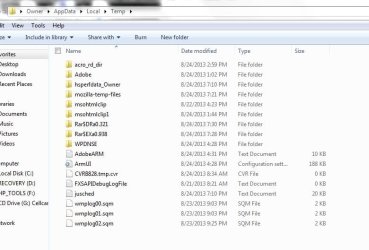
temp.JPG

RKiller report:

View attachment RKreport[0]_S_08242013_194450.txt (Scan)
View attachment RKreport[0]_D_08242013_194457.txt (Delete)

FRST report:
View attachment FRST.txt

MiniReg report:
View attachment Result.txt

@cottonball and @jumanji, I'll be heading to a place this weekend where I'll have access to a different computer. If there's anything you think I should do offline with the one infected while using the internet with another, then please send it along and I'll take the infected comp with me.
 

My Computer My Computer

At a glance

Windows 7 Home Premium 64bitAMD
Computer type
Laptop
Computer Manufacturer/Model Number
HP
OS
Windows 7 Home Premium 64bit
CPU
AMD
cottonball;2508671[COLOR=indigo said:
A colleague has successfully removed a version of this malware, but this one has some different traits. Aren't we lucky?

So lucky! I feel so honored to be infected. :p
 

My Computer My Computer

At a glance

Windows 7 Home Premium 64bitAMD
Computer type
Laptop
Computer Manufacturer/Model Number
HP
OS
Windows 7 Home Premium 64bit
CPU
AMD
Regarding the deletion of temp files:

Well, it seems that that is not the location where your malicious *.com resides and runs.

I just googled C:\PROGRA~3\LOCALS~1\Temp\ and there are lots of different *.com reported in that location. I did not read through any of it for it all seems to be Greek and Latin to me :). I request cottonball and others who have a flair for malware to have a look at it and see whether that throws any light.

Over to you malware experts.
 

My Computer My Computer

At a glance

Windows 7 Home Premium 32 bit
OS
Windows 7 Home Premium 32 bit
ducat1base:

Please do the following, and, in this sequence:

:info: First, once again, please run Malwarebytes Anti-Malware
Right-click the program and select: Run as Administrator
If an update is found, the program automatically updates itself.
At the program console, on the Scanner tab, and select: Perform Quick Scan
Next, click on the Scan button.

When the Malwarebytes scan is completed, click on: Show Results
When presented with a screen showing the malware detected, make sure everything is Checked, and click on: Remove Selected

When removal is completed, a report opens in Notepad.
:ar: Please copy/paste the entire contents of the MBAM report in your reply.

:ar: Second, restart the computer if MBAM did not request for you to do so!

:info: Third, download: Malwarebytes : Malwarebytes Anti-Rootkit
Save to the Desktop
Right-click the file and select: Extract here...
Follow the Usage instructions, but, please stop at Step 5:

Usage
1.Download Malwarebytes Anti-Rootkit from the link to the right.
2.Run the file and follow the onscreen instructions to extract it to a location of your choosing (your desktop by default).
3.Malwarebytes Anti-Rootkit will then open, follow the instructions in the wizard to update and allow the program to scan your computer for threats.
4.Click on the Cleanup button to remove any threats and reboot if prompted to do so.
5.Wait while the system shuts down and the cleanup process is performed.

When the program is done, two reports are created in the mbar folder:
1. system-log.txt
2. mbar-log-2013-08-24 (20-13-32).txt (corresponds to mbar-log-year-month-day (hour-minute-second).txt)

:ar: Please provide the mbar-log and the system-log.txt in your reply.


:info: Fourth, run Malwarebytes Anti-Malware one last time.
Right-click the program and select: Run as Administrator
At the program console, on the Scanner tab, and select: Perform Quick Scan
Next, click on the Scan button.

When the Malwarebytes scan is completed, click on: Show Results
When presented with a screen showing the malware detected, make sure everything is Checked, and click on: Remove Selected

When removal is completed, a report opens in Notepad.
:ar: Please provide the new MBAM report in your reply.

Bottom line, please provide the first MB Anti-malware report, the MB Anti-rootkit report, and, the last run of MB Anti-malware report.
 

My Computer My Computer

At a glance

Windows 7 Home Premium
Computer type
PC/Desktop
Computer Manufacturer/Model Number
An ol' eMachines
OS
Windows 7 Home Premium
Internet Speed
Fine for me...I'm retired!
OK, on what you can do if a clean PC is available:

You can at best check whether any data is still there on your SD card.

All the operations below including the creation of bootable Puppy Linux pendrive to be done on your friend's clean PC.

If your friend has a clean pen drive let him back up all data on it elsewhere and lend it to you .

You can create a bootable Linux Live pen drive, boot from it and check your SD Card.

Download the latest version of Lucid Puppy (Ubuntu-Compatible Build) ISO 5.2.8 from Download latest Puppy Linux release

Create your bootable pen drive with that ISO using Rufus Rufus - Create bootable USB drives the easy way (This process will format the pen drive and all data in it will be lost. That is why backup the data on the pen drive elsewhere before doing this.)

Using the one time boot menu on the computer check and confirm that you can boot into Lucid Puppy from the pen drive. This is important. Familiarise yourself.

If everything is OK, shut down the computer, plugin your SD card and boot into Linux puppy. ( Exercise caution. If by mistake or oversight you miss booting from the onetime boot menu and allow the PC to boot into Windows with the SD Card plugged in , your friend's PC may get infected. That is why the bold matter above.:) )

On how to see the data on your SD Card and how to copy it - if your data is still there and found -

http://www.sevenforums.com/software/198909-lucid-puppy-way-recover-files-non-bootable-computer.html

(Here we are bypassing Windows on your friend's PC, as if it is non-bootable so as not to infect his PC and trying to read your SD Card with Linux - not his HDD.:) . If you do not find your data , bad luck. You can format your SD card with Linux and clean it up. Explore the programs in Linux. I think you will find Gparted there with which to format. Again exercise caution. Do not format your friend's HDD and incur his wrath.)
 
Last edited:

My Computer My Computer

At a glance

Windows 7 Home Premium 32 bit
OS
Windows 7 Home Premium 32 bit
dicat1base,

Now you have two opportunities...you clean your laptop, and/or you check whether there is any data on your SD card.

Have done some additional research and the one-two punch, in succession, using MBAM and MBAR removed the Registry loading points. Hopefully, that will also be the end result for your case.
 

My Computer My Computer

At a glance

Windows 7 Home Premium
Computer type
PC/Desktop
Computer Manufacturer/Model Number
An ol' eMachines
OS
Windows 7 Home Premium
Internet Speed
Fine for me...I'm retired!
  • Like
Reactions: Arc
ducat1base,

Attention!! Update!!

Please hold off on the instructions on Post #64. <<---

The Farbar Recovery Scan Tool (FRST) is updated once again to deal with this infection.

Please remove your copy of FRST, and get a new one:
Farbar Recovery Scan Tool Download

Save to the Desktop.

Double-click the downloaded file to run it.
When the tool opens click Yes to disclaimer.
Press the Scan button.

When done, FRST64 makes a log (FRST.txt) in the same directory from which the tool is run (Desktop).

:ar: Please provide the new FSRT.txt report in your reply.
.
 

My Computer My Computer

At a glance

Windows 7 Home Premium
Computer type
PC/Desktop
Computer Manufacturer/Model Number
An ol' eMachines
OS
Windows 7 Home Premium
Internet Speed
Fine for me...I'm retired!

My Computer My Computer

At a glance

Windows 7 Home Premium 64bitAMD
Computer type
Laptop
Computer Manufacturer/Model Number
HP
OS
Windows 7 Home Premium 64bit
CPU
AMD
Let's hope we can make some headway today...

:info: Please open Notepad once again (Start > All Programs > Accessories > Notepad)
Copy the entire contents of the code box below to Notepad:
Save it on the Desktop, and name it: fixlist.txt

Code:
HKLM\...\Policies\Explorer\Run: [2264] C:\PROGRA~3\LOCALS~1\Temp\msqjiol.com No File

Run FRST, and press the Fix button, just once, and wait.
The tool creates a report on the Desktop called: Fixlog.txt

:ar:Please post the Fixlog.txt in your reply.

Need to take a look at these results, and then, we can roll...
 

My Computer My Computer

At a glance

Windows 7 Home Premium
Computer type
PC/Desktop
Computer Manufacturer/Model Number
An ol' eMachines
OS
Windows 7 Home Premium
Internet Speed
Fine for me...I'm retired!
Does "Values deleted successfully" mean we got it?

View attachment Fixlog.txt

@jumanji, stayed tuned, will check and see if my images are visible...
 

My Computer My Computer

At a glance

Windows 7 Home Premium 64bitAMD
Computer type
Laptop
Computer Manufacturer/Model Number
HP
OS
Windows 7 Home Premium 64bit
CPU
AMD
Does "Values deleted successfully" mean we got it? .....

Looks like.:) Let us wait for cb. He may perhaps order a rerun of everything in his arsenal to make sure.
 

My Computer My Computer

At a glance

Windows 7 Home Premium 32 bit
OS
Windows 7 Home Premium 32 bit
@jumanji,

On target. It is not a good idea to rely on just one result.


@ducat1base,

Hopefully, Yes. :)


:info: Please run RogueKiller once again, and this time press: Scan

:ar: When done, please post its new RKreport (Mode: Scan).

However, after you post these results, do the following:


:info: Once again, please run Malwarebytes Anti-Malware
Right-click the program and select: Run as Administrator
If an update is found, the program automatically updates itself.

At the program console, on the Scanner tab, and select: Perform Quick Scan
Next, click on the Scan button.


When the Malwarebytes scan is completed, click on: Show Results
When presented with a screen showing the malware detected, make sure everything is Checked, and click on:
Remove Selected


When removal is completed, a report opens in Notepad.
:ar: Please copy/paste the entire contents of the MBAM report in your reply.


:info: Restart the computer if MBAM did not request for you to do so!


:info: Download: Malwarebytes : Malwarebytes Anti-Rootkit
Save to the Desktop
Right-click the file and select: Extract here...
Follow the Usage instructions, but, please stop at Step 5:

Usage
1.Download Malwarebytes Anti-Rootkit from the link to the right.
2.Run the file and follow the onscreen instructions to extract it to a location of your choosing (your desktop by default).
3.Malwarebytes Anti-Rootkit will then open, follow the instructions in the wizard to update and allow the program to scan your computer for threats.
4.Click on the Cleanup button to remove any threats and reboot if prompted to do so.
5.Wait while the system shuts down and the cleanup process is performed.


When the program is done, two reports are created in the mbar folder:
1. system-log.txt
2. mbar-log-2013-08-26 (20-13-32).txt (corresponds to mbar-log-year-month-day (hour-minute-second).txt)

:ar: Please provide the mbar-log and the system-log.txt in your reply.
 

My Computer My Computer

At a glance

Windows 7 Home Premium
Computer type
PC/Desktop
Computer Manufacturer/Model Number
An ol' eMachines
OS
Windows 7 Home Premium
Internet Speed
Fine for me...I'm retired!

My Computer My Computer

At a glance

Windows 7 Home Premium 64bitAMD
Computer type
Laptop
Computer Manufacturer/Model Number
HP
OS
Windows 7 Home Premium 64bit
CPU
AMD
.... @jumanji, no dice with the SD card :( I went ahead and formatted it.

That was expected, unfortunately. I have no idea what all that malware does.

Still there is one last-ditch attempt to try and recover any data if possible.( If the files had been overwritten by the malware you will of course draw a blank. Inevitable.)

Prepare a MSDOS bootable pen drive again with Rufus. (Select MSDOS in the dropdown box instead of ISO and then click on Start)

Download the Dos/Win9x version of Test Disk from TestDisk Download - CGSecurity

Extract the Zip file.

It will be extracted into a folder named testdisk-6.14. Select all the files in that folder and copy those to the DOS bootable pen drive you had created. Boot from the pen drive with the SD Card plugged in. Against the command prompt type photorec.exe and press enter to run it. On how-to http://www.sevenforums.com/software/193467-guide-using-photorec-recovery-software.html

If it can dig out your files, you can copy them to your internal drive.

Anyway, try this only after you get an all-clear from cottonball. Most probably he is sleeping now.:)

From what I have seen, I see some DNS registry entries in the RK Report. The whois reports this:

27-08-2013 11-26-45.jpg

Do these point to the malware server msqjiol.com and should these be deleted? I would think so.

Let cottonball and other experts give their take on it.
 
Last edited:

My Computer My Computer

At a glance

Windows 7 Home Premium 32 bit
OS
Windows 7 Home Premium 32 bit
ducat1base,

Good job!!

On the following:
¤¤¤ Registry Entries : 2 ¤¤¤
[DNS] HKLM\[...]\CCSet\[...]\{FD384747-C343-4AE3-B338-90B3725EC0E4} : NameServer (203.144.65.2 203.144.66.3) -> FOUND
[DNS] HKLM\[...]\CS001\[...]\{FD384747-C343-4AE3-B338-90B3725EC0E4} : NameServer (203.144.65.2 203.144.66.3) -> FOUND

Registry key for CS001:
HKEY_LOCAL_MACHINE\SYSTEM\ControlSet001\Services\Tcpip\Parameters\Interfaces\{FD384747-C343-4AE3-B338-90B3725EC0E4}]

Geo information on: (203.144.66.2 203.144.66.3)
Location Phnom Penh, Phnum Penh, Cambodia (KH)
Cambodian ISP, Country Wide, Wireless IAP

Is this familiar to you?

The Scan reports any DNS configurations found.
However, it does not mean the entries are malware related.
If I recall correctly, this laptop has a unique connection.

Try entering the following in WhoIs: http://whois.net/ip-address-lookup/
203.144.66.2
or...
203.144.66.3

What is queried now is: 203.144.66.2203.144.66.3

MBAM and MBAR report no malware.


Question for you...
Are there any other USB pen drives, SD cards, or removable media in your possesion that are more than likely infected?
 
Last edited:

My Computer My Computer

At a glance

Windows 7 Home Premium
Computer type
PC/Desktop
Computer Manufacturer/Model Number
An ol' eMachines
OS
Windows 7 Home Premium
Internet Speed
Fine for me...I'm retired!
Good analysis setting at rest that those can be malware related.

So it is his ISP related and he may sleep in peace.:)

(oh! I have been so stingy! have to spread before I rep.)

A job well done cottonball.:thumbsup:
 

My Computer My Computer

At a glance

Windows 7 Home Premium 32 bit
OS
Windows 7 Home Premium 32 bit
Thanks, jumanji!

A job well done to you also. :geek: You provided ducat1base with info for future use.

Also, there may be other SD cards or USB data devices that need attention.

It's not over until it's over!!

:info: While we are at it, let’s check your Security status with the following...
Download Security Check:
http://screen317.spywareinfoforum.org/
Save to your Desktop.
Double-click: SecurityCheck.exe
Follow the onscreen instructions inside the black box.
When done, a Notepad report opens automatically, called: checkup.txt

:ar: Please post the checkup.txt in your reply.
(Please do not take any corrective actions!)
 

My Computer My Computer

At a glance

Windows 7 Home Premium
Computer type
PC/Desktop
Computer Manufacturer/Model Number
An ol' eMachines
OS
Windows 7 Home Premium
Internet Speed
Fine for me...I'm retired!
That DNS, I'm assuming, would be my VPN carrier. Are we starting to see the light at the end of the tunnel?


Here's the Security Check report:
View attachment checkup.txt

Yes, I believe I do have an external and another SD card which are infected.
 

My Computer My Computer

At a glance

Windows 7 Home Premium 64bitAMD
Computer type
Laptop
Computer Manufacturer/Model Number
HP
OS
Windows 7 Home Premium 64bit
CPU
AMD
Are we starting to see the light at the end of the tunnel?

Yes! You done gooood!! :D

Let's take care of some details, you do not need any vulnerabilities...

:warn: Java version out of Date!

Please update your version of Java:
java.com: Java + You

Also, uninstall all older versions of Java from your system.
They present a serious security risk.
Why should I uninstall older versions of Java from my system?


:warn: Adobe Reader out of Date!

Adobe Reader, latest version:
Adobe - Adobe Reader download - All versions
(Uncheck the following: Yes, install McAfee Security Scan Plus)

When done, go to Start > Control Panel > Programs and Features > Uninstall List
Look for, and remove any older Adobe Reader versions.


:info: Now, on the other SD card, and the external drive...

Do not plug them in yet.

Do you remember if there are images on these that have also 'disappeared'?
 

My Computer My Computer

At a glance

Windows 7 Home Premium
Computer type
PC/Desktop
Computer Manufacturer/Model Number
An ol' eMachines
OS
Windows 7 Home Premium
Internet Speed
Fine for me...I'm retired!
Back
Top