Audio 5.1 in Windows 7

PanterA

New member
Local time
8:52 AM
Messages
30
[FONT=verdana, arial, helvetica]Hey

I changed from XP to 7 will be soon. But what happens is that my 5.1 (T6100) only gives only 2 columns. Then I played around a bit and got to give the 5 columns, but columns from behind barely hear and have poor sound quality.

Any help?


Thanks
[/FONT]
 

My Computer My Computer

OS
Windows 7 Ultimate x64
[FONT=verdana, arial, helvetica]Hey

I changed from XP to 7 will be soon. But what happens is that my 5.1 (T6100) only gives only 2 columns. Then I played around a bit and got to give the 5 columns, but columns from behind barely hear and have poor sound quality.

Any help?


Thanks
[/FONT]
Hi PanterA, and welcome to Windows Seven Forums. We are glad you're here!

You need to recognize that even the Windows 7 RC, build 7100, is still in testing mode. There are many audio chipsets and not all have been added to 7 yet.

To help, we need to know what specific chipset you have. You need to go to your "User Control Panel" or "User CP" and fill in the "Edit System Specs". For audio, we need to know if you are using a sound card or onboard (on the motherboard) sound. Please post back with more info.

Robert
 

My Computer My Computer

OS
...
Hey!!!

Thanks for invite!!! :D

BTW,

My board is a Asus P5KPl (chipset -> G31+ICH7)

ASUSTeK Computer Inc.

I use the sound card onboard. And i have this colummns 5.1:

Creative Inspire T6100

Thanks!
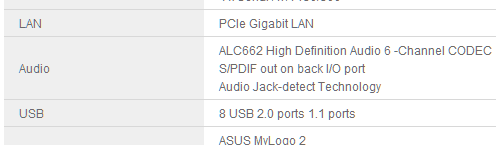
You should be able to get your sound to work with Windows 7. According to the Asus web site your chipset uses ACL662, which is supported by Realtek and 7:

Asus_ACL662_01.png

You have several choices: There are 5 Audio drivers from Asus, two VIA, three Realtek you can try:

Asus_ACL662_02.png

You can also try the most current Realtek driver, find it with Google.

You may need to install a driver in "Compatiblility Mode" for Vista to get it to work.

Open the "Advanced Search" for Windows Seven Forums and search just "Sound & Audio" and the "Keyword" ASUS. Lots to read here.

I look forward to your next post.

Robert
 

My Computer My Computer

OS
...
He tried with the latest drivers from Asus and the realtek but it was always the same. I can have 5.1, but the sound from the back is very bad.

But I will try to re-install the drivers with the compatibility mode.

Which advises the install? Realtek or from Asus?

Thanks!
 

My Computer My Computer

OS
Windows 7 Ultimate x64
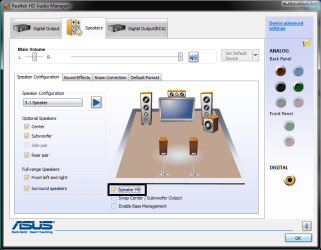
Does your speaker system support matrix sound? Matrix is a virtualized 5.1 environment. It's also called "Speaker fill" in the Realtek control panel.

The reason I'm asking is, if you aren't listening to true 5.1 audio, then "matrix" or "speaker fill" mode virtualizes it, which leads to pretty horrible sounding sound from the rear speakers. With MP3s especailly, there is little 5.1 support in the music scene.

PanterA: Does it only do this with music, or movies as well?
 
Last edited by a moderator:

My Computer My Computer

Computer type
PC/Desktop
Computer Manufacturer/Model Number
SuperBeast
OS
Windows 10 Tech Preview 9926 x64
CPU
AMD FX-8350
Motherboard
Gigabyte GA-990FXA-UD3
Memory
16GB DDR3 1333
Graphics Card(s)
Asus R9 290 DirectCU II OC, Gigabyte Windforce R9 290 OC
Sound Card
Integrated w/ Creative A250 2.1 speakers
Monitor(s) Displays
Main: Asus VN289H 28" Secondary: Acer G246HL 24"
Screen Resolution
1920x1080
Hard Drives
128 GB SanDisk Ultra Plus (Windows drive)

240 GB Crucial M500 SSD (Games drive)

1 TB WDC WD10EACS 7200RPM HDD (Data drive)

2 TB Seagate Expansion Desktop external HDD (Backup drive)
PSU
900w Antec HCG-900
Case
Raidmax Agusta Full ATX
Cooling
Corsair H80
Keyboard
Cooler Master Devastator MB24
Mouse
Cooler Master Devastator MS2K 1000/1600/2000 DPI
Internet Speed
100Mbps cable
Antivirus
Avast!
Browser
Chrome
In the film works only 4 columns. In the music work 5, but the 2 rear speakers with the sound is very low and poor quality.
 

My Computer My Computer

OS
Windows 7 Ultimate x64
Hmm...again, I would check to see if you have matrix/speaker fill mode and if it's turned on. Are the movies and music you are listening to in true 5.1 sound, or are they stereo only. The bad sound quality could be from the speakers trying to turn the stereo sound into virtualized 5.1 sound.
 

My Computer My Computer

Computer type
PC/Desktop
Computer Manufacturer/Model Number
SuperBeast
OS
Windows 10 Tech Preview 9926 x64
CPU
AMD FX-8350
Motherboard
Gigabyte GA-990FXA-UD3
Memory
16GB DDR3 1333
Graphics Card(s)
Asus R9 290 DirectCU II OC, Gigabyte Windforce R9 290 OC
Sound Card
Integrated w/ Creative A250 2.1 speakers
Monitor(s) Displays
Main: Asus VN289H 28" Secondary: Acer G246HL 24"
Screen Resolution
1920x1080
Hard Drives
128 GB SanDisk Ultra Plus (Windows drive)

240 GB Crucial M500 SSD (Games drive)

1 TB WDC WD10EACS 7200RPM HDD (Data drive)

2 TB Seagate Expansion Desktop external HDD (Backup drive)
PSU
900w Antec HCG-900
Case
Raidmax Agusta Full ATX
Cooling
Corsair H80
Keyboard
Cooler Master Devastator MB24
Mouse
Cooler Master Devastator MS2K 1000/1600/2000 DPI
Internet Speed
100Mbps cable
Antivirus
Avast!
Browser
Chrome
Well, if you have to check speaker fill to get all the speakers working...that means that whatever audio (mp3, movie audio track etc) isn't in true 5.1 sound. Most mp3s out there are ripped in stereo sound as opposed to 5.1. That is why you have to check the speaker fill button to get all the speakers to work. If you want to hear true 5.1 surround sound, then you need to use a movie or music track that was mixed in 5.1.

I have to do the same thing on almost all of my music, and most of my movies.
 

Attachments

  • Untitled.png
    Untitled.png
    48.7 KB · Views: 507

My Computer My Computer

Computer type
PC/Desktop
Computer Manufacturer/Model Number
SuperBeast
OS
Windows 10 Tech Preview 9926 x64
CPU
AMD FX-8350
Motherboard
Gigabyte GA-990FXA-UD3
Memory
16GB DDR3 1333
Graphics Card(s)
Asus R9 290 DirectCU II OC, Gigabyte Windforce R9 290 OC
Sound Card
Integrated w/ Creative A250 2.1 speakers
Monitor(s) Displays
Main: Asus VN289H 28" Secondary: Acer G246HL 24"
Screen Resolution
1920x1080
Hard Drives
128 GB SanDisk Ultra Plus (Windows drive)

240 GB Crucial M500 SSD (Games drive)

1 TB WDC WD10EACS 7200RPM HDD (Data drive)

2 TB Seagate Expansion Desktop external HDD (Backup drive)
PSU
900w Antec HCG-900
Case
Raidmax Agusta Full ATX
Cooling
Corsair H80
Keyboard
Cooler Master Devastator MB24
Mouse
Cooler Master Devastator MS2K 1000/1600/2000 DPI
Internet Speed
100Mbps cable
Antivirus
Avast!
Browser
Chrome
But this problem with any music or movie of any kind. And to give the 5 columns, I even have the speaker fill connected, otherwise only have 2 columns to give.

Because, from what I read this problem comes from Vista. Because in my XP 5.1 works 100%
 

My Computer My Computer

OS
Windows 7 Ultimate x64
Well, that's pretty odd that it would work in XP and not in 7. I don't know man. I explained it as best I could with my limited knowledge on the subject. Hopefully someone a little more knowledgeable will be able to help you out.
 

My Computer My Computer

Computer type
PC/Desktop
Computer Manufacturer/Model Number
SuperBeast
OS
Windows 10 Tech Preview 9926 x64
CPU
AMD FX-8350
Motherboard
Gigabyte GA-990FXA-UD3
Memory
16GB DDR3 1333
Graphics Card(s)
Asus R9 290 DirectCU II OC, Gigabyte Windforce R9 290 OC
Sound Card
Integrated w/ Creative A250 2.1 speakers
Monitor(s) Displays
Main: Asus VN289H 28" Secondary: Acer G246HL 24"
Screen Resolution
1920x1080
Hard Drives
128 GB SanDisk Ultra Plus (Windows drive)

240 GB Crucial M500 SSD (Games drive)

1 TB WDC WD10EACS 7200RPM HDD (Data drive)

2 TB Seagate Expansion Desktop external HDD (Backup drive)
PSU
900w Antec HCG-900
Case
Raidmax Agusta Full ATX
Cooling
Corsair H80
Keyboard
Cooler Master Devastator MB24
Mouse
Cooler Master Devastator MS2K 1000/1600/2000 DPI
Internet Speed
100Mbps cable
Antivirus
Avast!
Browser
Chrome
Thanks anyway!! :p

;)
 

My Computer My Computer

OS
Windows 7 Ultimate x64
No problem man. If I can find a solution, I will let you know.
 

My Computer My Computer

Computer type
PC/Desktop
Computer Manufacturer/Model Number
SuperBeast
OS
Windows 10 Tech Preview 9926 x64
CPU
AMD FX-8350
Motherboard
Gigabyte GA-990FXA-UD3
Memory
16GB DDR3 1333
Graphics Card(s)
Asus R9 290 DirectCU II OC, Gigabyte Windforce R9 290 OC
Sound Card
Integrated w/ Creative A250 2.1 speakers
Monitor(s) Displays
Main: Asus VN289H 28" Secondary: Acer G246HL 24"
Screen Resolution
1920x1080
Hard Drives
128 GB SanDisk Ultra Plus (Windows drive)

240 GB Crucial M500 SSD (Games drive)

1 TB WDC WD10EACS 7200RPM HDD (Data drive)

2 TB Seagate Expansion Desktop external HDD (Backup drive)
PSU
900w Antec HCG-900
Case
Raidmax Agusta Full ATX
Cooling
Corsair H80
Keyboard
Cooler Master Devastator MB24
Mouse
Cooler Master Devastator MS2K 1000/1600/2000 DPI
Internet Speed
100Mbps cable
Antivirus
Avast!
Browser
Chrome
Thanks anyway!! :p

;)
PanterA;

I noticed that the speaker properties picture you attached does not look anything like the speaker properties picture (Asus) blackroseMD1 attached. If you do not have a sound management utility that looks like blackroseMD1's, then chances are you have the default Windows audio drivers installed or the driver you have is only partly functioning. I believe you only need to find the right audio driver.

Sometimes when a lot of things have been tried without success, it helps to start over from the beginning. Now you have more experience than the first time. I would suggest you start with the Windows default audio driver (remove all drivers and let Windows find one for you) and follow blackroseMD1's suggestion to not use "speaker fill". Install and check out thoroughly each of the drivers available (try compatibility mode also) and hope you find the one that works?

Anyone have a better idea?

Robert
 

My Computer My Computer

OS
...
Good suggestion iseeuu. I didn't even start to think of the driver issues.
 

My Computer My Computer

Computer type
PC/Desktop
Computer Manufacturer/Model Number
SuperBeast
OS
Windows 10 Tech Preview 9926 x64
CPU
AMD FX-8350
Motherboard
Gigabyte GA-990FXA-UD3
Memory
16GB DDR3 1333
Graphics Card(s)
Asus R9 290 DirectCU II OC, Gigabyte Windforce R9 290 OC
Sound Card
Integrated w/ Creative A250 2.1 speakers
Monitor(s) Displays
Main: Asus VN289H 28" Secondary: Acer G246HL 24"
Screen Resolution
1920x1080
Hard Drives
128 GB SanDisk Ultra Plus (Windows drive)

240 GB Crucial M500 SSD (Games drive)

1 TB WDC WD10EACS 7200RPM HDD (Data drive)

2 TB Seagate Expansion Desktop external HDD (Backup drive)
PSU
900w Antec HCG-900
Case
Raidmax Agusta Full ATX
Cooling
Corsair H80
Keyboard
Cooler Master Devastator MB24
Mouse
Cooler Master Devastator MS2K 1000/1600/2000 DPI
Internet Speed
100Mbps cable
Antivirus
Avast!
Browser
Chrome
As not yet I obtained to decide the problem, still I walk to search to decide it.
And yet, I found this: http://www.sevenforums.com/sound-audio/5953-realtek-hd-x-fi-mod-driver.html

Do you have any information about this driver?

PS: The "speaker fill" only appears after install realtek driver.
Hey PanterA, no problem - there is no rush. I have a test box with a ASRock MB where the audio drivers did not want to load. I followed the compatibility mode tutorial closely and downloaded the latest audio driver for Vista from the ASRock website. After unzipping the download (7 does this automatically) I moved the files to a new folder, right clicked on the "setup" file, and selected Vista as the mode. The drivers loaded up perfectly and I have access to the same OEM audio control panel that appears in Win 98. So don't give up!?

I read some from the forum site from the link ... I do not have any experience with this driver. Sorry. It sounded promising?

Keep us posted?

Robert
 

My Computer My Computer

OS
...
Hey!! :)

Well. I had to try to follow this tutorial:

Windows 7 RC 64 bit Getting Sound From 2 Speakers and Minor Questions
(last post)


I can say that the 2 rear speakers are already much better. But the center column, it was a little lower.
And for example in games, my right column is full of noises. Sometimes make huge impression.

I do not know what I will do more. I think I can not do anything except spend money on a sound card.

Greetings
 

My Computer My Computer

OS
Windows 7 Ultimate x64
Back
Top