
Hi there,
well a while back my system (specs below) had a windows update when I went to bed, upon my return my PC booted up with no sound avaliable. i.e. in my task tray the speaker has a red X and displays "No Speakers or Headphones are plugged in" - they are definately plugged in. I did try to use a restore point straight away and it failed telling me the restore point was corrupted (or somthing to that effect).
System:
W7 64-Bit
Asus P5K Deluxe (SoundMax Audio)
e8400
4G Crucial Ballistix DDR2
2x 320GB Samsung SATAII
HD5850
If i try to get it solved by scanning it tells me that my Audio device is disabled, whether I tell it to test the rear/front panel/or USB.
I have searched far and wide to get this issue resolved and I've seen that there is a lot of info on this, but my issue seems to be slightly different and nothing ive tried works.
If i Look under playback devices nothing is missing (Ive enabled "Show hidden"), and if i switch where my speakers are plugged in the window recognises that and displays which it is plugged into.
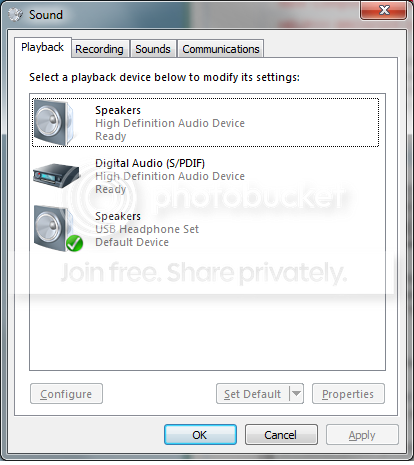
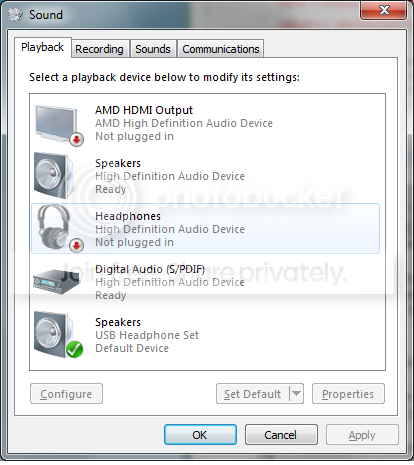
In Device manager there are no errors displayed, and I have tried uninstalling/updating/and disableing then re-enabling all different sound devices.

Thinking that my sound on the motherboard may have died (SounMax) I added the USB sound device to test. This device installed fine and shows it is avaliable but it will still not give any sound. The speaker icon in the task tray still tells me that no spekers etc. are plugged in and if prompted it will say "audio device is disabled".
If anyone has any ideas on new things I can try I'd greatly appreciate it, I'm about ready to completely reformat thhe whole thing.
Cheers
funk
well a while back my system (specs below) had a windows update when I went to bed, upon my return my PC booted up with no sound avaliable. i.e. in my task tray the speaker has a red X and displays "No Speakers or Headphones are plugged in" - they are definately plugged in. I did try to use a restore point straight away and it failed telling me the restore point was corrupted (or somthing to that effect).
System:
W7 64-Bit
Asus P5K Deluxe (SoundMax Audio)
e8400
4G Crucial Ballistix DDR2
2x 320GB Samsung SATAII
HD5850
If i try to get it solved by scanning it tells me that my Audio device is disabled, whether I tell it to test the rear/front panel/or USB.
I have searched far and wide to get this issue resolved and I've seen that there is a lot of info on this, but my issue seems to be slightly different and nothing ive tried works.
If i Look under playback devices nothing is missing (Ive enabled "Show hidden"), and if i switch where my speakers are plugged in the window recognises that and displays which it is plugged into.
In Device manager there are no errors displayed, and I have tried uninstalling/updating/and disableing then re-enabling all different sound devices.
Thinking that my sound on the motherboard may have died (SounMax) I added the USB sound device to test. This device installed fine and shows it is avaliable but it will still not give any sound. The speaker icon in the task tray still tells me that no spekers etc. are plugged in and if prompted it will say "audio device is disabled".
If anyone has any ideas on new things I can try I'd greatly appreciate it, I'm about ready to completely reformat thhe whole thing.
Cheers
funk
My Computer
- OS
- Windows 7 Profesional 64-bit
- CPU
- e8400
- Motherboard
- AUSU P5K Deluxe
- Memory
- Crucial Ballistix


