Solved HDTV audio device disabled, then vanished

Danhattan

New member
Local time
8:30 AM
Messages
4
I've been streaming from my Acer Aspire laptop to an LG HDTV for a couple years. No problems with either video or audio. Once I plug an HDMI cord from the laptop to the TV, the laptop sound output defaults to the TV speakers after the laptop makes a two-note sound indicating connection. Three nights ago, after done streaming, pulled the cord from the laptop, and didn't hear the sound. Using the laptop, no sound was issued from the laptop, so checked the speaker default through the speaker icon in the tray. It was still defaulting to the TV speakers. Should have just restarted the laptop right here.

Instead, right-clicked the TV speaker icon, chose Disable Device (thinking this is temporary), and the sound output defaulted back to the laptop's RealTek speakers. However, Disable Device equated to Delete Device as the laptop no longer defaults to the TV speakers through the HDMI connection, and the TV device no longer shows up as available in either Speaker Properties or the Device Manager.

How is this device/connection restored? Thanks in advance for any help. Daniel.
 

My Computer My Computer

Computer type
PC/Desktop
OS
Windows 7
You can try a System Restore (using an available restore date that is BEFORE you disabled the device).

If that does not fix it, reinstall the video driver (which should include the HDMI sound driver).

System Restore can be accessed from Start/Programs/Accessories/System Tools. System Restore will not delete any user data or e-mails.

Please fill in the "My System Specs". It helps use to try and help you.
 

My Computer My Computer

Computer type
PC/Desktop
Computer Manufacturer/Model Number
My Own Build
OS
Windows 10 64 bit
CPU
Intel i7 6700K
Motherboard
ASUS ROG Maximus VIII Hero
Memory
16GB Corsair Dominator
Graphics Card(s)
Intel CPU Graphics
Sound Card
RealTek
Monitor(s) Displays
27" Dell S2719dgf
Screen Resolution
2560X1440
Hard Drives
1 TB Samsung 850 EVO SSD for Win 10 Pro
500GB Samsung 850 EVO SSD for Win 10 Insider
2 TB drive for backup
PSU
EVGA Supernova 750G2
Case
BeQuiet Silent Base 600
Cooling
Deepcool Captain 120EX
Keyboard
Microsoft Wireless 2000
Mouse
Microsoft wireless
Internet Speed
100 MB/sec (Cable)
Antivirus
Microsoft Defender and Malwarebytes
Browser
Edge/Firefox
Other Info
Cakewalk (Sonar) by BandLab and Studio One 4.1 Pro recording studio software. MOTU 896Mk3 Hybrid recording interface, Frontier Tranzport wireless control unit, Behringer X-Touch Control Surface.
Five USB connected optical drives for CD Audio production using Nero BurningROM
System Specs

Fireberd,

Thanks for the reply. First, I've never done a system restore as I don't go recklessly surfing and also have Spybot up to date.

Second, I apologize in advance because when I first hit this forum, I did see the link to finding complete system specs and (oops) ignored it. How complete do the specs need to be? Not sure of the bit count on W7, but processor is Core I5, Aspire model is 5750, 4GB/500GB.

Now, call me naïve, but it just doesn't seem like this problem should be so vexing. Disable doesn't mean Delete, so that audio device must still be on my computer just waiting to be Enabled, no?

Again, thank you. Daniel.
 

My Computer My Computer

Computer type
PC/Desktop
OS
Windows 7
System specs, revisited

Fireberd,

After replying, saw link to system specs and did some checking. OS is W7 Home Premium, 64 bit, SP1. If more is necessary, let me know. Thanks again.
 

My Computer My Computer

Computer type
PC/Desktop
OS
Windows 7
System restore is not a complete reinstall. Just a "step back" to an earlier time.

System Restore is a feature in Microsoft Windows that allows the user to revert their computer's state to that of a previous point in time, which can be used to recover from system malfunctions or other problems. ...
http://en.wikipedia.org/wiki/System_Restore
 

My Computer My Computer

Computer type
PC/Desktop
Computer Manufacturer/Model Number
My Own Build
OS
Windows 10 64 bit
CPU
Intel i7 6700K
Motherboard
ASUS ROG Maximus VIII Hero
Memory
16GB Corsair Dominator
Graphics Card(s)
Intel CPU Graphics
Sound Card
RealTek
Monitor(s) Displays
27" Dell S2719dgf
Screen Resolution
2560X1440
Hard Drives
1 TB Samsung 850 EVO SSD for Win 10 Pro
500GB Samsung 850 EVO SSD for Win 10 Insider
2 TB drive for backup
PSU
EVGA Supernova 750G2
Case
BeQuiet Silent Base 600
Cooling
Deepcool Captain 120EX
Keyboard
Microsoft Wireless 2000
Mouse
Microsoft wireless
Internet Speed
100 MB/sec (Cable)
Antivirus
Microsoft Defender and Malwarebytes
Browser
Edge/Firefox
Other Info
Cakewalk (Sonar) by BandLab and Studio One 4.1 Pro recording studio software. MOTU 896Mk3 Hybrid recording interface, Frontier Tranzport wireless control unit, Behringer X-Touch Control Surface.
Five USB connected optical drives for CD Audio production using Nero BurningROM
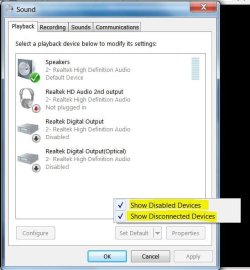
Open Sounds and click on the Playback Tab. Move your mouse anywhere inside the box of devices and Right Click. Check the two boxes for Show Disabled Devices and Show Disconnected Devices. Does the speaker show now?
 

Attachments

  • Sound Devices - Show All.JPG
    Sound Devices - Show All.JPG
    46.9 KB · Views: 7

My Computer My Computer

Computer type
PC/Desktop
Computer Manufacturer/Model Number
Built 2/11/2011
OS
Windows 7 Pro-x64
CPU
i7-2600 3.4GHz - 3.8GHz Turbo
Motherboard
Intel DH67BL-B3
Memory
8Gb - 2x4GB, Muskin 991770 PC3-1333
Graphics Card(s)
Integrated Intel HD 2000
Sound Card
Integrated Intel 10.1 HD, RealTek ALC892
Monitor(s) Displays
Asus LCD VH222H, Haier HL24XSL2a
Screen Resolution
1920x1080, 1920x1080
Hard Drives
Crucial SSD C300-128Gb,
Western Digital WD5002AALX - 500Gb,
Western Digital WD7501AALS - 750Gb
PSU
Seasonic 650W 80+ Gold Modular
Case
Rosewill Defender
Cooling
Stock CPU, Four 120mm case fans, PCH fan added
Keyboard
Logitech EX100 Y-RBH94 Wireless
Mouse
Logitech EX100 M-RCE95 Wireless
Internet Speed
3.0/1.5 Mbs
Antivirus
Microsoft Security Essentials
Browser
Microsoft Internet Explorer 11
Other Info
Antec Veris Premier-Multimedia IR Station,
Cyber Accoustics-3602 Speakers,
AFT XM-5U Card Reader,
Hauppauge TV-HVR-2250,
Sony LX300 USB Turntable
Carwiz,

First, thanks for your time. Second, I was really excited when I read your post. I'd been to that window, but it hadn't occurred to just right-click within the empty part of the window. Did so, and your screenshot is replicated.

That said, the HDTV device didn't reappear. At first. Dawned on me that since the laptop was on lap and not connected to the computer, the device wasn't available. Connected to the TV, and sure enough your advice was perfect. Audio restored. Really, really appreciate your time and knowledge. Seeing that others have looked at my post, hope you helped a lot of people.

Finally, in my opinion, you rock. Cheers. Daniel.
 

My Computer My Computer

Computer type
PC/Desktop
OS
Windows 7
Back
Top