Solved Audio Driver Malfunction on Restart

MistUnleashed

Avid BSOD Fixer
Power User
VIP
Local time
7:50 AM
Messages
260
Location
In A House
Hi Guys,

----------------------
GPU: Gainward NVidia GeForce GTX 460
SOUNDCARD: Asus P7P55DE-LX - Inbuilt to Motherboard
----------------------

Issue I am facing: On system restart, the audio drivers for both NVidia & VIA are 'deleted' and I have to reinstall the drivers every time I restart/start my computer - which is getting very tedious.

On running a bootlog (attached) i found that the drivers load but preceeding each audio driver load there was this driver called 'ksthunk.sys' which seems to malfunction.

Loaded driver \SystemRoot\system32\DRIVERS\mouclass.sys
Loaded driver \SystemRoot\system32\drivers\swenum.sys
Loaded driver \SystemRoot\system32\DRIVERS\umbus.sys
Did not load driver \SystemRoot\System32\drivers\vga.sys
Loaded driver \SystemRoot\system32\DRIVERS\usbhub.sys
Loaded driver \SystemRoot\system32\DRIVERS\nusb3hub.sys
Loaded driver \SystemRoot\System32\Drivers\NDProxy.SYS
Did not load driver \SystemRoot\System32\Drivers\NDProxy.SYS

Loaded driver \SystemRoot\system32\drivers\nvhda64v.sys
Did not load driver \SystemRoot\system32\drivers\ksthunk.sys
Loaded driver \SystemRoot\system32\drivers\nvhda64v.sys
Did not load driver \SystemRoot\system32\drivers\ksthunk.sys
Loaded driver \SystemRoot\system32\drivers\nvhda64v.sys
Did not load driver \SystemRoot\system32\drivers\ksthunk.sys
Loaded driver \SystemRoot\system32\drivers\nvhda64v.sys
Did not load driver \SystemRoot\system32\drivers\ksthunk.sys
Loaded driver \SystemRoot\system32\drivers\viahduaa.sys
Did not load driver \SystemRoot\system32\drivers\ksthunk.sys
Loaded driver \SystemRoot\system32\DRIVERS\monitor.sys
Loaded driver \SystemRoot\system32\DRIVERS\usbccgp.sys
Loaded driver \SystemRoot\system32\DRIVERS\hidusb.sys
Loaded driver \SystemRoot\System32\Drivers\LUsbFilt.Sys
Loaded driver \SystemRoot\system32\DRIVERS\LHidFilt.Sys
Loaded driver \SystemRoot\system32\DRIVERS\kbdhid.sys

Also I have noticed that other drivers also are not loading on system start-up. How can I resolve this?

I've honestly got no clue on how to proceed, any help is appreciated.

PS - Drivers are up-to-date

Thanks

MistUnleashed
 

Attachments

My Computer My Computer

Computer type
PC/Desktop
Computer Manufacturer/Model Number
Custom Build
OS
Windows 7 Ultimate x64
CPU
Intel Core i7 Socket 1156 LGA
Motherboard
Asus P7P55D-E LX
Memory
Corsair Dominator 4GB DDR3
Graphics Card(s)
Gainward GTX 460
Monitor(s) Displays
Acer V243HL
Screen Resolution
1920x1080
Hard Drives
Western Digital 1TB HDD
PSU
Antec TruePower 650W
Case
Antec 300
Cooling
Thermalrite CPU Cooler
Antivirus
Avast Anti-Virus

My Computer My Computer

Computer type
PC/Desktop
Computer Manufacturer/Model Number
My Own Build
OS
Windows 10 64 bit
CPU
Intel i7 6700K
Motherboard
ASUS ROG Maximus VIII Hero
Memory
16GB Corsair Dominator
Graphics Card(s)
Intel CPU Graphics
Sound Card
RealTek
Monitor(s) Displays
27" Dell S2719dgf
Screen Resolution
2560X1440
Hard Drives
1 TB Samsung 850 EVO SSD for Win 10 Pro
500GB Samsung 850 EVO SSD for Win 10 Insider
2 TB drive for backup
PSU
EVGA Supernova 750G2
Case
BeQuiet Silent Base 600
Cooling
Deepcool Captain 120EX
Keyboard
Microsoft Wireless 2000
Mouse
Microsoft wireless
Internet Speed
100 MB/sec (Cable)
Antivirus
Microsoft Defender and Malwarebytes
Browser
Edge/Firefox
Other Info
Cakewalk (Sonar) by BandLab and Studio One 4.1 Pro recording studio software. MOTU 896Mk3 Hybrid recording interface, Frontier Tranzport wireless control unit, Behringer X-Touch Control Surface.
Five USB connected optical drives for CD Audio production using Nero BurningROM
ksthunk.sys can be malware. Suggest you run a malware/spyware scan with a program such as Malwarebytes, as a start.

See this posting on it. ksthunk.sys Windows process - What is it?

Hi fireberd,

I have scanned ksthunk.sys which was in C:\Windows\System32\drivers and i've received no errors both on Avast and Malwarebytes.

Whats next to do?

Thanks
 

My Computer My Computer

Computer type
PC/Desktop
Computer Manufacturer/Model Number
Custom Build
OS
Windows 7 Ultimate x64
CPU
Intel Core i7 Socket 1156 LGA
Motherboard
Asus P7P55D-E LX
Memory
Corsair Dominator 4GB DDR3
Graphics Card(s)
Gainward GTX 460
Monitor(s) Displays
Acer V243HL
Screen Resolution
1920x1080
Hard Drives
Western Digital 1TB HDD
PSU
Antec TruePower 650W
Case
Antec 300
Cooling
Thermalrite CPU Cooler
Antivirus
Avast Anti-Virus
Rename the file to something such as "oldksthunk.sys" and then restart the PC and see what happens. According to the site in the link it may work without that file.

If you run into other problems, rename it back to "sthunk.sys".


A side note, I see you have a 64 bit OS but only 4GB of RAM. This is not the cause of your problem, but the reason to use a 64 bit OS is that it can address and use more than 4GB of RAM. With only 4GB (and if it can't be upgraded) the 32 bit OS would have been the best choice. A 64 bit OS uses more of the available RAM than a 32 bit OS and thus you have less available for programs.
 

My Computer My Computer

Computer type
PC/Desktop
Computer Manufacturer/Model Number
My Own Build
OS
Windows 10 64 bit
CPU
Intel i7 6700K
Motherboard
ASUS ROG Maximus VIII Hero
Memory
16GB Corsair Dominator
Graphics Card(s)
Intel CPU Graphics
Sound Card
RealTek
Monitor(s) Displays
27" Dell S2719dgf
Screen Resolution
2560X1440
Hard Drives
1 TB Samsung 850 EVO SSD for Win 10 Pro
500GB Samsung 850 EVO SSD for Win 10 Insider
2 TB drive for backup
PSU
EVGA Supernova 750G2
Case
BeQuiet Silent Base 600
Cooling
Deepcool Captain 120EX
Keyboard
Microsoft Wireless 2000
Mouse
Microsoft wireless
Internet Speed
100 MB/sec (Cable)
Antivirus
Microsoft Defender and Malwarebytes
Browser
Edge/Firefox
Other Info
Cakewalk (Sonar) by BandLab and Studio One 4.1 Pro recording studio software. MOTU 896Mk3 Hybrid recording interface, Frontier Tranzport wireless control unit, Behringer X-Touch Control Surface.
Five USB connected optical drives for CD Audio production using Nero BurningROM
Rename the file to something such as "oldksthunk.sys" and then restart the PC and see what happens. According to the site in the link it may work without that file.

If you run into other problems, rename it back to "sthunk.sys".


A side note, I see you have a 64 bit OS but only 4GB of RAM. This is not the cause of your problem, but the reason to use a 64 bit OS is that it can address and use more than 4GB of RAM. With only 4GB (and if it can't be upgraded) the 32 bit OS would have been the best choice. A 64 bit OS uses more of the available RAM than a 32 bit OS and thus you have less available for programs.

Hi fireberd,

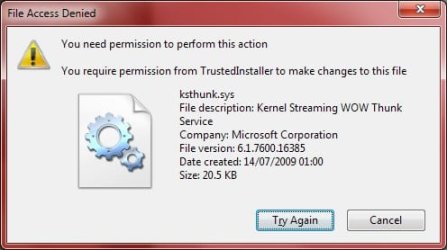
I cant rename it or modify it. I get an error (attached).

What do I do?

Thanks.
 

Attachments

  • MUksthunk.jpg
    MUksthunk.jpg
    21.1 KB · Views: 15

My Computer My Computer

Computer type
PC/Desktop
Computer Manufacturer/Model Number
Custom Build
OS
Windows 7 Ultimate x64
CPU
Intel Core i7 Socket 1156 LGA
Motherboard
Asus P7P55D-E LX
Memory
Corsair Dominator 4GB DDR3
Graphics Card(s)
Gainward GTX 460
Monitor(s) Displays
Acer V243HL
Screen Resolution
1920x1080
Hard Drives
Western Digital 1TB HDD
PSU
Antec TruePower 650W
Case
Antec 300
Cooling
Thermalrite CPU Cooler
Antivirus
Avast Anti-Virus
After looking back over your listing, that file may not be the problem.

Reinstall the Intel Motherboard Chipset Drivers, then restart and see if that helps.
The chipset drivers are listed on the ASUS downloads.

Motherboards | P7P55D-E LX | ASUS Global
 

My Computer My Computer

Computer type
PC/Desktop
Computer Manufacturer/Model Number
My Own Build
OS
Windows 10 64 bit
CPU
Intel i7 6700K
Motherboard
ASUS ROG Maximus VIII Hero
Memory
16GB Corsair Dominator
Graphics Card(s)
Intel CPU Graphics
Sound Card
RealTek
Monitor(s) Displays
27" Dell S2719dgf
Screen Resolution
2560X1440
Hard Drives
1 TB Samsung 850 EVO SSD for Win 10 Pro
500GB Samsung 850 EVO SSD for Win 10 Insider
2 TB drive for backup
PSU
EVGA Supernova 750G2
Case
BeQuiet Silent Base 600
Cooling
Deepcool Captain 120EX
Keyboard
Microsoft Wireless 2000
Mouse
Microsoft wireless
Internet Speed
100 MB/sec (Cable)
Antivirus
Microsoft Defender and Malwarebytes
Browser
Edge/Firefox
Other Info
Cakewalk (Sonar) by BandLab and Studio One 4.1 Pro recording studio software. MOTU 896Mk3 Hybrid recording interface, Frontier Tranzport wireless control unit, Behringer X-Touch Control Surface.
Five USB connected optical drives for CD Audio production using Nero BurningROM
After looking back over your listing, that file may not be the problem.

Reinstall the Intel Motherboard Chipset Drivers, then restart and see if that helps.
The chipset drivers are listed on the ASUS downloads.

Motherboards | P7P55D-E LX | ASUS Global

I recently updated the chipset driver, is it necessary to reinstall it again?
 

My Computer My Computer

Computer type
PC/Desktop
Computer Manufacturer/Model Number
Custom Build
OS
Windows 7 Ultimate x64
CPU
Intel Core i7 Socket 1156 LGA
Motherboard
Asus P7P55D-E LX
Memory
Corsair Dominator 4GB DDR3
Graphics Card(s)
Gainward GTX 460
Monitor(s) Displays
Acer V243HL
Screen Resolution
1920x1080
Hard Drives
Western Digital 1TB HDD
PSU
Antec TruePower 650W
Case
Antec 300
Cooling
Thermalrite CPU Cooler
Antivirus
Avast Anti-Virus
Did this happen after the chipset update?
 

My Computer My Computer

Computer type
PC/Desktop
Computer Manufacturer/Model Number
My Own Build
OS
Windows 10 64 bit
CPU
Intel i7 6700K
Motherboard
ASUS ROG Maximus VIII Hero
Memory
16GB Corsair Dominator
Graphics Card(s)
Intel CPU Graphics
Sound Card
RealTek
Monitor(s) Displays
27" Dell S2719dgf
Screen Resolution
2560X1440
Hard Drives
1 TB Samsung 850 EVO SSD for Win 10 Pro
500GB Samsung 850 EVO SSD for Win 10 Insider
2 TB drive for backup
PSU
EVGA Supernova 750G2
Case
BeQuiet Silent Base 600
Cooling
Deepcool Captain 120EX
Keyboard
Microsoft Wireless 2000
Mouse
Microsoft wireless
Internet Speed
100 MB/sec (Cable)
Antivirus
Microsoft Defender and Malwarebytes
Browser
Edge/Firefox
Other Info
Cakewalk (Sonar) by BandLab and Studio One 4.1 Pro recording studio software. MOTU 896Mk3 Hybrid recording interface, Frontier Tranzport wireless control unit, Behringer X-Touch Control Surface.
Five USB connected optical drives for CD Audio production using Nero BurningROM

My Computer My Computer

Computer type
PC/Desktop
Computer Manufacturer/Model Number
Custom Build
OS
Windows 7 Ultimate x64
CPU
Intel Core i7 Socket 1156 LGA
Motherboard
Asus P7P55D-E LX
Memory
Corsair Dominator 4GB DDR3
Graphics Card(s)
Gainward GTX 460
Monitor(s) Displays
Acer V243HL
Screen Resolution
1920x1080
Hard Drives
Western Digital 1TB HDD
PSU
Antec TruePower 650W
Case
Antec 300
Cooling
Thermalrite CPU Cooler
Antivirus
Avast Anti-Virus
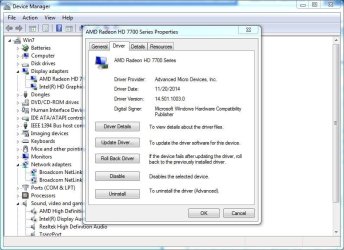
Rollback the video driver (you can do that in the Device Manager) and see if that makes a difference.

Go to the Device Manager, RIGHT click on the entry for the video card and then Left click Properties.
 

Attachments

  • Capture.JPG
    Capture.JPG
    74.6 KB · Views: 0

My Computer My Computer

Computer type
PC/Desktop
Computer Manufacturer/Model Number
My Own Build
OS
Windows 10 64 bit
CPU
Intel i7 6700K
Motherboard
ASUS ROG Maximus VIII Hero
Memory
16GB Corsair Dominator
Graphics Card(s)
Intel CPU Graphics
Sound Card
RealTek
Monitor(s) Displays
27" Dell S2719dgf
Screen Resolution
2560X1440
Hard Drives
1 TB Samsung 850 EVO SSD for Win 10 Pro
500GB Samsung 850 EVO SSD for Win 10 Insider
2 TB drive for backup
PSU
EVGA Supernova 750G2
Case
BeQuiet Silent Base 600
Cooling
Deepcool Captain 120EX
Keyboard
Microsoft Wireless 2000
Mouse
Microsoft wireless
Internet Speed
100 MB/sec (Cable)
Antivirus
Microsoft Defender and Malwarebytes
Browser
Edge/Firefox
Other Info
Cakewalk (Sonar) by BandLab and Studio One 4.1 Pro recording studio software. MOTU 896Mk3 Hybrid recording interface, Frontier Tranzport wireless control unit, Behringer X-Touch Control Surface.
Five USB connected optical drives for CD Audio production using Nero BurningROM
Solved

Hi All,

Thanks for all your help, unfortunately it wasnt anything that had already been suggested. I dissected the problem down and i can say the KSTHUNK.SYS was the problem all along. What was happening was that on Windows start-up, the OS was trying to read the file KSTHUNK.SYS but instead was wiping/deleting all of its information, such as version number, manufacturer etc. Hence after logging on, the audio drivers were trying to verify KSTHUNK.SYS but couldn't find any information in the file so it didnt load the audio drivers.

To solve this issue I did the following:


  1. Uninstalled VIA HD Audio Driver and HD VDeck Tool.
  2. Ran the Guru3D Display Driver Removal Tool: Display Driver Uninstaller Download version 15.3.0.0
  3. Ran CCleaner Registry Cleaner To Remove Left Over Keys.
  4. Went into C:\ and deleted any leftover NVidia or VIA Files.
  5. Went to C:\Windows\System32\drivers\ksthunk.sys and renamed in ksthunk.OLD (Had to tweak permissions to let me rename it)
  6. Disabled automatic driver installation: https://support.microsoft.com/en-us/kb/2500967
  7. Restarted Computer.
  8. After restart I went to C:\Windows\System32\drivers\ > Windows had loaded a backup version, I right-clicked and verified that it had version information, manufacturer etc then MADE A COPY ON THE DESKTOP - Just in case it was needed.
  9. Then I Installed the latest VIA Audio Drivers & NVidia Display + 3D Vision + Audio + Physx Drivers
  10. Re-enabled the automatic driver installation
  11. Went to C:\Windows\System32\drivers\ksthunk.sys, Properties then set KSTHUNK.SYS to READ-ONLY.
  12. Restarted Computer.
Hopefully if anyone else comes across this problem then the above instructions may help!


Thanks again for your help.


MistUnleashed
 

My Computer My Computer

Computer type
PC/Desktop
Computer Manufacturer/Model Number
Custom Build
OS
Windows 7 Ultimate x64
CPU
Intel Core i7 Socket 1156 LGA
Motherboard
Asus P7P55D-E LX
Memory
Corsair Dominator 4GB DDR3
Graphics Card(s)
Gainward GTX 460
Monitor(s) Displays
Acer V243HL
Screen Resolution
1920x1080
Hard Drives
Western Digital 1TB HDD
PSU
Antec TruePower 650W
Case
Antec 300
Cooling
Thermalrite CPU Cooler
Antivirus
Avast Anti-Virus
Back
Top