Audio Driver Problem

The first image is the one I posted before, which is taken before I updated the device

The second image is after I downloaded the zip file, then updated the device with the extracted files

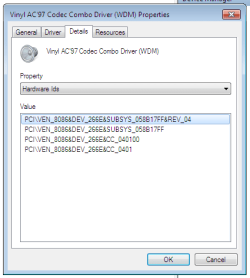
The third image is the Hardware ids of Multimedia Audio Controller

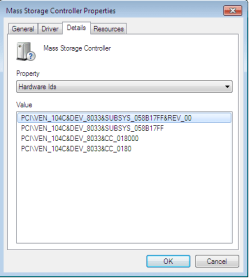
The forth image is the Hardware ids of Mass Storage Device

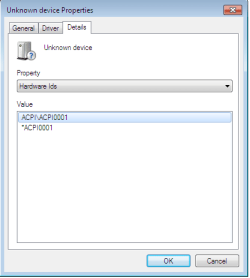
The fifth image is the Hardware ids of Unknown Device


Thanks!!!
 

Attachments

  • old.png
    old.png
    2.4 KB · Views: 773
  • After installing driver.png
    After installing driver.png
    4.2 KB · Views: 771
  • H ids for audio after installing driver.png
    H ids for audio after installing driver.png
    8.7 KB · Views: 30
  • Mass Storage Controller.png
    Mass Storage Controller.png
    7.5 KB · Views: 32
  • Unknown device.png
    Unknown device.png
    5.5 KB · Views: 40

My Computer

OS
Laptop: BENQ Joybook S53
Hi all,

I have a BENQ Joybook S53, and after I installed W7 last night, the audio stopped working. It says that I have "no audio devices installed"...

It also happened to me last time when I rebooted my XP, but after I downloaded the audio driver everything went well. However, this time, even after I downloaded and installed the audio driver, it still says the same thing!!

I even went back to XP and copied all the files regarding to "drivers" and pasted into WINDOWS (under C drive) and some others under System32... But it still isnt working for me...


I think my audio device is "Conexant AMC 2 Channel Audio" when I checked in XP..

Thank you for your help.

OP had issues with the original drivers
 

My Computer

OS
XP Pro/Vista Ultimate (64)/Windows 7 Ultimate Signature Edition(64)
CPU
Core 2 Duo E8500 @ stock
Motherboard
Gigabyte EP45-UD3R
Memory
8Gb (4 X 2Gb) Corsair Dominator 1066Mhz DDR2
Graphics Card(s)
XFX ATI Radeon 4870 1Gb
Sound Card
Onboard 7.1
Monitor(s) Displays
BenQ E2200Hd, Asus VW161D, HP L1506
Screen Resolution
1920 X 1080
Hard Drives
Seagate 7200.12 500Gb
2 X Hitachi 1Tb
PSU
CoolerMaster 650 EPD
Case
Thermaltake
Cooling
2 X Noctua 120mm's, Stock Intel
Keyboard
Logitech
Mouse
Logitech
Hi all,

I have a BENQ Joybook S53, and after I installed W7 last night, the audio stopped working. It says that I have "no audio devices installed"...

It also happened to me last time when I rebooted my XP, but after I downloaded the audio driver everything went well. However, this time, even after I downloaded and installed the audio driver, it still says the same thing!!

I even went back to XP and copied all the files regarding to "drivers" and pasted into WINDOWS (under C drive) and some others under System32... But it still isnt working for me...


I think my audio device is "Conexant AMC 2 Channel Audio" when I checked in XP..

Thank you for your help.
OP had issues with the original drivers

Be alot of searching to get a better drivers.
 

My Computer

OS
ME/XP/Vista/Win7
Hi All :)

Thanks for helping me solving the problem!!!


I downloaded the driver from the below website:
BenQ Joybook S53 notebook Audio Driver

And then used the method Orpheous provided in the previous replies

i.e. go to device manage > sound, video and game controllers > right click properties > driver > update driver

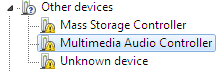
although originally the "multimedia audio controller" is under 'other devices', but I think the principle is still the same.

Everything is functionally normally now.


p.s. I only copied the files extracted from the zip file and pasted in system32, that's why it didn't work originally!!! Oh and I have No Idea why I did that, it seemed logical to me that time..


Thank you so much for the help, really!!!
You guys are great!!!


My Computer

OS
Laptop: BENQ Joybook S53
either method would have worked , but you got there in the end :thumbsup:
 

My Computer

Computer type
PC/Desktop
Computer Manufacturer/Model Number
self build
OS
win 7 ultimate32bit, Win8.1pro wmc 32bit
CPU
amd phenom x4 9600
Motherboard
asus m2n32-sli deluxe
Memory
corsair twinxs 2x2gb
Graphics Card(s)
2x nvidia 1gb 8500gt
Sound Card
onboard
Monitor(s) Displays
23" PB Viseo 233d
Screen Resolution
1920x1080
Hard Drives
maxtor sata 500gb
maxtor sata 320gb
fujitsu sata200gb
PSU
oryxx tornado 750w
Case
thermaltake xaser lll
Cooling
artic freezer64 pro + 7 case fans
Sorry for the mix up with the drivers, I was originally under the impression that you had tried installing the drivers in the traditional manner first!
Anyway, glad you managed to get it sorted out! Thanks for the input from theog and pebbly too!
 

My Computer

OS
XP Pro/Vista Ultimate (64)/Windows 7 Ultimate Signature Edition(64)
CPU
Core 2 Duo E8500 @ stock
Motherboard
Gigabyte EP45-UD3R
Memory
8Gb (4 X 2Gb) Corsair Dominator 1066Mhz DDR2
Graphics Card(s)
XFX ATI Radeon 4870 1Gb
Sound Card
Onboard 7.1
Monitor(s) Displays
BenQ E2200Hd, Asus VW161D, HP L1506
Screen Resolution
1920 X 1080
Hard Drives
Seagate 7200.12 500Gb
2 X Hitachi 1Tb
PSU
CoolerMaster 650 EPD
Case
Thermaltake
Cooling
2 X Noctua 120mm's, Stock Intel
Keyboard
Logitech
Mouse
Logitech
Sorry for the mix up with the drivers, I was originally under the impression that you had tried installing the drivers in the traditional manner first!
Anyway, glad you managed to get it sorted out! Thanks for the input from theog and pebbly too!

you,re welcome :thumbsup:
 

My Computer

Computer type
PC/Desktop
Computer Manufacturer/Model Number
self build
OS
win 7 ultimate32bit, Win8.1pro wmc 32bit
CPU
amd phenom x4 9600
Motherboard
asus m2n32-sli deluxe
Memory
corsair twinxs 2x2gb
Graphics Card(s)
2x nvidia 1gb 8500gt
Sound Card
onboard
Monitor(s) Displays
23" PB Viseo 233d
Screen Resolution
1920x1080
Hard Drives
maxtor sata 500gb
maxtor sata 320gb
fujitsu sata200gb
PSU
oryxx tornado 750w
Case
thermaltake xaser lll
Cooling
artic freezer64 pro + 7 case fans
Thanks again, everyone :)
 

My Computer

OS
Laptop: BENQ Joybook S53
The first image is the one I posted before, which is taken before I updated the device

The second image is after I downloaded the zip file, then updated the device with the extracted files

The third image is the Hardware ids of Multimedia Audio Controller

The forth image is the Hardware ids of Mass Storage Device

The fifth image is the Hardware ids of Unknown Device


Thanks!!!

Hi Merelda,

did you find a solution for the Hardware of the Unknown Device with the ID ACPI001?
I'm having problems to get the ACPI functions to work and the battery is not recognized by Win7...

Thanks in advance
-- djchainsaw
 

My Computer

OS
Windows 7 Professional x64
Back
Top