correct link where i could download realtek hd audio drivers

jraju

New member
Member
VIP
Local time
9:11 AM
Messages
759
Hi, Please give the correct link from where i could download the latest realtek audio drivers for my windows 7 64 bit pc.

Even downloading from legitimate download sites , could not be installed as it is being reported as corrupted errors.
Can I auto update the realtek audio drivers . Going to the

Device manager, clicking the sound controllers, show that the driver is upto date, but software like driver easy shows that updates are available and it shows the version information also.
The driver version , it shows is 6.0.9070.1 for my system.
How do i find this driver.
Sevenfourm links shows drivers from microsoft catelogue as cab file, which is not easy to install.

i want exe file to download install.
 

My Computer My Computer

At a glance

Microsoft Windows 7 Ultimate 64-bit 7601 Mult...Intel(R) Core(TM)2 Duo CPU E7200 @ 2.53GHz4.00 GBNVIDIA GeForce 210
Computer type
PC/Desktop
Computer Manufacturer/Model Number
custom build
OS
Microsoft Windows 7 Ultimate 64-bit 7601 Multiprocessor Free Service Pack 1
CPU
Intel(R) Core(TM)2 Duo CPU E7200 @ 2.53GHz
Motherboard
To be filled by O.E.M. To be filled by O.E.M.
Memory
4.00 GB
Graphics Card(s)
NVIDIA GeForce 210
Sound Card
(1) NVIDIA High Definition Audio (2) Realtek High Definiti
Screen Resolution
1920 x 1080 x 32 bits (4294967296 colors) @ 60 Hz
Hard Drives
ST3500312CS ATA Device
Sevenfourm links shows drivers from microsoft catelogue as cab file, which is not easy to install...
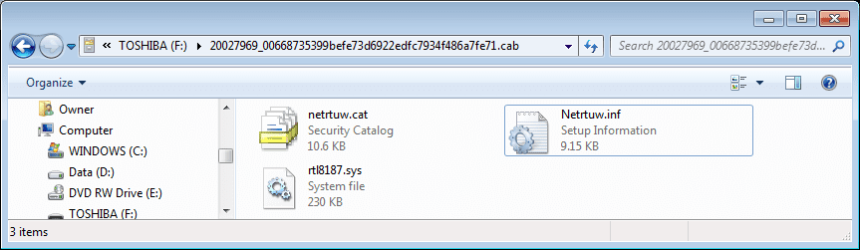
It's actually quite easy for a .cab file that contains a driver. A .cab file is just a compressed archive, same as a .zip file. And like a .zip file Explorer can open it and extract the contents.


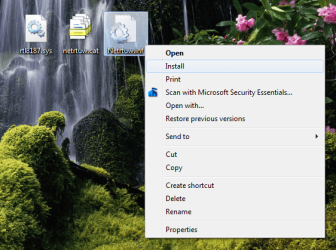
Extract the .cab file to a folder, or even to your desktop. Then right-click on the .inf file to install the driver.


.
 

Attachments

  • Cab extract.PNG
    Cab extract.PNG
    22.4 KB · Views: 1
  • Install INF.PNG
    Install INF.PNG
    110.4 KB · Views: 17

My Computers My Computers

  • At a glance

    Windows 7 Home Premium x64AMD V1204GB
    Computer type
    Laptop
    Computer Manufacturer/Model Number
    Toshiba satellite C650D
    OS
    Windows 7 Home Premium x64
    CPU
    AMD V120
    Memory
    4GB
    Internet Speed
    150 Mbps
    Antivirus
    MSE
    Browser
    IE11, Edge, Firefox
    Other Info
    I also have W7 Pro on my System Two, and several W7 Hyper-V VMs. My other machines run Windows 10/11. Their specs are in my Ten Forums & Eleven Forum profiles.
  • At a glance

    Windows 7 Pro x64Intel i5-3320M8 GB
    Computer type
    Laptop
    System Manufacturer/Model Number
    Lenovo Thinkpad T430
    OS
    Windows 7 Pro x64
    CPU
    Intel i5-3320M
    Memory
    8 GB
    Hard Drives
    250GB Samsung SSD 860 EVO
    Antivirus
    MSE
Hi, bree,

could you give the correct link. Thanks for your suggestion.
What I did was , just extract the file to a folder and then, go to the device manager, sound controllers and then right click and in the properties menu, select update the driver and browsed to the folder, and it installed it . Thanks for your tips, which is even quick quide.
For more knowledge,

would the cab file contain only one inf in the extracted folder?
2. Why selecting the search online updates, gives the message, that the best driver has already been installed for the device, even when there is a latest version available
 

My Computer My Computer

At a glance

Microsoft Windows 7 Ultimate 64-bit 7601 Mult...Intel(R) Core(TM)2 Duo CPU E7200 @ 2.53GHz4.00 GBNVIDIA GeForce 210
Computer type
PC/Desktop
Computer Manufacturer/Model Number
custom build
OS
Microsoft Windows 7 Ultimate 64-bit 7601 Multiprocessor Free Service Pack 1
CPU
Intel(R) Core(TM)2 Duo CPU E7200 @ 2.53GHz
Motherboard
To be filled by O.E.M. To be filled by O.E.M.
Memory
4.00 GB
Graphics Card(s)
NVIDIA GeForce 210
Sound Card
(1) NVIDIA High Definition Audio (2) Realtek High Definiti
Screen Resolution
1920 x 1080 x 32 bits (4294967296 colors) @ 60 Hz
Hard Drives
ST3500312CS ATA Device
A cab file may sometimes contain more than one .inf and driver, perhaps for a family of devices. That isn't a problem, because when you browse to the folder from Device Manager it will choose the one that is appropriate for your specific device.


I didn't provide a link as I don't know precisely which Realtek card you have.
 

My Computers My Computers

  • At a glance

    Windows 7 Home Premium x64AMD V1204GB
    Computer type
    Laptop
    Computer Manufacturer/Model Number
    Toshiba satellite C650D
    OS
    Windows 7 Home Premium x64
    CPU
    AMD V120
    Memory
    4GB
    Internet Speed
    150 Mbps
    Antivirus
    MSE
    Browser
    IE11, Edge, Firefox
    Other Info
    I also have W7 Pro on my System Two, and several W7 Hyper-V VMs. My other machines run Windows 10/11. Their specs are in my Ten Forums & Eleven Forum profiles.
  • At a glance

    Windows 7 Pro x64Intel i5-3320M8 GB
    Computer type
    Laptop
    System Manufacturer/Model Number
    Lenovo Thinkpad T430
    OS
    Windows 7 Pro x64
    CPU
    Intel i5-3320M
    Memory
    8 GB
    Hard Drives
    250GB Samsung SSD 860 EVO
    Antivirus
    MSE
hI, BREE, thanks for the reply.
I am expecting your reply to the point 2 I raised in my previous reply
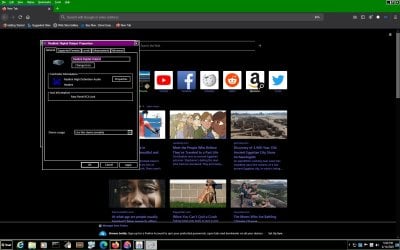
Please find enclosed the sound card details.
I am having a nvidia ge force 210 video card and so, having both realtek and nvidia audio drivers as per the enclosure
 

Attachments

  • sound card details .jpg
    sound card details .jpg
    150.2 KB · Views: 0

My Computer My Computer

At a glance

Microsoft Windows 7 Ultimate 64-bit 7601 Mult...Intel(R) Core(TM)2 Duo CPU E7200 @ 2.53GHz4.00 GBNVIDIA GeForce 210
Computer type
PC/Desktop
Computer Manufacturer/Model Number
custom build
OS
Microsoft Windows 7 Ultimate 64-bit 7601 Multiprocessor Free Service Pack 1
CPU
Intel(R) Core(TM)2 Duo CPU E7200 @ 2.53GHz
Motherboard
To be filled by O.E.M. To be filled by O.E.M.
Memory
4.00 GB
Graphics Card(s)
NVIDIA GeForce 210
Sound Card
(1) NVIDIA High Definition Audio (2) Realtek High Definiti
Screen Resolution
1920 x 1080 x 32 bits (4294967296 colors) @ 60 Hz
Hard Drives
ST3500312CS ATA Device
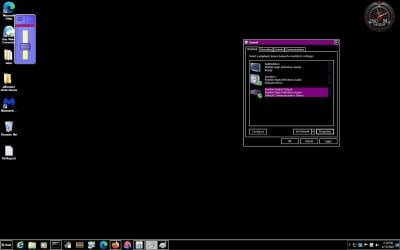
Hi, bree, I also wish to hear from you about the digital audio output thro my present speaker. I suppose, eventhough ,the cpu to pc is connected with hdmi, the audio that i get thro my default speaker is only analog sound thro the present two speakers and not the digital output.
But in playback tab, enclosed, i do find a digital output device, with a hdmi icon, as connected and ready. But i do not know, how do i enable the sound thro my speakers for the digital sound.
How do I know, if my speaker is supported for digital output of audio.
Are normal speakers support hdmi over voice.
if possible, please let me know, how to i hear the sound from my present speaker , by selecting this as my default device for audio playback.
I tried, but i do see green volume test level raising, but no sound in the video played
 

Attachments

  • digital audio device.jpg
    digital audio device.jpg
    61.4 KB · Views: 1

My Computer My Computer

At a glance

Microsoft Windows 7 Ultimate 64-bit 7601 Mult...Intel(R) Core(TM)2 Duo CPU E7200 @ 2.53GHz4.00 GBNVIDIA GeForce 210
Computer type
PC/Desktop
Computer Manufacturer/Model Number
custom build
OS
Microsoft Windows 7 Ultimate 64-bit 7601 Multiprocessor Free Service Pack 1
CPU
Intel(R) Core(TM)2 Duo CPU E7200 @ 2.53GHz
Motherboard
To be filled by O.E.M. To be filled by O.E.M.
Memory
4.00 GB
Graphics Card(s)
NVIDIA GeForce 210
Sound Card
(1) NVIDIA High Definition Audio (2) Realtek High Definiti
Screen Resolution
1920 x 1080 x 32 bits (4294967296 colors) @ 60 Hz
Hard Drives
ST3500312CS ATA Device
Hi, Bernardus,
The problem is not in hearing the audio.
I only now hear the analog audio, which was default from my speakers.
Now, I HAVE hdmi connection to the pc from cpu and want to change the audio experience from analog to digital. OFCOURSE, I could see the test gives, green upraising of audio bars, but i could not hear anything, as I do not know , how to configure hdmi audio.
Realtex speakers is the one i HAVE. There are 3 jacks round, at the back of the pc, in which I have used the green centre jack for my audio experience.
What I want is the hdmi audio experience, which is showing in the playback tabs I enclosed.
Hope that I cleared your doubts
 

My Computer My Computer

At a glance

Microsoft Windows 7 Ultimate 64-bit 7601 Mult...Intel(R) Core(TM)2 Duo CPU E7200 @ 2.53GHz4.00 GBNVIDIA GeForce 210
Computer type
PC/Desktop
Computer Manufacturer/Model Number
custom build
OS
Microsoft Windows 7 Ultimate 64-bit 7601 Multiprocessor Free Service Pack 1
CPU
Intel(R) Core(TM)2 Duo CPU E7200 @ 2.53GHz
Motherboard
To be filled by O.E.M. To be filled by O.E.M.
Memory
4.00 GB
Graphics Card(s)
NVIDIA GeForce 210
Sound Card
(1) NVIDIA High Definition Audio (2) Realtek High Definiti
Screen Resolution
1920 x 1080 x 32 bits (4294967296 colors) @ 60 Hz
Hard Drives
ST3500312CS ATA Device
Hi, Bernardus, had you PM to me. I could not locate your thread in here, but had received your emails
The posted message:
s this perhaps helpful?
No audio after installing a GeForce 210 Video Card - YouTube (No audio after installing a GeForce 210 Video Card - YouTube)
Error Page 404 | Device Drivers (Error Page 404 | Device Drivers)
NVidia GeForce G210 drivers for Windows 7 64-bit (NVidia GeForce G210 drivers for Windows 7 64-bit)

The onboard audio could be the trouble.
On mine it coupled around with a PCIe card (other fabric)
Can't even use the new card independent.
***************
 

My Computer My Computer

At a glance

Microsoft Windows 7 Ultimate 64-bit 7601 Mult...Intel(R) Core(TM)2 Duo CPU E7200 @ 2.53GHz4.00 GBNVIDIA GeForce 210
Computer type
PC/Desktop
Computer Manufacturer/Model Number
custom build
OS
Microsoft Windows 7 Ultimate 64-bit 7601 Multiprocessor Free Service Pack 1
CPU
Intel(R) Core(TM)2 Duo CPU E7200 @ 2.53GHz
Motherboard
To be filled by O.E.M. To be filled by O.E.M.
Memory
4.00 GB
Graphics Card(s)
NVIDIA GeForce 210
Sound Card
(1) NVIDIA High Definition Audio (2) Realtek High Definiti
Screen Resolution
1920 x 1080 x 32 bits (4294967296 colors) @ 60 Hz
Hard Drives
ST3500312CS ATA Device
Hi, I give herewith the rca jack information..
How do i get hdmi audio thro my pc speakers.
Now, I suppose, I am only getting analogic signal from my speakers
 

Attachments

  • JACK INFORMATION OF HDMI SYSTEM.jpg
    JACK INFORMATION OF HDMI SYSTEM.jpg
    137.3 KB · Views: 1

My Computer My Computer

At a glance

Microsoft Windows 7 Ultimate 64-bit 7601 Mult...Intel(R) Core(TM)2 Duo CPU E7200 @ 2.53GHz4.00 GBNVIDIA GeForce 210
Computer type
PC/Desktop
Computer Manufacturer/Model Number
custom build
OS
Microsoft Windows 7 Ultimate 64-bit 7601 Multiprocessor Free Service Pack 1
CPU
Intel(R) Core(TM)2 Duo CPU E7200 @ 2.53GHz
Motherboard
To be filled by O.E.M. To be filled by O.E.M.
Memory
4.00 GB
Graphics Card(s)
NVIDIA GeForce 210
Sound Card
(1) NVIDIA High Definition Audio (2) Realtek High Definiti
Screen Resolution
1920 x 1080 x 32 bits (4294967296 colors) @ 60 Hz
Hard Drives
ST3500312CS ATA Device
Hi jraju
So you still have that problem? I deleted my reply because it seemed an old posting.
Did you try to stop the start up of the onboard audio in bios?

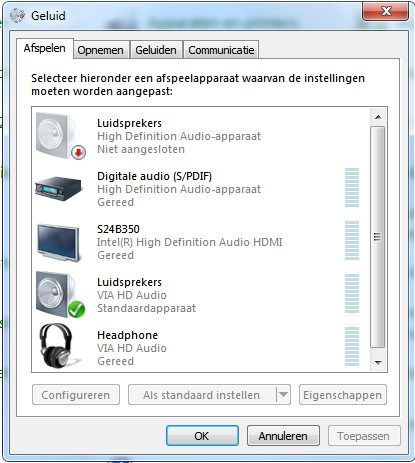
Here an example of mine with the onboard on and the extra PCI e card not being used.

Audio-settings.jpg


As you can see the PCI-e board is not in use.

It became only active if I plug in something, but it conflicts with the onboard audio.
Other possibilities could be the device address of a unit.
But in mine by recording they couple like a howling mike, until the maximum level is reached.

The HDMI is only for appropriate cable connection.
I hope you realise that HDMI is a protocol and all speakers are analogue.
Unless you have HDMI converters build into them.

My Monitor for instance accepts HDMI, but there are no speakers build in.
Still it's possible to switch HDMI on. Visible in Sound settings of W7.

Have you tried the driver downloads?
 

My Computer My Computer

At a glance

Microsoft Windows 7 Ultimate 64-bits 7601 Mul...Intel(R) Core(TM)2 Duo CPU E8400 @ 3.00GHz8,00 GB(1) Intel(R) G41 Express Chipset (2) Intel(R)...
Computer type
PC/Desktop
OS
Microsoft Windows 7 Ultimate 64-bits 7601 Multiprocessor Free Service Pack 1
CPU
Intel(R) Core(TM)2 Duo CPU E8400 @ 3.00GHz
Motherboard
ASRock G41MH/USB3.
Memory
8,00 GB
Graphics Card(s)
(1) Intel(R) G41 Express Chipset (2) Intel(R) G41 Express
Sound Card
(1) VIA High Definition Audio (2) Intel(R) High Definition
Monitor(s) Displays
S24B350 Samsung
Screen Resolution
1920 x 1080 x 32 bits (4294967296 colors) @ 60 Hz
Hard Drives
(1) ST31000528AS ATA Device (2) Generic- Compact Flash USB Device (3) Generic- MS/MS-Pro USB Device (4) Generic- SD/MMC USB Device (5) Generic- SM/xD-Picture USB Device
Antivirus
ZoneAlarm Free Antivirus + Firewall version: 12.0.104.000 Vs
Hi, bernadus,
I unserstand your postings now.
It means that , as we use hdmi cable for connection, the audio and video is inherent in it and we hear the sound from this hdmi inherent source, thro the analog speakers.
Nice point.
But why there is a hdmi plug like icon device is showning in my playback tab ?
Do you mean that I have to disable the onboard audio in bios.
If i do so, would it not disable the audio in all sources, please let me know.
Also please let me know, what settings could be adjusted in analog speakers, so that the sudio from hdmi source could be better heard, like in settings from the default analog settings that we would be having.
 

My Computer My Computer

At a glance

Microsoft Windows 7 Ultimate 64-bit 7601 Mult...Intel(R) Core(TM)2 Duo CPU E7200 @ 2.53GHz4.00 GBNVIDIA GeForce 210
Computer type
PC/Desktop
Computer Manufacturer/Model Number
custom build
OS
Microsoft Windows 7 Ultimate 64-bit 7601 Multiprocessor Free Service Pack 1
CPU
Intel(R) Core(TM)2 Duo CPU E7200 @ 2.53GHz
Motherboard
To be filled by O.E.M. To be filled by O.E.M.
Memory
4.00 GB
Graphics Card(s)
NVIDIA GeForce 210
Sound Card
(1) NVIDIA High Definition Audio (2) Realtek High Definiti
Screen Resolution
1920 x 1080 x 32 bits (4294967296 colors) @ 60 Hz
Hard Drives
ST3500312CS ATA Device
You have two sources of audio on your PC. It may happen that the on board one has priority over the extra audio board.
In my case, as soon as I plug in a connector at the backboard, it will get active in Sound settings.
Since most people now use digital equipment, the setting would probably digital or HDMI.
However, I still use analogous devices and amplifiers.
In the newest drivers, I can't even set analogue or HDMI, or digital is standard.
I too have some problems with my card, mainly the onboard input, which still won't work correctly with the PCIe card. It's either the onboard audio, or the extra card. Nevertheless both produce sound on my analogue output.

It's possible that the audio won't work if you switch off your onboard audio in BIOS, but it's very simple to switch it on again.
You shouldn't delete the drivers, unless they cause trouble. Conflicts between Windows generic and the manufacturers drivers are often problematic. Preference is usually the manufacturers version.
If you switch the onboard off, you have to adjust the Sound settings in Windows and divert it to the new card. You can test the output with a build in bleep. Still it's possible that is will detect automatically (which is also a Bios option). In my case the output will switch, but the input won't. The sound goes to both, but the new card won't record, very odd.
Another point is the sound setting by bitrate. It could be f.i. 44.100 or 48000/24 bits. Some devices and recording demand a specified bitrate. Or for instance Adobe Audition, that in and output use the same bitrate. If the source is absent it will never match. (My card doesn't show up in record options).

With analogue there is nothing to set. It won't contain any other command signals. However in the digital process you could change the case in 2, 3 or 5 speakers, special effects etc. But it's all artificial.
Analogue is nothing but volume and bass or treble. There is no place for any other information since analogue is a continuous signal. That's also why CD in CDA mode never displays any record information.
 

My Computer My Computer

At a glance

Microsoft Windows 7 Ultimate 64-bits 7601 Mul...Intel(R) Core(TM)2 Duo CPU E8400 @ 3.00GHz8,00 GB(1) Intel(R) G41 Express Chipset (2) Intel(R)...
Computer type
PC/Desktop
OS
Microsoft Windows 7 Ultimate 64-bits 7601 Multiprocessor Free Service Pack 1
CPU
Intel(R) Core(TM)2 Duo CPU E8400 @ 3.00GHz
Motherboard
ASRock G41MH/USB3.
Memory
8,00 GB
Graphics Card(s)
(1) Intel(R) G41 Express Chipset (2) Intel(R) G41 Express
Sound Card
(1) VIA High Definition Audio (2) Intel(R) High Definition
Monitor(s) Displays
S24B350 Samsung
Screen Resolution
1920 x 1080 x 32 bits (4294967296 colors) @ 60 Hz
Hard Drives
(1) ST31000528AS ATA Device (2) Generic- Compact Flash USB Device (3) Generic- MS/MS-Pro USB Device (4) Generic- SD/MMC USB Device (5) Generic- SM/xD-Picture USB Device
Antivirus
ZoneAlarm Free Antivirus + Firewall version: 12.0.104.000 Vs
bernardus, thanks for the neat explanation.
Yes, when I disabled on board audio in bios, i could not hear any sound from pc speakers. The playback option does not show the speakers at all, even though I have nvidia audio drivers.
May be your explanation of priority be the reason .

These drivers only work for my tv, which is connected to the pc using hdmi speakers. In Nvidia control panel, also sound settings only show, what is shown in windows menus.
Realtek, the default device drivers are getting bi-monthly updates whereas , nvidia never updates the driver from 2016 for my video geforce card.
Or can I download nvidia audio drivers of latest version from nvidia for wn 7 64 bits?
could you give advice on that and give a correct link for the latest drivers.
 

My Computer My Computer

At a glance

Microsoft Windows 7 Ultimate 64-bit 7601 Mult...Intel(R) Core(TM)2 Duo CPU E7200 @ 2.53GHz4.00 GBNVIDIA GeForce 210
Computer type
PC/Desktop
Computer Manufacturer/Model Number
custom build
OS
Microsoft Windows 7 Ultimate 64-bit 7601 Multiprocessor Free Service Pack 1
CPU
Intel(R) Core(TM)2 Duo CPU E7200 @ 2.53GHz
Motherboard
To be filled by O.E.M. To be filled by O.E.M.
Memory
4.00 GB
Graphics Card(s)
NVIDIA GeForce 210
Sound Card
(1) NVIDIA High Definition Audio (2) Realtek High Definiti
Screen Resolution
1920 x 1080 x 32 bits (4294967296 colors) @ 60 Hz
Hard Drives
ST3500312CS ATA Device
I already put some links about the drivers. But perhaps this will help you?
Download NVIDIA GeForce Graphics Driver 341.74 64-bit for Windows Vista 64 bit, Windows 7 64 bit, Windows 8 64 bit, Windows 8.1 64 bit

NVIDIA DRIVERS GeForce 342.01 Driver WHQL

You can't expect HDMI output to drive your analogue speakers.
HDMI is a special plug and cable.
Analogue is just two sets of straight wires or a stereo phone plug.
If your audio doesn't show up after stopping the bios function you have the device manager to direct to the proper driver information which is a .inf file So you may have to hint the device manager to the correct folder. Search in device manager for "hidden devices".
Inf files you will find in windows but also in driver.exe files. .inf Files search won't show all folders, it has to be guided to the proper folder and there is an option to include folders searching.
With a program pea.zip you could open these .exe files and archives to find the .inf files and extract.

Your PC apparently won't start to search new drivers, or does not detect the extra card. It may have to be using the wrong .inf file, therefore the id of the card won't match.
Even if the card is older, it won't mean that it won't work. Sometimes the program has to be installed in compatibility mode.
The driver I appoint to is a W7 64 bits version. At least it should be compatible, which won't exclude 32 bit .inf files
.inf files just contain "fingerprints" and information of the device.
 

My Computer My Computer

At a glance

Microsoft Windows 7 Ultimate 64-bits 7601 Mul...Intel(R) Core(TM)2 Duo CPU E8400 @ 3.00GHz8,00 GB(1) Intel(R) G41 Express Chipset (2) Intel(R)...
Computer type
PC/Desktop
OS
Microsoft Windows 7 Ultimate 64-bits 7601 Multiprocessor Free Service Pack 1
CPU
Intel(R) Core(TM)2 Duo CPU E8400 @ 3.00GHz
Motherboard
ASRock G41MH/USB3.
Memory
8,00 GB
Graphics Card(s)
(1) Intel(R) G41 Express Chipset (2) Intel(R) G41 Express
Sound Card
(1) VIA High Definition Audio (2) Intel(R) High Definition
Monitor(s) Displays
S24B350 Samsung
Screen Resolution
1920 x 1080 x 32 bits (4294967296 colors) @ 60 Hz
Hard Drives
(1) ST31000528AS ATA Device (2) Generic- Compact Flash USB Device (3) Generic- MS/MS-Pro USB Device (4) Generic- SD/MMC USB Device (5) Generic- SM/xD-Picture USB Device
Antivirus
ZoneAlarm Free Antivirus + Firewall version: 12.0.104.000 Vs
Back
Top