Audio drivers needed

7for7

New member
Local time
1:06 AM
Messages
6
Hi, everyone.

I've recently installed Win7 on my ASUS A8V-VM-SE mobo. Win7 has found every driver except for the sound... Well, actually it has found a driver but it's showing (S/PDIF) for some reason not AC'97. I need an AC'97 driver but cannot find one that works with this mobo. I've tried ASUS; Realtek (latest drivers don't work), VIA, Guru3D etc. all to no avail. Thanks Wayne
 

My Computer

OS
Windows 7 Ultimate x64
Can you fill your system spec in full please pal .... just helps a bit to try and help you out ;)
 

My Computer

Computer type
PC/Desktop
Computer Manufacturer/Model Number
Self Built
OS
Windows 7 Ultimate 64bit
CPU
AMD Phenom Quad core 9950 black edition
Motherboard
Gigabyte
Memory
16Gb
Graphics Card(s)
2x XFX Radeon 5850
Sound Card
PCI Express X-Fi Titanium / Logitech G35
Monitor(s) Displays
2x HP 2410i
Screen Resolution
1920x1080
Hard Drives
2x 500Gb Seagate
1x 300Gb Seagate
1x 1Tb Seagate
2x 1Tb Hitatchi
PSU
Jean Tech Storm 700W
Case
Cooler Master COSMOS S
Cooling
Akasa Evo Blue Pro
Keyboard
Logitech G15
Mouse
Mad Catz M.M.O. 7
Internet Speed
12mb

My Computer

Computer type
PC/Desktop
Computer Manufacturer/Model Number
Me
OS
Win 7 Ultimate x64
CPU
FX-8350 @ 4.6 GHz so far
Motherboard
Asus M5A97 EVO
Memory
ADATA XPG V1 Series Black 8GB DDR3 1600
Graphics Card(s)
Sapphire R9 270x Dual-X
Sound Card
Xonar DGX w/ Corsair Vengence 1300
Monitor(s) Displays
Acer S232HL Abid
Screen Resolution
1920x1080
Hard Drives
120 GB OCZ Vertex 3
500 GB Seagate 7200.12
PSU
Antec Earthwatts 650W Green
Case
Antec Three Hundred
Cooling
Cooler Master 212 EVO
Keyboard
Logitech G510
Mouse
Logitech G500s
Internet Speed
35000/3000
MB - ASUS A8V-VM-SE
Realtek ALC660 Codec
VIA VT8237a Southbridge
1GB (2x512MB) Elpida DDR400 RAM
nVidia 7600GT 256MB Graphix Card
WD 300GB Caviar HDD
Win 7 Ulti 32bit

Any more nfo please let me know.

Thanks

Wayne
 

My Computer

OS
Windows 7 Ultimate x64
Hi again Wayne

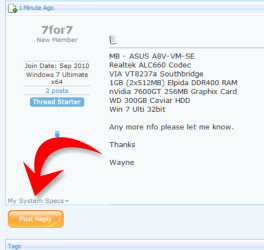
Soz pal I should have explained a bit better but you can update your system spec here (see pic)

But nevermind that .. did you try Stormy's suggestion ?
 

Attachments

  • 7for7.PNG
    7for7.PNG
    30.8 KB · Views: 21

My Computer

Computer type
PC/Desktop
Computer Manufacturer/Model Number
Self Built
OS
Windows 7 Ultimate 64bit
CPU
AMD Phenom Quad core 9950 black edition
Motherboard
Gigabyte
Memory
16Gb
Graphics Card(s)
2x XFX Radeon 5850
Sound Card
PCI Express X-Fi Titanium / Logitech G35
Monitor(s) Displays
2x HP 2410i
Screen Resolution
1920x1080
Hard Drives
2x 500Gb Seagate
1x 300Gb Seagate
1x 1Tb Seagate
2x 1Tb Hitatchi
PSU
Jean Tech Storm 700W
Case
Cooler Master COSMOS S
Cooling
Akasa Evo Blue Pro
Keyboard
Logitech G15
Mouse
Mad Catz M.M.O. 7
Internet Speed
12mb
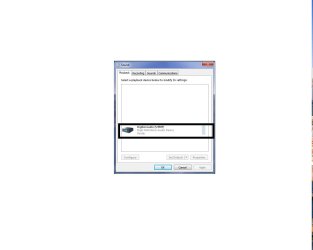
Sorry about that. It's not for this pc, it's for another one; an older machine that I'm trying to sort out for a mate of mine. Everything's gone swimmingly except for the sound. As I mentioned earlier I've been almost everywhere (everywhere that I can think of) for the drivers but with no success.
Some of the drivers that I've installed have actually shown (when playing music) that there is sound "happenning" and the level meter in the sys tray shows sound but the only thing showing is S/PDIF.
I get no sound from the rear outs or the front outs.

Cheers
 

Attachments

  • SPDIF.jpg
    SPDIF.jpg
    26.7 KB · Views: 55

My Computer

OS
Windows 7 Ultimate x64
Have you been uninstalling each driver that doesn't work before trying the next? If no then the chances of getting anything to install and work properly is probably going to be next to impossible. If yes, the correct driver (the Realtek HD) should install and work, unless there are enough bits and pieces from the previous installs still hanging around and causing problems.

In either case if you can do a system restore to the first restore point before you started installing any of the audio drivers, and then try the Realtek HD driver again. If that doesn't work it may be time to bite the bullet and start all over again with a clean install of Windows 7. This was a clean install and not an upgrade install to begin with I hope.

If it wasn't you may want to do that,

http://www.sevenforums.com/tutorials/1649-clean-install-windows-7-a.html

and then once Windows is installed and before installing anything else, try the audio driver. Make sure there is a restore point,

http://www.sevenforums.com/tutorials/697-system-restore-point-create.html

before installing the driver just in case it doesn't work; makes it quick and easy to roll back. If it doesn't work the next thing I would try is the last Vista version of the chipset drivers,

http://www.viaarena.com/Driver/VIA_HyperionPro_V524A.zip - direct download from Via

No idea if they are newer or older than the ones that come with Windows 7. They shouldn't be needed as Via is no longer supporting those chipsets and the only available 7 drivers are what comes with 7, but with the problems you have been having with it there is nothing to lose. If the chipset drivers do install, then try the Realtek driver again.
 

My Computer

Computer type
PC/Desktop
Computer Manufacturer/Model Number
Me
OS
Win 7 Ultimate x64
CPU
FX-8350 @ 4.6 GHz so far
Motherboard
Asus M5A97 EVO
Memory
ADATA XPG V1 Series Black 8GB DDR3 1600
Graphics Card(s)
Sapphire R9 270x Dual-X
Sound Card
Xonar DGX w/ Corsair Vengence 1300
Monitor(s) Displays
Acer S232HL Abid
Screen Resolution
1920x1080
Hard Drives
120 GB OCZ Vertex 3
500 GB Seagate 7200.12
PSU
Antec Earthwatts 650W Green
Case
Antec Three Hundred
Cooling
Cooler Master 212 EVO
Keyboard
Logitech G510
Mouse
Logitech G500s
Internet Speed
35000/3000
Sorry if this is a dumb question but did you plug the connector on your MB to the HD or the AC 97 slot?
 

My Computer

Computer type
PC/Desktop
Computer Manufacturer/Model Number
Self made
OS
windows 7 home premium 64, and Windows 10 64 bit
CPU
I7 940
Motherboard
ASUS P6TX58D Premium- BIOS VERSION 1402
Memory
12 GB Dominator 3 channel 1600
Graphics Card(s)
Radeon R9 Fury Nitro
Sound Card
Z1
Monitor(s) Displays
50 Inch Panasonic TV
Screen Resolution
1920x1080
Hard Drives
Main drive OCZ Revodrive V2 and 8 TB multi drives
PSU
Coolermaster 1000
Case
CoolerMaster 932
Cooling
Coolermaster Dual fan
Keyboard
mx 5500 revolution
Mouse
mx 5500 revolution
Internet Speed
12 mb
Browser
Chrome
Other Info
set up for 3D Blue Ray applications with a surround room of 12 speaker Definitive Technology and multi amps, main is driven by yamaha M-65
Hi, everyone.

I've recently installed Win7 on my ASUS A8V-VM-SE mobo. Win7 has found every driver except for the sound... Well, actually it has found a driver but it's showing (S/PDIF) for some reason not AC'97. I need an AC'97 driver but cannot find one that works with this mobo. I've tried ASUS; Realtek (latest drivers don't work), VIA, Guru3D etc. all to no avail. Thanks Wayne

You install audio drivers randomly?? :shock:

Audio drivers are not generic, you can actually mess things up by trying to install audio drivers for -hardware- not available.

As mentioned... use the Realtek HD driver.
If you can, uninstall all of the other audio drivers, first in the device manager, then withjout rebooting from Control Panel/Programs & Features.

Reboot and try the Realtek drivers.

Ap
 

My Computer

Computer Manufacturer/Model Number
Assembled in my workshop
OS
Windows 7 Home Premium
CPU
Intel Core 2 Duo @ 3.00gHz
Motherboard
Gigabyte GA-P35-S3G
Memory
4 GB
Graphics Card(s)
ATI Radeon HD 2600 XT
Sound Card
RME 24/96 Card, Realtek Internal Audio PreSonus FireStudio
Monitor(s) Displays
Acer 1917 (x2)
Screen Resolution
1280 x 1024 on both monitors
Hard Drives
Three 250GB Seagate SATA Barracuda 7200rpm
PSU
Rosewill 500-watt
Case
Rosewill mid-tower
Cooling
Noctua NH-U9B (CPU), PwrSupply fan + single large case Fan
Keyboard
Macally w/2/USB ports.
Mouse
Trackman Wheel
Other Info
Event 20/20 bas studio monitors, Yamaha sub.
Rackmount Korg/Roland/Yamaha synthesizers,
Cubase MIDI/audio recording. Sony Soundforge audio/mastering software. CD Architect Mastering. RME & Presonus audio interfaces.
Hi, Again
I've uninstalled the sound drivers from Device Manager and Programs & Features; rebooted and installed the Realtek HD Audio 2.51 drivers with, I'm afraid, the same result.
Now, I have noticed that every time I uninstall a driver and reboot. Windows automatically installs its own driver and I can't seem to find a way to stop it. Aaargh!
So does this mean I'm always going to be installing over the top of Win 7's own driver?
Also, I've noticed that the FP Audio is connected and enabled in the BIOS and the pins are connected thus:

Pins:
1. Mic In
2. GND
3. Mic Bias
4. -
5. Ret R
6. Spkout R
7. -
8. -
9. Ret L
10. Spkout L

Do these look right and could this also have an effect on why only S/PDIF is showing in Control Panel/ Sound?

Cheers

Wayne
 

My Computer

OS
Windows 7 Ultimate x64
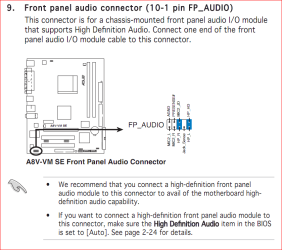
Don't hold me to it but from the looks of what you're describing it looks like you have a mix of HD Audio and AC'97 connected. This is from the manual for your motherboard,

fpaudio.PNG

and shows the proper jumper configuration. The bios setting it is referring to is under the Southbridge configuration setting and only has two options, disabled and auto with auto being the default.

This is from a different manual but shows the difference between the HD Audio and AC'97 connections,

fpaudio2.jpg


so double check all the connections on yours, or if you don't use the front panel jacks disconnect them all together.
 

My Computer

Computer type
PC/Desktop
Computer Manufacturer/Model Number
Me
OS
Win 7 Ultimate x64
CPU
FX-8350 @ 4.6 GHz so far
Motherboard
Asus M5A97 EVO
Memory
ADATA XPG V1 Series Black 8GB DDR3 1600
Graphics Card(s)
Sapphire R9 270x Dual-X
Sound Card
Xonar DGX w/ Corsair Vengence 1300
Monitor(s) Displays
Acer S232HL Abid
Screen Resolution
1920x1080
Hard Drives
120 GB OCZ Vertex 3
500 GB Seagate 7200.12
PSU
Antec Earthwatts 650W Green
Case
Antec Three Hundred
Cooling
Cooler Master 212 EVO
Keyboard
Logitech G510
Mouse
Logitech G500s
Internet Speed
35000/3000
Yes, I've seen this in the manual but the BIOS on the MB shows in the Southbridge Settings that the options for High Def Audio are Disabled/Enabled no Auto. For the Front Panel Support Type options are AC'97/HD Audio.
I believe that most budget cases (this case within this bracket) don't usually have HD audio on the front panel and in the BIOS this is set to AC'97. I just wondered if the pins had been set correctly?
 

My Computer

OS
Windows 7 Ultimate x64
PooMan UK and Techymike, thank you for your help and advice it has been appreciated.


Stormy13, I’d like to give you big thanks for the amount of effort you put in to resolving my issue. Alas the on-board sound still eludes me so I have decided to get a new soundcard - and problem solved.

On the strength of you guys I would definitely recommend www.sevenforums.com to anyone having issues that need attention.

Thanks again

Wayne

P.S. Aphelion. I haven’t been RANDOMLY trying drivers; I’ve been doing it in a structured and logical way. Please don’t be so quick to denigrate, especially with people who are at their wit’s end with a problem that refuses to be resolved.
 

My Computer

OS
Windows 7 Ultimate x64
Back
Top