casanovaman95
New member
- Local time
- 3:08 PM
- Messages
- 3
Good morning, all.
I am trying to re-map my rear audio jacks (bass, l/r or whichever) to be the default audio output (green jack) as my front jack is broken ( I have to tape male 3.5mm at certain angle) and the tip of another male 3.5mm is broken in rear normal (green) jack.
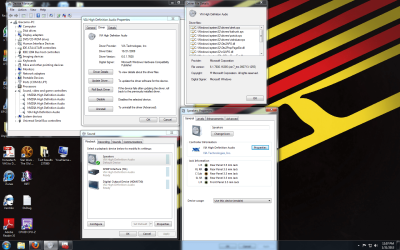
I found the sticky thread pertaining to realtek drivers/audio manager, but I do not have a realtek sound card. Despite this I searched through my registry to get to "HKEY_LOCAL_MACHINE\SYSTEM\CurrentControlSet\Control\Class\{4D36E96C-E325-11CE-BFC1-08002BE10318}\0000\Settings\DevType_0888_SS147b1083 or ending in DevType_0885_SS18490890" but it does not look the same. (see attached screenshot).
When I check what my drivers are under device manager -> Sound, video and game controllers, there are 5 items that drop down:
High Definition Audio Device
NVIDIA High Definition Audio Device
NVIDIA High Definition Audio Device
NVIDIA High Definition Audio Device
NVIDIA High Definition Audio Device
Any help as to how to re-map one of my unused rear jacks to a normal jack is greatly appreciated.
If any more info is needed, let me know.
Thanks!
I am trying to re-map my rear audio jacks (bass, l/r or whichever) to be the default audio output (green jack) as my front jack is broken ( I have to tape male 3.5mm at certain angle) and the tip of another male 3.5mm is broken in rear normal (green) jack.
I found the sticky thread pertaining to realtek drivers/audio manager, but I do not have a realtek sound card. Despite this I searched through my registry to get to "HKEY_LOCAL_MACHINE\SYSTEM\CurrentControlSet\Control\Class\{4D36E96C-E325-11CE-BFC1-08002BE10318}\0000\Settings\DevType_0888_SS147b1083 or ending in DevType_0885_SS18490890" but it does not look the same. (see attached screenshot).
When I check what my drivers are under device manager -> Sound, video and game controllers, there are 5 items that drop down:
High Definition Audio Device
NVIDIA High Definition Audio Device
NVIDIA High Definition Audio Device
NVIDIA High Definition Audio Device
NVIDIA High Definition Audio Device
Any help as to how to re-map one of my unused rear jacks to a normal jack is greatly appreciated.
If any more info is needed, let me know.
Thanks!
Attachments

My Computer
At a glance
Windows 7 Home Premium 64bitAMD Phenom X4 BE 965 3.4GHz8GB Mushkin Stiletto DDR3 667MHznVIDIA GTX 460 1GB
- OS
- Windows 7 Home Premium 64bit
- CPU
- AMD Phenom X4 BE 965 3.4GHz
- Motherboard
- ASUS M4N75TD
- Memory
- 8GB Mushkin Stiletto DDR3 667MHz
- Graphics Card(s)
- nVIDIA GTX 460 1GB