
Audio Keeps Going Out, Especially in Mozilla

ryguy7272

New member
Member
Local time
6:53 PM
Messages
43
My audio device has become very unstable in the past few days, and I have no idea why. Sometimes I have no audio at all, and sometimes it works in Windows, but it is working less and less frequently in Mozilla/Firefox.


The screen shot below seems to suggest everything is fine.


Is there some kind of diagnostic tool that I can run to check the status of things? Or, is there some tool that I can download to help me manage the audio on my system? Again, when I check the audio settings, everything seems fine, but it is definitely not fine.


Thanks!
 

Attachments
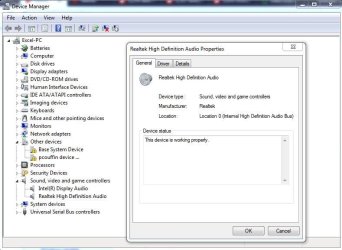
  • Capture.JPG
    Capture.JPG
    63.7 KB · Views: 0

My Computer

Computer type
PC/Desktop
Computer Manufacturer/Model Number
Lenovo
OS
Windows7
In Firefox 54 and below:

  1. Click the menu button
    2014-01-10-13-08-08-f52b8c.png
    and select Options (Windows) or Preferences (Mac, Linux).
  2. Select the Advanced panel and the General tab.
  3. Uncheck Use hardware acceleration when available.
  4. Close Firefox completely and then restart Firefox to see if the problem persists.
In Firefox 55 and above:

  1. Click the menu button
    2014-01-10-13-08-08-f52b8c.png
    and select Options (Windows) or Preferences (Mac, Linux).
  2. Select the General panel.
  3. Under Performance, uncheck Use recommended performance settings. Additional settings will be displayed.
    2017-08-27-03-46-52-fd0019.png
  4. Uncheck Use hardware acceleration when available.
  5. Close Firefox completely and then restart Firefox to see if the problem persists.
 

My Computer

Computer type
PC/Desktop
Computer Manufacturer/Model Number
Lenovo
OS
Windows7
Hi ryguy7272

I understand that you keep loosing audio output.

Can you say any more about the problem: does it happen after when you power up, or mid-way through listening to something?

Had you tried unplugging your audio speakers and re-plugging back in? What happens?

Volume Mixer is quite a good diagnostic to use. It shows the different source volume outputs in real-time.

What sound card are you using?
 

My Computer

Computer type
PC/Desktop
OS
Windows 7 x64, Vista x64, 8.1 smartphone
CPU
Intel E8400 65W 64-bit
Motherboard
Gigabyte EP45-UD3LR
Memory
DDR2 2 x 2GB, 1GB x 2
Graphics Card(s)
XFX Radeon HD5750
Sound Card
AMD High Definition Audio; Realtek High Definition Audio
Monitor(s) Displays
iiyama prolite X2377HDS
Screen Resolution
1920 x 1080
Hard Drives
500GB 7200 rpm Seagate ST3500413AS 16MB, 500GB 5400 rpm Toshiba MQ02ABF050H 32MB, 200GB 7200 rpm Seagate ST3200820AS 8MB, 2TB 7200 rpm Western Digital WD20EZRX 64MB
PSU
Enermax Liberty Modular
Case
Antec P193 Midi Tower
Keyboard
Mionix ZIBAL 60
Mouse
Razer USB 2.0 Diamondback Mouse or Huion Graphics Tablet
Browser
Internet Explorer, Lunascape, Firefox, Opera, Avast Safezone
I found a solution for my problem and posted it. Hopefully it helps others who encounter the same issue. Thanks to all.
 

My Computer

Computer type
PC/Desktop
Computer Manufacturer/Model Number
Lenovo
OS
Windows7
Congratulations. Please mark this question as SOLVED for the benefit of other readers. Thank you.
 

My Computer

Computer type
PC/Desktop
OS
Windows 7 x64, Vista x64, 8.1 smartphone
CPU
Intel E8400 65W 64-bit
Motherboard
Gigabyte EP45-UD3LR
Memory
DDR2 2 x 2GB, 1GB x 2
Graphics Card(s)
XFX Radeon HD5750
Sound Card
AMD High Definition Audio; Realtek High Definition Audio
Monitor(s) Displays
iiyama prolite X2377HDS
Screen Resolution
1920 x 1080
Hard Drives
500GB 7200 rpm Seagate ST3500413AS 16MB, 500GB 5400 rpm Toshiba MQ02ABF050H 32MB, 200GB 7200 rpm Seagate ST3200820AS 8MB, 2TB 7200 rpm Western Digital WD20EZRX 64MB
PSU
Enermax Liberty Modular
Case
Antec P193 Midi Tower
Keyboard
Mionix ZIBAL 60
Mouse
Razer USB 2.0 Diamondback Mouse or Huion Graphics Tablet
Browser
Internet Explorer, Lunascape, Firefox, Opera, Avast Safezone
I found a solution for my problem and posted it. Hopefully it helps others who encounter the same issue. Thanks to all.


You said you posted the solution, but where?
 

My Computer

Computer type
PC/Desktop
OS
Windows 7 Ultimate x64
Back
Top