Solved Audio not working on HP Spectre XT 13-2003ef under Windows 7

Niccolo

New member
Local time
12:17 AM
Messages
6
Hello

First of all, my apologies if this same subject has been already dealt with in another post.

After updating the OS on my HP laptop from Windows 7 to 10, I experienced random sound issues (audio would stop working randomly). Messed around with drivers, audio stopped working altogether and, considering I was not impressed with Windows 10, I decided to go back to Windows 7 through an HP factory recovery procedure available on start-up.

Now I've got the laptop with Windows 7, everything works well except for no sound (usual loudspeaker icon with a red cross on it), as according to the OS there is no installed audio device.

I tried all the usual fixes (run Windows troubleshooter, search for updated audio drivers, etc.), including downloading and installing "IDT High-Definition (HD) Audio Driver" which, according to the HP Support website, is the correct driver for my laptop. Unfortunately, the driver refuses to install, and I cannot solve the problem.

Could anyone suggest any other approach?

Many thanks in advance and don't hesitate to contact me if you need more details on the laptop or the OS.

Niccolò
 

My Computer My Computer

At a glance

Windows 7 Home Premium 64
Computer type
PC/Desktop
Computer Manufacturer/Model Number
HP Spectre XT 13-2003ef
OS
Windows 7 Home Premium 64

My Computer My Computer

At a glance

Windows 10 64 bitIntel i7 6700K16GB Corsair DominatorIntel CPU Graphics
Computer type
PC/Desktop
Computer Manufacturer/Model Number
My Own Build
OS
Windows 10 64 bit
CPU
Intel i7 6700K
Motherboard
ASUS ROG Maximus VIII Hero
Memory
16GB Corsair Dominator
Graphics Card(s)
Intel CPU Graphics
Sound Card
RealTek
Monitor(s) Displays
27" Dell S2719dgf
Screen Resolution
2560X1440
Hard Drives
1 TB Samsung 850 EVO SSD for Win 10 Pro
500GB Samsung 850 EVO SSD for Win 10 Insider
2 TB drive for backup
PSU
EVGA Supernova 750G2
Case
BeQuiet Silent Base 600
Cooling
Deepcool Captain 120EX
Keyboard
Microsoft Wireless 2000
Mouse
Microsoft wireless
Internet Speed
100 MB/sec (Cable)
Antivirus
Microsoft Defender and Malwarebytes
Browser
Edge/Firefox
Other Info
Cakewalk (Sonar) by BandLab and Studio One 4.1 Pro recording studio software. MOTU 896Mk3 Hybrid recording interface, Frontier Tranzport wireless control unit, Behringer X-Touch Control Surface.
Five USB connected optical drives for CD Audio production using Nero BurningROM
Hello firebe(i)rd

Thank you for your assistance.

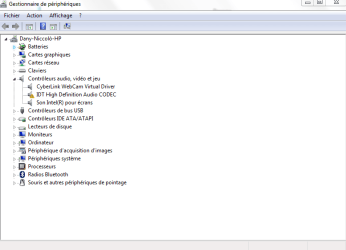
Since my first post this morning, something has changed as, when I came home this evening, Windows managed to (sort of) partially install the IDT driver, hence the screenshot attached.

However, still no sound, and when I launched a driver update, it went on forever with no joy (I ended up stopping it via Task Manager).

Kind regards

Niccolò
 

Attachments

My Computer My Computer

At a glance

Windows 7 Home Premium 64
Computer type
PC/Desktop
Computer Manufacturer/Model Number
HP Spectre XT 13-2003ef
OS
Windows 7 Home Premium 64
What is the error code for the IDT High Definition Audio Codec? e.g. Code 10, Code 28, etc.
 

My Computer My Computer

At a glance

Windows 10 64 bitIntel i7 6700K16GB Corsair DominatorIntel CPU Graphics
Computer type
PC/Desktop
Computer Manufacturer/Model Number
My Own Build
OS
Windows 10 64 bit
CPU
Intel i7 6700K
Motherboard
ASUS ROG Maximus VIII Hero
Memory
16GB Corsair Dominator
Graphics Card(s)
Intel CPU Graphics
Sound Card
RealTek
Monitor(s) Displays
27" Dell S2719dgf
Screen Resolution
2560X1440
Hard Drives
1 TB Samsung 850 EVO SSD for Win 10 Pro
500GB Samsung 850 EVO SSD for Win 10 Insider
2 TB drive for backup
PSU
EVGA Supernova 750G2
Case
BeQuiet Silent Base 600
Cooling
Deepcool Captain 120EX
Keyboard
Microsoft Wireless 2000
Mouse
Microsoft wireless
Internet Speed
100 MB/sec (Cable)
Antivirus
Microsoft Defender and Malwarebytes
Browser
Edge/Firefox
Other Info
Cakewalk (Sonar) by BandLab and Studio One 4.1 Pro recording studio software. MOTU 896Mk3 Hybrid recording interface, Frontier Tranzport wireless control unit, Behringer X-Touch Control Surface.
Five USB connected optical drives for CD Audio production using Nero BurningROM
Hello fireberd

I do not get a specific error code; at the end of the installation process I get on of the attached windows, depending on whether 1) I run the self-installing package distributed by HP or 2) I go via Device Manager.

The messages say respectively:

1) Detected material (device/driver) is not taken in charge by this IDT package. The installation will be aborted.

2) The following material (device/driver) has not been installed: IDT High Definition Audio CODEC. An error happened during the installation of the device. The class installation refused the installation or update request for this device.

To complicate things even further, this morning the sound icon in bottom-right tray had gone back to normal, and the volume keys worked, but still no sound.

After a couple of power cycles (shutdown / startup), back to the old "loudspeaker-with-a-red-cross" icon...

Thank you once more for your patience!
 

Attachments

  • 20160811@08h40 - Capture.PNG
    20160811@08h40 - Capture.PNG
    5.9 KB · Views: 9
  • 20160811@08h45 - Capture.PNG
    20160811@08h45 - Capture.PNG
    29.5 KB · Views: 9
Last edited:

My Computer My Computer

At a glance

Windows 7 Home Premium 64
Computer type
PC/Desktop
Computer Manufacturer/Model Number
HP Spectre XT 13-2003ef
OS
Windows 7 Home Premium 64
According to the HP Downloads, there is no Windows 7 drivers available for this model. You need a Windows 7 specific driver, a Windows 8.1 or Windows 10 driver is not compatible.

Uninstall any audio driver you have installed, restart the PC and if compatible, Windows should install the generic "High Definition Audio Codec (driver).
 

My Computer My Computer

At a glance

Windows 10 64 bitIntel i7 6700K16GB Corsair DominatorIntel CPU Graphics
Computer type
PC/Desktop
Computer Manufacturer/Model Number
My Own Build
OS
Windows 10 64 bit
CPU
Intel i7 6700K
Motherboard
ASUS ROG Maximus VIII Hero
Memory
16GB Corsair Dominator
Graphics Card(s)
Intel CPU Graphics
Sound Card
RealTek
Monitor(s) Displays
27" Dell S2719dgf
Screen Resolution
2560X1440
Hard Drives
1 TB Samsung 850 EVO SSD for Win 10 Pro
500GB Samsung 850 EVO SSD for Win 10 Insider
2 TB drive for backup
PSU
EVGA Supernova 750G2
Case
BeQuiet Silent Base 600
Cooling
Deepcool Captain 120EX
Keyboard
Microsoft Wireless 2000
Mouse
Microsoft wireless
Internet Speed
100 MB/sec (Cable)
Antivirus
Microsoft Defender and Malwarebytes
Browser
Edge/Firefox
Other Info
Cakewalk (Sonar) by BandLab and Studio One 4.1 Pro recording studio software. MOTU 896Mk3 Hybrid recording interface, Frontier Tranzport wireless control unit, Behringer X-Touch Control Surface.
Five USB connected optical drives for CD Audio production using Nero BurningROM
Thank you very much for the suggestion fireberd, I will try this evening.

However, please see the following webpage for IDT High Definition (HD) Audio Driver for Windows 7 and my model of laptop:
HP Software and Driver Downloads for HP Printers, Laptops, Desktops and More | HP® Customer Support

I'm starting to wonder whether it's a hardware problem, although the fact that the problem happened after migrating to Windows 10 would be an odd coincidence. I might have a look at cables and connections this evening, after having tried out your fix.
 

My Computer My Computer

At a glance

Windows 7 Home Premium 64
Computer type
PC/Desktop
Computer Manufacturer/Model Number
HP Spectre XT 13-2003ef
OS
Windows 7 Home Premium 64
OK. I see the drivers now.

Did you install the Intel motherboard chipset drivers? If not, install the chipset drivers, restart the PC, and try the IDT driver install again. In Windows 7, the correct install sequence is (1) Install Windows (2) Install motherboard chipset drivers (3) Install device drivers including Video, Sound, etc.

One of the purposes of the chipset drivers is to identify all the devices on the motherboard. If the IDT audio was not properly defined, the driver will not install or install properly.
 

My Computer My Computer

At a glance

Windows 10 64 bitIntel i7 6700K16GB Corsair DominatorIntel CPU Graphics
Computer type
PC/Desktop
Computer Manufacturer/Model Number
My Own Build
OS
Windows 10 64 bit
CPU
Intel i7 6700K
Motherboard
ASUS ROG Maximus VIII Hero
Memory
16GB Corsair Dominator
Graphics Card(s)
Intel CPU Graphics
Sound Card
RealTek
Monitor(s) Displays
27" Dell S2719dgf
Screen Resolution
2560X1440
Hard Drives
1 TB Samsung 850 EVO SSD for Win 10 Pro
500GB Samsung 850 EVO SSD for Win 10 Insider
2 TB drive for backup
PSU
EVGA Supernova 750G2
Case
BeQuiet Silent Base 600
Cooling
Deepcool Captain 120EX
Keyboard
Microsoft Wireless 2000
Mouse
Microsoft wireless
Internet Speed
100 MB/sec (Cable)
Antivirus
Microsoft Defender and Malwarebytes
Browser
Edge/Firefox
Other Info
Cakewalk (Sonar) by BandLab and Studio One 4.1 Pro recording studio software. MOTU 896Mk3 Hybrid recording interface, Frontier Tranzport wireless control unit, Behringer X-Touch Control Surface.
Five USB connected optical drives for CD Audio production using Nero BurningROM
Hello fireberd, one quick update: when I switched on the laptop after coming back from work this evening, as by magic I got a message saying that the IDT Codec driver had been installed. The sound was effectively back, without me doing anything since last night...

Then, when I started Skype, it disappeared, although I could hear come crackling coming from the loudspeakers every now and then. I realised that by pushing hard on the loudspeakers' grille, between keyboard and display, the sound would come on again. I suspect a loose connection on the sound card, which I'll get round to check tomorrow.

In any case, the sound is now working (and has been for the last couple of hours), so thank you very much for your help and assistance. If you ever happen to be in Brussels (not that I could think of many good reasons to, but you never know..) beer and a cone of fries (cornet de frites) will be on me ;-)
 

My Computer My Computer

At a glance

Windows 7 Home Premium 64
Computer type
PC/Desktop
Computer Manufacturer/Model Number
HP Spectre XT 13-2003ef
OS
Windows 7 Home Premium 64
Glad to hear it appears to be resolved. Sorry I wasn't more help.
Jack
 

My Computer My Computer

At a glance

Windows 10 64 bitIntel i7 6700K16GB Corsair DominatorIntel CPU Graphics
Computer type
PC/Desktop
Computer Manufacturer/Model Number
My Own Build
OS
Windows 10 64 bit
CPU
Intel i7 6700K
Motherboard
ASUS ROG Maximus VIII Hero
Memory
16GB Corsair Dominator
Graphics Card(s)
Intel CPU Graphics
Sound Card
RealTek
Monitor(s) Displays
27" Dell S2719dgf
Screen Resolution
2560X1440
Hard Drives
1 TB Samsung 850 EVO SSD for Win 10 Pro
500GB Samsung 850 EVO SSD for Win 10 Insider
2 TB drive for backup
PSU
EVGA Supernova 750G2
Case
BeQuiet Silent Base 600
Cooling
Deepcool Captain 120EX
Keyboard
Microsoft Wireless 2000
Mouse
Microsoft wireless
Internet Speed
100 MB/sec (Cable)
Antivirus
Microsoft Defender and Malwarebytes
Browser
Edge/Firefox
Other Info
Cakewalk (Sonar) by BandLab and Studio One 4.1 Pro recording studio software. MOTU 896Mk3 Hybrid recording interface, Frontier Tranzport wireless control unit, Behringer X-Touch Control Surface.
Five USB connected optical drives for CD Audio production using Nero BurningROM
Hello Jack

Actually, I was too quick to pull the trigger, as last night sound stopped working again.

I'm more and more convinced that there is a problem of cabling or loose connection at the bottom of it, and will have a look at the innards of the beast this evening.

On this note, do you think that if there was indeed a cabling/connection problem, which meant that the sound card was randomly appearing as uninstalled, this would prevent the IDT driver to install, as the device it refers to is not present in the laptop?

Cheers, Niccolò
 

My Computer My Computer

At a glance

Windows 7 Home Premium 64
Computer type
PC/Desktop
Computer Manufacturer/Model Number
HP Spectre XT 13-2003ef
OS
Windows 7 Home Premium 64
That could very well be what is causing the problem. Open it and check all cabling (reseat - unplug then plug back in - audio cables).
 

My Computer My Computer

At a glance

Windows 10 64 bitIntel i7 6700K16GB Corsair DominatorIntel CPU Graphics
Computer type
PC/Desktop
Computer Manufacturer/Model Number
My Own Build
OS
Windows 10 64 bit
CPU
Intel i7 6700K
Motherboard
ASUS ROG Maximus VIII Hero
Memory
16GB Corsair Dominator
Graphics Card(s)
Intel CPU Graphics
Sound Card
RealTek
Monitor(s) Displays
27" Dell S2719dgf
Screen Resolution
2560X1440
Hard Drives
1 TB Samsung 850 EVO SSD for Win 10 Pro
500GB Samsung 850 EVO SSD for Win 10 Insider
2 TB drive for backup
PSU
EVGA Supernova 750G2
Case
BeQuiet Silent Base 600
Cooling
Deepcool Captain 120EX
Keyboard
Microsoft Wireless 2000
Mouse
Microsoft wireless
Internet Speed
100 MB/sec (Cable)
Antivirus
Microsoft Defender and Malwarebytes
Browser
Edge/Firefox
Other Info
Cakewalk (Sonar) by BandLab and Studio One 4.1 Pro recording studio software. MOTU 896Mk3 Hybrid recording interface, Frontier Tranzport wireless control unit, Behringer X-Touch Control Surface.
Five USB connected optical drives for CD Audio production using Nero BurningROM
Back
Top