Audio playback skips

fjanoos

New member
Local time
12:07 AM
Messages
4
Hello,

I recently installed Win 7 on my computer (Core2 Duo [email protected], Intel DP965LT mobo, 2GB RAM, 320GB Seagate SATA HDD, Sigmatel integrated audio, NVIDIA GeForce 7600 gfx card).

I find that audio playback is skipping - every 10-15 secs it skips. This happens regardless of the audiosource (Media player, youtube, vlc etc) and regardless of media format (audio/video).

I recall that I had this same problem when I had freshly installed Vista on this same computer, but after some time the problem stopped (don't recollect exactly how).

I saw a similar thread (but for sound skipping in Vista) where somebody had suggested getting new SATA drivers. I believe I that I have the latest SATA drivers for my mobo.

Any suggestions would be appreciated.

-fj
 

My Computer

Computer Manufacturer/Model Number
Self
OS
Windows 7 Ultimate RC1 64-bit
CPU
Core 2 Duo E6300 1.86GHz
Motherboard
Intel DP965LT
Memory
2 GB
Graphics Card(s)
NVidia Geforce 7600
Sound Card
Sigmatel Integrated Audio
Monitor(s) Displays
Dell P1100 and Viewsonic G220fb
Hard Drives
320GB Seagate SATA
PSU
500W
Case
Sagitta Raidmax
Cooling
Standard
Use a trial of EVEREST to determine the exact model of your soundcard. Afterwards, google it and try finding new drivers.
 

My Computer

Computer type
PC/Desktop
Computer Manufacturer/Model Number
Multirama PC Expert [Bulgaria]
OS
Windows 7 Home Premium [64-Bit]
CPU
Intel Core 2 Quad CPU Q8200 @ 2.33 GHz
Motherboard
GIGABYTE GA-G31M-S2C
Memory
4094 MB DDR2
Graphics Card(s)
SAPPHIRE Radeon HD 6970 (2 GB VRAM)
Sound Card
Realtek ALC883 @ Intel 82801GB ICH7 - High Definition Audio
Monitor(s) Displays
Samsung SyncMaster BX2235 [21.5" LCD with LED Backlight]
Screen Resolution
1920x1080
Hard Drives
Hitachi HDT721075SLA360 - 750 GB
PSU
Cooler Master GX750 - 750W
Case
Multirama (Black / 2010 Revision)
Cooling
Stock + Cooler Master
Keyboard
Logitech G510 (Gaming Keyboard)
Mouse
Razer Lachesis (4000 DPI, Blue Version)
Internet Speed
Vivacom Optical [100 Mbps]
Browser
Chrome [Windows]
Hi,

The sound skipping happens only when i use my speakers (connected to rear audio panel ) and not my headphones (connected to the front audio panel).

I installed the IDT sound codec that intel provides as a sound driver for the DP965LT mobo.

the idt configuration application has a window which shows the kind of playback device (speaker or headphone) connected to the rear and front panels.

and i noticed that every time the sound skips the application will quickly switch the device shown for the rear panel to a head phone and then back to the speaker.

any ideas about what's going on here ?

regards,
-firdaus
 

My Computer

Computer Manufacturer/Model Number
Self
OS
Windows 7 Ultimate RC1 64-bit
CPU
Core 2 Duo E6300 1.86GHz
Motherboard
Intel DP965LT
Memory
2 GB
Graphics Card(s)
NVidia Geforce 7600
Sound Card
Sigmatel Integrated Audio
Monitor(s) Displays
Dell P1100 and Viewsonic G220fb
Hard Drives
320GB Seagate SATA
PSU
500W
Case
Sagitta Raidmax
Cooling
Standard
This doesn't seem like a software problem then, maybe the connector of your speakers is faulty. Have you tried plugging the speakers into the front panel? Maybe there's a problem with the back...
 

My Computer

Computer type
PC/Desktop
Computer Manufacturer/Model Number
Multirama PC Expert [Bulgaria]
OS
Windows 7 Home Premium [64-Bit]
CPU
Intel Core 2 Quad CPU Q8200 @ 2.33 GHz
Motherboard
GIGABYTE GA-G31M-S2C
Memory
4094 MB DDR2
Graphics Card(s)
SAPPHIRE Radeon HD 6970 (2 GB VRAM)
Sound Card
Realtek ALC883 @ Intel 82801GB ICH7 - High Definition Audio
Monitor(s) Displays
Samsung SyncMaster BX2235 [21.5" LCD with LED Backlight]
Screen Resolution
1920x1080
Hard Drives
Hitachi HDT721075SLA360 - 750 GB
PSU
Cooler Master GX750 - 750W
Case
Multirama (Black / 2010 Revision)
Cooling
Stock + Cooler Master
Keyboard
Logitech G510 (Gaming Keyboard)
Mouse
Razer Lachesis (4000 DPI, Blue Version)
Internet Speed
Vivacom Optical [100 Mbps]
Browser
Chrome [Windows]
Hi,

The audio plays fine from the front panel. I did consider the problem might lie with the hardware - except that I have an Ubuntu dual boot - and the audio from the rear panel is fine in Ubuntu. Also - I recently upgraded from Vista and the audio was fine with vista too.

Regards,
-fj
 

My Computer

Computer Manufacturer/Model Number
Self
OS
Windows 7 Ultimate RC1 64-bit
CPU
Core 2 Duo E6300 1.86GHz
Motherboard
Intel DP965LT
Memory
2 GB
Graphics Card(s)
NVidia Geforce 7600
Sound Card
Sigmatel Integrated Audio
Monitor(s) Displays
Dell P1100 and Viewsonic G220fb
Hard Drives
320GB Seagate SATA
PSU
500W
Case
Sagitta Raidmax
Cooling
Standard
If your front panel has two inputs like mine, I would consider plugging the speakers into the first and the headphones into the other. Microphone goes in the back. Just configure everything and make sure it works. Drivers should allow you to point what type of device you've connected for each input.

If you have 1 front input only you're... not lucky.
I'm not really your hardware guy, last thing I'd suggest is a soundcard refresh:
1. Go to the start menu and type "Device Manager".
2. Click the arrow next to "Sound, video and game controllers".
3. Find your audiocard in the list, it should be something like "DP965LT Mobo", as you pointed out.
4. Right click your audiocard and say "Disable".
5. Restart the computer.
6. Go to "Device Manager" again and repeat steps 2 and 3.
7. This time, right click and select "Enable".
8. Test your audio again, if the problem persists, try a second computer reboot.
9. Test everything again.
10. If the problem still persists, read the part before the comma in the 6th sentence in my post. (The one after "If you have 1 front input only you're... not lucky.")
 
Last edited:

My Computer

Computer type
PC/Desktop
Computer Manufacturer/Model Number
Multirama PC Expert [Bulgaria]
OS
Windows 7 Home Premium [64-Bit]
CPU
Intel Core 2 Quad CPU Q8200 @ 2.33 GHz
Motherboard
GIGABYTE GA-G31M-S2C
Memory
4094 MB DDR2
Graphics Card(s)
SAPPHIRE Radeon HD 6970 (2 GB VRAM)
Sound Card
Realtek ALC883 @ Intel 82801GB ICH7 - High Definition Audio
Monitor(s) Displays
Samsung SyncMaster BX2235 [21.5" LCD with LED Backlight]
Screen Resolution
1920x1080
Hard Drives
Hitachi HDT721075SLA360 - 750 GB
PSU
Cooler Master GX750 - 750W
Case
Multirama (Black / 2010 Revision)
Cooling
Stock + Cooler Master
Keyboard
Logitech G510 (Gaming Keyboard)
Mouse
Razer Lachesis (4000 DPI, Blue Version)
Internet Speed
Vivacom Optical [100 Mbps]
Browser
Chrome [Windows]
Hi - thanks for the info. I went thru the steps you mentioned - but to no avail.

My rear panel has 3 jacks - the front has 2. The problem is definitely with the rear panel - the audio streams fine from the front panel. The audio driver cannot recognize the audio device connected to the jacks in the rear panel. The rear panel is directly integrated into the mobo - and it works fine from ubuntu - so this is definitely not a h/w issue.

Secondly - if I connect the headphones and speakers, one in each of the front panel jacks - they are recognized correctly - but the sound doesn't stream through the device connected to what was originally the mic jack. It only streams through the original hp jack. Does this matter ?

Thirdly, in Device Manage the sound device shows up as "IDT High Definition Audio CODEC", not as DP965LT as you suggested.

Fourthly, when I freshly installed Win7 - it was configured as a Sigmatel Device (which didn't work either). Then I downloaded the IDT driver from Intel's webpage - and now Win 7 won't let me roll back the driver - or reinstall the Sigmatel driver.

Any ideas ?

-fj
 

My Computer

Computer Manufacturer/Model Number
Self
OS
Windows 7 Ultimate RC1 64-bit
CPU
Core 2 Duo E6300 1.86GHz
Motherboard
Intel DP965LT
Memory
2 GB
Graphics Card(s)
NVidia Geforce 7600
Sound Card
Sigmatel Integrated Audio
Monitor(s) Displays
Dell P1100 and Viewsonic G220fb
Hard Drives
320GB Seagate SATA
PSU
500W
Case
Sagitta Raidmax
Cooling
Standard
Secondly - if I connect the headphones and speakers, one in each of the front panel jacks - they are recognized correctly - but the sound doesn't stream through the device connected to what was originally the mic jack. It only streams through the original hp jack. Does this matter ?
I didn't really get that, could you try explaining again?
And If you still got the headphones and speakers to work the way you want to, who cares what the PC does to ensure that! Doesn't seem like much...

Fourthly, when I freshly installed Win7 - it was configured as a Sigmatel Device (which didn't work either). Then I downloaded the IDT driver from Intel's webpage - and now Win 7 won't let me roll back the driver - or reinstall the Sigmatel driver.
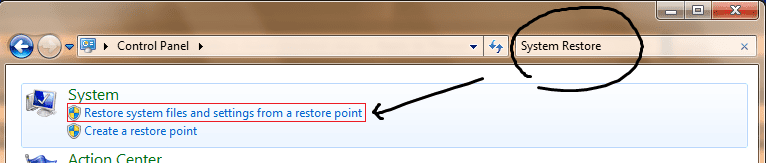
Another question - when you open your device manager do you see any unrecognized device? They are automatically set to open up and notify you, most times have a yellow or red warning sign. If you see no such notification, try a System Restore. Found in:
Restore.png

Set a restore point right before installing any drivers. WARNING! Some of your settings will be restored to their earlier preferences. This process (since you're going to restore to a much older point) might take up to one hour or more, depending on your personal computer's performance. Please finish any important work and make sure you have NO APPLICATIONS RUNNING before beginning the process.
 

My Computer

Computer type
PC/Desktop
Computer Manufacturer/Model Number
Multirama PC Expert [Bulgaria]
OS
Windows 7 Home Premium [64-Bit]
CPU
Intel Core 2 Quad CPU Q8200 @ 2.33 GHz
Motherboard
GIGABYTE GA-G31M-S2C
Memory
4094 MB DDR2
Graphics Card(s)
SAPPHIRE Radeon HD 6970 (2 GB VRAM)
Sound Card
Realtek ALC883 @ Intel 82801GB ICH7 - High Definition Audio
Monitor(s) Displays
Samsung SyncMaster BX2235 [21.5" LCD with LED Backlight]
Screen Resolution
1920x1080
Hard Drives
Hitachi HDT721075SLA360 - 750 GB
PSU
Cooler Master GX750 - 750W
Case
Multirama (Black / 2010 Revision)
Cooling
Stock + Cooler Master
Keyboard
Logitech G510 (Gaming Keyboard)
Mouse
Razer Lachesis (4000 DPI, Blue Version)
Internet Speed
Vivacom Optical [100 Mbps]
Browser
Chrome [Windows]
Back
Top