Audio suddenly stops working

Dreambreaker

New member
Local time
4:52 PM
Messages
8
So my audio suddenly stops while playing Rainbow Six Siege. This has happen before while playing siege and is fixed by restarting siege and Uplay and only effects the game and nothing else. This time, everything that involves audio just stops working. Everything has been fine up until now.

I've tried doing system restores, uninstalling and installing the newest driver of the Realtek HD Audio Driver from Asus' website, made sure that the drivers were alright via Device Manager, removed any external drives, and checked for loose cables. Nothing worked so I tried using different headphones, but that did not fix it. Both headphones work when tested through my phone. BIOS has HD Audio enabled. I tried plugging my headphones into the rear jack and I got sound but there was a lot of "static" or "robotic sound" coming through them and the quality was horrible thus driving me to the conclusion that something went wrong with the front panel audio or my headphones are not being detected.
 

My Computer

Computer type
PC/Desktop
Computer Manufacturer/Model Number
Custom
OS
Windows 7 Pro x64
CPU
i5 4690K
Motherboard
Asus Z97-A
Memory
32Gb of Crucial Ram
Graphics Card(s)
Radeon R9 390
Screen Resolution
1980 x 1080
Hard Drives
2Tb Western Digital Red
125Gb Plextor M5S SSD
PSU
750W Thermaltake SMART Series
Case
Corsair SPEC-02
Keyboard
Ducky Shine 5
Mouse
Steelseries Rival
Antivirus
Windows Security Essentials
Browser
Google Chrome
I gather from your post that the game causes audio to stop. Are you trying to play some other audio application at the same time as the game? That could pose a conflict. If not and its just the game, look at the game setup, or even reinstalling the game.
 

My Computer

Computer type
PC/Desktop
Computer Manufacturer/Model Number
My Own Build
OS
Windows 10 64 bit
CPU
Intel i7 6700K
Motherboard
ASUS ROG Maximus VIII Hero
Memory
16GB Corsair Dominator
Graphics Card(s)
Intel CPU Graphics
Sound Card
RealTek
Monitor(s) Displays
27" Dell S2719dgf
Screen Resolution
2560X1440
Hard Drives
1 TB Samsung 850 EVO SSD for Win 10 Pro
500GB Samsung 850 EVO SSD for Win 10 Insider
2 TB drive for backup
PSU
EVGA Supernova 750G2
Case
BeQuiet Silent Base 600
Cooling
Deepcool Captain 120EX
Keyboard
Microsoft Wireless 2000
Mouse
Microsoft wireless
Internet Speed
100 MB/sec (Cable)
Antivirus
Microsoft Defender and Malwarebytes
Browser
Edge/Firefox
Other Info
Cakewalk (Sonar) by BandLab and Studio One 4.1 Pro recording studio software. MOTU 896Mk3 Hybrid recording interface, Frontier Tranzport wireless control unit, Behringer X-Touch Control Surface.
Five USB connected optical drives for CD Audio production using Nero BurningROM
Siege is one of those games where sound provides tons of information so I can't afford to play other sound applications at the same time. So I reinstalled that game and plugged my headphones into front audio panel and still got no sound at all. There was no sound even with YouTube videos, windows, other games, etc.
 

My Computer

Computer type
PC/Desktop
Computer Manufacturer/Model Number
Custom
OS
Windows 7 Pro x64
CPU
i5 4690K
Motherboard
Asus Z97-A
Memory
32Gb of Crucial Ram
Graphics Card(s)
Radeon R9 390
Screen Resolution
1980 x 1080
Hard Drives
2Tb Western Digital Red
125Gb Plextor M5S SSD
PSU
750W Thermaltake SMART Series
Case
Corsair SPEC-02
Keyboard
Ducky Shine 5
Mouse
Steelseries Rival
Antivirus
Windows Security Essentials
Browser
Google Chrome
Is the sound OK if you boot up the PC but do not run the game?
 

My Computer

Computer type
PC/Desktop
Computer Manufacturer/Model Number
My Own Build
OS
Windows 10 64 bit
CPU
Intel i7 6700K
Motherboard
ASUS ROG Maximus VIII Hero
Memory
16GB Corsair Dominator
Graphics Card(s)
Intel CPU Graphics
Sound Card
RealTek
Monitor(s) Displays
27" Dell S2719dgf
Screen Resolution
2560X1440
Hard Drives
1 TB Samsung 850 EVO SSD for Win 10 Pro
500GB Samsung 850 EVO SSD for Win 10 Insider
2 TB drive for backup
PSU
EVGA Supernova 750G2
Case
BeQuiet Silent Base 600
Cooling
Deepcool Captain 120EX
Keyboard
Microsoft Wireless 2000
Mouse
Microsoft wireless
Internet Speed
100 MB/sec (Cable)
Antivirus
Microsoft Defender and Malwarebytes
Browser
Edge/Firefox
Other Info
Cakewalk (Sonar) by BandLab and Studio One 4.1 Pro recording studio software. MOTU 896Mk3 Hybrid recording interface, Frontier Tranzport wireless control unit, Behringer X-Touch Control Surface.
Five USB connected optical drives for CD Audio production using Nero BurningROM
No, I do not hear that little chime at the login screen.
 

My Computer

Computer type
PC/Desktop
Computer Manufacturer/Model Number
Custom
OS
Windows 7 Pro x64
CPU
i5 4690K
Motherboard
Asus Z97-A
Memory
32Gb of Crucial Ram
Graphics Card(s)
Radeon R9 390
Screen Resolution
1980 x 1080
Hard Drives
2Tb Western Digital Red
125Gb Plextor M5S SSD
PSU
750W Thermaltake SMART Series
Case
Corsair SPEC-02
Keyboard
Ducky Shine 5
Mouse
Steelseries Rival
Antivirus
Windows Security Essentials
Browser
Google Chrome

My Computer

Computer type
PC/Desktop
Computer Manufacturer/Model Number
My Own Build
OS
Windows 10 64 bit
CPU
Intel i7 6700K
Motherboard
ASUS ROG Maximus VIII Hero
Memory
16GB Corsair Dominator
Graphics Card(s)
Intel CPU Graphics
Sound Card
RealTek
Monitor(s) Displays
27" Dell S2719dgf
Screen Resolution
2560X1440
Hard Drives
1 TB Samsung 850 EVO SSD for Win 10 Pro
500GB Samsung 850 EVO SSD for Win 10 Insider
2 TB drive for backup
PSU
EVGA Supernova 750G2
Case
BeQuiet Silent Base 600
Cooling
Deepcool Captain 120EX
Keyboard
Microsoft Wireless 2000
Mouse
Microsoft wireless
Internet Speed
100 MB/sec (Cable)
Antivirus
Microsoft Defender and Malwarebytes
Browser
Edge/Firefox
Other Info
Cakewalk (Sonar) by BandLab and Studio One 4.1 Pro recording studio software. MOTU 896Mk3 Hybrid recording interface, Frontier Tranzport wireless control unit, Behringer X-Touch Control Surface.
Five USB connected optical drives for CD Audio production using Nero BurningROM
Yes, there's no audio at all at startup.
 

Attachments

  • ghjubkujh.PNG
    ghjubkujh.PNG
    12.8 KB · Views: 10
  • hguvku.PNG
    hguvku.PNG
    10.3 KB · Views: 0

My Computer

Computer type
PC/Desktop
Computer Manufacturer/Model Number
Custom
OS
Windows 7 Pro x64
CPU
i5 4690K
Motherboard
Asus Z97-A
Memory
32Gb of Crucial Ram
Graphics Card(s)
Radeon R9 390
Screen Resolution
1980 x 1080
Hard Drives
2Tb Western Digital Red
125Gb Plextor M5S SSD
PSU
750W Thermaltake SMART Series
Case
Corsair SPEC-02
Keyboard
Ducky Shine 5
Mouse
Steelseries Rival
Antivirus
Windows Security Essentials
Browser
Google Chrome
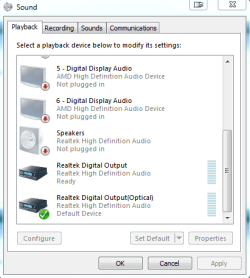
Aha! The digital output is set as default. Change that to "Speakers".
 

My Computer

Computer type
PC/Desktop
Computer Manufacturer/Model Number
My Own Build
OS
Windows 10 64 bit
CPU
Intel i7 6700K
Motherboard
ASUS ROG Maximus VIII Hero
Memory
16GB Corsair Dominator
Graphics Card(s)
Intel CPU Graphics
Sound Card
RealTek
Monitor(s) Displays
27" Dell S2719dgf
Screen Resolution
2560X1440
Hard Drives
1 TB Samsung 850 EVO SSD for Win 10 Pro
500GB Samsung 850 EVO SSD for Win 10 Insider
2 TB drive for backup
PSU
EVGA Supernova 750G2
Case
BeQuiet Silent Base 600
Cooling
Deepcool Captain 120EX
Keyboard
Microsoft Wireless 2000
Mouse
Microsoft wireless
Internet Speed
100 MB/sec (Cable)
Antivirus
Microsoft Defender and Malwarebytes
Browser
Edge/Firefox
Other Info
Cakewalk (Sonar) by BandLab and Studio One 4.1 Pro recording studio software. MOTU 896Mk3 Hybrid recording interface, Frontier Tranzport wireless control unit, Behringer X-Touch Control Surface.
Five USB connected optical drives for CD Audio production using Nero BurningROM
The set to default option is grayed out for the speakers.
 

My Computer

Computer type
PC/Desktop
Computer Manufacturer/Model Number
Custom
OS
Windows 7 Pro x64
CPU
i5 4690K
Motherboard
Asus Z97-A
Memory
32Gb of Crucial Ram
Graphics Card(s)
Radeon R9 390
Screen Resolution
1980 x 1080
Hard Drives
2Tb Western Digital Red
125Gb Plextor M5S SSD
PSU
750W Thermaltake SMART Series
Case
Corsair SPEC-02
Keyboard
Ducky Shine 5
Mouse
Steelseries Rival
Antivirus
Windows Security Essentials
Browser
Google Chrome
Speakers is grayed out because Windows is not seeing your speakers. (unplugged)

If your speakers are plugged in, where are they plugged in?
 

My Computer

Computer type
PC/Desktop
Computer Manufacturer/Model Number
Home made Desktop
OS
Windows 10 Pro. 64/ version 1709 Windows 7 Pro/64
CPU
Intel i7-6800K @ 4.3
Motherboard
ASUS X-99 Deluxe II
Memory
Corsair Platinum 16 gig @2400
Graphics Card(s)
EVGA GTX 1070 OC
Monitor(s) Displays
Asus 27" LED LCD/VE278Q
Screen Resolution
1920-1080 or 1280-720 HDMI
Hard Drives
INTEL SSD 730-240 Gb Sata 3.0/
PSU
EVGA Platium 1200W
Case
Phanteks Luxe Tempered Glass 8 fans/ one radiator
Cooling
XSPC/ Water Cooled CPU
Keyboard
Das 4 Professional
Mouse
Logitech M705/MX Anywhere 2-S
Internet Speed
100 mbits
Antivirus
Microsoft Security Essentials/ Malwarebytes Premium 3.0/ SAS
Browser
I.E. 11 default/Firefox/ ISP Time Warner Cable/Spectrum
Other Info
LG BluRay Burner/
Sound system-KLipsch-THX/
Icy Dock ssd Hot Swap bays.
Headphones are plugged into the front audio panel and even if they are plugged in, the option is still grayed out.
 

My Computer

Computer type
PC/Desktop
Computer Manufacturer/Model Number
Custom
OS
Windows 7 Pro x64
CPU
i5 4690K
Motherboard
Asus Z97-A
Memory
32Gb of Crucial Ram
Graphics Card(s)
Radeon R9 390
Screen Resolution
1980 x 1080
Hard Drives
2Tb Western Digital Red
125Gb Plextor M5S SSD
PSU
750W Thermaltake SMART Series
Case
Corsair SPEC-02
Keyboard
Ducky Shine 5
Mouse
Steelseries Rival
Antivirus
Windows Security Essentials
Browser
Google Chrome
If you have speakers, make sure they are plugged in and powered on. If you do not have speakers, plug the headset into the rear GREEN speaker jack. Then "refresh" the sound by going to the Device Manager, RIGHT click on the Realtek entry and then LEFT click "Uninstall". DO NOT uninstall the drivers. Restart the PC and when Windows starts it will detect and reinstall the sound. Then check the Sound Panel to see if Speakers are set as default or can be set as default.
 

My Computer

Computer type
PC/Desktop
Computer Manufacturer/Model Number
My Own Build
OS
Windows 10 64 bit
CPU
Intel i7 6700K
Motherboard
ASUS ROG Maximus VIII Hero
Memory
16GB Corsair Dominator
Graphics Card(s)
Intel CPU Graphics
Sound Card
RealTek
Monitor(s) Displays
27" Dell S2719dgf
Screen Resolution
2560X1440
Hard Drives
1 TB Samsung 850 EVO SSD for Win 10 Pro
500GB Samsung 850 EVO SSD for Win 10 Insider
2 TB drive for backup
PSU
EVGA Supernova 750G2
Case
BeQuiet Silent Base 600
Cooling
Deepcool Captain 120EX
Keyboard
Microsoft Wireless 2000
Mouse
Microsoft wireless
Internet Speed
100 MB/sec (Cable)
Antivirus
Microsoft Defender and Malwarebytes
Browser
Edge/Firefox
Other Info
Cakewalk (Sonar) by BandLab and Studio One 4.1 Pro recording studio software. MOTU 896Mk3 Hybrid recording interface, Frontier Tranzport wireless control unit, Behringer X-Touch Control Surface.
Five USB connected optical drives for CD Audio production using Nero BurningROM
Ok, so the speakers have no been set as default, but there is still no sound in the front jack.
 
Last edited:

My Computer

Computer type
PC/Desktop
Computer Manufacturer/Model Number
Custom
OS
Windows 7 Pro x64
CPU
i5 4690K
Motherboard
Asus Z97-A
Memory
32Gb of Crucial Ram
Graphics Card(s)
Radeon R9 390
Screen Resolution
1980 x 1080
Hard Drives
2Tb Western Digital Red
125Gb Plextor M5S SSD
PSU
750W Thermaltake SMART Series
Case
Corsair SPEC-02
Keyboard
Ducky Shine 5
Mouse
Steelseries Rival
Antivirus
Windows Security Essentials
Browser
Google Chrome
There is sound now at the rear green speaker jack, right?

Next step would be to check the front panel headset/mic connection on the motherboard. The plug for the front panel is labeled "HD Audio" (preferred) but on some older cases it could be labeled "AC97". Generally, the sound connection is on the lower left of the motherboard.
 

My Computer

Computer type
PC/Desktop
Computer Manufacturer/Model Number
My Own Build
OS
Windows 10 64 bit
CPU
Intel i7 6700K
Motherboard
ASUS ROG Maximus VIII Hero
Memory
16GB Corsair Dominator
Graphics Card(s)
Intel CPU Graphics
Sound Card
RealTek
Monitor(s) Displays
27" Dell S2719dgf
Screen Resolution
2560X1440
Hard Drives
1 TB Samsung 850 EVO SSD for Win 10 Pro
500GB Samsung 850 EVO SSD for Win 10 Insider
2 TB drive for backup
PSU
EVGA Supernova 750G2
Case
BeQuiet Silent Base 600
Cooling
Deepcool Captain 120EX
Keyboard
Microsoft Wireless 2000
Mouse
Microsoft wireless
Internet Speed
100 MB/sec (Cable)
Antivirus
Microsoft Defender and Malwarebytes
Browser
Edge/Firefox
Other Info
Cakewalk (Sonar) by BandLab and Studio One 4.1 Pro recording studio software. MOTU 896Mk3 Hybrid recording interface, Frontier Tranzport wireless control unit, Behringer X-Touch Control Surface.
Five USB connected optical drives for CD Audio production using Nero BurningROM
Yes, there is sound coming out of the rear green speaker jack.

I unplugged the HD Audio cable and re-plugged it. Afterwards, the computer recognized the headphones unlike last time but no sound is coming through them.
 

My Computer

Computer type
PC/Desktop
Computer Manufacturer/Model Number
Custom
OS
Windows 7 Pro x64
CPU
i5 4690K
Motherboard
Asus Z97-A
Memory
32Gb of Crucial Ram
Graphics Card(s)
Radeon R9 390
Screen Resolution
1980 x 1080
Hard Drives
2Tb Western Digital Red
125Gb Plextor M5S SSD
PSU
750W Thermaltake SMART Series
Case
Corsair SPEC-02
Keyboard
Ducky Shine 5
Mouse
Steelseries Rival
Antivirus
Windows Security Essentials
Browser
Google Chrome
Back
Top